How Can I Undo WIN7 Dual Boot on 2 HDDs

Jimx

New member
Local time
3:43 PM
Messages
2
I recently installed Windows 7 Professional 32 bit on my PC. It has two internal hard disk drives, HDD 0 and HDD 1. Before WIN7, I had Windows XP OS on HDD 0. I moved my WINXP OS to HDD 1, and installed a bran new empty HDD 0. Then I booted my Windows 7 Professional full version DVD and did a clean install to the bran new HDD 0. The install went OK, but unbeknown to me and without any prior warning, the Windows 7 install created a dual boot system. When I boot WIN7 from HDD 0, I now get a black and white Windows Boot Manager screen with choices of “Earlier Version of Windows” or the highlighted default of “Windows 7”. The Windows 7 install also changed the boot area on my WINXP HDD 1. When I go into the BIOS boot screen and boot from my WINXP OS HDD 1, I get the same Windows Boot Manager screen with the same two choices. Is there any way to undo the dual boot Windows Boot Manager? I would like to get the boot area on my WINXP HDD 1 back to the way it was before the Windows 7 install and have a normal boot area on the WIN7 HDD 0. I don’t want to remove or uninstall WINXP or WIN7, I just want to be able to boot from either one via the BIOS normally (without Windows Boot Manager) like the way I could before the Windows 7 install.
 

My Computer My Computer

At a glance

Windows 7 Professional 64 bit
OS
Windows 7 Professional 64 bit
Hi Jim. Smart to boot two OS HD's via BIOS so they can come and go as you please. Unfortunately you didn't know that Win7 will configure a multi-boot if installed while another OS is plugged in.

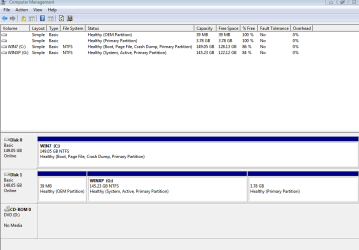
Can you please post back a screenshot of your full Disk Management drive map and listings, using Snipping Tool in Start Menu? There may be something unmentioned about your setup that needs to be taken into account before we can give you failsafe steps.

If XP alone is marked System Active then the procedure is to mark Win7 Active in XP Disk Management, power down, unplug XP HD, set Win7 HD as first HD to boot in BIOS setup (after DVD drive) then boot the Win7 DVD Repair console or Repair CD, click through to Recovery Tools list to run Startup Repair up to 3 separate times with reboots to write the MBR to Win7.
http://www.sevenforums.com/tutorials/2083-system-repair-disc-create.html
http://www.sevenforums.com/tutorials/105541-startup-repair-run-3-separate-times.html

When you plug XP HD back in set preferred HD as first to boot in BIOS setup, then boot the other HD by tapping one-time BIOS Boot Menu during bootup:
Asus - F8
HP/Compaq - Esc
Sony - F2
Acer - F2
Gateway - F10
eMachnes - F10
Toshiba - F12
Dell - F12
IBM/Lenovo - the blue Thinkvantage button

If the Dual Boot menu still appears when booting XP, remove it by installing EasyBCD 2.0 to Edit Boot menu. You'll need to install Net Framework 2.0 to use EasyBCD in XP. Welcome to EasyBCD 2.0! — The NeoSmart Files
 
Last edited:
Drive Map.PNG attached.
 

Attachments

  • Drive Map.PNG
    Drive Map.PNG
    15.4 KB · Views: 80

My Computer My Computer

At a glance

Windows 7 Professional 64 bit
OS
Windows 7 Professional 64 bit
Yes you're good to go with the steps given earlier. No surprises here.
 
Bcdedit /delete {identifier-long-number} /f
 

My Computers My Computers

  • At a glance

    7 X64i5 84002x8gb 3200mhz
    Computer type
    PC/Desktop
    OS
    7 X64
    CPU
    i5 8400
    Motherboard
    gigabyte b365m ds3h
    Memory
    2x8gb 3200mhz
    Hard Drives
    various
    PSU
    pure power 11 400w cm
    Case
    Coolermaster
    Cooling
    cryorig m9i
  • At a glance

    7x64g54008gb ddr4 2400
    Computer type
    PC/Desktop
    OS
    7x64
    CPU
    g5400
    Motherboard
    ga b365m ds3h
    Memory
    8gb ddr4 2400
    PSU
    xfx pro 450w
Welcome to the Seven Forums! Jimx

To simplify things for you simply go into the Control Panel>System>Advanced Settings>Startup & Recovery as shown in the attached image below and reduce the time to select XP or uncheck the display option there to not even see the option of "previous version of Windows" appear.

Since you have an unintended dual boot you may want to keep the entry and simply reduce the display time to see 7 load faster when not planning to boot into XP at the moment. Through the use of a few free programs like EasyBCD or BellaVista you can also see the XP entry renamed from the present "previous version of Windows" to something else like "Windows XP Home or Pro" depending on which edition you are running.

For the simple deletion open up the msconfig utility and go into the Boot tab to highlight the "previous version" entry leaving the 7 default entry untouched.
 

Attachments

  • Startup Options Reduce or Disable.jpg
    Startup Options Reduce or Disable.jpg
    61.8 KB · Views: 58

My Computers My Computers

  • At a glance

    W7 Ultimate x64/W10 Pro x64/W11 Pro Triple Bo...AMD Phenom II X4 975 Deneb 3.6ghz - 965 2nd r...Kingston Hyper X DDR3 1600 1.5v 16gb - Hyper ...MSI HD Radeon 5750 1gb - MSI HD Radeon 6450 o...
    Computer type
    PC/Desktop
    Computer Manufacturer/Model Number
    Custom builds = 2
    OS
    W7 Ultimate x64/W10 Pro x64/W11 Pro Triple Boot - Main PC W7 Remote PC Micro ATX W7 Pro x64/W11 Pro
    CPU
    AMD Phenom II X4 975 Deneb 3.6ghz - 965 2nd remote pc
    Motherboard
    Gigabyte GA-790XTA-UD4-Gigabyte GA-880GM-D2H remote pc
    Memory
    Kingston Hyper X DDR3 1600 1.5v 16gb - Hyper X Fury 8gb 2nd
    Graphics Card(s)
    MSI HD Radeon 5750 1gb - MSI HD Radeon 6450 on mini tower
    Sound Card
    Creative Labs X-Fi Xtreme Audio P - Realtek onooard 2nd case
    Monitor(s) Displays
    ASUS VW199T-P 19" HP 2082a Main-HP 2082a 20" remote pc
    Screen Resolution
    Asus 1440x900 - HP 1600x900
    Hard Drives
    WD Black 1TB HD per OS W7, W10, and pending W11 presently on 500gb OS Drive - Pending Triple 1TB HDs for Spanned Storage/backup volume
    Single 2TB external USB enclosure, single 1TB System 7 Host/Boot drive, Pending 8TB external HD for system image b
    PSU
    Corsair 750TX - primary / Corsair CX600 - second
    Case
    Antec 900-2 - SSD compatible / NZXT Vulcan mini tower
    Cooling
    Zalman CNPS9900A
    Keyboard
    AZIO L70 Backlit Letters Gaming - ONN Cordless/USB
    Mouse
    MSI DS200 Programmable, Logitech Cordless
    Internet Speed
    30mbps upgrade - primary hard wired - mini tower usb WiFi
    Antivirus
    GFI VIPRE Internet Security 2014 on W7 2016 beta on W10,
    Browser
    Cyberfox, WaterFox 64bit FF variants, FireFox x64, Pale Moon
    Other Info
    Accomdata fan cooled usb 2.0 PIDE/Sata II, III external enclosure.
    Sambient usb/eSata PATA/Sata II, III external enclosure.
  • At a glance

    W7 Pro x64/W11 ProAMD Deneb 3.6ghz - 965Kingston Hyper X Fury 8gbMSI HD Radeon 6450 DVI Output
    Computer type
    PC/Desktop
    System Manufacturer/Model Number
    CUSTOM ASSEMBLY
    OS
    W7 Pro x64/W11 Pro
    CPU
    AMD Deneb 3.6ghz - 965
    Motherboard
    Gigabyte GA-880GM-D2H remote pc
    Memory
    Kingston Hyper X Fury 8gb
    Graphics Card(s)
    MSI HD Radeon 6450 DVI Output
    Sound Card
    Realtek onooard Creative or Other separate PENDING
    Monitor(s) Displays
    VIZIO 32" LCD TV Separate LCD Pending
    Screen Resolution
    1600x1080
    Hard Drives
    WD 500GB OS Host/Boot WD Green 1TB Storage/Backup
    PSU
    Corsair 600W - THERMALTAKE 600W spare case
    Case
    NZXT Vulcan mini tower
    Cooling
    Twin 120mm Top Fans - 240mm Side Cover
    Keyboard
    ONN Cordless/USB Logitech Cordless
    Mouse
    ONN USB/Cordless - Logitech Cordless
    Internet Speed
    DSL 5G
    Browser
    MS Edge, FireFox, WaterFox x64, FireFox Nightly
    Other Info
    OS Testing-Remote Access to Main TeamViewer
Back
Top