
Solved How could this be... To a Microsoft Tech

win7person

New member
Member
Local time
12:23 AM
Messages
20
Location
In a house mostly
I've built myself quite a system, Theoretically its nothing short of kick ass, however, it runs low on resources all the time. I built a gaming system, (top of the line for most puter parts) it boots to desktop in under 30 seconds. I have 9 things running in my task bar. I play 2 games Eve Online and World of Warcraft.

Most of the stuff running in taskbar include Nvidia tools, Sound, Curse client (wow addon manager), Microsoft essentials AV, kbrd profiler (logitech), mouse config (razor), my messenger proggie, 2 others that escape me.

Any suggestions will suffice - but the system is more than capable of running more and shouldn't by hardware specs run out of resources at all. "But, hey its windows is the easy answer" - Not the answer i'm looking for - Looking for empirical evidence to why this is happening and will it be fixed in any service pack?

My Setup:

OS: Windows 7 Professional SP1 x64
Mobo:
GIGABYTE GA-Z68XP-UD5
CPU:
Intel Core i7-2600K Sandy Bridge
CPU Cooler:
CORSAIR H80
Mem:
CORSAIR Vengeance 16GB (4 x 4GB)
VDC:
EVGA GTX570 2560MB (025-P3-1579-AR)
RAID: x2 ST32000641AS
SSD:
Plextor M3 Series PX-128M3 2.5" 128GB SATA III
PWS:
SeaSonic X750 Gold 750W
Case:
Corsair Obsidian Series 650D

I find it really hard to believe that I can come close to low resources. According to my resource manager its only using up to 8gigs of physical memory even when my games are running and it stays nominal in that margin. Is it simply a windows glitch?

I've got the latest and greatest Video driver Nvidia 295.73 (we all know how well its working out for us :rolleyes:)

Note: I run my SSD independently and it has Windows on it / I do not use it as a caching drive for my other mechanicals.
My mechanicals are in RAID 1+0
 
Last edited:

My Computer

Computer Manufacturer/Model Number
N/A
OS
windows 7 professional x64 SP1
CPU
Intel Core i7-3770K 3.5Ghz, 3.9Ghz Turbo
Motherboard
GIGABYTE GA-Z68XP-UD5 LGA 1155
Memory
CORSAIR Vengeance 16GB (4 x 4GB) (CML16GX3M4A1600C9B)
Graphics Card(s)
EVGA GeForce GTX 680; 04G-P4-3687-KR
Sound Card
Onboard
Monitor(s) Displays
SAMSUNG XL2370-1 Charcoal Gray 23" 2ms Full HD HDMI LED
Screen Resolution
1080p
Hard Drives
x2 Seagate Barracuda XT ST32000641AS 2TB 7200 RPM SATA 6.0Gb/s
Plextor M3 Series PX-128M3 2.5" 128GB SATA III SSD
PSU
SeaSonic X750 Gold 750W ATX12V V2.3/EPS 12V V2.91
Case
Corsair Obsidian Series 650D (CC650DW-1)
Cooling
CORSAIR H80 (CWCH80) High Performance Liquid CPU Cooler
How large is the page file and on what drive?
 

My Computer

Computer Manufacturer/Model Number
HP Pavillion dv-7 1005 Tx
OS
Win 8 Release candidate 8400
CPU
[email protected]
Memory
4 gigs
Graphics Card(s)
Nvidia 9600M
Sound Card
HD built-in
Monitor(s) Displays
17" Wxga
Screen Resolution
1440x900
Cooling
none
Internet Speed
45Mb down 5Mb up
default / SSD
 
Last edited:

My Computer

Computer Manufacturer/Model Number
N/A
OS
windows 7 professional x64 SP1
CPU
Intel Core i7-3770K 3.5Ghz, 3.9Ghz Turbo
Motherboard
GIGABYTE GA-Z68XP-UD5 LGA 1155
Memory
CORSAIR Vengeance 16GB (4 x 4GB) (CML16GX3M4A1600C9B)
Graphics Card(s)
EVGA GeForce GTX 680; 04G-P4-3687-KR
Sound Card
Onboard
Monitor(s) Displays
SAMSUNG XL2370-1 Charcoal Gray 23" 2ms Full HD HDMI LED
Screen Resolution
1080p
Hard Drives
x2 Seagate Barracuda XT ST32000641AS 2TB 7200 RPM SATA 6.0Gb/s
Plextor M3 Series PX-128M3 2.5" 128GB SATA III SSD
PSU
SeaSonic X750 Gold 750W ATX12V V2.3/EPS 12V V2.91
Case
Corsair Obsidian Series 650D (CC650DW-1)
Cooling
CORSAIR H80 (CWCH80) High Performance Liquid CPU Cooler
default / SSD

So you have a 16 gig page file and a 16 gig hibersys file on that drive?


Can we get some examples of benchmarks, or frame rates, etc?

WEI would also be helpful
 

My Computer

Computer Manufacturer/Model Number
HP Pavillion dv-7 1005 Tx
OS
Win 8 Release candidate 8400
CPU
[email protected]
Memory
4 gigs
Graphics Card(s)
Nvidia 9600M
Sound Card
HD built-in
Monitor(s) Displays
17" Wxga
Screen Resolution
1440x900
Cooling
none
Internet Speed
45Mb down 5Mb up
So you have a 16 gig page file and a 16 gig hibersys file on that drive?

If that is Default then that is what it is. I have not tweaked anything since I installed it 2 weeks ago.

WEI would also be helpful

Certainly, but, I am at work atm - will post when I have it.
 

My Computer

Computer Manufacturer/Model Number
N/A
OS
windows 7 professional x64 SP1
CPU
Intel Core i7-3770K 3.5Ghz, 3.9Ghz Turbo
Motherboard
GIGABYTE GA-Z68XP-UD5 LGA 1155
Memory
CORSAIR Vengeance 16GB (4 x 4GB) (CML16GX3M4A1600C9B)
Graphics Card(s)
EVGA GeForce GTX 680; 04G-P4-3687-KR
Sound Card
Onboard
Monitor(s) Displays
SAMSUNG XL2370-1 Charcoal Gray 23" 2ms Full HD HDMI LED
Screen Resolution
1080p
Hard Drives
x2 Seagate Barracuda XT ST32000641AS 2TB 7200 RPM SATA 6.0Gb/s
Plextor M3 Series PX-128M3 2.5" 128GB SATA III SSD
PSU
SeaSonic X750 Gold 750W ATX12V V2.3/EPS 12V V2.91
Case
Corsair Obsidian Series 650D (CC650DW-1)
Cooling
CORSAIR H80 (CWCH80) High Performance Liquid CPU Cooler
When you say "runs low on resources" can you please explain exactly what you meant?

Is that from an error message from windows or something in the logs? If so what exactly does the message say (exact wording).


The word "Resources" has a very special meaning internally to windows and has nothing to do with CPU ram or anything normally user visible, but it IS used in some error messages and can be confusing. So I need t clear up the use of that word first :)
 

My Computer

Computer Manufacturer/Model Number
Scratch built
OS
Windows 7 x64 Ultimate
CPU
i7 960
Motherboard
Asus P6X58D
Memory
12 Gig Corsair Dominator
Graphics Card(s)
Nvidia 480
Sound Card
Maudio Delta 44 + breakout box
Monitor(s) Displays
Dell UltraSharp U2410 24in and Samsung 21 dual monitors
Screen Resolution
1920x1200 and 1280x1024
Hard Drives
Primary: Intel X-25M G2 160G SSD
Secondary: Segate baracuda 1.0 TB
HDs in AHCI mode.
PSU
Corasair TX850
Case
Cooler Master HAF
Cooling
Corsair H50
Keyboard
Logitech G15 + N52 game pad
Mouse
Logitech MX518
Internet Speed
15kbs down 4.5kbps up
Other Info
WEI 7.6
CPU & RAM 7.6
Graphics 7.9
Hard disk 7.7
+1

Yes, I would think that system would be fine. However, I think we need to start getting into specifics about what is actually happening, and when (what you're doing at that time that the "what" is occurring). Any little bit of info you can provide us with, whether it ends up being useful or not, would be quite helpful.
 

My Computer

Computer type
PC/Desktop
Computer Manufacturer/Model Number
Custom
OS
Windows 10 Pro x64
CPU
Intel Core i7 4790K @ 4.5GHz
Motherboard
Asus Maximus Hero VII
Memory
32GB DDR3
Graphics Card(s)
Nvidia GeForce GTX970
Sound Card
Realtek HD Audio
Screen Resolution
1920x1200
Hard Drives
1x Samsung 250GB SSD
4x WD RE 2TB (RAIDZ)
PSU
Corsair AX760i
Case
Fractal Design Define R4
Cooling
Noctua NH-D15
When you say "runs low on resources" can you please explain exactly what you meant?
Absolutely, The error I get happens when I've been playing WoW for 8+hours - Mind you it will not interrupt my game to let me know this, its generally happening when I am alt / tabbing to the desktop. Things are very fast no program lag of any kind.

The Message I get:
" Windows 7 Windows Has Detected Your Computer's Performance Is Slow"
Then it refers to Aero / My Color Scheme / and some other option

Key things I am doing whilst Alt/tab
1. Opening Firefox
2. Sometimes I just leave Firefox open
3. Occasionally open notepad
4. Have Ventrilo running at times / not all the time / have this on manual open
5. Occasionally open Word and leave Open
6. Sometimes Have Word, Notepad, Vent, and Firefox open at the same time
7. Sometimes I have Bluebird (email) open
8. Seldom have Teamspeak2 or 3 running - this is also a manual open

There are 2 accounts on this computer / I always restart for a Fresh login

General Habits when i get this error the most:
1. Playing WoW 8+ hours
2. Have Firefox running in background
3. Have Word running

Have all the stuff in task bar 9 items: Vent or TS2/3 are NOT present.


My Computer

Computer Manufacturer/Model Number
N/A
OS
windows 7 professional x64 SP1
CPU
Intel Core i7-3770K 3.5Ghz, 3.9Ghz Turbo
Motherboard
GIGABYTE GA-Z68XP-UD5 LGA 1155
Memory
CORSAIR Vengeance 16GB (4 x 4GB) (CML16GX3M4A1600C9B)
Graphics Card(s)
EVGA GeForce GTX 680; 04G-P4-3687-KR
Sound Card
Onboard
Monitor(s) Displays
SAMSUNG XL2370-1 Charcoal Gray 23" 2ms Full HD HDMI LED
Screen Resolution
1080p
Hard Drives
x2 Seagate Barracuda XT ST32000641AS 2TB 7200 RPM SATA 6.0Gb/s
Plextor M3 Series PX-128M3 2.5" 128GB SATA III SSD
PSU
SeaSonic X750 Gold 750W ATX12V V2.3/EPS 12V V2.91
Case
Corsair Obsidian Series 650D (CC650DW-1)
Cooling
CORSAIR H80 (CWCH80) High Performance Liquid CPU Cooler
You may want to switch to the non-Aero theme while gaming.
Some games consume huge resources and memory.
The performance can be impacted while Aero is running.
 

My Computer

Computer type
PC/Desktop
Computer Manufacturer/Model Number
Custom Build
OS
Windows 7 Home Premium 64 bit
CPU
Intel Core i7-4790
Motherboard
GA-Z87X-D3H
Memory
G.SKILL 8GB (2 x 4GB) DDR3 F3-10666CL9D-8GBNT
Graphics Card(s)
AMD Radeon R7 250
Sound Card
Realtek ALC892
Monitor(s) Displays
Samsung UN32EH5000, Dell 1703FPT
Screen Resolution
1920 x 1080, 1280 x 1024
Hard Drives
WD5003AZEX
WD10EZEX
Samsung HD103SJ
Samsung 128 GB 840 PRO
PSU
SeaSonic M12II SS-500GM
Case
Fractal Design Define R4
Cooling
Zalman CNPS9900ALED
Keyboard
Logitech K800
Mouse
Logitech M705
Internet Speed
16 Mbps
Antivirus
Avast
Browser
Firefox
Other Info
Bose Companion 2 Multimedia Speakers
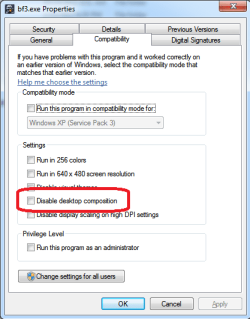
Easier than disabling Aero manually,

gamexeprop.png
 

My Computer

Computer type
PC/Desktop
Computer Manufacturer/Model Number
Me
OS
Win 7 Ultimate x64
CPU
FX-8350 @ 4.6 GHz so far
Motherboard
Asus M5A97 EVO
Memory
ADATA XPG V1 Series Black 8GB DDR3 1600
Graphics Card(s)
Sapphire R9 270x Dual-X
Sound Card
Xonar DGX w/ Corsair Vengence 1300
Monitor(s) Displays
Acer S232HL Abid
Screen Resolution
1920x1080
Hard Drives
120 GB OCZ Vertex 3
500 GB Seagate 7200.12
PSU
Antec Earthwatts 650W Green
Case
Antec Three Hundred
Cooling
Cooler Master 212 EVO
Keyboard
Logitech G510
Mouse
Logitech G500s
Internet Speed
35000/3000

My Computer

Computer type
PC/Desktop
Computer Manufacturer/Model Number
Custom Build
OS
Windows 7 Home Premium 64 bit
CPU
Intel Core i7-4790
Motherboard
GA-Z87X-D3H
Memory
G.SKILL 8GB (2 x 4GB) DDR3 F3-10666CL9D-8GBNT
Graphics Card(s)
AMD Radeon R7 250
Sound Card
Realtek ALC892
Monitor(s) Displays
Samsung UN32EH5000, Dell 1703FPT
Screen Resolution
1920 x 1080, 1280 x 1024
Hard Drives
WD5003AZEX
WD10EZEX
Samsung HD103SJ
Samsung 128 GB 840 PRO
PSU
SeaSonic M12II SS-500GM
Case
Fractal Design Define R4
Cooling
Zalman CNPS9900ALED
Keyboard
Logitech K800
Mouse
Logitech M705
Internet Speed
16 Mbps
Antivirus
Avast
Browser
Firefox
Other Info
Bose Companion 2 Multimedia Speakers
I understand the concept of disabling it, but why do I have too? I shouldn't have to based on my hardware components, should I? I just want to know why Windows is doing it. Do I need more RAM? My mobo can handle 32gig.
 

My Computer

Computer Manufacturer/Model Number
N/A
OS
windows 7 professional x64 SP1
CPU
Intel Core i7-3770K 3.5Ghz, 3.9Ghz Turbo
Motherboard
GIGABYTE GA-Z68XP-UD5 LGA 1155
Memory
CORSAIR Vengeance 16GB (4 x 4GB) (CML16GX3M4A1600C9B)
Graphics Card(s)
EVGA GeForce GTX 680; 04G-P4-3687-KR
Sound Card
Onboard
Monitor(s) Displays
SAMSUNG XL2370-1 Charcoal Gray 23" 2ms Full HD HDMI LED
Screen Resolution
1080p
Hard Drives
x2 Seagate Barracuda XT ST32000641AS 2TB 7200 RPM SATA 6.0Gb/s
Plextor M3 Series PX-128M3 2.5" 128GB SATA III SSD
PSU
SeaSonic X750 Gold 750W ATX12V V2.3/EPS 12V V2.91
Case
Corsair Obsidian Series 650D (CC650DW-1)
Cooling
CORSAIR H80 (CWCH80) High Performance Liquid CPU Cooler
Ugh, yeah no you shouldn't have to do that, I think that the fact that WoW is consuming massive amounts of CPU and causing some other internal stuff to respond slower than expected (maybe it's trying to run a backup or some other thing in the background) and popping that "Error" up.

My initial guess is that there is nothing wrong at all and that warning is being over zealous. The thing to do I think would be to google that error message and see if there is a way of shutting it off. It's trying to be "Helpful" but in this case... probably just not warranted at all.

More ram is not necessary at all... If something runs you out of that 16 gig then maybe, but only loading 50 10 layer 22 MP PSDs into Photoshop would do that :D

There is another thread about it here:
http://www.sevenforums.com/performa...ws-has-detected-slow-performance-nagging.html

Common issues seem to be games of video specifically on high end machines. No real answers other than possibly game update or try a difference video driver... Or try turning off changing wallpaper, if it does that during playing a game some feel might be the cause.
 

My Computer

Computer Manufacturer/Model Number
Scratch built
OS
Windows 7 x64 Ultimate
CPU
i7 960
Motherboard
Asus P6X58D
Memory
12 Gig Corsair Dominator
Graphics Card(s)
Nvidia 480
Sound Card
Maudio Delta 44 + breakout box
Monitor(s) Displays
Dell UltraSharp U2410 24in and Samsung 21 dual monitors
Screen Resolution
1920x1200 and 1280x1024
Hard Drives
Primary: Intel X-25M G2 160G SSD
Secondary: Segate baracuda 1.0 TB
HDs in AHCI mode.
PSU
Corasair TX850
Case
Cooler Master HAF
Cooling
Corsair H50
Keyboard
Logitech G15 + N52 game pad
Mouse
Logitech MX518
Internet Speed
15kbs down 4.5kbps up
Other Info
WEI 7.6
CPU & RAM 7.6
Graphics 7.9
Hard disk 7.7
Ugh, yeah no you shouldn't have to do that, I think that the fact that WoW is consuming massive amounts of CPU and causing some other internal stuff to respond slower than expected (maybe it's trying to run a backup or some other thing in the background) and popping that "Error" up.

My initial guess is that there is nothing wrong at all and that warning is being over zealous. The thing to do I think would be to google that error message and see if there is a way of shutting it off. It's trying to be "Helpful" but in this case... probably just not warranted at all.

More ram is not necessary at all... If something runs you out of that 16 gig then maybe, but only loading 50 10 layer 22 MP PSDs into Photoshop would do that
biggrin.gif
+1 m8 I know where you're coming from - Thanks for your help, I appreciate all here. :) I love Win7 after coming from XP. Deep down I knew the system was just trying to be the "overprotective nanny" as I have read in many articles that surround this issue.

I appreciate you
Win7person Out!

Note: I'll do Benches when I get home and post them here if you like. :D
Note#2: Also know for a fact that that last to driver builds from Nvidia have been less than desirable since most of us can't install PhysX software on our systems because of the Driver installation suite that its packaged with does something screwy with the PhysX installation. Thats why I was rolling my eyes in the beginning Post for The video driver.
 
Last edited:

My Computer

Computer Manufacturer/Model Number
N/A
OS
windows 7 professional x64 SP1
CPU
Intel Core i7-3770K 3.5Ghz, 3.9Ghz Turbo
Motherboard
GIGABYTE GA-Z68XP-UD5 LGA 1155
Memory
CORSAIR Vengeance 16GB (4 x 4GB) (CML16GX3M4A1600C9B)
Graphics Card(s)
EVGA GeForce GTX 680; 04G-P4-3687-KR
Sound Card
Onboard
Monitor(s) Displays
SAMSUNG XL2370-1 Charcoal Gray 23" 2ms Full HD HDMI LED
Screen Resolution
1080p
Hard Drives
x2 Seagate Barracuda XT ST32000641AS 2TB 7200 RPM SATA 6.0Gb/s
Plextor M3 Series PX-128M3 2.5" 128GB SATA III SSD
PSU
SeaSonic X750 Gold 750W ATX12V V2.3/EPS 12V V2.91
Case
Corsair Obsidian Series 650D (CC650DW-1)
Cooling
CORSAIR H80 (CWCH80) High Performance Liquid CPU Cooler
On another note: I can't update my game because World of Warcraft and Eve Online are MMORPG games the only way to get an update is when Blizzard or CCPgames are ready to update the products themselves then its automatic when you open the GUI.
 

My Computer

Computer Manufacturer/Model Number
N/A
OS
windows 7 professional x64 SP1
CPU
Intel Core i7-3770K 3.5Ghz, 3.9Ghz Turbo
Motherboard
GIGABYTE GA-Z68XP-UD5 LGA 1155
Memory
CORSAIR Vengeance 16GB (4 x 4GB) (CML16GX3M4A1600C9B)
Graphics Card(s)
EVGA GeForce GTX 680; 04G-P4-3687-KR
Sound Card
Onboard
Monitor(s) Displays
SAMSUNG XL2370-1 Charcoal Gray 23" 2ms Full HD HDMI LED
Screen Resolution
1080p
Hard Drives
x2 Seagate Barracuda XT ST32000641AS 2TB 7200 RPM SATA 6.0Gb/s
Plextor M3 Series PX-128M3 2.5" 128GB SATA III SSD
PSU
SeaSonic X750 Gold 750W ATX12V V2.3/EPS 12V V2.91
Case
Corsair Obsidian Series 650D (CC650DW-1)
Cooling
CORSAIR H80 (CWCH80) High Performance Liquid CPU Cooler
Also, be aware it's actually complaining you're low on resources related to Video memory, not Windows itself (I would bet if you look in the Diagnostics-Performance log in the event viewer you'll see messages about your video memory being low around the times the issues occur).
 

My Computer

Computer type
PC/Desktop
Computer Manufacturer/Model Number
Custom
OS
Windows 10 Pro x64
CPU
Intel Core i7 4790K @ 4.5GHz
Motherboard
Asus Maximus Hero VII
Memory
32GB DDR3
Graphics Card(s)
Nvidia GeForce GTX970
Sound Card
Realtek HD Audio
Screen Resolution
1920x1200
Hard Drives
1x Samsung 250GB SSD
4x WD RE 2TB (RAIDZ)
PSU
Corsair AX760i
Case
Fractal Design Define R4
Cooling
Noctua NH-D15
Well, its been Interesting thus far.. I did as Stormy13 had suggested and turned off the Windows Composition for the Program itself. +1 to Stormy13 - as the nagging nanny went buh-bye.

Also, be aware it's actually complaining you're low on resources related to Video memory, not Windows itself (I would bet if you look in the Diagnostics-Performance log in the event viewer you'll see messages about your video memory being low around the times the issues occur).
Ive got 2.5g of DDR5 running on my VDC, - In WoW I'm Termed as a Raider - I get to see all the most epic parts of the game so I'd imagine at some points of certain fights it can be draining on the Video Memory. Since I've Disabled windows Comp b4 I looked at this forum - I'll check that when I go back home. If it does reflect such things should I send a bug report to Blizzard stating they have a Memory Leak in the programming? with logs to back it up?
 

My Computer

Computer Manufacturer/Model Number
N/A
OS
windows 7 professional x64 SP1
CPU
Intel Core i7-3770K 3.5Ghz, 3.9Ghz Turbo
Motherboard
GIGABYTE GA-Z68XP-UD5 LGA 1155
Memory
CORSAIR Vengeance 16GB (4 x 4GB) (CML16GX3M4A1600C9B)
Graphics Card(s)
EVGA GeForce GTX 680; 04G-P4-3687-KR
Sound Card
Onboard
Monitor(s) Displays
SAMSUNG XL2370-1 Charcoal Gray 23" 2ms Full HD HDMI LED
Screen Resolution
1080p
Hard Drives
x2 Seagate Barracuda XT ST32000641AS 2TB 7200 RPM SATA 6.0Gb/s
Plextor M3 Series PX-128M3 2.5" 128GB SATA III SSD
PSU
SeaSonic X750 Gold 750W ATX12V V2.3/EPS 12V V2.91
Case
Corsair Obsidian Series 650D (CC650DW-1)
Cooling
CORSAIR H80 (CWCH80) High Performance Liquid CPU Cooler
...
Note#2: Also know for a fact that that last to driver builds from Nvidia have been less than desirable since most of us can't install PhysX software on our systems because of the Driver installation suite that its packaged with does something screwy with the PhysX installation. Thats why I was rolling my eyes in the beginning Post for The video driver.
i hate the nvidia driver app euphemistically called an 'installer'. after getting a 'failed' i can sometimes get them to install by going to c:\nvidia where it extracts, finding the sub folder, ie. the physx, and running the .msi there on it's own. same for the main graphics driver, hd audio, etc. 3d drivers doesn't work that way tho.

there is a stand-alone physx update to v. 9.12.0213 on the nvidia website that doesn't use their cruddy driver installer, it updates/replaces the version that come with the 295.73 whql drivers with a new one, or installs it if not already present. worked fine for me.

(still don't have 3d drivers, but as i don't have any 3d apps, not really a problem)
 

My Computer

Computer type
PC/Desktop
Computer Manufacturer/Model Number
Custom build Nanu by 3SX
OS
Win 7 ultimate x64 sp1
CPU
Intel i7 4 core 3770k ivy bridge o/c to 4.2ghz
Motherboard
Asus p8z77-i Deluxe
Memory
16 GB
Graphics Card(s)
Nvidia geforce GTX650
Sound Card
Realtek on mb
Monitor(s) Displays
24in. lcd/led
Screen Resolution
1920x1080
Hard Drives
128GB Kingston SSD
500GB seagate maximus xt hybrid
500GB hitachi HD
500GB external WD Passport usb3
PSU
Silverstone 450 watt
Case
Silverstone FT03 Black Fortress
Cooling
Water cooler
Keyboard
Logitech wireless kbd/mouse mk300
Mouse
Logitech wireless kbd/mouse mk300
Internet Speed
8mb adsl (actuall speed is around 6mb)
Other Info
Asus DSL-N55U wireless router
SONY BC-5850H 6X BLURAY writer
OUTPOST Security Suite
there is a stand-alone physx update to v. 9.12.0213 on the nvidia website that doesn't use their cruddy driver installer, it updates/replaces the version that come with the 295.73 whql drivers with a new one, or installs it if not already present. worked fine for me.

I tried the Standalone PhysX update and still it does nothing but fail, I recently have got a installer cleaner of sorts i found on these forums, but as work goes I wasn't reluctant to do much about it yet.

i can sometimes get them to install by going to c:\nvidia where it extracts, finding the sub folder, ie. the physx, and running the .msi there on it's own.

I come up with a handful of soggy corn flakes when I tried this, I figured that I could try and look for the installer from whence it was originally installed too, but no go. Going to try the Installer cleaner and see how that goes tonight.

A side note: I've never had a problem installing anything from Nvidia previous to installing Win7 - Coming from XP environment. Since everyone is complaining about the Driver Suite in the last 5 builds on the Nvidia / Geforce Forums, well it goes without saying that Nvidia is on the ball with pleading the 5th amendment (USA Constitution humor)
 

My Computer

Computer Manufacturer/Model Number
N/A
OS
windows 7 professional x64 SP1
CPU
Intel Core i7-3770K 3.5Ghz, 3.9Ghz Turbo
Motherboard
GIGABYTE GA-Z68XP-UD5 LGA 1155
Memory
CORSAIR Vengeance 16GB (4 x 4GB) (CML16GX3M4A1600C9B)
Graphics Card(s)
EVGA GeForce GTX 680; 04G-P4-3687-KR
Sound Card
Onboard
Monitor(s) Displays
SAMSUNG XL2370-1 Charcoal Gray 23" 2ms Full HD HDMI LED
Screen Resolution
1080p
Hard Drives
x2 Seagate Barracuda XT ST32000641AS 2TB 7200 RPM SATA 6.0Gb/s
Plextor M3 Series PX-128M3 2.5" 128GB SATA III SSD
PSU
SeaSonic X750 Gold 750W ATX12V V2.3/EPS 12V V2.91
Case
Corsair Obsidian Series 650D (CC650DW-1)
Cooling
CORSAIR H80 (CWCH80) High Performance Liquid CPU Cooler
Back
Top