
How did my win7 switched to test mode?

dnns

New member
Local time
11:53 AM
Messages
2
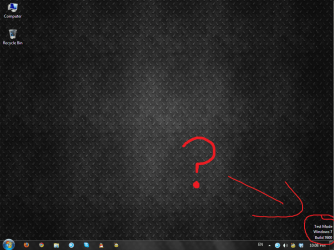
I noticed today that my legally bought windows 7 set up suddenly had a "test mode" at the lower right corner. Does anyone know about it?

The only major installation I did recently was installing a device driver for a PS3 controller. Do you think it had anything to do with it? I used a program to install an unsigned driver.
 

Attachments
  • wth.png
    wth.png
    360.1 KB · Views: 47

My Computer My Computer

At a glance

Windows 7
OS
Windows 7
If it is leagal and you say it is, this should work:


Open a cmd window with administrator rights and run this command:
Bcdedit.exe -set TESTSIGNING OFF then reboot


It should be gone.
 

My Computer My Computer

At a glance

Windows 10, Home Clean InstallIntel Core2 processsor Q8200(2.33Ghz 1333FSB)...6 gbATI Radeon 256MB HD3650
Computer type
PC/Desktop
Computer Manufacturer/Model Number
Dell XPS 420
OS
Windows 10, Home Clean Install
CPU
Intel Core2 processsor Q8200(2.33Ghz 1333FSB) Quad Core Tech
Motherboard
Dell
Memory
6 gb
Graphics Card(s)
ATI Radeon 256MB HD3650
Sound Card
Intergrated 7.1 Channel Audio
Monitor(s) Displays
Dell SP2009W 20"
Hard Drives
640 GB Serial ATA Hard drive
Cooling
Fan
Keyboard
Dell USB Keyboard
Mouse
Dell Premium Optical USB
Internet Speed
DSL 2.85
Click on Start button, then type "cmd" without quotes. In the results window, right click on CMD, then click on "Run as administrator".

At the command prompt, type:

Bcdedit.exe -set TESTSIGNING OFF

Reboot the PC.
 

My Computer My Computer

At a glance

Windows 7 x64 pro/ Windows 7 x86 Pro/ XP SP3 x86
Computer Manufacturer/Model Number
Too many to describe...
OS
Windows 7 x64 pro/ Windows 7 x86 Pro/ XP SP3 x86
Back
Top