How Do I Best Go About Cable Management On My HP Pavlilion P7-1010?

windude99

Windows 7 Guy
Guru
VIP
Local time
2:53 PM
Messages
1,517
Location
USA
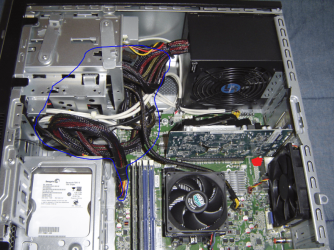
The cable management isn't the best. Here is a pic:
 

Attachments

  • CableManagement.PNG
    CableManagement.PNG
    387.3 KB · Views: 29

My Computer My Computer

At a glance

Windows 7 Professional x64 Service Pack 1AMD Athlon X4 6456GB DDR3 1066Sapphire Radeon HD 5670 512MB GDDR5
Computer type
PC/Desktop
Computer Manufacturer/Model Number
HP Pavilion P7-1010
OS
Windows 7 Professional x64 Service Pack 1
CPU
AMD Athlon X4 645
Motherboard
Foxxcon N-Alvorix RS880
Memory
6GB DDR3 1066
Graphics Card(s)
Sapphire Radeon HD 5670 512MB GDDR5
Sound Card
Realtek Integrated Audio
Monitor(s) Displays
HP 2011x
Screen Resolution
1600x900
Hard Drives
1. Crucial M4 128GB SSD
2. 1TB Seagate Barracuda 7200.12 RPM
3. 1TB Western Digital Caviar Green 5400RPM
PSU
Seasonic S12 II Bronze 380 Watt
Case
HP OEM
Cooling
Coolermaster Heatsink, AVC Case Fan
Keyboard
HP OEM- Made by Chicony
Mouse
HP OEM- Made by Logitech
Internet Speed
20MBit Down/4 Up
Antivirus
Microsoft Security Essentials
Browser
Internet Explorer 10
There are a lot of guides showing different cable management techniques, but none of them are a substitute for experience. When you've done enough of them you develop an instinct for it which is hard to put into words.

Here is what I would recommend:

1) Write down everything that is connected so you make sure you get it all connected again afterward.
2) Disconnect everything.
3) Starting with the biggest cable and working down to the smaller ones, attach them one by one, routing the cables out of the way and away from fan blades, etc.
4) For now, use twist ties to wrap up each individual cable as you attach them, again - one at a time.
5) When you are done and everything is connected, look at the whole works with a critical eye and look for ways you could have done things better. (That's why we stick with the twist ties for now.)
6) When you get to a point where you think you've got it as good as it's going to get, replace the twist ties with cable ties. Pull them snug and clip the ends short.
 

My Computer My Computer

At a glance

Main - Windows 7 Pro SP1 64-Bit; 2nd - Window...Main - Core i7 2600K; 2nd - Core i7 920Main - 16GB Corsair Vengeance; 2nd - 12GB Cor...Main - XFX Radeon 6870 1GB; 2nd - XFX Radeon ...
Computer Manufacturer/Model Number
Self
OS
Main - Windows 7 Pro SP1 64-Bit; 2nd - Windows Server 2008 R2
CPU
Main - Core i7 2600K; 2nd - Core i7 920
Motherboard
Main - Asus P8Z68-V Pro/Gen3; 2nd - Gigabyte GA-EX58-UDR3
Memory
Main - 16GB Corsair Vengeance; 2nd - 12GB Corsair Vengeance
Graphics Card(s)
Main - XFX Radeon 6870 1GB; 2nd - XFX Radeon 4870 1GB
Sound Card
Both: Onboard Realtek Azalia
Monitor(s) Displays
Main - Hann 25" + I-INC 25" + Acer 23"; 2nd - Upgrading Soon
Screen Resolution
Main - 1920x1080 (All Three Monitors); 2nd - Upgrading Soon
Hard Drives
Main - (1) Crucial M4 128GB (Boot)
Main - (1) Seagate 2TB 64MB Cache (Data)
Main - (1) Seagate 2TB 64MB Cache (Data Backup)
2nd - (1) Intel X25-M SSD 80GB (Boot)
2nd - (3) Seagate 1TB 32MB Cache (Data Backup)
2nd - (1) Seagate 320GB (Because)
PSU
Main - OCZ 600W Modular; 2nd - OCZ 600W
Case
Main - Thermaltake Element G; 2nd - NZXT something or other
Cooling
Main - Corsair H80; 2nd - Prolimatech Megahalems
Keyboard
Main - Razer Reclusa; 2nd - Old MS Keyboard
Mouse
Main - Logitech MX Revolution; 2nd - Old MS Mouse
Internet Speed
20Mbps Time-Warner Cable
There are a lot of guides showing different cable management techniques, but none of them are a substitute for experience. When you've done enough of them you develop an instinct for it which is hard to put into words.

Here is what I would recommend:

1) Write down everything that is connected so you make sure you get it all connected again afterward.
2) Disconnect everything.
3) Starting with the biggest cable and working down to the smaller ones, attach them one by one, routing the cables out of the way and away from fan blades, etc.
4) For now, use twist ties to wrap up each individual cable as you attach them, again - one at a time.
5) When you are done and everything is connected, look at the whole works with a critical eye and look for ways you could have done things better. (That's why we stick with the twist ties for now.)
6) When you get to a point where you think you've got it as good as it's going to get, replace the twist ties with cable ties. Pull them snug and clip the ends short.
Thanks! I am gonna open it up and start working on it.
 

My Computer My Computer

At a glance

Windows 7 Professional x64 Service Pack 1AMD Athlon X4 6456GB DDR3 1066Sapphire Radeon HD 5670 512MB GDDR5
Computer type
PC/Desktop
Computer Manufacturer/Model Number
HP Pavilion P7-1010
OS
Windows 7 Professional x64 Service Pack 1
CPU
AMD Athlon X4 645
Motherboard
Foxxcon N-Alvorix RS880
Memory
6GB DDR3 1066
Graphics Card(s)
Sapphire Radeon HD 5670 512MB GDDR5
Sound Card
Realtek Integrated Audio
Monitor(s) Displays
HP 2011x
Screen Resolution
1600x900
Hard Drives
1. Crucial M4 128GB SSD
2. 1TB Seagate Barracuda 7200.12 RPM
3. 1TB Western Digital Caviar Green 5400RPM
PSU
Seasonic S12 II Bronze 380 Watt
Case
HP OEM
Cooling
Coolermaster Heatsink, AVC Case Fan
Keyboard
HP OEM- Made by Chicony
Mouse
HP OEM- Made by Logitech
Internet Speed
20MBit Down/4 Up
Antivirus
Microsoft Security Essentials
Browser
Internet Explorer 10
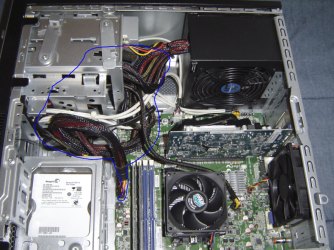
Your biggest challenge looks to be the large bundle going directly to the motherboard. I'd start with doubling it back on itself and tying it off to shorten it up a bit. For the smaller 4-pin connector going to the motherboard (attached right next to the CPU), you might try running it under the gap in what looks to be a video or TV card right along the back of the case. (Where I put the red mark.)

If you do a Google image search for case cable management you'll find lots of pictures demonstrating some creative ideas.

One example:
Antec MicroFusion Remote 350 Mini HTPC Enclosure | Antec MicroFusion,MicroFusion Remote 350,Mini HTPC Enclosure,computer case,Enclosure,Antec MicroFusion Remote 350 Computer Case Mini HTPC Enclosure Performance Test Product Review

And another:
AnandTech - Zalman HD-160 and Accompanying Products
 

Attachments

  • CableManagement-01.png
    CableManagement-01.png
    388.5 KB · Views: 13

My Computer My Computer

At a glance

Main - Windows 7 Pro SP1 64-Bit; 2nd - Window...Main - Core i7 2600K; 2nd - Core i7 920Main - 16GB Corsair Vengeance; 2nd - 12GB Cor...Main - XFX Radeon 6870 1GB; 2nd - XFX Radeon ...
Computer Manufacturer/Model Number
Self
OS
Main - Windows 7 Pro SP1 64-Bit; 2nd - Windows Server 2008 R2
CPU
Main - Core i7 2600K; 2nd - Core i7 920
Motherboard
Main - Asus P8Z68-V Pro/Gen3; 2nd - Gigabyte GA-EX58-UDR3
Memory
Main - 16GB Corsair Vengeance; 2nd - 12GB Corsair Vengeance
Graphics Card(s)
Main - XFX Radeon 6870 1GB; 2nd - XFX Radeon 4870 1GB
Sound Card
Both: Onboard Realtek Azalia
Monitor(s) Displays
Main - Hann 25" + I-INC 25" + Acer 23"; 2nd - Upgrading Soon
Screen Resolution
Main - 1920x1080 (All Three Monitors); 2nd - Upgrading Soon
Hard Drives
Main - (1) Crucial M4 128GB (Boot)
Main - (1) Seagate 2TB 64MB Cache (Data)
Main - (1) Seagate 2TB 64MB Cache (Data Backup)
2nd - (1) Intel X25-M SSD 80GB (Boot)
2nd - (3) Seagate 1TB 32MB Cache (Data Backup)
2nd - (1) Seagate 320GB (Because)
PSU
Main - OCZ 600W Modular; 2nd - OCZ 600W
Case
Main - Thermaltake Element G; 2nd - NZXT something or other
Cooling
Main - Corsair H80; 2nd - Prolimatech Megahalems
Keyboard
Main - Razer Reclusa; 2nd - Old MS Keyboard
Mouse
Main - Logitech MX Revolution; 2nd - Old MS Mouse
Internet Speed
20Mbps Time-Warner Cable
Power Supply..

you were able to fit a Seasonic S12 II Bronze 380 Watt power supply in your HP P7-1010 desktop computer? any issues? I know the space/size is very limited because of the tiny factory power supply. Any others fit?
 

My Computer My Computer

At a glance

64bit, windows 7 professionalI7-93012GB DDR3HD 5770
Computer type
PC/Desktop
Computer Manufacturer/Model Number
Custon Build
OS
64bit, windows 7 professional
CPU
I7-930
Motherboard
Asus P6t-SE
Memory
12GB DDR3
Graphics Card(s)
HD 5770
Hard Drives
6
I think you've done a very good job of cable management, considering how long the cables are. The cable bundles are out of the way of parts which need ventilation - that is the key consideration.

It would be good if the power supply manufacturers would put shorter cables on their power supplies, and include some extension cables so that you could make the cables longer if you wanted to. It wouldn't cost them much more to do it that way, and it would be very helpful if you are installing the power supply in a small case.
 

My Computer My Computer

At a glance

Linux Mint 18.2 xfce 64-bit (VMWare host) / W...Haswell4 GB
Computer type
PC/Desktop
Computer Manufacturer/Model Number
Dell
OS
Linux Mint 18.2 xfce 64-bit (VMWare host) / Windows 8.1 Pro 32-bit (VMWare guest)
CPU
Haswell
Memory
4 GB
Monitor(s) Displays
Acer 23"
Screen Resolution
1920 x 1080
Hard Drives
Two hard drives, 1TB each: One for Linux, one for my data.
Keyboard
IBM Model M
Antivirus
Sophos (Linux), Trend Micro (Windows)
Browser
Firefox, Opera
Other Info
I use Samba to share my data drive with the other computers at my house and with my guest session in VMWare Workstation Player.
Back
Top