
Solved How do I change cmd to default settings?

boyzy

New member
Local time
7:08 AM
Messages
2
Hi,

Recently my computer's internet gliched and I can no longer connect to any webpage. I think it might have somthing to do with me deleting route 0.0.0.0 on cmd. this is what I wrote:

route delete -p 0.0.0.0

Is there any way i can restore the deleted route?
 

My Computer

OS
Windows 7 Home Premium 64bit
Hi and welcome to the Forum
Can you do a system restore to a point behind when you did the deletion? It would also beg the question why did you delete it?
 

My Computer

Computer type
PC/Desktop
OS
Microsoft Windows 7 Home Premium 64-bit 7601 Multiprocessor Free Service Pack 1
CPU
Intel(R) Core(TM) i7-3770 CPU @ 3.40GHz
Motherboard
ASUSTeK COMPUTER INC. P8H77-M
Memory
8.00 GB
Graphics Card(s)
Intel(R) HD Graphics 4000
Sound Card
On Board
Monitor(s) Displays
Dell 24"
Screen Resolution
1920 x 1080
Hard Drives
(1) INTEL SSDSC2CT180A3 ATA Device (2) ST500DM002-1BD142 ATA Device (3) WDC WD3200AAKS-75L9A0 ATA Device (4) Generic- Compact Flash USB Device (5) Generic- MS/MS-Pro USB Device (6) Generic- SD/MMC USB Device (7) Generic- SM/xD-Picture USB
PSU
500w Corsair
Case
Cooler Master
Cooling
3 Fans
Keyboard
Logitech MK300
Mouse
Logitech WOM
Internet Speed
75Mb
Antivirus
Norton 360
Browser
Firefox, Opera, IE
route ADD?

Can't you just replace the missing entry?

:eek: You should create a backup system image before you start (in case of disaster). :eek:
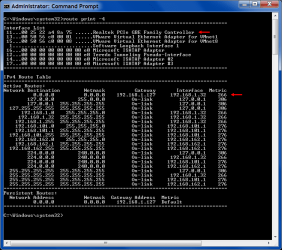
To display the IPv4 Route Table use:
route print -4
To replace the missing route use:
route ADD 0.0.0.0 MASK 0.0.0.0 <Gateway IP> METRIC <metric> IF <interface>
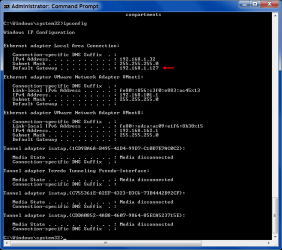
You can get the <Gateway IP> by using:
ipconfig
You should be able to work out the METRIC and IF by examining the IPv4 Route Table.
IPConfig.png Route Print.png
For example my info:

  • <Gateway IP> 192.168.1.127
  • <metric> 266
  • <interface> 11
Therefore my command would be:
route ADD 0.0.0.0 MASK 0.0.0.0 192.168.1.127 METRIC 266 IF 11
Note:
I have a static IP address (not DHCP provided IP address).
 
Last edited:

My Computer

Computer type
PC/Desktop
Computer Manufacturer/Model Number
n/a
OS
W7 Ultimate SP1, LM19.2 MATE, W10 Home 1703, W10 Pro 1703 VM, #All 64 bit
CPU
AMD Phenom II x6 1100T, 3.3 GHz
Motherboard
ASUS M4A88T-M/USB3 (AM3)
Memory
12GB DDR3 1333 G-Skill (4GB x 2), G-Skill (2GB x 2)
Graphics Card(s)
NVIDIA GeForce GTX 660
Sound Card
Realtek?
Monitor(s) Displays
Samsung S23B350
Screen Resolution
1920x1080
Hard Drives
WD Green 2TB (SATA), WD Green 3TB (SATA), WD Blue 4TB (SATA), WD Blue 6TB (SATA)
PSU
Cooler Master
Case
Antec GX300 Tower
Cooling
3x Antec TRICOOL 120mm Fans
Mouse
Wired Optical
Internet Speed
DSL
Antivirus
Avast
Browser
Pale Moon (64 bit)
Other Info
2018-12-27 Upgraded HDDs
2015-12-10 Upgraded case, graphics card, storage
2015-08-15 Upgraded motherboard & RAM
2015-07-15 Upgraded LM17.1 to LM17.2
  • Like
Reactions: Arc
wait, doesn't matter now, I've fixed it. But thanks for the help anyway. :D
 
Last edited:

My Computer

OS
Windows 7 Home Premium 64bit
Back
Top