How do I change my DNS Ip so it matches my gateway?

wuddy

New member
Local time
3:26 PM
Messages
5
Check out the question, 'nuff said so.
 

My Computer My Computer

At a glance

windows 7 64-bit
OS
windows 7 64-bit
If you go to ( Network and Sharing > Change Adapter Settings > Right-click Adapter > Properties > IPv4 > Properties ) there are the options for Obtain IP Automatically and Obtain DNS automatically. If both are checked, then during the connection process your computer will broadcast to a DHCP server looking for an address. Your router will then respond, providing you with your NAT'd IP address and it's own DNS server information.

If you have this checked already but for some reason it doesn't match what your router's DNS server is, you can always configure it manually, by copying down your router's DNS and typing it into the field on the IPv4 Properties dialog.

I would only recommend doing this for a desktop though. If it's a laptop that will be traveling and connecting to different access points, you may have problems with your ISP's DNS servers not recognizing your requests as you will have a different IP, likely from a different provider - I'm not sure if that would be an issue or not. If you are having DNS problems though, and your router doesn't want to provide you the info automatically, (and it's a laptop), you might want to consider using a public DNS server. Google's DNS servers ares 8.8.8.8 and 8.8.4.4, and OpenDNS's servers are 208.67.222.222 and 208.67.220.220. Either option will work regardless of where you're connecting from.

 

My Computer My Computer

At a glance

Windows 7/8/8.1 x64 &&& Debian-Based LinuxAlways AMDAlways G-SkillAlways ATi/AMD
Computer Manufacturer/Model Number
Always changing!
OS
Windows 7/8/8.1 x64 &&& Debian-Based Linux
CPU
Always AMD
Motherboard
Always Asus
Memory
Always G-Skill
Graphics Card(s)
Always ATi/AMD
Internet Speed
Never fast enough
Antivirus
MBAM, MBAR, MBAE, Outpost (WinDefender Disabled)
Browser
Firefox w/plugins galore
Check out the question, 'nuff said so.

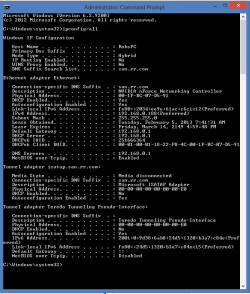
You would remove the DNS entries from the ipV4 properties of the connection, then type the preferred DNS servers into your router's settings for DNS servers.

This will allow the Default Gateway to show up in the ipconfig/all as your DNS servers. This only means that you are using the router for the DNS and because of this your default gateway shows up under DNS servers in the ipconfig/all.

Notice in my ipconfig/all that the gateway shows up as the DNS server.
 

Attachments

  • ipconfig.PNG
    ipconfig.PNG
    15 KB · Views: 4

My Computer My Computer

At a glance

Windows 7 Ult, Windows 8.1 Pro,Q9650-4.275GHz, E8600 4.5GHz, E6750-3.8GHzG.Skill PC2 9600 1200Mhz 5 5 5 15 2TGTX480
Computer type
PC/Desktop
Computer Manufacturer/Model Number
Home built
OS
Windows 7 Ult, Windows 8.1 Pro,
CPU
Q9650-4.275GHz, E8600 4.5GHz, E6750-3.8GHz
Motherboard
Evga 780i FTW
Memory
G.Skill PC2 9600 1200Mhz 5 5 5 15 2T
Graphics Card(s)
GTX480
Sound Card
Asus Xonar D2
Monitor(s) Displays
HannsG
Screen Resolution
1680X1050
Hard Drives
GSkill Phoenix Pro 120GB SSD
PSU
ThermalTake Toughpower 1000Watt modular
Case
ThermalTake XaserV
Cooling
Xigmatek S1283
Keyboard
Logitech G15
Mouse
Logitech G9
Internet Speed
T1
Back
Top