Solved How do I change the default time format in Windows 7 Starter?

TF2User

New member
Local time
7:18 AM
Messages
9
(Er, I'm not sure if I placed this in the right forum ^^")
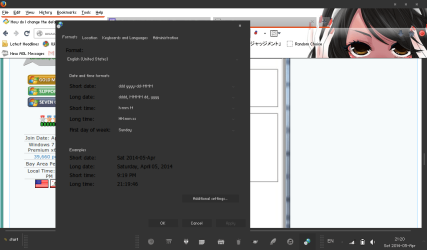
A few years, I purchased a Windows 7 Starter netbook and now I'm enlightened with all the knowledge of customization and theme editing I can do with it. But something's been bugging me - how do I change the time format?
WWJX8XR.png

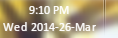
As you can see, changing the date format looks fine. The Time format hasn't changed.

rRe5dOh.png

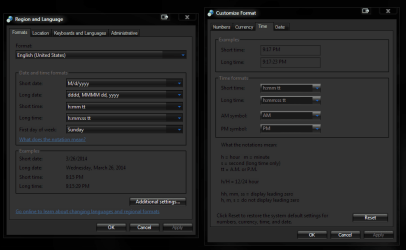
I've tried changing it to 24hr format (I'm more used to military time), tried switching around where the PM showed up, but it doesn't show up on my taskbar, only on the hover over for files & folders. Any way i can fix this?
 

My Computer My Computer

Computer type
PC/Desktop
Computer Manufacturer/Model Number
Dell
OS
Windows 7 Starter Edition x86
Memory
1 GB

Attachments

  • Capture.PNG
    Capture.PNG
    25.6 KB · Views: 2
Last edited by a moderator:

My Computer My Computer

Computer type
PC/Desktop
Computer Manufacturer/Model Number
Jeepmann/Custom Built
OS
Windows 7 Ultimate 64bit
CPU
Intel Core i7-2600K Sandy Bridge 3.4GHz (@[email protected])
Motherboard
Asus Maximus IV Extreme LGA 1155 Intel P67
Memory
G.SKILL Ripjaws X Series 16GB 1600Mhz (4 x 4GB) (Stock)
Graphics Card(s)
x2 EVGA GeForce GTX 760's w/ACXCoolers in SLI Surround
Sound Card
On-Board
Monitor(s) Displays
3x Acer 24" HDMI Widescreen LCD Monitor
Screen Resolution
3@ 1920x1080 (5760x1080 In Surround)
Hard Drives
Samsung 830 128gb ssd
Western Digital Caviar Black 640GB 7200 RPM
Western Digital Caviar Black 500GB 7200 RPM
Seagate 2tb 7200 RPM
PSU
COOLER MASTER Silent Pro 1000W
Case
COOLER MASTER HAF X Black
Cooling
CORSAIR Hydro H70
Keyboard
Logitech G510
Mouse
Zalman M300
Internet Speed
100mbps-ish Down & 5mbps-ish Up
Other Info
I installed the stock 140mm case fan outside of case then installed the H70+ 1 of its 120mm fans inside case. Used the 2nd 120mm from the H70 to go in the Gpu tunnel.
230mm Front,200mm side,200mm top,120mm Gpu tunnel,120mm&140mm on H70.
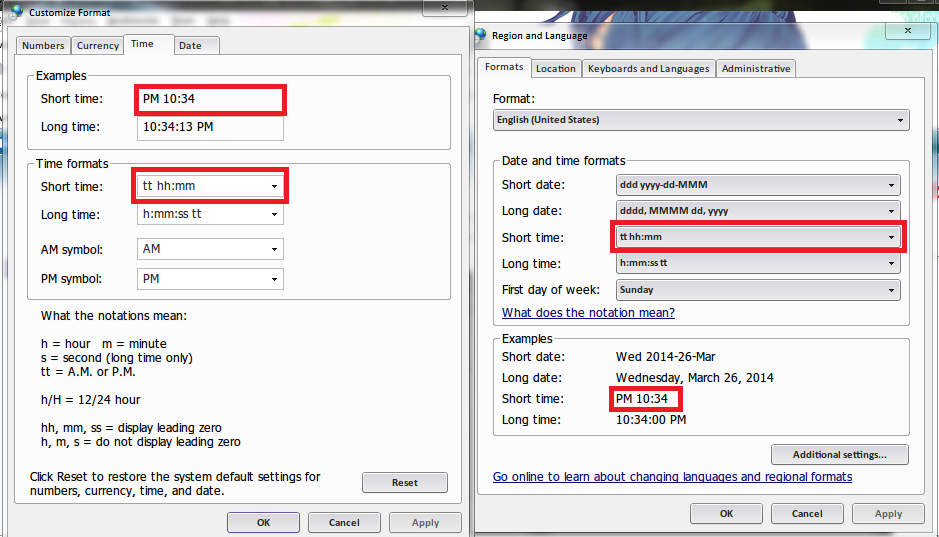
Believe me, I've tried:
F62QTrJ.png

But even after applying changes, my time on the taskbar still looks the same as the screenshot on the original post...
 

My Computer My Computer

Computer type
PC/Desktop
Computer Manufacturer/Model Number
Dell
OS
Windows 7 Starter Edition x86
Memory
1 GB
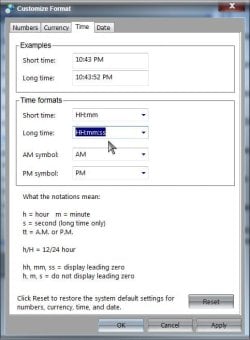
Welcome to Seven Forums TF2User. It's unclear from the screenshot. You are choosing a time format that begins with a capital H (24 hour time)?

Military.jpg

If so, what happens if you drag the taskbar double height? Any change?

A Guy
 

My Computer My Computer

Computer type
PC/Desktop
OS
Windows 10 Home x64
CPU
INTEL Core i5-750 Quad-Core 3.37GHz
Motherboard
ASUS P7P55D
Memory
HyperX Fury Black Series 8GB (2 x 4GB) 1866Mhz
Graphics Card(s)
EVGA GeForce GTX 750 Superclocked 1GB 128-Bit GDDR5
Monitor(s) Displays
LG 32MA68HY 32" IPS
Screen Resolution
1920 x 1080
Hard Drives
Samsung 840 Evo 120GB, SEAGATE 500GB Barracuda® 7200.12, SATA 3 Gb/s, 7200 RPM, 16MB cache
PSU
ANTEC TruePower New TP-550, 80 PLUS, 550W
Case
ANTEC Three Hundred Illusion
Cooling
COOLER MASTER Hyper 212 Plus, 4 x 120mm 1 x 140mm Noctua's
Internet Speed
85 + Mbps
Antivirus
Avast
Browser
Vivaldi
Yeah, that actually totally works! And sorry about the previous picture, I have a bad habit of cropping out the taskbar in my pictures. :p
So as you can see, I've applied a different time format (after dragging it double size and changing the time, then dragging it back down again) but it's stuck at 24-hr format. The problem is that you can't change the time when it's normal size. That's a fault on Microsoft's part I suppose. Thanks for the help, A Guy!
EDIT: Actually, that wasn't it at all - it turns out the problem was that the short and long time had to be matching (the long time had to be the same as the short time, but you could add seconds to it)

 

Attachments

  • 876.png
    876.png
    41.5 KB · Views: 1

My Computer My Computer

Computer type
PC/Desktop
Computer Manufacturer/Model Number
Dell
OS
Windows 7 Starter Edition x86
Memory
1 GB
Ahhh, good you got it, you can lock the taskbar again if you haven't already since the screenshot ;)

A Guy
 

My Computer My Computer

Computer type
PC/Desktop
OS
Windows 10 Home x64
CPU
INTEL Core i5-750 Quad-Core 3.37GHz
Motherboard
ASUS P7P55D
Memory
HyperX Fury Black Series 8GB (2 x 4GB) 1866Mhz
Graphics Card(s)
EVGA GeForce GTX 750 Superclocked 1GB 128-Bit GDDR5
Monitor(s) Displays
LG 32MA68HY 32" IPS
Screen Resolution
1920 x 1080
Hard Drives
Samsung 840 Evo 120GB, SEAGATE 500GB Barracuda® 7200.12, SATA 3 Gb/s, 7200 RPM, 16MB cache
PSU
ANTEC TruePower New TP-550, 80 PLUS, 550W
Case
ANTEC Three Hundred Illusion
Cooling
COOLER MASTER Hyper 212 Plus, 4 x 120mm 1 x 140mm Noctua's
Internet Speed
85 + Mbps
Antivirus
Avast
Browser
Vivaldi
Back
Top