Hi,
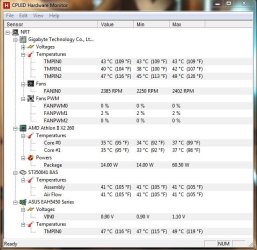
I have re-seated my CPU stock cooler because of over dust particles in my room.. Applied thermal paste... and connected to the four pins slot in the motherboard... Now I want to confirm my CPU cooler is running at variable speed. A simple doubt started in my mind is that, whether I connected the cooler's pin to the motherboard correctly (as its both sides were same) also want to clarify that I connected right ... plz help...
Room temp: 34 C
CPU temp: 35 C
I have re-seated my CPU stock cooler because of over dust particles in my room.. Applied thermal paste... and connected to the four pins slot in the motherboard... Now I want to confirm my CPU cooler is running at variable speed. A simple doubt started in my mind is that, whether I connected the cooler's pin to the motherboard correctly (as its both sides were same) also want to clarify that I connected right ... plz help...
Room temp: 34 C
CPU temp: 35 C
My Computer
- Computer Manufacturer/Model Number
- Assembled
- OS
- Windows 7 Ultimate 64-bit SP1
- CPU
- AMD Athlon II X2 260 @ 3.2 Ghz
- Motherboard
- Gigabyte Technology Co., Ltd. M68MT-S2 (Socket M2)
- Memory
- Kingston 8.0GB Dual-Channel DDR3 @ 669MHz (9-9-9-24)
- Graphics Card(s)
- ASUS EAH 5450 - 1 GB
- Sound Card
- Realtek HD Audio
- Monitor(s) Displays
- 23 Inch - DELL SP2309W
- Screen Resolution
- 2048 x 1152
- Hard Drives
- 488GB Seagate ST3500418AS ATA Device (SATA)
- PSU
- 450W
- Case
- Iball - Standard Form - i8190
- Cooling
- Stock Cooling
- Keyboard
- Logitech
- Mouse
- Logitech
- Internet Speed
- 1 MB/Sec
- Other Info
- Creative Inspire 2.1 Speakers, LITEON 24x DVD Writer