How do i control a user account?

funboymo

New member
Local time
7:07 AM
Messages
5
Hi,

I have many people using my computer and I want to stop them from being on my account. What I mean by this is,that I want to set up an account for everyone else to use with the following control:

1. I (as an administrator) get to control password creation, account pictures and all personal settings. THEY HAVE NO CONTROL OVER BEING ABLE TO CHANGE WHAT I HAVE SET.

2. My library, computer and data files are unseen by the other account. This means they can not edit my documents, open my music. THEY BASICALLY WILL OPEN THE USER ACCOUNT AND SEE NON OF MY FILES.

3. I (as an administrator) control what they surf on the net. e.g. adult content.

I know some of this seems like 'mission impossible' but please can you help me. I am sick of feeling like I don't control my own computer any more.

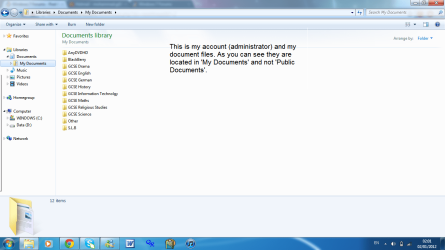
As for point 2, I would like to elaborate. My biggest concern is that my documents keeps on appearing in the documents section of the user account that I tried to create. Even though I have tried everything to stop this, nothing has seemed to work.

PRINT 2 -- I could not get this print screen to upload so I will describe it. In the print screen it is the same as the PRINT 1 but there is a 'Public Documents' file and the file includes all my personal files.

Thank You,

m.gendi
 

Attachments
  • Print 1.png
    Print 1.png
    62.4 KB · Views: 24
Last edited by a moderator:

My Computer My Computer

OS
London
What you are wanting to do is very simple. Type in the Windows search box " user " and then choose User Accounts, from here you can create a new account for the other users and choose standard user account for them. I would make just 1 user account and let all the others use that unless you want that everyone has their own account.

To secure your files from others you can either edit the user accounts permissions but if you are not familar with that then I recommand either first reading up on it or you can simply make a folder private by right clicking on it and chosing to not share the folder.

http://windows.microsoft.com/en-us/windows7/products/features/user-account-control

http://www.howtogeek.com/howto/5261/beginner-geek-add-a-new-user-account-in-windows-7/
 
Last edited:

My Computer My Computer

Computer Manufacturer/Model Number
Home build
OS
Windows 7 Pro x64
CPU
AMD FX 4100 4 Core 3.6GHz AM3+
Motherboard
ASROCK 970 Extreme3
Memory
16GB G.Skill RipjawsX
Graphics Card(s)
Radeon 6850
Sound Card
ASUS Xonar D1
Monitor(s) Displays
ASUS 23" LCD
Hard Drives
SSD 120GB
WD 750GB Black series
WD 640GB Black series
PSU
700W
Case
Antec 100
Cooling
Hyper 212 Plus
Internet Speed
50MB
Hi,

Thank you for your quick reply. Due to your help I have finally managed to block other users from seeing my personal documents, so thank you for that. I have done as you have said by making an account as 'standard user'. However, the 'standard user' still has the power to create an account password. How do I stop them from doing this?

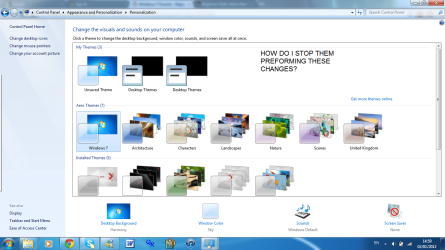
Also, is there away to stop the 'standard user' form being able to make personal changes to the computer, such as, changing the desktop background, windows colour and any other changes?

Please refer to the attachment for extra guidance on my second inquiry.

"print 2" -- I want them to not be able to make those changes and other changes like deleting desktop icons and so on.

Thanks for your help,

m.gendi
 

Attachments

  • print 2.png
    print 2.png
    122.2 KB · Views: 4

My Computer My Computer

OS
London

My Computer My Computer

Computer type
PC/Desktop
Computer Manufacturer/Model Number
Home Built
OS
Windows 10 Education 64 bit
CPU
AMD Phenom II X4 980 Black Edition Deneb 3.7GHz
Motherboard
Asus M4N68T-M V2 µATX Motherboard
Memory
8GB 4GBx2 Kingston PC10600 DDR3 1333 Memory
Graphics Card(s)
Zotac NVIDIA Geforce GT640 2 Gig DDR3 PCIe
Sound Card
VIA VT1708s High Definition Audio 8-channel Onboard
Monitor(s) Displays
22" LG E2242 1080p and 2 19" I-INC AG191D
Screen Resolution
1280x1024 - 1920x1080 - 1280x1024
Hard Drives
Crucial M100 256 GB SSD and 500 GB WD Blue SATA
PSU
Thermaltake TR 620
Case
Power Up Black ATX Mid-Tower Case
Cooling
Stock heatsink and fan
Keyboard
Logitech Wireless K350 Wave
Mouse
Logitech Wireless M570 Trackman Wheel
Internet Speed
80 Mbps Down 30 Mbps Up
Antivirus
Windows Defender
Browser
Internet Explorer 11
Other Info
HP DVD1040e Lightscribe - External USB2
Hi,

Thank you for your reply. To answer your points, I am using Windows 7 (Home Premium) and my operating system (OS) is "64-bit operating system". Can I still preform the requests I am asking for now that you are aware of my operating system and windows version?

Many Thanks,

m.gendi
 

My Computer My Computer

OS
London
To be honest, my main and last issue is that I don't know how to stop the standard user from creating/changing the password for their account. All I want to know at this point is how to stop them from doing this.
 

My Computer My Computer

OS
London
If you want to lock it down so all the other users can do is surf the internet then you could enable the Guest account and let the others use the Guest account. The Guest account is the most restrictive but you can change what the standard user can do be editing the permissions or you could set up Parental Controls which allow you to block certain websites by content, run programs and so on.
 

My Computer My Computer

Computer Manufacturer/Model Number
Home build
OS
Windows 7 Pro x64
CPU
AMD FX 4100 4 Core 3.6GHz AM3+
Motherboard
ASROCK 970 Extreme3
Memory
16GB G.Skill RipjawsX
Graphics Card(s)
Radeon 6850
Sound Card
ASUS Xonar D1
Monitor(s) Displays
ASUS 23" LCD
Hard Drives
SSD 120GB
WD 750GB Black series
WD 640GB Black series
PSU
700W
Case
Antec 100
Cooling
Hyper 212 Plus
Internet Speed
50MB
Hi,

Thank you very much for your helpful reply.

To answer your reply, I want the account to be normal but the user has no huge control over personalization or the account password. You mentioned 'editing the permissions'. How do I get to this? Can you give me a step by step in take. e.g. 1. go to ...., etc.

Just elaborate, when I say 'normal' I mean, the user can use applications/programs things such as media player,
internet, Adobe and other pre-installed applications/programs.
Thank You Very Much,

m.gendi
 

My Computer My Computer

OS
London
No Group Policy Editor on Home Premium so its either parental controls or use the guest account.
 

My Computer My Computer

Computer type
PC/Desktop
Computer Manufacturer/Model Number
Home Built
OS
Windows 10 Education 64 bit
CPU
AMD Phenom II X4 980 Black Edition Deneb 3.7GHz
Motherboard
Asus M4N68T-M V2 µATX Motherboard
Memory
8GB 4GBx2 Kingston PC10600 DDR3 1333 Memory
Graphics Card(s)
Zotac NVIDIA Geforce GT640 2 Gig DDR3 PCIe
Sound Card
VIA VT1708s High Definition Audio 8-channel Onboard
Monitor(s) Displays
22" LG E2242 1080p and 2 19" I-INC AG191D
Screen Resolution
1280x1024 - 1920x1080 - 1280x1024
Hard Drives
Crucial M100 256 GB SSD and 500 GB WD Blue SATA
PSU
Thermaltake TR 620
Case
Power Up Black ATX Mid-Tower Case
Cooling
Stock heatsink and fan
Keyboard
Logitech Wireless K350 Wave
Mouse
Logitech Wireless M570 Trackman Wheel
Internet Speed
80 Mbps Down 30 Mbps Up
Antivirus
Windows Defender
Browser
Internet Explorer 11
Other Info
HP DVD1040e Lightscribe - External USB2
Hi,

Thank you for your reply. To answer your points, I am using Windows 7 (Home Premium) and my operating system (OS) is "64-bit operating system". Can I still preform the requests I am asking for now that you are aware of my operating system and windows version?

Many Thanks,

m.gendi

Guest account has even more stringent controls.
 

My Computer My Computer

Computer Manufacturer/Model Number
HP Pavillion dv-7 1005 Tx
OS
Win 8 Release candidate 8400
CPU
[email protected]
Memory
4 gigs
Graphics Card(s)
Nvidia 9600M
Sound Card
HD built-in
Monitor(s) Displays
17" Wxga
Screen Resolution
1440x900
Cooling
none
Internet Speed
45Mb down 5Mb up
Back
Top