How do I convert MS Word 97 to MS Word 2010

pepsi

New member
Member
Local time
3:28 AM
Messages
28
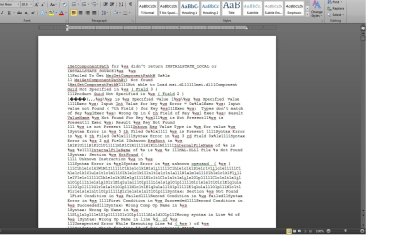
I've found some old files from MS Word 97 (see attachment) and I want to convert them to ms10. Can someone walk me through the procedure?
 

Attachments

  • Untitled.jpg
    Untitled.jpg
    139.4 KB · Views: 25

My Computer My Computer

At a glance

windows7 home premium Versio 6.1.7601 Service...AMDAthlonProcessor 28501.75GBNVIDIA GeForce 6150SE nForce 430
Computer Manufacturer/Model Number
EL1333G-01
OS
windows7 home premium Versio 6.1.7601 Service Pack 1 Build 7601 IE 9
CPU
AMDAthlonProcessor 2850
Motherboard
WMCP61M
Memory
1.75GB
Graphics Card(s)
NVIDIA GeForce 6150SE nForce 430
Sound Card
Realtek High Definition Audio
Monitor(s) Displays
Dell SE198WFP(Analog)
Hard Drives
System Information Report

General
Operating System Microsoft Windows 7 Home Premium
Central Processor AMD Athlon(tm) Processor 2850e
User Name Judy
Graphics
PSU
NIVIDA

My Computer My Computer

At a glance

Windows 7 Home Premium 64bitIntel(R) Core(TM) i3-2120 CPU @ 3.30GHz3.00 GB(1) Intel(R) HD Graphics (2) VNC Mirror Driver
Computer type
PC/Desktop
Computer Manufacturer/Model Number
Packard Bell
OS
Windows 7 Home Premium 64bit
CPU
Intel(R) Core(TM) i3-2120 CPU @ 3.30GHz
Motherboard
Packard Bell IPISB-AG
Memory
3.00 GB
Graphics Card(s)
(1) Intel(R) HD Graphics (2) VNC Mirror Driver
Sound Card
Realtek High Definition Audio
Monitor(s) Displays
AIO LCD
Screen Resolution
1920 x 1080
Hard Drives
WDC WD10EADX-22TDHB0 ATA Device
Fixed hard disk media
4 partitions
931.51 GB
Keyboard
Wireless
Mouse
Wireless
Antivirus
Microsoft Security Essentials
Browser
IE; Firefox
Other Info
Also:
Samsung N220 Plus Netbook - Windows 7 Home
HP laptop
iPad 5

My Computer My Computer

At a glance

windows7 home premium Versio 6.1.7601 Service...AMDAthlonProcessor 28501.75GBNVIDIA GeForce 6150SE nForce 430
Computer Manufacturer/Model Number
EL1333G-01
OS
windows7 home premium Versio 6.1.7601 Service Pack 1 Build 7601 IE 9
CPU
AMDAthlonProcessor 2850
Motherboard
WMCP61M
Memory
1.75GB
Graphics Card(s)
NVIDIA GeForce 6150SE nForce 430
Sound Card
Realtek High Definition Audio
Monitor(s) Displays
Dell SE198WFP(Analog)
Hard Drives
System Information Report

General
Operating System Microsoft Windows 7 Home Premium
Central Processor AMD Athlon(tm) Processor 2850e
User Name Judy
Graphics
PSU
NIVIDA
The file may be corrupted. I would install LibreOffice and try opening in Writer.

Home » LibreOffice

If it opens, you may need to run some "fixes" if the original is corrupt - most common problems are with the TOC (delete it) or page numbers in footers.

If it "works" then SAVE AS the new Word version.

Regards,
GEWB
 

My Computer My Computer

At a glance

Linux Mint / XP / Win7 Home, Pro, Ultimate / ...
Computer type
PC/Desktop
Computer Manufacturer/Model Number
(7 different computers booting up to 10 systems)
OS
Linux Mint / XP / Win7 Home, Pro, Ultimate / Win8.1 / Win10
Other Info
Four desktops, two laptops, one notebook and one tablet
The file may be corrupted. I would install LibreOffice and try opening in Writer.

I've downloaded both the main installer and the libre office built in help but I can't figure out how to open it in writer. Can you walk me through it?
 

My Computer My Computer

At a glance

windows7 home premium Versio 6.1.7601 Service...AMDAthlonProcessor 28501.75GBNVIDIA GeForce 6150SE nForce 430
Computer Manufacturer/Model Number
EL1333G-01
OS
windows7 home premium Versio 6.1.7601 Service Pack 1 Build 7601 IE 9
CPU
AMDAthlonProcessor 2850
Motherboard
WMCP61M
Memory
1.75GB
Graphics Card(s)
NVIDIA GeForce 6150SE nForce 430
Sound Card
Realtek High Definition Audio
Monitor(s) Displays
Dell SE198WFP(Analog)
Hard Drives
System Information Report

General
Operating System Microsoft Windows 7 Home Premium
Central Processor AMD Athlon(tm) Processor 2850e
User Name Judy
Graphics
PSU
NIVIDA
If the document is corrupt, you could try 'Open and Repair':

The fix is really easy and quick...

  1. Just Open Word, click on File > Open.
  2. In Open dialogue box, select the document you want to repair, now click on a small arrow on the side of the Open button.
  3. It will show a drop down menu, click on Open and Repair.
MSword2007.jpg


openandrepair.jpg
 

My Computer My Computer

At a glance

Windows 7 Home Premium 64bitIntel(R) Core(TM) i3-2120 CPU @ 3.30GHz3.00 GB(1) Intel(R) HD Graphics (2) VNC Mirror Driver
Computer type
PC/Desktop
Computer Manufacturer/Model Number
Packard Bell
OS
Windows 7 Home Premium 64bit
CPU
Intel(R) Core(TM) i3-2120 CPU @ 3.30GHz
Motherboard
Packard Bell IPISB-AG
Memory
3.00 GB
Graphics Card(s)
(1) Intel(R) HD Graphics (2) VNC Mirror Driver
Sound Card
Realtek High Definition Audio
Monitor(s) Displays
AIO LCD
Screen Resolution
1920 x 1080
Hard Drives
WDC WD10EADX-22TDHB0 ATA Device
Fixed hard disk media
4 partitions
931.51 GB
Keyboard
Wireless
Mouse
Wireless
Antivirus
Microsoft Security Essentials
Browser
IE; Firefox
Other Info
Also:
Samsung N220 Plus Netbook - Windows 7 Home
HP laptop
iPad 5
Irene's method is the "default" way but may not always work which is why I have been using LibreOffice (OpenOffice) for years - I just find it matches my workflow with less frustration.

Should you want/need to use LibreOffice, it is used much like MS Word. You asked how to open a file in Writer (I assume you mean after installing LibreOffice)...


Click the Windows Start icon in the lower left of your task bar to open the Windows menu. The first level menu opens.
WinMenu-1.PNG


Click on All Programs and the second level Windows menu opens. Scroll down the program list and click on the LibreOffice folder to expand the list. Select (click on) LibreOffice Writer.
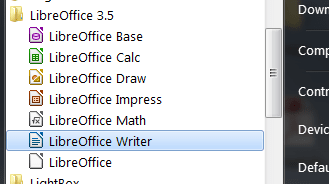
OpenMenu.PNG


Note: if the default LibreOffice suite launch menu is open, select the type of file you wish to work with:
Text Document
Spreadsheet
Presentation
Drawing
Database
Formula
Templates
Open...
(opens a generic navigation window to select a file)
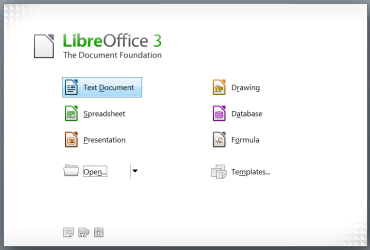
2ndOpenMenu.PNG


LibreOffice Writer opens to a blank page.
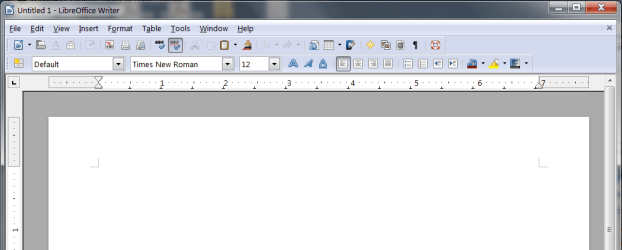
BlankFile.PNG


On the menu bar, click on File then click on Open...
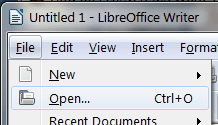
File-Open.PNG


Navigate to the desired file. Select the file and click the Open button.
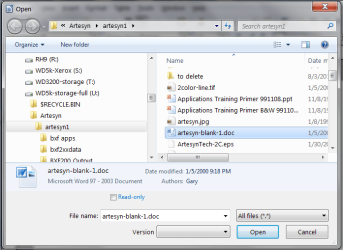
Nav2File.PNG


Your file will open in Writer (if it is not too badly corrupt).
OpenedFile.PNG


Fix any problem areas such as the Word TOC, page numbering, etc.

Once corrected, you can save the file in Word DOCX format from LibreOffice.

On the menu bar click File then Save As...
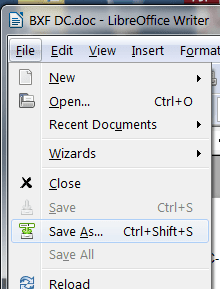
FileSaveAs.PNG


At the far right of the Save as type box, click the down arrow - the type drop list opens.
SaveAsList.PNG


Scroll down and select (click on) Microsoft Word 2007/2010 XML (.docx) (*.docx).
The file name and type will populate the File name text box (you can change the name if you wish).
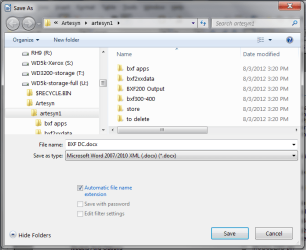
SaveAsSelected.PNG

Click the Save button.

Done!

Regards,
GEWB

 

My Computer My Computer

At a glance

Linux Mint / XP / Win7 Home, Pro, Ultimate / ...
Computer type
PC/Desktop
Computer Manufacturer/Model Number
(7 different computers booting up to 10 systems)
OS
Linux Mint / XP / Win7 Home, Pro, Ultimate / Win8.1 / Win10
Other Info
Four desktops, two laptops, one notebook and one tablet
GEWB,
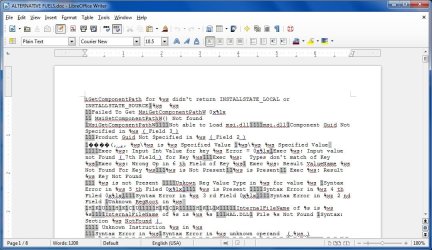
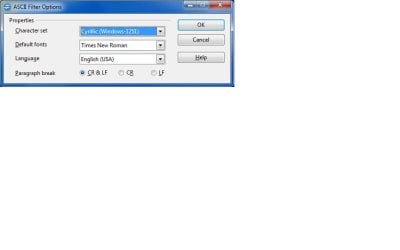
I followed your directions and I've enclosed the results. I've also enclosed the ASCI Filter Options.
I also followed Irene's directions and that didn't work
 

Attachments

  • Untitled.jpg
    Untitled.jpg
    108.7 KB · Views: 10
  • Untitled 2.jpg
    Untitled 2.jpg
    18.2 KB · Views: 6

My Computer My Computer

At a glance

windows7 home premium Versio 6.1.7601 Service...AMDAthlonProcessor 28501.75GBNVIDIA GeForce 6150SE nForce 430
Computer Manufacturer/Model Number
EL1333G-01
OS
windows7 home premium Versio 6.1.7601 Service Pack 1 Build 7601 IE 9
CPU
AMDAthlonProcessor 2850
Motherboard
WMCP61M
Memory
1.75GB
Graphics Card(s)
NVIDIA GeForce 6150SE nForce 430
Sound Card
Realtek High Definition Audio
Monitor(s) Displays
Dell SE198WFP(Analog)
Hard Drives
System Information Report

General
Operating System Microsoft Windows 7 Home Premium
Central Processor AMD Athlon(tm) Processor 2850e
User Name Judy
Graphics
PSU
NIVIDA
Hello pepsi -

Not sure I can help from here.

Regards,
GEWB
 

My Computer My Computer

At a glance

Linux Mint / XP / Win7 Home, Pro, Ultimate / ...
Computer type
PC/Desktop
Computer Manufacturer/Model Number
(7 different computers booting up to 10 systems)
OS
Linux Mint / XP / Win7 Home, Pro, Ultimate / Win8.1 / Win10
Other Info
Four desktops, two laptops, one notebook and one tablet
Have you actually checked which mode the document is in?

If not, here is how to do it:
Document modes and compatibility

When you open a document in Word 2010, it is in one of three modes:

  • Word 2010
  • Word 2007 Compatibility Mode
  • Word 97-2003 Compatibility Mode
To determine which mode the document is in, check the document's title bar. If (Compatibility Mode) appears after the file name, the document is in either Word 2007 Compatibility Mode or Word 97-2003 Compatibility Mode. To determine which, do the following:

  1. Click the File tab.

  1. Click Info.
  2. In the Prepare for Sharing section, click Check for Issues, and then click Check Compatibility.
  3. Click Select versions to show.
A check mark appears next to the name of the mode that the document is in.
Also, what is the .extension showing on the filename?

Another possibility:
Try the
steps mentioned below:

1. Right click the Word file.
2. Select Open With from the pop-up menu
3. Click Choose Program.
4. Select Word 2010 in the Programs box
5. Check Always use the selected program to open this kind of file
6. Click OK.
Try opening the word file and see if it helps.
 

My Computer My Computer

At a glance

Windows 7 Home Premium 64bitIntel(R) Core(TM) i3-2120 CPU @ 3.30GHz3.00 GB(1) Intel(R) HD Graphics (2) VNC Mirror Driver
Computer type
PC/Desktop
Computer Manufacturer/Model Number
Packard Bell
OS
Windows 7 Home Premium 64bit
CPU
Intel(R) Core(TM) i3-2120 CPU @ 3.30GHz
Motherboard
Packard Bell IPISB-AG
Memory
3.00 GB
Graphics Card(s)
(1) Intel(R) HD Graphics (2) VNC Mirror Driver
Sound Card
Realtek High Definition Audio
Monitor(s) Displays
AIO LCD
Screen Resolution
1920 x 1080
Hard Drives
WDC WD10EADX-22TDHB0 ATA Device
Fixed hard disk media
4 partitions
931.51 GB
Keyboard
Wireless
Mouse
Wireless
Antivirus
Microsoft Security Essentials
Browser
IE; Firefox
Other Info
Also:
Samsung N220 Plus Netbook - Windows 7 Home
HP laptop
iPad 5
Thanks for the help. I finally decided that if the file was that old and I didn't miss it, it couldn't be that important.
 

My Computer My Computer

At a glance

windows7 home premium Versio 6.1.7601 Service...AMDAthlonProcessor 28501.75GBNVIDIA GeForce 6150SE nForce 430
Computer Manufacturer/Model Number
EL1333G-01
OS
windows7 home premium Versio 6.1.7601 Service Pack 1 Build 7601 IE 9
CPU
AMDAthlonProcessor 2850
Motherboard
WMCP61M
Memory
1.75GB
Graphics Card(s)
NVIDIA GeForce 6150SE nForce 430
Sound Card
Realtek High Definition Audio
Monitor(s) Displays
Dell SE198WFP(Analog)
Hard Drives
System Information Report

General
Operating System Microsoft Windows 7 Home Premium
Central Processor AMD Athlon(tm) Processor 2850e
User Name Judy
Graphics
PSU
NIVIDA
Thanks for the help. I finally decided that if the file was that old and I didn't miss it, it couldn't be that important.
Smart, very smart!

Regards,
GEWB
 

My Computer My Computer

At a glance

Linux Mint / XP / Win7 Home, Pro, Ultimate / ...
Computer type
PC/Desktop
Computer Manufacturer/Model Number
(7 different computers booting up to 10 systems)
OS
Linux Mint / XP / Win7 Home, Pro, Ultimate / Win8.1 / Win10
Other Info
Four desktops, two laptops, one notebook and one tablet
Back
Top