How do I copy from my pictures to external hard drive ?

Just as I was about to pack up for the night, I right clicked the entire picture library icon and it has invited me to copy. I'm doing that at the moment (it's going to take another 25 minutes, there's a lot of pictures there), Hopefully then I can send to the external. If this works, hopefully I can do this at regular intervals (and the whole library won't be copied several times !).
 

My Computer My Computer

At a glance

windows 7 home
OS
windows 7 home
There is no Edit button in Windows 7's My Pictures folder or Windows Explorer.

Seavixen:

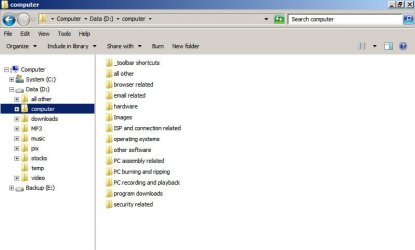
Below is a pic of Windows Explorer on my system with Edit menu clearly shown.

I can't speak for anyone else.

I guess there is no edit menu in libraries. All the more reason not to use libraries.
 

Attachments

  • Untitled-1.jpg
    Untitled-1.jpg
    47.4 KB · Views: 11

My Computer My Computer

At a glance

Windows 7 Home Premium SP1, 64-bitIntel Skylake i5-6600K, not overclocked8 GB HyperX DDR4-2666 (2 x 4 GB)none; graphics are integrated on CPU
Computer type
PC/Desktop
Computer Manufacturer/Model Number
Ignatz Special; 4 speed manual gearbox; factory air conditioning; one of one
OS
Windows 7 Home Premium SP1, 64-bit
CPU
Intel Skylake i5-6600K, not overclocked
Motherboard
AsRock Z170M Extreme 4, micro ATX
Memory
8 GB HyperX DDR4-2666 (2 x 4 GB)
Graphics Card(s)
none; graphics are integrated on CPU
Sound Card
onboard: Realtek ALC1150; external: USB Behringer UF0-202
Monitor(s) Displays
Dell S2340M 23 inch IPS
Screen Resolution
1600 x 900
Hard Drives
System: Crucial MX100 series SSD, 128 GB;
Data: Samsung Spinpoint 103SJ, 1 TB;
Backup: WD Caviar Green WD30EZRX-00D8PB0, 3 TB
PSU
Rosewill SilentNight 500 watt fanless, semi-modular
Case
Antec Solo II
Cooling
Noctua NH-U12S; Noctua F12 intake, Noctua S12A exhaust
Keyboard
Microsoft 200 6JH-00001 USB
Mouse
Dell or Microsoft optical wired; USB
Antivirus
Microsoft Security Essentials and Malwarebytes Premium
Browser
Pale Moon
Other Info
All fans PWM; speeds at idle: CPU circa 500 rpm; intake circa 600 rpm; exhaust circa 600 rpm; CPU temps 27 idle and 47 C load in a warm room (27 C/81 F) when running Intel Extreme Tuning Utility stress test.
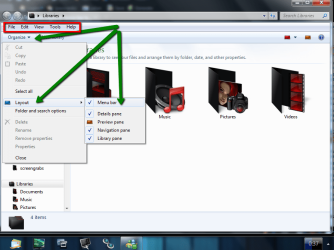
to display the menu bar including the edit and file etc
click organise /layout and click menu bar

2011-11-17_2037.png

if you dont want it to show permanently then have menu bar unchecked in layout, pressing alt when a window is in focus will show the menu bar pressing alt again will close it
 

My Computer My Computer

At a glance

Microsoft Windows 7 Home Premium 64-bit 7600IIx4 amd athelon 635 processor2x2gbati radeon HD 5450
Computer Manufacturer/Model Number
Hewlett packard/p6512uk
OS
Microsoft Windows 7 Home Premium 64-bit 7600
CPU
IIx4 amd athelon 635 processor
Motherboard
FOXCONN 2AA9
Memory
2x2gb
Graphics Card(s)
ati radeon HD 5450
Sound Card
(1) Realtek High Definition Audio (2) AMD High Definition
Monitor(s) Displays
samsung lcd tv 32"
Screen Resolution
1360x 768
Hard Drives
(1) WDC WD10 01FAES-60Z2A0 SATA Disk Device (2) Maxtor OneTouch USB Device (3) ST310003 33AS USB Device (4) WD My Book 1111 USB Device
PSU
?
Cooling
air!
Keyboard
wireless hp
Mouse
wireless Hp,optical
Internet Speed
1.10mb/s
Antivirus
MSE
Browser
Firefox
Thanks Boohbah, I tried that but the description you have given and the screen shot make no sense to me, I have no idea where to go beyond dragging the external over to one side, that worked but I could not drag the pictures to the left, all that happened there was a stretch. Why can't I just highlight them and copy them to the external ?

The beggining of this tutorial will explain what aero snap is and how to use it, thanks to brink ,he explains things better than i

  • Dragging a window by the title bar to the left and right edge of the screen will fill that half the screen with that window when the mouse pointer reaches the edge of the screen. Dragging the window down a bit will restore the window back to how it was before.
  • Placing the mouse pointer on the top or bottom border of a window until the mouse pointer turns into an up-down double arrow and left click and hold, then drag the top or bottom window border to the top or bottom edge of the screen. This will fill the top and bottom of the screen within the left and right borders of the window. Dragging the window down a bit, or double clicking in the window's title bar, will restore the window back to how it was before.
  • Dragging a window by the title bar to the top edge of the screen will maximize the window to fill the desktop when the mouse pointer reaches the top edge of the screen. Dragging the window down a bit, or double clicking in the window's title bar, will restore the window back to how it was before.

http://www.sevenforums.com/tutorials/3069-aero-snap-turn-off.html
 

My Computer My Computer

At a glance

Microsoft Windows 7 Home Premium 64-bit 7600IIx4 amd athelon 635 processor2x2gbati radeon HD 5450
Computer Manufacturer/Model Number
Hewlett packard/p6512uk
OS
Microsoft Windows 7 Home Premium 64-bit 7600
CPU
IIx4 amd athelon 635 processor
Motherboard
FOXCONN 2AA9
Memory
2x2gb
Graphics Card(s)
ati radeon HD 5450
Sound Card
(1) Realtek High Definition Audio (2) AMD High Definition
Monitor(s) Displays
samsung lcd tv 32"
Screen Resolution
1360x 768
Hard Drives
(1) WDC WD10 01FAES-60Z2A0 SATA Disk Device (2) Maxtor OneTouch USB Device (3) ST310003 33AS USB Device (4) WD My Book 1111 USB Device
PSU
?
Cooling
air!
Keyboard
wireless hp
Mouse
wireless Hp,optical
Internet Speed
1.10mb/s
Antivirus
MSE
Browser
Firefox
My favorite way it to download the Microsoft Sync toy: Download Details - Microsoft Download Center - SyncToy 2.1 and create a folder of the same name where your pictures are now on your destination drive. Then use Sync Toy to sync the folders. Original Folder on the left and destination on the right. Be sure to do an echo sync. Then whenever you want or when you've added or removed picture sync again and it will add or delete what you've changed.

Thanks for this devnullore, I've just synced several folders that contain all my personal stuff.

I created four folder pairs, used Echo sync as you suggested, named the four backups and ran them.

They are now in sync between my internal backup drive and external backup drive - over 10,000 files taken care of and no more backup worries. :)

Adrian, give this a try. It's a great little program.
 

My Computer My Computer

At a glance

Windows 7 Ultimate SP1 64-BitIntel Core i7 870 @ 2.93GHz8Gb Dual-Channel DDR3 @ 664MHznVidia GeForce GTX 460 1024MB dedicated RAM
Computer Manufacturer/Model Number
HP Pavilion Elite 495UK
OS
Windows 7 Ultimate SP1 64-Bit
CPU
Intel Core i7 870 @ 2.93GHz
Motherboard
MSI 2A9C (CPU1)
Memory
8Gb Dual-Channel DDR3 @ 664MHz
Graphics Card(s)
nVidia GeForce GTX 460 1024MB dedicated RAM
Sound Card
Realtek HD Audio
Monitor(s) Displays
HP2310i
Screen Resolution
1920 x 1080
Hard Drives
1x1954GB Hitachi HDS22020ALA 330 (RAID), 1x1954GB Hitachi External for backup and storage
PSU
460W
Case
HP Elite
Cooling
Air cooled
Keyboard
Logitech K750 solar-powered keyboard
Mouse
Logitech Wireless M180 mouse
Internet Speed
2Mb
Other Info
Pure Avanti Flow Internet Radio with iPod Dock, 64Gb iPod, HP USB Speakers, Sony MDR-V500 Headphones, Sony Vaio F-Series Laptop
Back
Top