How do I copy Windows 7 Ultimate 64-Bit DVD-ROM to a DVD+R?

Mrsjeffyg

New member
Local time
2:05 PM
Messages
12
I am not familiar with copying anything to a DVD.
I need to make a backup copy (exact copy) of my Windows 7 Ultimate 64-bit to another DVD+R.
What are the exact steps to do so? I have only 1 DVD drive. Is it possible to copy it?

Thank you for your suggestions, but I am not able to do it. I need to have super detailed instructions. When I tried to copy it, as suggested by Britton30, I never got a screen or anything to put the blank DVD+R in. Something is missing in the translation. I have rarely used the DVD or CD to record, so I do not know what to expect and when to do something.

I also tried ImgBurn as suggested by WHS. It managed to copy the BOOT, AUTORUN.INF and BOOTMGR.

The disc I am trying to duplicate has the following on it:
Folders: BOOT EFI SOURCES SUPPORT UPGRADE
Files: AUTORUN.INF BOOTMGR SETUP.EXE

Do I need to copy all of these or do something else? It is actually for Windows 7 Ultimate SP1.

I have only ONE disc left! It needs to be bootable and it is NOT rewriteable.

Please give super-detailed instructions!
 
Last edited:

My Computer My Computer

At a glance

Windows 7 Ultimate x64
Computer type
Laptop
Computer Manufacturer/Model Number
Toshiba
OS
Windows 7 Ultimate x64
Welcome to Seven Forums Mrsjefflyg.

yes you can make a copy.
1. Put the w7 DVD in the drive, close the install window when it opens.
2. Open computer, right click on the w7 drive. It should open a menu with options. One should be burn or copy this disk. Choose the proper one.
3. You should get prompt to insert a blank DVD in the drive.
4. The prompts will lead you through the process.

It may take a few minutes, Windows will have to copy the DVD contents to a temporary burning folder.
 

My Computer My Computer

At a glance

Windows 7 Ultimate X64 SP1Intel i5-2550K, Differing ~4.4-4.8GHz No buil...16GB G.Skill Sniper 1866MHz @ 2133MHz 2x8GBASUS GTX650TIB-DC2OC-2GD5, (650TI Boost)
Computer type
PC/Desktop
Computer Manufacturer/Model Number
Home Built Desktop By DataTech
OS
Windows 7 Ultimate X64 SP1
CPU
Intel i5-2550K, Differing ~4.4-4.8GHz No built in GPU
Motherboard
ASUS P8Z68-V PRO/GEN3
Memory
16GB G.Skill Sniper 1866MHz @ 2133MHz 2x8GB
Graphics Card(s)
ASUS GTX650TIB-DC2OC-2GD5, (650TI Boost)
Sound Card
Onboard Realtek 5-1
Monitor(s) Displays
Samsung P2570HD
Screen Resolution
1920x1080
Hard Drives
Samsung 840 Pro 256GB SSD for OS, 500GB Seagate Constellation (Enterprise drive) for Data
PSU
Corsair HX650W
Case
Inwin Dragon Rider
Cooling
Hyper 212 EVO w/two Noctua fans, push-pull, @1300 RPM
Keyboard
E-Z Eyes, bright yellow keys with large characters
Mouse
steelseries SENSEI Laser Pro Gaming
Internet Speed
48-51Mbs Mbs down, 11 Mbs up Xfinity Cable
Antivirus
Norton Internet Security 2013
Browser
IE 10, Opera, Pale Moon if needed
Other Info
4 case fans, LG BluRay-RE, ASUS DVD-RW, Mr. Fusion power supply, 1.21 gigawatts.
I would use ImgBurn and create an image file in some folder from the DVD and then burn that image file (also with ImgBurn) to the other DVD,
 

My Computer My Computer

At a glance

Vista, Windows7, Mint Mate, Zorin, Windows 8from 1.6GHz Duo to i7
Computer Manufacturer/Model Number
HP, Dell, Gateway, Toshiba - 4 laptops and 2 desktops
OS
Vista, Windows7, Mint Mate, Zorin, Windows 8
CPU
from 1.6GHz Duo to i7
Monitor(s) Displays
2x HP w2207
Hard Drives
5x HDD, 7x SSD, 12x Externals
Keyboard
with trackball - no mices
Mouse
Trackball mice
Internet Speed
DSL 6000
Welcome to Seven Forums Mrsjefflyg.

yes you can make a copy.
1. Put the w7 DVD in the drive, close the install window when it opens.
2. Open computer, right click on the w7 drive. It should open a menu with options. One should be burn or copy this disk. Choose the proper one.
3. You should get prompt to insert a blank DVD in the drive.
4. The prompts will lead you through the process.

It may take a few minutes, Windows will have to copy the DVD contents to a temporary burning folder.
Just copy the files from dvd isn't enough! You have to copy the bootsector as well. Use imgburn (free)
 

My Computer My Computer

At a glance

Microsoft Windows 7 Home Premium 64-bits 7601...Intel(R) Core(TM) i3 CPU M 370 @ 2.40GHz4,00 GBATI Mobility Radeon HD 5400 Series
Computer type
Laptop
Computer Manufacturer/Model Number
ACER ASPIRE 5742G
OS
Microsoft Windows 7 Home Premium 64-bits 7601 Multiprocessor Free Service Pack 1
CPU
Intel(R) Core(TM) i3 CPU M 370 @ 2.40GHz
Motherboard
Acer Aspire 5742G
Memory
4,00 GB
Graphics Card(s)
ATI Mobility Radeon HD 5400 Series
Sound Card
(1) AMD High Definition Audio Device (2) Realtek High Defi
Screen Resolution
1366 x 768 x 32 bits (4294967296 colors) @ 60 Hz
Hard Drives
WDC WD5000BEVT-22ZAT0
Hi Mrsjefflyg,

Alternatively, you can download the official ISO image of Windows 7 Ultimate (x64) from one of the direct-download links here (Ctrl+F to search for English).

Put simply, you can consider an ISO image like a "virtual copy" of a DVD, which you can burn to an actual DVD. This is pretty much the physical DVD you buy, just in digital format.

You can then burn the downloaded ISO image using any free image burner. One with an easy interface is InfraRecorder.

infrarecorder.gif


"Write Image" should do the trick.

Additional Tips:
1) Keep the ISO file in your computer, just in case you lose your install discs.
2) Save your product key in a text document.
 
Last edited:

My Computer My Computer

At a glance

Windows 7 Professional SP1 x64 (OEM)Intel® Core™ i5 2430M/2410M ProcessorDDR3 1333 SODIMM (8GB)NVIDIA® GeForce® GT 555M (2GB)
Computer type
Laptop
Computer Manufacturer/Model Number
ASUS N45SF
OS
Windows 7 Professional SP1 x64 (OEM)
CPU
Intel® Core™ i5 2430M/2410M Processor
Motherboard
Intel® HM65 Express Chipset
Memory
DDR3 1333 SODIMM (8GB)
Graphics Card(s)
NVIDIA® GeForce® GT 555M (2GB)
Sound Card
Realtek High Definition Audio
Monitor(s) Displays
14.0" LED Backlight
Screen Resolution
16:9 HD (1366x768)
Hard Drives
640GB Seagate (internal), 1TB Toshiba Canvio Portable, 2TB x 2 WD My Book Essential (external)
Antivirus
Malwarebytes Anti-Malware Home (Premium)
Browser
Waterfox
Other Info
Optical Drive: Slimtype DVD A DS8A5SH (Super-Multi DVD);
Audio: Bang & Olufsen ICEpower®, SonicMaster
Hey, I like this new girl, she knows her stuff, excellent advice Kathy :thumbsup:

@ Mrsjefflyg

Is your dvd drive a dvd burner ?

Personally I use PowerIso, but it`s not free, I just put my windows dvd in, open up Computer, right click on the Windows dvd , click PowerIso from the drop down menu and choose Make Image File

ImgBurn or InfraRecorder may work the same way. Or just use it`s GUI as suggested.
 
Last edited:

My Computer My Computer

At a glance

Windows 10 Pro x64Intel Core i7 6700KGSkill TridentZ RGB 16GB 3600 16-16-16-36EVGA GTX 980 Ti SC x2
Computer type
PC/Desktop
Computer Manufacturer/Model Number
Skylake Special #666
OS
Windows 10 Pro x64
CPU
Intel Core i7 6700K
Motherboard
Asus Sabertooth Z170 Mark 1
Memory
GSkill TridentZ RGB 16GB 3600 16-16-16-36
Graphics Card(s)
EVGA GTX 980 Ti SC x2
Sound Card
Realtek High Definition
Monitor(s) Displays
AOC G2460PG
Screen Resolution
1920 x 1080 144Hz
Hard Drives
Samsung 860 Pro 256GB, Seagate Barracuda 4TB x2
PSU
EVGA 1000 P2, EVGA White Custom Braided Cables
Case
Corsair Vengeance C70 Gunmetal Black
Cooling
Corsair H100i v2, Corsair ML120 x2, Thermal Grizzly Kryonaut
Keyboard
Logitech G910 Orion Spectrum
Mouse
Logitech G700s
Internet Speed
Verizon Fios Quantum Gateway 75/75
Antivirus
Windows Defender, Malwarebytes Free 3.8.3
Browser
Chrome
Other Info
Corsair SP120 x4, LG Blu-ray Drive, Durabrand HT-395 100 Watt Dolby Digital Amp, Corsair H2100 Wireless 7.1 Headset
Hi Mrsjefflyg,

Alternatively, you can download the official ISO image of Windows 7 Ultimate (x64) from one of the direct-download links here (Ctrl+F to search for English).

Put simply, you can consider an ISO image like a "virtual copy" of a DVD, which you can burn to an actual DVD. This is pretty much the physical DVD you buy, just in digital format.

You can then burn the downloaded ISO image using any free image burner. One with an easy interface is InfraRecorder.

infrarecorder.gif


"Write Image" should do the trick.
Hi Kathy, I saw you on other threads as well.... trying to help people now? I hope they appreciate your help.

But in win7: right click ISO->open with->Win7 DVD burning. If ISO extension is associated to win7 DVD burning (the default application).... double click will start the burning.
 

My Computer My Computer

At a glance

Microsoft Windows 7 Home Premium 64-bits 7601...Intel(R) Core(TM) i3 CPU M 370 @ 2.40GHz4,00 GBATI Mobility Radeon HD 5400 Series
Computer type
Laptop
Computer Manufacturer/Model Number
ACER ASPIRE 5742G
OS
Microsoft Windows 7 Home Premium 64-bits 7601 Multiprocessor Free Service Pack 1
CPU
Intel(R) Core(TM) i3 CPU M 370 @ 2.40GHz
Motherboard
Acer Aspire 5742G
Memory
4,00 GB
Graphics Card(s)
ATI Mobility Radeon HD 5400 Series
Sound Card
(1) AMD High Definition Audio Device (2) Realtek High Defi
Screen Resolution
1366 x 768 x 32 bits (4294967296 colors) @ 60 Hz
Hard Drives
WDC WD5000BEVT-22ZAT0
Hi Kaktussoft,

Most of my own questions deal with licensing, but I've been around computers for quite a while. So I help around when I can. :)

Thought maybe the OP can use something lightweight, should he/she decide to start having basic CD/DVD projects, apart from burning images. I use PowerISO myself.

As always, multiple methods for a task.

Thanks by the way, AddRAM. ;)
 

My Computer My Computer

At a glance

Windows 7 Professional SP1 x64 (OEM)Intel® Core™ i5 2430M/2410M ProcessorDDR3 1333 SODIMM (8GB)NVIDIA® GeForce® GT 555M (2GB)
Computer type
Laptop
Computer Manufacturer/Model Number
ASUS N45SF
OS
Windows 7 Professional SP1 x64 (OEM)
CPU
Intel® Core™ i5 2430M/2410M Processor
Motherboard
Intel® HM65 Express Chipset
Memory
DDR3 1333 SODIMM (8GB)
Graphics Card(s)
NVIDIA® GeForce® GT 555M (2GB)
Sound Card
Realtek High Definition Audio
Monitor(s) Displays
14.0" LED Backlight
Screen Resolution
16:9 HD (1366x768)
Hard Drives
640GB Seagate (internal), 1TB Toshiba Canvio Portable, 2TB x 2 WD My Book Essential (external)
Antivirus
Malwarebytes Anti-Malware Home (Premium)
Browser
Waterfox
Other Info
Optical Drive: Slimtype DVD A DS8A5SH (Super-Multi DVD);
Audio: Bang & Olufsen ICEpower®, SonicMaster
Welcome to Seven Forums Mrsjefflyg.

yes you can make a copy.
1. Put the w7 DVD in the drive, close the install window when it opens.
2. Open computer, right click on the w7 drive. It should open a menu with options. One should be burn or copy this disk. Choose the proper one.
3. You should get prompt to insert a blank DVD in the drive.
4. The prompts will lead you through the process.

It may take a few minutes, Windows will have to copy the DVD contents to a temporary burning folder.
Just copy the files from dvd isn't enough! You have to copy the bootsector as well. Use imgburn (free)
Absolutely wrong! I have done it the way I explained, it all gets copied.
 

My Computer My Computer

At a glance

Windows 7 Ultimate X64 SP1Intel i5-2550K, Differing ~4.4-4.8GHz No buil...16GB G.Skill Sniper 1866MHz @ 2133MHz 2x8GBASUS GTX650TIB-DC2OC-2GD5, (650TI Boost)
Computer type
PC/Desktop
Computer Manufacturer/Model Number
Home Built Desktop By DataTech
OS
Windows 7 Ultimate X64 SP1
CPU
Intel i5-2550K, Differing ~4.4-4.8GHz No built in GPU
Motherboard
ASUS P8Z68-V PRO/GEN3
Memory
16GB G.Skill Sniper 1866MHz @ 2133MHz 2x8GB
Graphics Card(s)
ASUS GTX650TIB-DC2OC-2GD5, (650TI Boost)
Sound Card
Onboard Realtek 5-1
Monitor(s) Displays
Samsung P2570HD
Screen Resolution
1920x1080
Hard Drives
Samsung 840 Pro 256GB SSD for OS, 500GB Seagate Constellation (Enterprise drive) for Data
PSU
Corsair HX650W
Case
Inwin Dragon Rider
Cooling
Hyper 212 EVO w/two Noctua fans, push-pull, @1300 RPM
Keyboard
E-Z Eyes, bright yellow keys with large characters
Mouse
steelseries SENSEI Laser Pro Gaming
Internet Speed
48-51Mbs Mbs down, 11 Mbs up Xfinity Cable
Antivirus
Norton Internet Security 2013
Browser
IE 10, Opera, Pale Moon if needed
Other Info
4 case fans, LG BluRay-RE, ASUS DVD-RW, Mr. Fusion power supply, 1.21 gigawatts.
Welcome to Seven Forums Mrsjefflyg.

yes you can make a copy.
1. Put the w7 DVD in the drive, close the install window when it opens.
2. Open computer, right click on the w7 drive. It should open a menu with options. One should be burn or copy this disk. Choose the proper one.
3. You should get prompt to insert a blank DVD in the drive.
4. The prompts will lead you through the process.

It may take a few minutes, Windows will have to copy the DVD contents to a temporary burning folder.
Just copy the files from dvd isn't enough! You have to copy the bootsector as well. Use imgburn (free)
Absolutely wrong! I have done it the way I explained, it all gets copied.
That CD/DVD you created is bootable??
http://www.7tutorials.com/how-copy-disc-cd-dvd-or-blu-ray-windows
 

My Computer My Computer

At a glance

Microsoft Windows 7 Home Premium 64-bits 7601...Intel(R) Core(TM) i3 CPU M 370 @ 2.40GHz4,00 GBATI Mobility Radeon HD 5400 Series
Computer type
Laptop
Computer Manufacturer/Model Number
ACER ASPIRE 5742G
OS
Microsoft Windows 7 Home Premium 64-bits 7601 Multiprocessor Free Service Pack 1
CPU
Intel(R) Core(TM) i3 CPU M 370 @ 2.40GHz
Motherboard
Acer Aspire 5742G
Memory
4,00 GB
Graphics Card(s)
ATI Mobility Radeon HD 5400 Series
Sound Card
(1) AMD High Definition Audio Device (2) Realtek High Defi
Screen Resolution
1366 x 768 x 32 bits (4294967296 colors) @ 60 Hz
Hard Drives
WDC WD5000BEVT-22ZAT0
Yup both are bootable, I have two for w7 and one for XP, both work as the original using the copy function I described. Original are carefully preserved.
 

My Computer My Computer

At a glance

Windows 7 Ultimate X64 SP1Intel i5-2550K, Differing ~4.4-4.8GHz No buil...16GB G.Skill Sniper 1866MHz @ 2133MHz 2x8GBASUS GTX650TIB-DC2OC-2GD5, (650TI Boost)
Computer type
PC/Desktop
Computer Manufacturer/Model Number
Home Built Desktop By DataTech
OS
Windows 7 Ultimate X64 SP1
CPU
Intel i5-2550K, Differing ~4.4-4.8GHz No built in GPU
Motherboard
ASUS P8Z68-V PRO/GEN3
Memory
16GB G.Skill Sniper 1866MHz @ 2133MHz 2x8GB
Graphics Card(s)
ASUS GTX650TIB-DC2OC-2GD5, (650TI Boost)
Sound Card
Onboard Realtek 5-1
Monitor(s) Displays
Samsung P2570HD
Screen Resolution
1920x1080
Hard Drives
Samsung 840 Pro 256GB SSD for OS, 500GB Seagate Constellation (Enterprise drive) for Data
PSU
Corsair HX650W
Case
Inwin Dragon Rider
Cooling
Hyper 212 EVO w/two Noctua fans, push-pull, @1300 RPM
Keyboard
E-Z Eyes, bright yellow keys with large characters
Mouse
steelseries SENSEI Laser Pro Gaming
Internet Speed
48-51Mbs Mbs down, 11 Mbs up Xfinity Cable
Antivirus
Norton Internet Security 2013
Browser
IE 10, Opera, Pale Moon if needed
Other Info
4 case fans, LG BluRay-RE, ASUS DVD-RW, Mr. Fusion power supply, 1.21 gigawatts.
Yup both are bootable, I have two for w7 and one for XP, both work as the original using the copy function I described. Original are carefully preserved.
Thanx for the info... never knew that
 

My Computer My Computer

At a glance

Microsoft Windows 7 Home Premium 64-bits 7601...Intel(R) Core(TM) i3 CPU M 370 @ 2.40GHz4,00 GBATI Mobility Radeon HD 5400 Series
Computer type
Laptop
Computer Manufacturer/Model Number
ACER ASPIRE 5742G
OS
Microsoft Windows 7 Home Premium 64-bits 7601 Multiprocessor Free Service Pack 1
CPU
Intel(R) Core(TM) i3 CPU M 370 @ 2.40GHz
Motherboard
Acer Aspire 5742G
Memory
4,00 GB
Graphics Card(s)
ATI Mobility Radeon HD 5400 Series
Sound Card
(1) AMD High Definition Audio Device (2) Realtek High Defi
Screen Resolution
1366 x 768 x 32 bits (4294967296 colors) @ 60 Hz
Hard Drives
WDC WD5000BEVT-22ZAT0

My Computer My Computer

At a glance

Win 10 Pro x64Intel I5-2500K @3.3GHz16GB G.Skill Ripjaws X (4x4GB)EVGA GeForce 750 Ti SC 2GB
Computer type
PC/Desktop
Computer Manufacturer/Model Number
Self Built
OS
Win 10 Pro x64
CPU
Intel I5-2500K @3.3GHz
Motherboard
Asrock P67 Extreme4
Memory
16GB G.Skill Ripjaws X (4x4GB)
Graphics Card(s)
EVGA GeForce 750 Ti SC 2GB
Sound Card
ASUS Xonar DG 5.1 Channels 24-bit 96KHz PCI Interface Sound
Monitor(s) Displays
auria eq2367
Screen Resolution
1920 x 1080
Hard Drives
250GB Samsung 850 EVO SSD
1TB WD Blue
1TB Hitachi
PSU
SeaSonic X 650W 80 Plus Gold
Case
Corsair Obsidian 750D
Cooling
Corsair H60, Three 140mm case fans
Keyboard
Logitech Wireless Keyboard K520
Mouse
Logitech Wireless Mouse M310
Internet Speed
Wave Broadband ~ 100 dn 5 up
Antivirus
Windows Defender, Malwarebytes Premium
Browser
Edge, IE11, Chrome
Other Info
Laptop specs: HP g7-1365dx /
CPU: AMD A6-3420M APU with Radeon(tm) HD Graphics /
RAM: Crucial 8Gb (2x4Gb) /
SSD: Crucial M4-CT128M4SSD2 ATA Device/ FW 000F /
GFX: AMD Radeon HD 6520G /
OS: Windows 10 Pro x64
I think we all say the same thing - and have again succeeded to confuse the OP. ;)

The OP is ducking anyhow after this ordeal
 

My Computer My Computer

At a glance

Vista, Windows7, Mint Mate, Zorin, Windows 8from 1.6GHz Duo to i7
Computer Manufacturer/Model Number
HP, Dell, Gateway, Toshiba - 4 laptops and 2 desktops
OS
Vista, Windows7, Mint Mate, Zorin, Windows 8
CPU
from 1.6GHz Duo to i7
Monitor(s) Displays
2x HP w2207
Hard Drives
5x HDD, 7x SSD, 12x Externals
Keyboard
with trackball - no mices
Mouse
Trackball mice
Internet Speed
DSL 6000
I think we all say the same thing - and have again succeeded to confuse the OP. ;)

The OP is ducking anyhow after this ordeal
:o:o:o
True, Mrsjefflyg just follow Kathy025's plan.
 

My Computer My Computer

At a glance

Windows 7 Ultimate X64 SP1Intel i5-2550K, Differing ~4.4-4.8GHz No buil...16GB G.Skill Sniper 1866MHz @ 2133MHz 2x8GBASUS GTX650TIB-DC2OC-2GD5, (650TI Boost)
Computer type
PC/Desktop
Computer Manufacturer/Model Number
Home Built Desktop By DataTech
OS
Windows 7 Ultimate X64 SP1
CPU
Intel i5-2550K, Differing ~4.4-4.8GHz No built in GPU
Motherboard
ASUS P8Z68-V PRO/GEN3
Memory
16GB G.Skill Sniper 1866MHz @ 2133MHz 2x8GB
Graphics Card(s)
ASUS GTX650TIB-DC2OC-2GD5, (650TI Boost)
Sound Card
Onboard Realtek 5-1
Monitor(s) Displays
Samsung P2570HD
Screen Resolution
1920x1080
Hard Drives
Samsung 840 Pro 256GB SSD for OS, 500GB Seagate Constellation (Enterprise drive) for Data
PSU
Corsair HX650W
Case
Inwin Dragon Rider
Cooling
Hyper 212 EVO w/two Noctua fans, push-pull, @1300 RPM
Keyboard
E-Z Eyes, bright yellow keys with large characters
Mouse
steelseries SENSEI Laser Pro Gaming
Internet Speed
48-51Mbs Mbs down, 11 Mbs up Xfinity Cable
Antivirus
Norton Internet Security 2013
Browser
IE 10, Opera, Pale Moon if needed
Other Info
4 case fans, LG BluRay-RE, ASUS DVD-RW, Mr. Fusion power supply, 1.21 gigawatts.
@Britton,

I don't recall seeing a 'burn or copy this disc" option. :confused:

There is a copy option, but that will copy the files from the dvd , not the iso image itself.

Are you sure that isn't a third party thing, perhaps included by the oem?
 

My Computers My Computers

  • At a glance

    7 X64i5 84002x8gb 3200mhz
    Computer type
    PC/Desktop
    OS
    7 X64
    CPU
    i5 8400
    Motherboard
    gigabyte b365m ds3h
    Memory
    2x8gb 3200mhz
    Hard Drives
    various
    PSU
    pure power 11 400w cm
    Case
    Coolermaster
    Cooling
    cryorig m9i
  • At a glance

    7x64g54008gb ddr4 2400
    Computer type
    PC/Desktop
    OS
    7x64
    CPU
    g5400
    Motherboard
    ga b365m ds3h
    Memory
    8gb ddr4 2400
    PSU
    xfx pro 450w
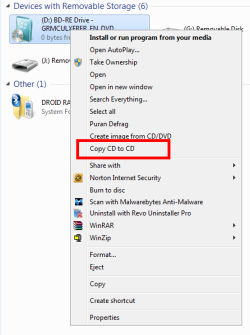
This is the option I used with a single optical drive. this does make an image of the disk first then will burn it to a disk.

copy.png
 

My Computer My Computer

At a glance

Windows 7 Ultimate X64 SP1Intel i5-2550K, Differing ~4.4-4.8GHz No buil...16GB G.Skill Sniper 1866MHz @ 2133MHz 2x8GBASUS GTX650TIB-DC2OC-2GD5, (650TI Boost)
Computer type
PC/Desktop
Computer Manufacturer/Model Number
Home Built Desktop By DataTech
OS
Windows 7 Ultimate X64 SP1
CPU
Intel i5-2550K, Differing ~4.4-4.8GHz No built in GPU
Motherboard
ASUS P8Z68-V PRO/GEN3
Memory
16GB G.Skill Sniper 1866MHz @ 2133MHz 2x8GB
Graphics Card(s)
ASUS GTX650TIB-DC2OC-2GD5, (650TI Boost)
Sound Card
Onboard Realtek 5-1
Monitor(s) Displays
Samsung P2570HD
Screen Resolution
1920x1080
Hard Drives
Samsung 840 Pro 256GB SSD for OS, 500GB Seagate Constellation (Enterprise drive) for Data
PSU
Corsair HX650W
Case
Inwin Dragon Rider
Cooling
Hyper 212 EVO w/two Noctua fans, push-pull, @1300 RPM
Keyboard
E-Z Eyes, bright yellow keys with large characters
Mouse
steelseries SENSEI Laser Pro Gaming
Internet Speed
48-51Mbs Mbs down, 11 Mbs up Xfinity Cable
Antivirus
Norton Internet Security 2013
Browser
IE 10, Opera, Pale Moon if needed
Other Info
4 case fans, LG BluRay-RE, ASUS DVD-RW, Mr. Fusion power supply, 1.21 gigawatts.
I haven't got that in my win7. Looks like something added by a 3rd party program. Plenty of 3rd party programs available for that kind of thing.
 

My Computers My Computers

  • At a glance

    7 X64i5 84002x8gb 3200mhz
    Computer type
    PC/Desktop
    OS
    7 X64
    CPU
    i5 8400
    Motherboard
    gigabyte b365m ds3h
    Memory
    2x8gb 3200mhz
    Hard Drives
    various
    PSU
    pure power 11 400w cm
    Case
    Coolermaster
    Cooling
    cryorig m9i
  • At a glance

    7x64g54008gb ddr4 2400
    Computer type
    PC/Desktop
    OS
    7x64
    CPU
    g5400
    Motherboard
    ga b365m ds3h
    Memory
    8gb ddr4 2400
    PSU
    xfx pro 450w

My Computers My Computers

  • At a glance

    7 X64i5 84002x8gb 3200mhz
    Computer type
    PC/Desktop
    OS
    7 X64
    CPU
    i5 8400
    Motherboard
    gigabyte b365m ds3h
    Memory
    2x8gb 3200mhz
    Hard Drives
    various
    PSU
    pure power 11 400w cm
    Case
    Coolermaster
    Cooling
    cryorig m9i
  • At a glance

    7x64g54008gb ddr4 2400
    Computer type
    PC/Desktop
    OS
    7x64
    CPU
    g5400
    Motherboard
    ga b365m ds3h
    Memory
    8gb ddr4 2400
    PSU
    xfx pro 450w

My Computer My Computer

At a glance

Windows 7 Ultimate X64 SP1Intel i5-2550K, Differing ~4.4-4.8GHz No buil...16GB G.Skill Sniper 1866MHz @ 2133MHz 2x8GBASUS GTX650TIB-DC2OC-2GD5, (650TI Boost)
Computer type
PC/Desktop
Computer Manufacturer/Model Number
Home Built Desktop By DataTech
OS
Windows 7 Ultimate X64 SP1
CPU
Intel i5-2550K, Differing ~4.4-4.8GHz No built in GPU
Motherboard
ASUS P8Z68-V PRO/GEN3
Memory
16GB G.Skill Sniper 1866MHz @ 2133MHz 2x8GB
Graphics Card(s)
ASUS GTX650TIB-DC2OC-2GD5, (650TI Boost)
Sound Card
Onboard Realtek 5-1
Monitor(s) Displays
Samsung P2570HD
Screen Resolution
1920x1080
Hard Drives
Samsung 840 Pro 256GB SSD for OS, 500GB Seagate Constellation (Enterprise drive) for Data
PSU
Corsair HX650W
Case
Inwin Dragon Rider
Cooling
Hyper 212 EVO w/two Noctua fans, push-pull, @1300 RPM
Keyboard
E-Z Eyes, bright yellow keys with large characters
Mouse
steelseries SENSEI Laser Pro Gaming
Internet Speed
48-51Mbs Mbs down, 11 Mbs up Xfinity Cable
Antivirus
Norton Internet Security 2013
Browser
IE 10, Opera, Pale Moon if needed
Other Info
4 case fans, LG BluRay-RE, ASUS DVD-RW, Mr. Fusion power supply, 1.21 gigawatts.
Back
Top