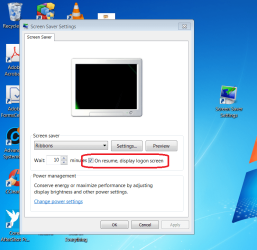
How do I create a desktop shortcut to "blank" screensaver such that on resume it displays the logon screen?
I have not had any success with checking "On resume, display logon screen" and trying the suggestions in:
Thanks!
Joe
I have not had any success with checking "On resume, display logon screen" and trying the suggestions in:
Thanks!
Joe
My Computer
At a glance
Windows 10 Home C1H12.30 gigahertz Intel Core i7-10510U12GBIntel UHD Graphics
- Computer type
- Laptop
- Computer Manufacturer/Model Number
- HP Laptop 17t-by200 CTO
- OS
- Windows 10 Home C1H1
- CPU
- 2.30 gigahertz Intel Core i7-10510U
- Motherboard
- HP 865A 64.17
- Memory
- 12GB
- Graphics Card(s)
- Intel UHD Graphics
- Monitor(s) Displays
- HP 27es