How do I delete everything from windows? (selling computer)

Annika

New member
Local time
6:42 PM
Messages
1
Hi everyone!
First of all, apologies if this is in the wrong section.
I have a sony vaio laptop, which I want to sell. I am going to back up all my stuff I want to keep to an external drive, but after that, is there a way to delete everything from windows (programs, settings etc) and return it to its factory settings?

How would I do this? I have windows 7 64 bit professional. If someone could help I'd be most grateful!

Thanks :D
 

My Computer

Computer type
PC/Desktop
Computer Manufacturer/Model Number
Sony Vaio
OS
Windows 7 Professional 64bit
Hi, Welcome to Seven forums.

You can do this by re installing Windows 7 using Recovery in Control Panel, under Advanced recovery methods. This method re installs Windows 7, either from a recovery image provided by your computer manufacturer, or from your original Windows 7 installation files. Make 100% all your programs and files are backed up because they will be wiped during the re install.


For all the details on reinstalling visit, Installing and reinstalling Windows. - Microsoft Windows Help
 

My Computer

Computer type
PC/Desktop
Computer Manufacturer/Model Number
Custom Bulid/Self made
OS
Windows 11 x64
CPU
i5 2500K @ 3.3 GHz
Motherboard
ASUS P8 Z77 V pro
Memory
16 GB DDR 3 @ 1600Mhz
Graphics Card(s)
MSI 1050TI 4GB OC version
Sound Card
On Board (Realtek HD audio)
Monitor(s) Displays
Samsung 22" LCD
Screen Resolution
1920*1080
Hard Drives
Seagate 1 TB, WD 1TB, Seagate 2 TB ( I use a lot of space)
PSU
coolermaster 750 W
Case
Coolermaster HAF912
Cooling
Coolermaster hyper 212 EVO
Keyboard
Samsung
Mouse
Dell Wireless
Internet Speed
Wireless 50 Mbps
Antivirus
AVG 2016 Internet Security
Browser
Google Chrome
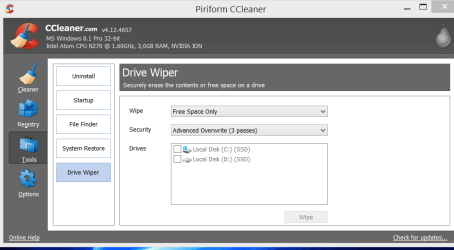
...then I'd overwrite the free space, to be sure no personal files could be retrieved. Example, ccleaner's drive wiper (free space).
 

Attachments

  • wipe.PNG
    wipe.PNG
    19.2 KB · Views: 1

My Computer

Computer type
Laptop
Computer Manufacturer/Model Number
Dell \ Lenovo\ HP \ Toshiba
OS
W7, W8.1
Antivirus
MSE, Malwarebytes
Browser
FF
Enter VAIO Care by pressing the [Assist] Button on your laptop or selecting VAIO Care from the Start menu. Once in VAIO Care choose Recovery then C drive recovery to restore system to the factory image.

I would first create Recovery disks so you have a backup method if Recovery fails when run from its partition. This can also be performed while in VAIO Care. Once In VAIO Care you should see the option to Create recovery software. 2 Blank DVDs will be required.

If both methods fail you can either do the superior Clean Reinstall - Factory OEM Windows 7 or order Vaio Recovery disks for your model from Sony.

Sometimes if Recovery disks balk you need to wipe the HD first with Diskpart Clean Command
 

My Computer

Computer type
PC/Desktop
Computer Manufacturer/Model Number
Golden Mk. I.4
OS
Windows 10 Pro x64 ; Xubuntu x64
CPU
Intel i7 860 @ 2.80 GHz O/C'ed to 4.0GHz
Motherboard
Gigabyte P55A-UD3R Rev.1. Award BIOS F13
Memory
16GB Corsair Vengance DDR3 @ 661 MHz Dual Channel (9-9-9-24)
Graphics Card(s)
EVGA NVidia GTX 560 1024MB
Sound Card
Realtek Integrated
Monitor(s) Displays
Dual Samsung SyncMaster 2494HS
Screen Resolution
1920*1080 and 1920*1080
Hard Drives
1*Samsung 840 EVO 120GB SSD;
1*OCZ Vertex 2 60GB SSD;
2*Samsung F3 SpinPoint 1TB in RAID0;
1*Samsung F1 SpinPoint 1TB;
2*Western Digital 1TB External USB 3.0
1*Western Digital 500GB External USB 3.0
1*Seagate 500GB External USB 2.0
PSU
Thermaltake ToughPower QFan 750W
Case
Thermaltake Element S VK60001W2Z
Cooling
Corsair H60 Water Cooling, 2*230mm and 2*80mm case fans
Keyboard
Logitech G110
Mouse
Logitech MX518
Hi there
Why even bother re-installing Windows.

Download GPARTED, create a bootable USB, boot from it and delete all the partitions.

You might want also do do a secure erase -- write binary zeros to every sector --there's some free programs to do that -just google.

The Secure erase prevents people from "Undeleting" files -- a normal delete just deletes the directory entry and not the actual data. The space is marked as free and the old data is only overwritten when the OS decides a file needs more space so it looks in the "Free space" table.

Cheers
jimbo
 

My Computer

Computer type
PC/Desktop
Computer Manufacturer/Model Number
Custom built, several laptops HP/ASUS
OS
Linux CENTOS 7 / various Windows OS'es and servers
CPU
Intel i7 Intel i5
Memory
8GB, 16GB
Graphics Card(s)
On Motherboard
Sound Card
Realtek HD audio
Monitor(s) Displays
Apple Cinema display, Samsung LCD
Screen Resolution
1920 X 1080
Hard Drives
4 X 1TB SATA
Mouse
Toshiba wireless laser
Internet Speed
> 20MB up
You might want also do do a secure erase -- write binary zeros to every sector --there's some free programs to do that -just google
LOL...thats what a clean all does Jimbo....take a look at the tutorial
 

My Computer

Computer type
PC/Desktop
Computer Manufacturer/Model Number
Golden Mk. I.4
OS
Windows 10 Pro x64 ; Xubuntu x64
CPU
Intel i7 860 @ 2.80 GHz O/C'ed to 4.0GHz
Motherboard
Gigabyte P55A-UD3R Rev.1. Award BIOS F13
Memory
16GB Corsair Vengance DDR3 @ 661 MHz Dual Channel (9-9-9-24)
Graphics Card(s)
EVGA NVidia GTX 560 1024MB
Sound Card
Realtek Integrated
Monitor(s) Displays
Dual Samsung SyncMaster 2494HS
Screen Resolution
1920*1080 and 1920*1080
Hard Drives
1*Samsung 840 EVO 120GB SSD;
1*OCZ Vertex 2 60GB SSD;
2*Samsung F3 SpinPoint 1TB in RAID0;
1*Samsung F1 SpinPoint 1TB;
2*Western Digital 1TB External USB 3.0
1*Western Digital 500GB External USB 3.0
1*Seagate 500GB External USB 2.0
PSU
Thermaltake ToughPower QFan 750W
Case
Thermaltake Element S VK60001W2Z
Cooling
Corsair H60 Water Cooling, 2*230mm and 2*80mm case fans
Keyboard
Logitech G110
Mouse
Logitech MX518
Back
Top