Solved How do I delete Win7 from old, second HDD?

Bill in WA

New member
Local time
4:46 AM
Messages
4
I have just installed a 1Tb Western Digital HDD in my PC with Win7 Ultimate x64. My old 185 HDD also has Win7 Ult. x64 on it but I want to use it for storage. I have been trying to boot from CD so that I can delete my old OS partition, but booting from CD just takes me to my new install. Yes, I have changed the boot order but it still boots me to my new install on the new HDD. I have done this before - two WinXP installs on two HDDs - but this time I want to recycle my old HDD. Why can I not get to the CD boot screen that will allow me to partition and format my HDDs? Is it because Windows sees two complete versions of itself? Is there another way to achieve format on my old HDD? I know it is small but I need it until I buy another larger HDD for an archive disk. (I actually have three HDDs. I am trying to do away with my antique IDE drive that I have been using for an archive and now have patched in to my recently purchased Motherboard. I need to use my old ATA to replace it temporarily and just want to clean it off.)
 

My Computer

Computer Manufacturer/Model Number
msi
OS
windows 7 ultimate x64
Hi Bill in WA, Welcome to SF

Start>type diskmgmt.msc>enter

This page will show disk configuration and allow you delete/create partitions
Just be aware that if you installed new win setup with old drive connected your boot info may still be on old disk and if you delete it it may leave system unbootable and in need of startup repair
Dont know if your familiar with this, if your not sure post a snip of your maximised disk management and we can advise
 

My Computer

Computer type
PC/Desktop
Computer Manufacturer/Model Number
Pauly Special
OS
Win7 Ultimate X64
CPU
Intel i5 3570K
Motherboard
Gigabyte Z77X-DS3H
Memory
8GB DDR3 1600
Graphics Card(s)
Onboard
Sound Card
Onboard
Screen Resolution
1280x1024
Hard Drives
Samsung 840 Evo SSD (OS)
1TB Spinner (Data)
PSU
800W Arctic
Case
Cooler Master
Cooling
3x120mm Fans
Keyboard
MS Wireless
Mouse
MS Wireless
Internet Speed
20M
Sorry for the obvious question, but have you confirmed that the CD still boots? Asking because CDs do wear out and if its no longer bootable, the PC will go to the hard drive.

If it's not bootable, you should download and burn a CD of the Minitool Partition Wizard Boot CD. You could then boot from that and use it to wipe/erase the partitions.
 

My Computer

Computer type
PC/Desktop
Computer Manufacturer/Model Number
Custom
OS
Win7 Pro 32-bit, Win8 Pro 32-bit
CPU
AMD Phenom II X6 1090T
Motherboard
Gigabyte
Memory
4GB ddr3 1300
Graphics Card(s)
AMD HD 4290 onboard
Sound Card
Builtin Realtek HD Audio
Monitor(s) Displays
Samsung 24" widescreen, LG 23" widescreen
Screen Resolution
1920x1200/1920x1080
Hard Drives
Kingston 256GB SSD
Keyboard
Logitech Illuminated Keyboard
Mouse
Logitech M705 wireless mouse
Antivirus
Norton Av 2013
Browser
IE v10
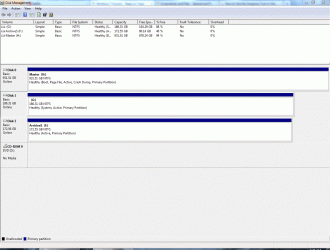
Thanks for the quick response Pauly. As I look at Disk Management it shows me "boot" only on the new, large HDD. I have deleted as much as I could trying to get my Win7 disk to see a problem on the old drive, but it hasn't helped. I actually did disconnect the old drive to set up the new one, it was the only way I could get to the CD screen to let me set up the partition. This morning the old drive was marked as active but the new one was not, however the only options Disk Management is giving me where partitions are concerned is to mark the new, large HDD as active, which I have done hoping it would change something. It did not. Am I missing something on Disk Management?

At any rate, I have attached a snip of Disk Management screen.

One other thing, at startup I am asked to select which Win7 I want to boot, but when I pick the old one it no longer boots up. If I disconnect the new large drive and then boot from CD should it now take me to the partition prompt screen (for lack of better term) since the boot is no longer listed on the old drive? If I can get to that screen I can do what I want to do. I am tempted to try it now but have to get ready for work at the moment.
 

Attachments

  • Capturew.GIF
    Capturew.GIF
    244.7 KB · Views: 4

My Computer

Computer Manufacturer/Model Number
msi
OS
windows 7 ultimate x64
Mark, it is the same CD that I used the day before yesterday to load the new, large HDD, so unless something happened in the last 48 hours... The DVD drive is also very new as is the Motherboard, CPU, and the video card. In the process of a major overhaul/upgrade in preparation to move to Thailand. But it was a good thought.

The partition program is a good thought too. Will try that tonight when I get home from work. Funny I had been remembering the old Partition Magic from the Win98 days - I still even have it, somewhere - but am pretty sure it will no longer work. Your suggestion may just be the ticket for me.
 
Last edited:

My Computer

Computer Manufacturer/Model Number
msi
OS
windows 7 ultimate x64
Mark, thank you. I downloaded the program and it worked and very quickly and easily too. It didn't even make me boot to do it. It let me do it from my new install of Win7. Thanks very much. And Happy Holidays to all.
 

My Computer

Computer Manufacturer/Model Number
msi
OS
windows 7 ultimate x64
Back
Top