
Solved How do i determain the size of my memory

MetalMan228

New member
Member
VIP
Local time
10:12 AM
Messages
265
Location
Lancaster PA
Hi everyone,

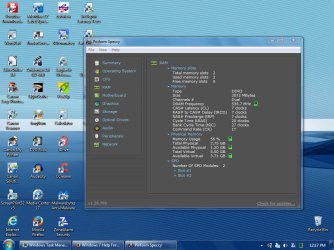
I wish to up grade my memory in my PC and have installed Speccy which tells me i have:

3.00GB Dual-Channel DDR3 @ 535MHz (7-7-7-20)

What i need to know is the size of each memory stick and the max my PC can use. In other words i need to be able to choose the appropriate RAM, but i cannot understand all the information Speccy is telling me.

I have enclosed a screenshot for all the tech guru's to decipher.

Thanks!!
 

Attachments
  • SP32-20150322-121748.jpg
    SP32-20150322-121748.jpg
    99.9 KB · Views: 5

My Computer My Computer

At a glance

Windows 7 professional 64 bitAMD Athlon(tm) II X2 220 Processor3GBNVIDIA GeForce 6150SE nForce 430
Computer type
PC/Desktop
Computer Manufacturer/Model Number
HP 505B B2C02UT Business Desktop
OS
Windows 7 professional 64 bit
CPU
AMD Athlon(tm) II X2 220 Processor
Motherboard
PEGATRON (2A99)
Memory
3GB
Graphics Card(s)
NVIDIA GeForce 6150SE nForce 430
Sound Card
Realtek ALC662 High Definition Audio (OEM)
Monitor(s) Displays
OEM Dell CRT
Screen Resolution
N/A
Hard Drives
(1) NCQ Smart IV 500GB Hard Drive - 7,200RPM - SATA 3.0Gb/s

HP LightScribe CD/DVD burner
PSU
OEM HP 300 watt
Case
OEM
Cooling
OEM
Keyboard
wired Logitech K120
Mouse
wired M100 mouse
Internet Speed
G5 High Speed Internet
Antivirus
ZoneAlarm Extreme Security
Browser
FF36.04 IE11
Other Info
JRivers Media Center v17

AudioQuest dragonfly DAC V1.2

Mackie MR5 Studio Monitors
Last edited:

My Computer My Computer

At a glance

Dual Boot: Windows 8.1 & Server 2012r2 VMs: K...A10 7700 Kavari SteamRoller8GB DDR3 SDRAM PC3-85001024MB ATI AMD Radeon R7 Graphics
Computer type
PC/Desktop
Computer Manufacturer/Model Number
Custom
OS
Dual Boot: Windows 8.1 & Server 2012r2 VMs: Kali Linux, Backbox, Matriux, Windows 8.1
CPU
A10 7700 Kavari SteamRoller
Motherboard
ASUS A88XM-PLUS (FM2+ )
Memory
8GB DDR3 SDRAM PC3-8500
Graphics Card(s)
1024MB ATI AMD Radeon R7 Graphics
Sound Card
Realtek High Definition Audio
Monitor(s) Displays
Samsung
Hard Drives
SSD Crucial 120gb
WD VelociRaptor 1tb
PSU
Rosewill Gaming 650w
Case
Rosewill Galaxy 2
Internet Speed
55/12
Antivirus
Malwarebytes, MSE, SAS
Browser
FireFox, Chrome

My Computer My Computer

At a glance

Windows 7 Pro x64 sp1i7 4770K8GB Corsair Vengeance 1600MHzonboard
Computer type
PC/Desktop
Computer Manufacturer/Model Number
self build
OS
Windows 7 Pro x64 sp1
CPU
i7 4770K
Motherboard
MSI B85M-E45
Memory
8GB Corsair Vengeance 1600MHz
Graphics Card(s)
onboard
Monitor(s) Displays
LG 27MP35
Screen Resolution
1920-1080
Hard Drives
Seagate 2TB
PSU
Cooler Master GX 750
Case
Antec 300
Cooling
Seidon 120V
Internet Speed
60/18
Antivirus
MSE
Browser
Firefox
You have 3gb of ram. Windows 7 Professional can handle 192gb of ram.

Read more:
https://msdn.microsoft.com/en-us/li...778(v=vs.85).aspx?f=255&MSPPError=-2147217396

You want to look for DDR3 1333MHz PC3-10600 ram.

It is best bought in pairs. I would say for most people, 6gb of ram will be fine. Most users wont need more than 8gb.

Pegatron 2a99 specs say

2 x 240-pin DDR3 DIMM slots Supports Dual Channel DDR3 1333/1066 MHz non-ECC, un-buffered (Max 4GB)

Good catch.
 

My Computer My Computer

At a glance

Dual Boot: Windows 8.1 & Server 2012r2 VMs: K...A10 7700 Kavari SteamRoller8GB DDR3 SDRAM PC3-85001024MB ATI AMD Radeon R7 Graphics
Computer type
PC/Desktop
Computer Manufacturer/Model Number
Custom
OS
Dual Boot: Windows 8.1 & Server 2012r2 VMs: Kali Linux, Backbox, Matriux, Windows 8.1
CPU
A10 7700 Kavari SteamRoller
Motherboard
ASUS A88XM-PLUS (FM2+ )
Memory
8GB DDR3 SDRAM PC3-8500
Graphics Card(s)
1024MB ATI AMD Radeon R7 Graphics
Sound Card
Realtek High Definition Audio
Monitor(s) Displays
Samsung
Hard Drives
SSD Crucial 120gb
WD VelociRaptor 1tb
PSU
Rosewill Gaming 650w
Case
Rosewill Galaxy 2
Internet Speed
55/12
Antivirus
Malwarebytes, MSE, SAS
Browser
FireFox, Chrome
Ok, Excellent info!!

Now badcrc is saying 4GB, but Gator is saying 8GB. Is my memory limit due to my motherboard since Gator is saying Win 7 PRO can handle 192GB? Can i use 8GB?

And I would choose pairs that would be 2 x 2GB or 2 x 4GB, correct?
 

My Computer My Computer

At a glance

Windows 7 professional 64 bitAMD Athlon(tm) II X2 220 Processor3GBNVIDIA GeForce 6150SE nForce 430
Computer type
PC/Desktop
Computer Manufacturer/Model Number
HP 505B B2C02UT Business Desktop
OS
Windows 7 professional 64 bit
CPU
AMD Athlon(tm) II X2 220 Processor
Motherboard
PEGATRON (2A99)
Memory
3GB
Graphics Card(s)
NVIDIA GeForce 6150SE nForce 430
Sound Card
Realtek ALC662 High Definition Audio (OEM)
Monitor(s) Displays
OEM Dell CRT
Screen Resolution
N/A
Hard Drives
(1) NCQ Smart IV 500GB Hard Drive - 7,200RPM - SATA 3.0Gb/s

HP LightScribe CD/DVD burner
PSU
OEM HP 300 watt
Case
OEM
Cooling
OEM
Keyboard
wired Logitech K120
Mouse
wired M100 mouse
Internet Speed
G5 High Speed Internet
Antivirus
ZoneAlarm Extreme Security
Browser
FF36.04 IE11
Other Info
JRivers Media Center v17

AudioQuest dragonfly DAC V1.2

Mackie MR5 Studio Monitors
Look at the spec's from HP for your machine. There is a table that will tell you exactly how much RAM it can have installed. As to the original question, there are 2 sticks currently that are 1Gig and 2Gig's each. You can only run in dual-channel mode with 2 identical sticks of memory/ Thus a kit of 2 stick of 2 Gig's each or possibly 4Gig's. You will not need more than 8Gig's total for most situations, except Gaming (possibly).
 

My Computer My Computer

At a glance

Windows 7 Enterprise 64bit Desktops; Windows ...AMD Athlon 2 X3; I5-6200 6th gen (Dell)8 Gig Desktop, 8Gig Laptop, 16Gig LaptopRadeon R5450 1Gig
Computer type
PC/Desktop
Computer Manufacturer/Model Number
Custom Desktop (2 alike) Dell inspiron 13" W10 Laptop Dell Inspiron 17 5759
OS
Windows 7 Enterprise 64bit Desktops; Windows 7 Professional 64Bit 17"Laptop
CPU
AMD Athlon 2 X3; I5-6200 6th gen (Dell)
Motherboard
Gigabyte GA 78LMT-USB3 (2 Desktops)
Memory
8 Gig Desktop, 8Gig Laptop, 16Gig Laptop
Graphics Card(s)
Radeon R5450 1Gig
Sound Card
Creative SB X-Fi Titanium Extreme Audio Desktop 1
Monitor(s) Displays
Dell 2419
Screen Resolution
1920x1080
Hard Drives
Crucial M500 500GB SSD Desktop 1 and Laptops
Samsung 850EVO 250GB - Desktop 2
PSU
Thermaltake 600watt
Case
Rosewill
Cooling
Scythe Typhoon 120mm
Keyboard
Kensington
Mouse
Logitech M310
Internet Speed
50/50
Antivirus
Avast
Browser
Firefox 68
Ok, Excellent info!!

Now badcrc is saying 4GB, but Gator is saying 8GB. Is my memory limit due to my motherboard since Gator is saying Win 7 PRO can handle 192GB? Can i use 8GB?

And I would choose pairs that would be 2 x 2GB or 2 x 4GB, correct?

Note the "Max 4 GB" in the specs quoted by badcrc from Pegatron.

If that's accurate (I have no idea), you are limited to 4 grand total; which would best be 2 x 2 GB.

You are limited by the motherboard.
 

My Computer My Computer

At a glance

Windows 7 Home Premium SP1, 64-bitIntel Skylake i5-6600K, not overclocked8 GB HyperX DDR4-2666 (2 x 4 GB)none; graphics are integrated on CPU
Computer type
PC/Desktop
Computer Manufacturer/Model Number
Ignatz Special; 4 speed manual gearbox; factory air conditioning; one of one
OS
Windows 7 Home Premium SP1, 64-bit
CPU
Intel Skylake i5-6600K, not overclocked
Motherboard
AsRock Z170M Extreme 4, micro ATX
Memory
8 GB HyperX DDR4-2666 (2 x 4 GB)
Graphics Card(s)
none; graphics are integrated on CPU
Sound Card
onboard: Realtek ALC1150; external: USB Behringer UF0-202
Monitor(s) Displays
Dell S2340M 23 inch IPS
Screen Resolution
1600 x 900
Hard Drives
System: Crucial MX100 series SSD, 128 GB;
Data: Samsung Spinpoint 103SJ, 1 TB;
Backup: WD Caviar Green WD30EZRX-00D8PB0, 3 TB
PSU
Rosewill SilentNight 500 watt fanless, semi-modular
Case
Antec Solo II
Cooling
Noctua NH-U12S; Noctua F12 intake, Noctua S12A exhaust
Keyboard
Microsoft 200 6JH-00001 USB
Mouse
Dell or Microsoft optical wired; USB
Antivirus
Microsoft Security Essentials and Malwarebytes Premium
Browser
Pale Moon
Other Info
All fans PWM; speeds at idle: CPU circa 500 rpm; intake circa 600 rpm; exhaust circa 600 rpm; CPU temps 27 idle and 47 C load in a warm room (27 C/81 F) when running Intel Extreme Tuning Utility stress test.
Ok, Excellent info!!

Now badcrc is saying 4GB, but Gator is saying 8GB. Is my memory limit due to my motherboard since Gator is saying Win 7 PRO can handle 192GB? Can i use 8GB?

And I would choose pairs that would be 2 x 2GB or 2 x 4GB, correct?

Note the "Max 4 GB" in the specs quoted by badcrc from Pegatron.

If that's accurate (I have no idea), you are limited to 4 grand total; which would best be 2 x 2 GB.

You are limited by the motherboard.

Yep, I was mistaken and I edited my original post.
 

My Computer My Computer

At a glance

Dual Boot: Windows 8.1 & Server 2012r2 VMs: K...A10 7700 Kavari SteamRoller8GB DDR3 SDRAM PC3-85001024MB ATI AMD Radeon R7 Graphics
Computer type
PC/Desktop
Computer Manufacturer/Model Number
Custom
OS
Dual Boot: Windows 8.1 & Server 2012r2 VMs: Kali Linux, Backbox, Matriux, Windows 8.1
CPU
A10 7700 Kavari SteamRoller
Motherboard
ASUS A88XM-PLUS (FM2+ )
Memory
8GB DDR3 SDRAM PC3-8500
Graphics Card(s)
1024MB ATI AMD Radeon R7 Graphics
Sound Card
Realtek High Definition Audio
Monitor(s) Displays
Samsung
Hard Drives
SSD Crucial 120gb
WD VelociRaptor 1tb
PSU
Rosewill Gaming 650w
Case
Rosewill Galaxy 2
Internet Speed
55/12
Antivirus
Malwarebytes, MSE, SAS
Browser
FireFox, Chrome
Thanks for clearing up the mild confusion.

So, for example, i went on a vendors site and picked a set of sticks with the following specs:

4GB (2 x 2GB) 240-Pin DDR3 SDRAM DDR3 1600 (PC3 12800) Desktop Memory

Is this appropriate for my PC? I am still confused with the various memory speeds. I think back in the old days (XP) you choose only the specific memory speed of your PC, ie: 488, 537 etc. When i look online to buy memory i see various speeds like are in the following screen shot and the numbers are meaningless to me. I have 537, where is the 537 speeds?
 

Attachments

  • SP32-20150322-141826.jpg
    SP32-20150322-141826.jpg
    5.9 KB · Views: 41

My Computer My Computer

At a glance

Windows 7 professional 64 bitAMD Athlon(tm) II X2 220 Processor3GBNVIDIA GeForce 6150SE nForce 430
Computer type
PC/Desktop
Computer Manufacturer/Model Number
HP 505B B2C02UT Business Desktop
OS
Windows 7 professional 64 bit
CPU
AMD Athlon(tm) II X2 220 Processor
Motherboard
PEGATRON (2A99)
Memory
3GB
Graphics Card(s)
NVIDIA GeForce 6150SE nForce 430
Sound Card
Realtek ALC662 High Definition Audio (OEM)
Monitor(s) Displays
OEM Dell CRT
Screen Resolution
N/A
Hard Drives
(1) NCQ Smart IV 500GB Hard Drive - 7,200RPM - SATA 3.0Gb/s

HP LightScribe CD/DVD burner
PSU
OEM HP 300 watt
Case
OEM
Cooling
OEM
Keyboard
wired Logitech K120
Mouse
wired M100 mouse
Internet Speed
G5 High Speed Internet
Antivirus
ZoneAlarm Extreme Security
Browser
FF36.04 IE11
Other Info
JRivers Media Center v17

AudioQuest dragonfly DAC V1.2

Mackie MR5 Studio Monitors
If the specs quoted above from Pegatron in post 3 in this thread are correct, you need DDR3 1333, which is aka PC3-10600, with these further specifications: 240-pin DDR3 DIMM, unbuffered, non-ECC. Not sure about the voltage as it's not mentioned in post 3. Two sticks of 2 GB each.

There's 48 examples in that blue print in your last post.
 

My Computer My Computer

At a glance

Windows 7 Home Premium SP1, 64-bitIntel Skylake i5-6600K, not overclocked8 GB HyperX DDR4-2666 (2 x 4 GB)none; graphics are integrated on CPU
Computer type
PC/Desktop
Computer Manufacturer/Model Number
Ignatz Special; 4 speed manual gearbox; factory air conditioning; one of one
OS
Windows 7 Home Premium SP1, 64-bit
CPU
Intel Skylake i5-6600K, not overclocked
Motherboard
AsRock Z170M Extreme 4, micro ATX
Memory
8 GB HyperX DDR4-2666 (2 x 4 GB)
Graphics Card(s)
none; graphics are integrated on CPU
Sound Card
onboard: Realtek ALC1150; external: USB Behringer UF0-202
Monitor(s) Displays
Dell S2340M 23 inch IPS
Screen Resolution
1600 x 900
Hard Drives
System: Crucial MX100 series SSD, 128 GB;
Data: Samsung Spinpoint 103SJ, 1 TB;
Backup: WD Caviar Green WD30EZRX-00D8PB0, 3 TB
PSU
Rosewill SilentNight 500 watt fanless, semi-modular
Case
Antec Solo II
Cooling
Noctua NH-U12S; Noctua F12 intake, Noctua S12A exhaust
Keyboard
Microsoft 200 6JH-00001 USB
Mouse
Dell or Microsoft optical wired; USB
Antivirus
Microsoft Security Essentials and Malwarebytes Premium
Browser
Pale Moon
Other Info
All fans PWM; speeds at idle: CPU circa 500 rpm; intake circa 600 rpm; exhaust circa 600 rpm; CPU temps 27 idle and 47 C load in a warm room (27 C/81 F) when running Intel Extreme Tuning Utility stress test.
I found an anomaly in SPECCY yesterday. I was given a Dell Inspiron 6000 Notebook running WinXP with 1GB RAM [2x512MB]. I ran SPECCY and it showed a maximum of 4GB possible but Crucial said 2GB maximum. Having some compatible modules I gave 4GB [2x2GB] a try but some would show only 2GB, one pair would flash the screen and immediately shut down while another pair wouldn't boot at all. It's happy with 2GB [2x1GB matched].
 

My Computer My Computer

At a glance

Windows 7 Ultimate 64-bit, Windows 8.1 64-bit...
Computer type
PC/Desktop
Computer Manufacturer/Model Number
Customs, Dell, Gateway, HP, Toshiba, Acer, ASUS
OS
Windows 7 Ultimate 64-bit, Windows 8.1 64-bit, Mac OS X 10.10, Linux Mint 17, Windows 10 Pro TP
Keyboard
Microsoft
Mouse
Microsoft
In case anyone has forgotten - RAM speed in this case is not an issue. The OP can use faster modules if he/she wants. One can verify what can be put in using the Crucial website, which I have found to be very accurate. Just my 2 cents.
 

My Computer My Computer

At a glance

Windows 7 Enterprise 64bit Desktops; Windows ...AMD Athlon 2 X3; I5-6200 6th gen (Dell)8 Gig Desktop, 8Gig Laptop, 16Gig LaptopRadeon R5450 1Gig
Computer type
PC/Desktop
Computer Manufacturer/Model Number
Custom Desktop (2 alike) Dell inspiron 13" W10 Laptop Dell Inspiron 17 5759
OS
Windows 7 Enterprise 64bit Desktops; Windows 7 Professional 64Bit 17"Laptop
CPU
AMD Athlon 2 X3; I5-6200 6th gen (Dell)
Motherboard
Gigabyte GA 78LMT-USB3 (2 Desktops)
Memory
8 Gig Desktop, 8Gig Laptop, 16Gig Laptop
Graphics Card(s)
Radeon R5450 1Gig
Sound Card
Creative SB X-Fi Titanium Extreme Audio Desktop 1
Monitor(s) Displays
Dell 2419
Screen Resolution
1920x1080
Hard Drives
Crucial M500 500GB SSD Desktop 1 and Laptops
Samsung 850EVO 250GB - Desktop 2
PSU
Thermaltake 600watt
Case
Rosewill
Cooling
Scythe Typhoon 120mm
Keyboard
Kensington
Mouse
Logitech M310
Internet Speed
50/50
Antivirus
Avast
Browser
Firefox 68
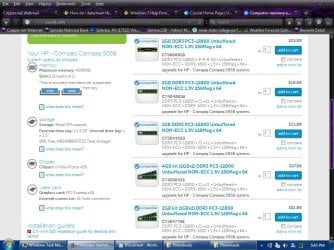
I think i am getting a picture of the memory i would need. Still not sure of the various speeds, but ignatzatsonic told me what speed I need. I ran the Crucial test, just to see what it showed, see screen shot.

The only other question is: Does different memory work with different CPU's? I ran into this while looking at memory:

"...compatible with Dual Channel Intel Core i5 CPU for P55 chipset motherboard, Dual Channel Core i7 CPU for P55 chipset motherboard."

I have an AMD Athlon(tm) II X2 220 Processor. Or is memory stupid and does not care what CPU you have?
 

Attachments

  • SP32-20150322-174541.jpg
    SP32-20150322-174541.jpg
    117 KB · Views: 3

My Computer My Computer

At a glance

Windows 7 professional 64 bitAMD Athlon(tm) II X2 220 Processor3GBNVIDIA GeForce 6150SE nForce 430
Computer type
PC/Desktop
Computer Manufacturer/Model Number
HP 505B B2C02UT Business Desktop
OS
Windows 7 professional 64 bit
CPU
AMD Athlon(tm) II X2 220 Processor
Motherboard
PEGATRON (2A99)
Memory
3GB
Graphics Card(s)
NVIDIA GeForce 6150SE nForce 430
Sound Card
Realtek ALC662 High Definition Audio (OEM)
Monitor(s) Displays
OEM Dell CRT
Screen Resolution
N/A
Hard Drives
(1) NCQ Smart IV 500GB Hard Drive - 7,200RPM - SATA 3.0Gb/s

HP LightScribe CD/DVD burner
PSU
OEM HP 300 watt
Case
OEM
Cooling
OEM
Keyboard
wired Logitech K120
Mouse
wired M100 mouse
Internet Speed
G5 High Speed Internet
Antivirus
ZoneAlarm Extreme Security
Browser
FF36.04 IE11
Other Info
JRivers Media Center v17

AudioQuest dragonfly DAC V1.2

Mackie MR5 Studio Monitors
The CPU doesn't really care as long as the motherboard supports the modules. I've used the same modules on motherboards for the Intel CPU and the AMD CPU.

A note on the speed: I've always been able to use the faster in slower slots, e.g. PC2-6400 in slots that called for PC2-4200 or PC2-5300. Seems the modules will 'fall back' to slower speeds or run at the same speed as the slowest in use. As Crucial says it's usually best to use the modules in matched pairs.

Some brands aren't compatible with other brands so maybe having all modules from the same vendor is best.
 

My Computer My Computer

At a glance

Windows 7 Ultimate 64-bit, Windows 8.1 64-bit...
Computer type
PC/Desktop
Computer Manufacturer/Model Number
Customs, Dell, Gateway, HP, Toshiba, Acer, ASUS
OS
Windows 7 Ultimate 64-bit, Windows 8.1 64-bit, Mac OS X 10.10, Linux Mint 17, Windows 10 Pro TP
Keyboard
Microsoft
Mouse
Microsoft
Memory requirements are driven by the motherboard. Likewise, only certain CPUs can be installed on any given motherboard.

If you built your own PC and used an Acme model X motherboard, you'd go to the Acme website and look up up their model X motherboard to see what RAM it required and buy accordingly. Acme probably would have a compatible RAM list, although some RAM not listed would also work if the primary specs matched.

The Crucial configurator is quite accurate, with very few errors.
 

My Computer My Computer

At a glance

Windows 7 Home Premium SP1, 64-bitIntel Skylake i5-6600K, not overclocked8 GB HyperX DDR4-2666 (2 x 4 GB)none; graphics are integrated on CPU
Computer type
PC/Desktop
Computer Manufacturer/Model Number
Ignatz Special; 4 speed manual gearbox; factory air conditioning; one of one
OS
Windows 7 Home Premium SP1, 64-bit
CPU
Intel Skylake i5-6600K, not overclocked
Motherboard
AsRock Z170M Extreme 4, micro ATX
Memory
8 GB HyperX DDR4-2666 (2 x 4 GB)
Graphics Card(s)
none; graphics are integrated on CPU
Sound Card
onboard: Realtek ALC1150; external: USB Behringer UF0-202
Monitor(s) Displays
Dell S2340M 23 inch IPS
Screen Resolution
1600 x 900
Hard Drives
System: Crucial MX100 series SSD, 128 GB;
Data: Samsung Spinpoint 103SJ, 1 TB;
Backup: WD Caviar Green WD30EZRX-00D8PB0, 3 TB
PSU
Rosewill SilentNight 500 watt fanless, semi-modular
Case
Antec Solo II
Cooling
Noctua NH-U12S; Noctua F12 intake, Noctua S12A exhaust
Keyboard
Microsoft 200 6JH-00001 USB
Mouse
Dell or Microsoft optical wired; USB
Antivirus
Microsoft Security Essentials and Malwarebytes Premium
Browser
Pale Moon
Other Info
All fans PWM; speeds at idle: CPU circa 500 rpm; intake circa 600 rpm; exhaust circa 600 rpm; CPU temps 27 idle and 47 C load in a warm room (27 C/81 F) when running Intel Extreme Tuning Utility stress test.
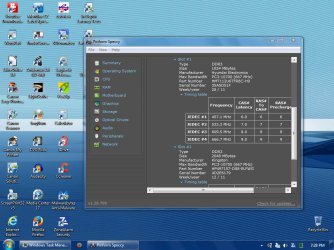
I just looked deeper into the Speccy report and found out that as installed, my sticks are PC3-10700!! See screenshot. Do i still need to stay with 10600 as ignatzatsonic stated earlier? I am confused again.

Could i use PC3 10660? or only PC3 10600? (both listed as 1333mhz) What is the difference here?


And what is the result of using sticks with differing voltages, ie; 1.35 or 1.6 instead of the 1.5v nom.

And do i need to stay with the 7-7-7-20 timing? Why or why not.
 

Attachments

  • SP32-20150322-192810.jpg
    SP32-20150322-192810.jpg
    105.6 KB · Views: 1
Last edited:

My Computer My Computer

At a glance

Windows 7 professional 64 bitAMD Athlon(tm) II X2 220 Processor3GBNVIDIA GeForce 6150SE nForce 430
Computer type
PC/Desktop
Computer Manufacturer/Model Number
HP 505B B2C02UT Business Desktop
OS
Windows 7 professional 64 bit
CPU
AMD Athlon(tm) II X2 220 Processor
Motherboard
PEGATRON (2A99)
Memory
3GB
Graphics Card(s)
NVIDIA GeForce 6150SE nForce 430
Sound Card
Realtek ALC662 High Definition Audio (OEM)
Monitor(s) Displays
OEM Dell CRT
Screen Resolution
N/A
Hard Drives
(1) NCQ Smart IV 500GB Hard Drive - 7,200RPM - SATA 3.0Gb/s

HP LightScribe CD/DVD burner
PSU
OEM HP 300 watt
Case
OEM
Cooling
OEM
Keyboard
wired Logitech K120
Mouse
wired M100 mouse
Internet Speed
G5 High Speed Internet
Antivirus
ZoneAlarm Extreme Security
Browser
FF36.04 IE11
Other Info
JRivers Media Center v17

AudioQuest dragonfly DAC V1.2

Mackie MR5 Studio Monitors
And what is the result of using sticks with differing voltages, ie; 1.35 or 1.6 instead of the 1.5v nom
You can use only the voltages supported by the motherboard, doing otherwise risks damage to the module or board, or both.
 

My Computer My Computer

At a glance

Windows 7 Ultimate 64-bit, Windows 8.1 64-bit...
Computer type
PC/Desktop
Computer Manufacturer/Model Number
Customs, Dell, Gateway, HP, Toshiba, Acer, ASUS
OS
Windows 7 Ultimate 64-bit, Windows 8.1 64-bit, Mac OS X 10.10, Linux Mint 17, Windows 10 Pro TP
Keyboard
Microsoft
Mouse
Microsoft
It matters less what you have now, since they are going to be replaced.

Pegatron 2a99 specs say only this, apparently:

2 x 240-pin DDR3 DIMM slots Supports Dual Channel DDR3 1333/1066 MHz non-ECC, un-buffered (Max 4GB)

No reference to voltage.

You can Google trying to find info on recommended voltage, but may not have any luck.

Timings aren't critical. Lower numbers are better, but you'd be hard pressed to tell. If you buy a matched pair, each stick will have the same timings.

If you can't find over-riding evidence to the contrary, I'd trust what the Crucial configurator recommends and I'd probably buy from them. Buy whatever voltages are on their list for your board.

I recall reading about 10600 versus 10660, but I wouldn't get in a lather about it. Stay with a matched pair from Crucial's list unless it outright conflicts with the Pegatron 2a99 specs of:

2 x 240-pin DDR3 DIMM slots Supports Dual Channel DDR3 1333/1066 MHz non-ECC, un-buffered (Max 4GB)
 

My Computer My Computer

At a glance

Windows 7 Home Premium SP1, 64-bitIntel Skylake i5-6600K, not overclocked8 GB HyperX DDR4-2666 (2 x 4 GB)none; graphics are integrated on CPU
Computer type
PC/Desktop
Computer Manufacturer/Model Number
Ignatz Special; 4 speed manual gearbox; factory air conditioning; one of one
OS
Windows 7 Home Premium SP1, 64-bit
CPU
Intel Skylake i5-6600K, not overclocked
Motherboard
AsRock Z170M Extreme 4, micro ATX
Memory
8 GB HyperX DDR4-2666 (2 x 4 GB)
Graphics Card(s)
none; graphics are integrated on CPU
Sound Card
onboard: Realtek ALC1150; external: USB Behringer UF0-202
Monitor(s) Displays
Dell S2340M 23 inch IPS
Screen Resolution
1600 x 900
Hard Drives
System: Crucial MX100 series SSD, 128 GB;
Data: Samsung Spinpoint 103SJ, 1 TB;
Backup: WD Caviar Green WD30EZRX-00D8PB0, 3 TB
PSU
Rosewill SilentNight 500 watt fanless, semi-modular
Case
Antec Solo II
Cooling
Noctua NH-U12S; Noctua F12 intake, Noctua S12A exhaust
Keyboard
Microsoft 200 6JH-00001 USB
Mouse
Dell or Microsoft optical wired; USB
Antivirus
Microsoft Security Essentials and Malwarebytes Premium
Browser
Pale Moon
Other Info
All fans PWM; speeds at idle: CPU circa 500 rpm; intake circa 600 rpm; exhaust circa 600 rpm; CPU temps 27 idle and 47 C load in a warm room (27 C/81 F) when running Intel Extreme Tuning Utility stress test.
Yes, after researching it i agree, the 10600, 10666, 10700's are basically the same:

"Different manufacturers label their DDR3 1333MHz RAM with different theoretical maximum bandwidth numbers. 10600/10660/10666 all mean the same 1333MHz speed, so it doesn't matter which kind you get."

I will stay with 1.5v.

But the Crucial configurator recommends PC3-12800 memory (which is a DDR3-1600). (post #13)

Why is this when everyone here is recommending PC3-106xxx

I read that:

"PC3-10600 is also known as DDR3-1333 (clocked at 1333MHz)
PC3-12800 is DDR3-1600

Most DDR3-1600 should be capable of falling back to DDR3-1333, often with better timings, as if the memory chips can do CL9 at 1600, they can usually do CL7 at 1333

You will find many sites suggesting RAM that is one step higher speed than is actually used by the system."

So is the PC3-12800 a better stick, i mean faster than the 1333/106xxx
 

My Computer My Computer

At a glance

Windows 7 professional 64 bitAMD Athlon(tm) II X2 220 Processor3GBNVIDIA GeForce 6150SE nForce 430
Computer type
PC/Desktop
Computer Manufacturer/Model Number
HP 505B B2C02UT Business Desktop
OS
Windows 7 professional 64 bit
CPU
AMD Athlon(tm) II X2 220 Processor
Motherboard
PEGATRON (2A99)
Memory
3GB
Graphics Card(s)
NVIDIA GeForce 6150SE nForce 430
Sound Card
Realtek ALC662 High Definition Audio (OEM)
Monitor(s) Displays
OEM Dell CRT
Screen Resolution
N/A
Hard Drives
(1) NCQ Smart IV 500GB Hard Drive - 7,200RPM - SATA 3.0Gb/s

HP LightScribe CD/DVD burner
PSU
OEM HP 300 watt
Case
OEM
Cooling
OEM
Keyboard
wired Logitech K120
Mouse
wired M100 mouse
Internet Speed
G5 High Speed Internet
Antivirus
ZoneAlarm Extreme Security
Browser
FF36.04 IE11
Other Info
JRivers Media Center v17

AudioQuest dragonfly DAC V1.2

Mackie MR5 Studio Monitors
Yes, after researching it i agree, the 10600, 10666, 10700's are basically the same:

"Different manufacturers label their DDR3 1333MHz RAM with different theoretical maximum bandwidth numbers. 10600/10660/10666 all mean the same 1333MHz speed, so it doesn't matter which kind you get."

I will stay with 1.5v.

But the Crucial configurator recommends PC-12800 memory though. (post #13)

Why is this when everyone here is recommending PC3-106....

The Crucial configurator may be wrong.

The specs quoted earlier in this thread for your alleged Pegatron board could be wrong. Maybe you don't in fact have that motherboard. Maybe you do.

You need to decide for yourself what motherboard you have and then do your best to research it, down to the board revision number level.

If that conflicts with Crucial, I would call Crucial and mention your documentation and ask what gives. I've dealt with their customer support before and had good luck.

I've never heard of anyone not being able to return RAM to them if the configurator is wrong.

They may or may not have a suitable answer. I'd like to tell you to always rely on the manufacturer's web site, but I suppose that could be wrong too.

It of course is possible the board would run fine on either of the choices.
 

My Computer My Computer

At a glance

Windows 7 Home Premium SP1, 64-bitIntel Skylake i5-6600K, not overclocked8 GB HyperX DDR4-2666 (2 x 4 GB)none; graphics are integrated on CPU
Computer type
PC/Desktop
Computer Manufacturer/Model Number
Ignatz Special; 4 speed manual gearbox; factory air conditioning; one of one
OS
Windows 7 Home Premium SP1, 64-bit
CPU
Intel Skylake i5-6600K, not overclocked
Motherboard
AsRock Z170M Extreme 4, micro ATX
Memory
8 GB HyperX DDR4-2666 (2 x 4 GB)
Graphics Card(s)
none; graphics are integrated on CPU
Sound Card
onboard: Realtek ALC1150; external: USB Behringer UF0-202
Monitor(s) Displays
Dell S2340M 23 inch IPS
Screen Resolution
1600 x 900
Hard Drives
System: Crucial MX100 series SSD, 128 GB;
Data: Samsung Spinpoint 103SJ, 1 TB;
Backup: WD Caviar Green WD30EZRX-00D8PB0, 3 TB
PSU
Rosewill SilentNight 500 watt fanless, semi-modular
Case
Antec Solo II
Cooling
Noctua NH-U12S; Noctua F12 intake, Noctua S12A exhaust
Keyboard
Microsoft 200 6JH-00001 USB
Mouse
Dell or Microsoft optical wired; USB
Antivirus
Microsoft Security Essentials and Malwarebytes Premium
Browser
Pale Moon
Other Info
All fans PWM; speeds at idle: CPU circa 500 rpm; intake circa 600 rpm; exhaust circa 600 rpm; CPU temps 27 idle and 47 C load in a warm room (27 C/81 F) when running Intel Extreme Tuning Utility stress test.
Back
Top