Solved How do i change the size of my screen so it fits correctly

JosiSF

New member
Local time
2:43 PM
Messages
4
Hello evryone! :)

I recently got a new graphic card an NVIDIA GeForce GT630 but i have a problem with my screen resolution.
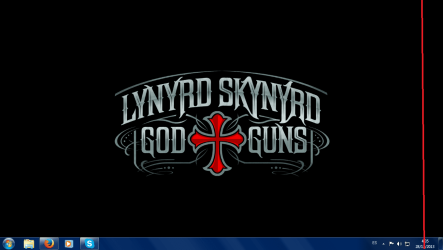
On the attached image there is a red line drawed on a screen shot of my desktop that mark a part of the screen , that part is missing from my desktop becouse the screen looks larger on the resolution that my computer recommend (1360x768). I try other resolutions, some fits but looks blurry and others are too big for my screen (LG LCD 17 inch.).I updated the graphic card driver and check all the options i could but i still dont find solution for this problem. My actual resolution looks perfect but i only need to make it less longer so it fits correctly on my screen. I also try to use the monitor options but with no luck.

Thanks for taking the time for reading my post, i hope someone can help me find a solution.:D

Have a nice day.
 

Attachments

  • screen problem.png
    screen problem.png
    73 KB · Views: 0

My Computer My Computer

At a glance

Windows 7 64bitIntel core i58 gb ramGeForce GT 630
Computer type
PC/Desktop
Computer Manufacturer/Model Number
custom build
OS
Windows 7 64bit
CPU
Intel core i5
Motherboard
Speedmind
Memory
8 gb ram
Graphics Card(s)
GeForce GT 630
Hard Drives
1 tera hard drive
Antivirus
Avast
Browser
Mozilla Firefox
So you don't see right part of screen because it's stretched (horizontally)? Is it also streched vertically a bit?
 

My Computer My Computer

At a glance

Microsoft Windows 7 Home Premium 64-bits 7601...Intel(R) Core(TM) i3 CPU M 370 @ 2.40GHz4,00 GBATI Mobility Radeon HD 5400 Series
Computer type
Laptop
Computer Manufacturer/Model Number
ACER ASPIRE 5742G
OS
Microsoft Windows 7 Home Premium 64-bits 7601 Multiprocessor Free Service Pack 1
CPU
Intel(R) Core(TM) i3 CPU M 370 @ 2.40GHz
Motherboard
Acer Aspire 5742G
Memory
4,00 GB
Graphics Card(s)
ATI Mobility Radeon HD 5400 Series
Sound Card
(1) AMD High Definition Audio Device (2) Realtek High Defi
Screen Resolution
1366 x 768 x 32 bits (4294967296 colors) @ 60 Hz
Hard Drives
WDC WD5000BEVT-22ZAT0
yeah! horizontally its too stretched there, vertical is fine :), any clue of what could it be?

Thanks for the fast reply
 

My Computer My Computer

At a glance

Windows 7 64bitIntel core i58 gb ramGeForce GT 630
Computer type
PC/Desktop
Computer Manufacturer/Model Number
custom build
OS
Windows 7 64bit
CPU
Intel core i5
Motherboard
Speedmind
Memory
8 gb ram
Graphics Card(s)
GeForce GT 630
Hard Drives
1 tera hard drive
Antivirus
Avast
Browser
Mozilla Firefox
yeah! horizontally its too stretched there, vertical is fine :), any clue of what could it be?

Thanks for the fast reply
It's an LCD screen ... correct? What's brand/model of laptop?
Other resolutions work fine (I mean no content is missing from display)?
 

My Computer My Computer

At a glance

Microsoft Windows 7 Home Premium 64-bits 7601...Intel(R) Core(TM) i3 CPU M 370 @ 2.40GHz4,00 GBATI Mobility Radeon HD 5400 Series
Computer type
Laptop
Computer Manufacturer/Model Number
ACER ASPIRE 5742G
OS
Microsoft Windows 7 Home Premium 64-bits 7601 Multiprocessor Free Service Pack 1
CPU
Intel(R) Core(TM) i3 CPU M 370 @ 2.40GHz
Motherboard
Acer Aspire 5742G
Memory
4,00 GB
Graphics Card(s)
ATI Mobility Radeon HD 5400 Series
Sound Card
(1) AMD High Definition Audio Device (2) Realtek High Defi
Screen Resolution
1366 x 768 x 32 bits (4294967296 colors) @ 60 Hz
Hard Drives
WDC WD5000BEVT-22ZAT0
yes is an LCD screen but is a custom made table pc , yeah other one fit but they look very blurry and some others didnt fit, the monitor brand is LG is 17 inch
 

My Computer My Computer

At a glance

Windows 7 64bitIntel core i58 gb ramGeForce GT 630
Computer type
PC/Desktop
Computer Manufacturer/Model Number
custom build
OS
Windows 7 64bit
CPU
Intel core i5
Motherboard
Speedmind
Memory
8 gb ram
Graphics Card(s)
GeForce GT 630
Hard Drives
1 tera hard drive
Antivirus
Avast
Browser
Mozilla Firefox
yes is an LCD screen but is a custom made table pc , yeah other one fit but they look very blurry and some others didnt fit, the monitor brand is LG is 17 inch
Is screen built-in the laptop? Or is it an external screen? If external ... try to attach to another compter. Same problem?
 

My Computer My Computer

At a glance

Microsoft Windows 7 Home Premium 64-bits 7601...Intel(R) Core(TM) i3 CPU M 370 @ 2.40GHz4,00 GBATI Mobility Radeon HD 5400 Series
Computer type
Laptop
Computer Manufacturer/Model Number
ACER ASPIRE 5742G
OS
Microsoft Windows 7 Home Premium 64-bits 7601 Multiprocessor Free Service Pack 1
CPU
Intel(R) Core(TM) i3 CPU M 370 @ 2.40GHz
Motherboard
Acer Aspire 5742G
Memory
4,00 GB
Graphics Card(s)
ATI Mobility Radeon HD 5400 Series
Sound Card
(1) AMD High Definition Audio Device (2) Realtek High Defi
Screen Resolution
1366 x 768 x 32 bits (4294967296 colors) @ 60 Hz
Hard Drives
WDC WD5000BEVT-22ZAT0
in the graphic properties.choose some lower resolution e.g 1280x768 then click apply.then in panel fit options choose scale full screen & click apply.after that choose u'r monitor's highest or native resolution,then click apply,ok.that's how i managed to scale any resolution full screen in my laptop :)
 

My Computer My Computer

At a glance

Windows 7 Ultimate x86Intel® Pentium® Dual Core CPU B950 @ 2.10GHz2GB DDR3Intel® HD Graphics
Computer type
Laptop
Computer Manufacturer/Model Number
Asus
OS
Windows 7 Ultimate x86
CPU
Intel® Pentium® Dual Core CPU B950 @ 2.10GHz
Motherboard
Asustek Computer Inc.
Memory
2GB DDR3
Graphics Card(s)
Intel® HD Graphics
Sound Card
Realtek High Definition Audio(ALC269) With Sonic Master
Screen Resolution
1366x768
Hard Drives
320GB Seagate
Keyboard
Keyboard Device Filter (Provider-ATK)
Mouse
HID-compliant mouse,Microsoft PS2/Mouse
Internet Speed
Very Slow
Antivirus
Kaspersky Internet Security 2013/Malwarebytes Anti-Malware
Browser
Goggle Chrome
Thanks you so much guys for the answers i already fix the problem it was my monitor all the time it was a little change i have to do :D
 

My Computer My Computer

At a glance

Windows 7 64bitIntel core i58 gb ramGeForce GT 630
Computer type
PC/Desktop
Computer Manufacturer/Model Number
custom build
OS
Windows 7 64bit
CPU
Intel core i5
Motherboard
Speedmind
Memory
8 gb ram
Graphics Card(s)
GeForce GT 630
Hard Drives
1 tera hard drive
Antivirus
Avast
Browser
Mozilla Firefox
Thanks you so much guys for the answers i already fix the problem it was my monitor all the time it was a little change i have to do :D

Plz tell in detail what u did,because anyone with this problem can also fix it.glad u fixed it :)
 

My Computer My Computer

At a glance

Windows 7 Ultimate x86Intel® Pentium® Dual Core CPU B950 @ 2.10GHz2GB DDR3Intel® HD Graphics
Computer type
Laptop
Computer Manufacturer/Model Number
Asus
OS
Windows 7 Ultimate x86
CPU
Intel® Pentium® Dual Core CPU B950 @ 2.10GHz
Motherboard
Asustek Computer Inc.
Memory
2GB DDR3
Graphics Card(s)
Intel® HD Graphics
Sound Card
Realtek High Definition Audio(ALC269) With Sonic Master
Screen Resolution
1366x768
Hard Drives
320GB Seagate
Keyboard
Keyboard Device Filter (Provider-ATK)
Mouse
HID-compliant mouse,Microsoft PS2/Mouse
Internet Speed
Very Slow
Antivirus
Kaspersky Internet Security 2013/Malwarebytes Anti-Malware
Browser
Goggle Chrome
Back
Top