Solved How do I disable Admin fuctions in Windows 7?

0pTicaL

New member
Power User
Local time
4:05 AM
Messages
294
Location
San Francisco
When I visited Best Buy the other day they were running ads on their notebooks and I noticed that all the typical keyboard functions does not work (i.e. ctrl+alt+del, alt+tab, etc.)

How can I disable all admin functions on my laptop so when I have guests over they cannot mess with my settings? I only want them to be able to surf the web and nothing else. They cannot install or download anything, cannot use windows key + R to access regedit, or use ctrl+alt+del.

Can this be done within Windows 7 or do I need a special program for this?
 

My Computer My Computer

At a glance

Windows 7 Ultimate x64 SP1Core i7 2600k (4.6GHz)16GB G.SKILL Ares 1600MHzMSI R6970 Lightning
Computer type
PC/Desktop
Computer Manufacturer/Model Number
Less is more
OS
Windows 7 Ultimate x64 SP1
CPU
Core i7 2600k (4.6GHz)
Motherboard
ASUS P8Z68 Deluxe (3603)
Memory
16GB G.SKILL Ares 1600MHz
Graphics Card(s)
MSI R6970 Lightning
Sound Card
Asus Xonar Essence ST (UNi drivers 1.41)
Monitor(s) Displays
Samsung P2570, CrossOver 27Q LED-P
Screen Resolution
1920*1080, 2560*1440
Hard Drives
256GB OCZ Vector, 2x Hitachi 4TB (7K4000), Hitachi 3TB (7K3000 & 5K3000)
PSU
Seasonic X750
Case
Lian-Li PC-P80N
Cooling
NZXT HAVIK 140 (2x GELID Wing12PL Push/Pull)
Keyboard
CM Storm Trigger (Brown Switch)
Mouse
Logitech G400
Internet Speed
55Mbps/10Mbps
Other Info
Speakers - Klipsch ProMedia 2.1
Headphones - Sennheiser HD595
Router - ASUS RT-N66U
Webcam - Logitech C910
Last edited:

My Computer My Computer

At a glance

Windows 7 Ultimate x64Intel Core i7 2600K (O/C 4.7GHz)8GB Corsair Vengeance LP, DDR3, 1600MhzNvidia GTX 460 Graphics Card
Computer type
PC/Desktop
Computer Manufacturer/Model Number
Custom
OS
Windows 7 Ultimate x64
CPU
Intel Core i7 2600K (O/C 4.7GHz)
Motherboard
Asus ROG Maximus IV Extreme-Z - Intel Z68 Chipset
Memory
8GB Corsair Vengeance LP, DDR3, 1600Mhz
Graphics Card(s)
Nvidia GTX 460 Graphics Card
Sound Card
Onboard
Monitor(s) Displays
Dell E228WFP
Hard Drives
2 x 500GB Samsung SpinPoint Drives (1 for OS, 1 for Data and Apps)
PSU
CoolerMaster 1000W
Case
CoolerMaster HAF
Cooling
Air
Internet Speed
Fibre - 60MB Down, 30MB Up
Antivirus
ESET NOD32 Antivirus
When I visited Best Buy the other day they were running ads on their notebooks and I noticed that all the typical keyboard functions does not work (i.e. ctrl+alt+del, alt+tab, etc.)

How can I disable all admin functions on my laptop so when I have guests over they cannot mess with my settings? I only want them to be able to surf the web and nothing else. They cannot install or download anything, cannot use windows key + R to access regedit, or use ctrl+alt+del.

Can this be done within Windows 7 or do I need a special program for this?


there is more than one way to do what you want (if i understand correctly what you want)
easy one would be to create limited account for guests, it has most of the administrator functions (such as regedit) disabled by default.
another way is to use local group policy editor
Open the Start menu, and type gpedit.msc in the search line and press Enter.
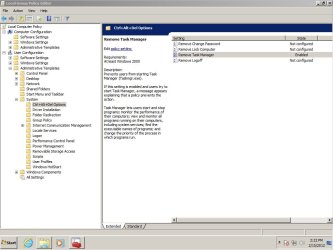
you will see local group policy editor there you can disable many things (there is so many settings that its easy to get lost for inexperienced user so be careful)
you can disable ctrl+alt+del functions like this (see attached pictutre with remove task manager enabled)
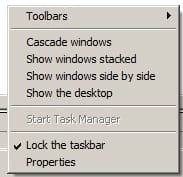
in picture you can see that task manager is removed
you will not be able to see task manager option when ctr+alt+del is clicked and on task bar context menu task manager option will be not active.
explore for more options you can configure many settings in there

read this
http://www.sevenforums.com/tutorials/151415-group-policy-apply-specific-user-group.html
how to apply policy for specific users, be careful do not disable things for your self :)
 

Attachments

  • gpo.jpg
    gpo.jpg
    73.8 KB · Views: 33
  • task1.jpg
    task1.jpg
    6.5 KB · Views: 345

My Computer My Computer

At a glance

Windows 7 pro 64bit. (SP1)Intel core I5 24008GB DDR3 KingstonGigabyte GF GTX650OC
Computer type
PC/Desktop
Computer Manufacturer/Model Number
Self Built PC
OS
Windows 7 pro 64bit. (SP1)
CPU
Intel core I5 2400
Motherboard
Gigabyte H61
Memory
8GB DDR3 Kingston
Graphics Card(s)
Gigabyte GF GTX650OC
Sound Card
Realtek HD audio
Monitor(s) Displays
LCD 20"
Screen Resolution
1600x900
Hard Drives
INTEL SSD 320 80GB +Seagate 7200.12 1TBx3
PSU
Coolermaster RX450W
Case
Coolermaster atx case
Cooling
stock cooler
Keyboard
logitech
Mouse
logitech
Internet Speed
FTTD 100mbps
When I visited Best Buy the other day they were running ads on their notebooks and I noticed that all the typical keyboard functions does not work (i.e. ctrl+alt+del, alt+tab, etc.)

How can I disable all admin functions on my laptop so when I have guests over they cannot mess with my settings? I only want them to be able to surf the web and nothing else. They cannot install or download anything, cannot use windows key + R to access regedit, or use ctrl+alt+del.

Can this be done within Windows 7 or do I need a special program for this?

You could create a new "standard user" account for your guests and password protect your own. That way anything that is attempted that requires Admin privileges will require your password (make sure UAC is On) This won't restrict them to the web browser exclusively, but it will prevent changes to your profile and to system settings. For the greater lock-down you describe you would need to use the group policy editor.
 

My Computer My Computer

At a glance

Windows 7 x64Intel Core2 Extreme Q6850 3.00GHz8 GBRadeon R7 260X
Computer type
PC/Desktop
OS
Windows 7 x64
CPU
Intel Core2 Extreme Q6850 3.00GHz
Motherboard
EVGA 132-CK-NF79
Memory
8 GB
Graphics Card(s)
Radeon R7 260X
Sound Card
Xonar DS
Hard Drives
Hitachi Deskstar 1 tb
Thank you for the suggestions guys, I'm going to do some research on gpedit.msc before making any changes. Time to hit the digital books.
 

My Computer My Computer

At a glance

Windows 7 Ultimate x64 SP1Core i7 2600k (4.6GHz)16GB G.SKILL Ares 1600MHzMSI R6970 Lightning
Computer type
PC/Desktop
Computer Manufacturer/Model Number
Less is more
OS
Windows 7 Ultimate x64 SP1
CPU
Core i7 2600k (4.6GHz)
Motherboard
ASUS P8Z68 Deluxe (3603)
Memory
16GB G.SKILL Ares 1600MHz
Graphics Card(s)
MSI R6970 Lightning
Sound Card
Asus Xonar Essence ST (UNi drivers 1.41)
Monitor(s) Displays
Samsung P2570, CrossOver 27Q LED-P
Screen Resolution
1920*1080, 2560*1440
Hard Drives
256GB OCZ Vector, 2x Hitachi 4TB (7K4000), Hitachi 3TB (7K3000 & 5K3000)
PSU
Seasonic X750
Case
Lian-Li PC-P80N
Cooling
NZXT HAVIK 140 (2x GELID Wing12PL Push/Pull)
Keyboard
CM Storm Trigger (Brown Switch)
Mouse
Logitech G400
Internet Speed
55Mbps/10Mbps
Other Info
Speakers - Klipsch ProMedia 2.1
Headphones - Sennheiser HD595
Router - ASUS RT-N66U
Webcam - Logitech C910
I decided to use parental controls on the new Guest account and disabled all programs from running since I only need one program to run (Windows Photo Viewer).

Works like a charm.
 

My Computer My Computer

At a glance

Windows 7 Ultimate x64 SP1Core i7 2600k (4.6GHz)16GB G.SKILL Ares 1600MHzMSI R6970 Lightning
Computer type
PC/Desktop
Computer Manufacturer/Model Number
Less is more
OS
Windows 7 Ultimate x64 SP1
CPU
Core i7 2600k (4.6GHz)
Motherboard
ASUS P8Z68 Deluxe (3603)
Memory
16GB G.SKILL Ares 1600MHz
Graphics Card(s)
MSI R6970 Lightning
Sound Card
Asus Xonar Essence ST (UNi drivers 1.41)
Monitor(s) Displays
Samsung P2570, CrossOver 27Q LED-P
Screen Resolution
1920*1080, 2560*1440
Hard Drives
256GB OCZ Vector, 2x Hitachi 4TB (7K4000), Hitachi 3TB (7K3000 & 5K3000)
PSU
Seasonic X750
Case
Lian-Li PC-P80N
Cooling
NZXT HAVIK 140 (2x GELID Wing12PL Push/Pull)
Keyboard
CM Storm Trigger (Brown Switch)
Mouse
Logitech G400
Internet Speed
55Mbps/10Mbps
Other Info
Speakers - Klipsch ProMedia 2.1
Headphones - Sennheiser HD595
Router - ASUS RT-N66U
Webcam - Logitech C910
Back
Top