Solved How do I edit a file in Program Files tree?

StupidUser

New member
Member
VIP
Local time
7:35 PM
Messages
109
How do I edit a file in the ProgramFiles(x86) directory?

There is a .xml configuration file which is supposed to be editable to configure the app the way I want it (that's why it's called configuration file, MS!). Here's the file tree: C:\Program Files (x86)\TeXnicCenter\packages\math.xml.

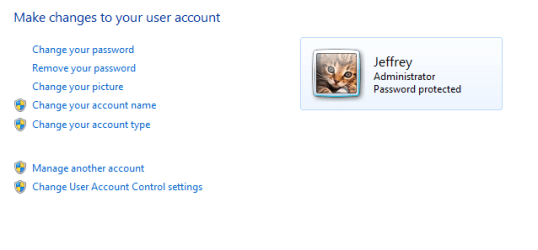
I can make changes in Notepad, but cannot save anything back to this directory. I am the sole user and administrator of my system (see the pic?), so I should be allowed to do whatever the heck I wanna do! It is a Win7 Ultimate (x64).

How do I edit this file? Thanks

Question 2 (this one is really rhetorical-venting): Why-oh-why would MS keep me from editing my files in my directories on my personal computer? It's mine! (Did you notice that pattern?)

P.S. - I have no idea what the correct subforum for this question is (since I never expected to have to ask such an inane question). I'm sorry if it's in the wrong place (feel free to move it and scold me appropriately :) ).
 

Attachments

  • Capture.PNG
    Capture.PNG
    7.4 KB · Views: 11
Last edited:

My Computer

Computer type
PC/Desktop
Computer Manufacturer/Model Number
Lenovo/2757CTO Thinkpad W700
OS
Microsoft Windows 7 Professional 64-bit 7601 Multiprocessor Free Service Pack 1
CPU
AMD A6-5350M APU with Radeon(tm) HD Graphics
Motherboard
LENOVO 20B20011US
Memory
16.00 GB
Graphics Card(s)
AMD Radeon HD 8450G
Sound Card
(1) AMD High Definition Audio Device (2) Conexant 20671 Sm
Monitor(s) Displays
??
Screen Resolution
1366 x 768 x 32 bits (4294967296 colors) @ 60 Hz
Hard Drives
HGST HTS 545032A7E380 SATA Disk Device
Mouse
Microsoft Optical Wheel Mouse
Other Info
BIOS: Ver 1.00PARTTBLX
You forgot an option in your poll for "No, and I'm glad it is this way, especially since other major OSes have been this well protected for years".

For the record, I have no trouble going into my Program Files directories and making changes to files. I just have no need to do so. Sounds like you have some permissions issues, or your UAC settings moved to be too strict.
 

My Computer

OS
Windows 7 Ultimate x64 SP1
CPU
Intel Core i7-2600
Motherboard
Gigabyte GA-P67A-UD3P-B3
Memory
12 GB Patriot Extreme DDR3-1333
Graphics Card(s)
Nvidia GTX 470
Monitor(s) Displays
Dell UltraSharp 2209WA
Hard Drives
OCZ Agility3 240 GB, WD5001AALS, WD7501AALS
PSU
OCZ ModStream 700W
Case
CoolerMaster HAF 912 Advanced
Cooling
CoolerMaster Hyper 212 Plus
Drag the file in question to your desktop, open it, edit it, save it. Then drag it back to its previous location. Done.
 

My Computer

Computer type
PC/Desktop
Computer Manufacturer/Model Number
Alienware Aurora ALX R4
OS
Windows 10 Pro (x64)
CPU
Intel Core i7-3930K (3.2GHz - 4.5GHz)
Motherboard
Alienware Aurora-R4 x79
Memory
4x Samsung 4GB PC3-12800 DDR3 (16GB 1600MHz)
Graphics Card(s)
Nvidia Geforce GTX 690
Sound Card
SteelSeries Siberia Elite
Monitor(s) Displays
Dell UltraSharp U3011
Screen Resolution
2560x1600
Hard Drives
Samsung 850 Pro 256 GB, Seagate 1TB Desktop Hybrid HDD, 2x Western Digital 4TB Green HDD
PSU
875W Some Dell PSU <.<
Case
Alienware Aurora ALX
Cooling
Custom Liquid Cooling (EK CPU & GPU blocks) dual EK 480RAD
Keyboard
Logitech G710+ Mechanical
Mouse
Logitech G700s
Internet Speed
Verizon Fios (50 mbps average)
Other Info
Server: Intel NUC D54250WYK: i5-4250U, 16GB, 256 GB mSATA, Windows Server 2012 R2
math.xml is located on a protected directory (Program Files x86). When you double-click to open it, it opens in an un-elevated Notepad (user mode), that's why you can't save it back.

You can either do what logicearth said, or simply right-click Notepad and run as admin, and then Ctrl+O to open "C:\Program Files (x86)\TeXnicCenter\packages\math.xml."

Don't worry, everything there is still editable. Your system is just making the right precautions through UAC (don't disable UAC <_<).
 

My Computer

Computer Manufacturer/Model Number
Asus G73SW-XN2
OS
Windows 2000 5.0 Build 2195
CPU
Intel Core i7-2630QM@2GHz(2.9GHz Turbo Boost) [Sandy Bridge]
Motherboard
Asus G73SW (Intel HM65 Chipset)
Memory
Kingston DDR3 1333 16GB (4GBx4)
Graphics Card(s)
nVidia GTX 460m 1.5GB
Sound Card
EAX Advanced HD 5.0, THX TruStudio
Monitor(s) Displays
17.3 in. primary & 23 in. secondary
Screen Resolution
1920x1080
Hard Drives
Seagate Momentus XT (SATA II) 500 GB @ 7200 RPM
Hitachi (SATA II) 500GB @ 7200 RPM

Non Raid because ASUS was crappy to choose an HM65 Chipset
Keyboard
Built-in 102-Key Backlit Keyboard
Other Info
It's a Laptop.
You forgot an option in your poll for "No, and I'm glad it is this way, especially since other major OSes have been this well protected for years"...
I didn't think anyone would actually give that answer. :D (Maybe I was a little frustrated - for a change).

Just out of curiosity, how is it that other OSes have been this well protected but still let you change your own configuration files without frustrating me half as much?

...You can ...simply right-click Notepad and run as admin, and then Ctrl+O to open "C:\Program Files (x86)\TeXnicCenter\packages\math.xml."...
This solution works best for me. Thanks every1.
 

My Computer

Computer type
PC/Desktop
Computer Manufacturer/Model Number
Lenovo/2757CTO Thinkpad W700
OS
Microsoft Windows 7 Professional 64-bit 7601 Multiprocessor Free Service Pack 1
CPU
AMD A6-5350M APU with Radeon(tm) HD Graphics
Motherboard
LENOVO 20B20011US
Memory
16.00 GB
Graphics Card(s)
AMD Radeon HD 8450G
Sound Card
(1) AMD High Definition Audio Device (2) Conexant 20671 Sm
Monitor(s) Displays
??
Screen Resolution
1366 x 768 x 32 bits (4294967296 colors) @ 60 Hz
Hard Drives
HGST HTS 545032A7E380 SATA Disk Device
Mouse
Microsoft Optical Wheel Mouse
Other Info
BIOS: Ver 1.00PARTTBLX
If you try using Linux or OSX, you get prompted far more than Windows 7 does....and the often require entering your password, not just right-clicking the file or application.
 

My Computer

OS
Windows 7 Ultimate x64 SP1
CPU
Intel Core i7-2600
Motherboard
Gigabyte GA-P67A-UD3P-B3
Memory
12 GB Patriot Extreme DDR3-1333
Graphics Card(s)
Nvidia GTX 470
Monitor(s) Displays
Dell UltraSharp 2209WA
Hard Drives
OCZ Agility3 240 GB, WD5001AALS, WD7501AALS
PSU
OCZ ModStream 700W
Case
CoolerMaster HAF 912 Advanced
Cooling
CoolerMaster Hyper 212 Plus
If you try using Linux or OSX, you get prompted far more than Windows 7 does....and the often require entering your password, not just right-clicking the file or application.
Really? Years ago when I used to manage a - I'm embarrassed to admit - Dec Vax system I never had those problems.
 

My Computer

Computer type
PC/Desktop
Computer Manufacturer/Model Number
Lenovo/2757CTO Thinkpad W700
OS
Microsoft Windows 7 Professional 64-bit 7601 Multiprocessor Free Service Pack 1
CPU
AMD A6-5350M APU with Radeon(tm) HD Graphics
Motherboard
LENOVO 20B20011US
Memory
16.00 GB
Graphics Card(s)
AMD Radeon HD 8450G
Sound Card
(1) AMD High Definition Audio Device (2) Conexant 20671 Sm
Monitor(s) Displays
??
Screen Resolution
1366 x 768 x 32 bits (4294967296 colors) @ 60 Hz
Hard Drives
HGST HTS 545032A7E380 SATA Disk Device
Mouse
Microsoft Optical Wheel Mouse
Other Info
BIOS: Ver 1.00PARTTBLX
Unless you run under the "root" account on Unix/Linux, you have to use either su or sudo to edit certain configuration details in system directories (akin to Program Files). However, on Unix/Linux systems most programs store their configuration in a users home directory (/home/[username]). Of course, not all programs do this on Unix/Linux or on Windows, like your program for example.

The only reason you did not have these problems on previous versions of Windows (Windows XP) because you ran under administrative power. On Windows Vista and 7 you do not have Administrative power until you elevate an application. That is what the UAC prompt does, it elevates you to administrative power, on demand. This allows you to do administrative tasks while not having your web browser or any internet connect program have access to that level of power, which is bad.

Btw...why are you comparing a system (DEC VEX) from the early 1970-1980s to a modern system? At that point in time, the internet barely existed as it does now. And Security was less of an issue, pioneer days.
 

My Computer

Computer type
PC/Desktop
Computer Manufacturer/Model Number
Alienware Aurora ALX R4
OS
Windows 10 Pro (x64)
CPU
Intel Core i7-3930K (3.2GHz - 4.5GHz)
Motherboard
Alienware Aurora-R4 x79
Memory
4x Samsung 4GB PC3-12800 DDR3 (16GB 1600MHz)
Graphics Card(s)
Nvidia Geforce GTX 690
Sound Card
SteelSeries Siberia Elite
Monitor(s) Displays
Dell UltraSharp U3011
Screen Resolution
2560x1600
Hard Drives
Samsung 850 Pro 256 GB, Seagate 1TB Desktop Hybrid HDD, 2x Western Digital 4TB Green HDD
PSU
875W Some Dell PSU <.<
Case
Alienware Aurora ALX
Cooling
Custom Liquid Cooling (EK CPU & GPU blocks) dual EK 480RAD
Keyboard
Logitech G710+ Mechanical
Mouse
Logitech G700s
Internet Speed
Verizon Fios (50 mbps average)
Other Info
Server: Intel NUC D54250WYK: i5-4250U, 16GB, 256 GB mSATA, Windows Server 2012 R2
I get what you are saying. I just have to get used to the new type of security.

I'm not so much comparing Windows to Vax as using it as my point of reference. It's the only big system I ever administrated. And yes, we did have the internet back then (80s and 90s) and yes, there were security threats waaaay back then. :D
 

My Computer

Computer type
PC/Desktop
Computer Manufacturer/Model Number
Lenovo/2757CTO Thinkpad W700
OS
Microsoft Windows 7 Professional 64-bit 7601 Multiprocessor Free Service Pack 1
CPU
AMD A6-5350M APU with Radeon(tm) HD Graphics
Motherboard
LENOVO 20B20011US
Memory
16.00 GB
Graphics Card(s)
AMD Radeon HD 8450G
Sound Card
(1) AMD High Definition Audio Device (2) Conexant 20671 Sm
Monitor(s) Displays
??
Screen Resolution
1366 x 768 x 32 bits (4294967296 colors) @ 60 Hz
Hard Drives
HGST HTS 545032A7E380 SATA Disk Device
Mouse
Microsoft Optical Wheel Mouse
Other Info
BIOS: Ver 1.00PARTTBLX
Back
Top