How do I format my laptop and reinstall Windows 7 without cds?

cjknott32

New member
Local time
1:26 PM
Messages
5
Hello,

I want to format my computer, but I have a small problem: I have no installation cd's for Windows 7. My computer is a laptop, a Dell Inspiron 1525. It's been running a little slow here lately, so I decided to give it a good clean-up. However, I fear to format it without the installation cd's.

Also, to be honest, I don't really even know how to go about formatting it, so I would appreciate some help with that too.

Thank you!
 

My Computer My Computer

At a glance

Windows 7
Computer type
PC/Desktop
Computer Manufacturer/Model Number
Dell Inspiron 1525
OS
Windows 7
Browser
google chrome

My Computer My Computer

At a glance

Windows 7 Ultimate 32-Bit & Windows 7 Ultimat...Intel Core i7 CPU 950 @ 3.07GHzOCZ 6GB (3 x 2GB) 240-Pin DDR3 SDRAM DDR3 160...ATI Radeon HD 5700 Series
Computer Manufacturer/Model Number
Custom Built
OS
Windows 7 Ultimate 32-Bit & Windows 7 Ultimate 64-Bit
CPU
Intel Core i7 CPU 950 @ 3.07GHz
Motherboard
ASUS P6T DELUXE V2
Memory
OCZ 6GB (3 x 2GB) 240-Pin DDR3 SDRAM DDR3 1600 OCZ3X1600R2
Graphics Card(s)
ATI Radeon HD 5700 Series
Sound Card
OnBoard
Hard Drives
WD6400AACS-00M3B0 (640GB SATA )
PSU
CORSAIR 850w
Case
NZXT LEXA
Cooling
Intel Stock Heatsink Fan
Keyboard
Microsoft Wireless Laser Keyboard 7000
Mouse
Microsoft Wireless Laser Mouse 7000
Hello,

I want to format my computer, but I have a small problem: I have no installation cd's for Windows 7. My computer is a laptop, a Dell Inspiron 1525. It's been running a little slow here lately, so I decided to give it a good clean-up. However, I fear to format it without the installation cd's.

Also, to be honest, I don't really even know how to go about formatting it, so I would appreciate some help with that too.

Thank you!

Hi cjknott32,

Welcome to Seven forums.

Please check this link below for restoring your system to factory defaults without using the disks:

http://dell.to/12PHD5J

And if you still require disks for your system then you can request the same at the link below:

http://dell.to/Zj7oHA

Keep us posted with the results so we can advise you further.
 

My Computer My Computer

At a glance

Winndows 7 32 bit
Computer type
PC/Desktop
OS
Winndows 7 32 bit
   Information
We always assume you have made your Recovery Disks using the OEM manufacturer's Recovery Media Creator app the first day you had your new PC.
& made the Startup Repair CD.
startup repair disc-create


Did you make the OEM manufacturer's Recovery Disks?


You can order Microsoft official OEM Recovery disks from your OEM manufacturer's website.


How to use Dell Recovery Partition, make Recovery Disks & how to order Microsoft official Dell OEM manufacturer's Recovery Disks.
Manuals | Dell US
RouteTo
Dell - Support
 

My Computer My Computer

At a glance

ME/XP/Vista/Win7
OS
ME/XP/Vista/Win7
Ok,

Thank you SandeepP, your post was more helpful. I did, however, run into a problem.

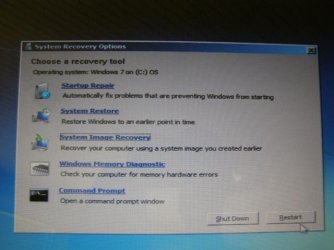
I clicked on the first link you gave me, and got all the way down to step 9. Here's where the trouble is. Step 9 says: "Depending on your configuration, you may need to select Dell Factory Tools and then Dell Factory Image Restore." I see no such thing on my screen. Rather, I have a small window called "System Recovery Tools" and it gives me 5 different things to click on: Startup Repair, System Restore, System Image Recovery, Windows Memory Diagnostic, and Command Prompt. I have clicked on each one but none of them have gotten me anywhere. I thought maybe "System Image Recovery" would be the one, but it says "Windows cannot find a system image on this computer."
 

My Computer My Computer

At a glance

Windows 7
Computer type
PC/Desktop
Computer Manufacturer/Model Number
Dell Inspiron 1525
OS
Windows 7
Browser
google chrome
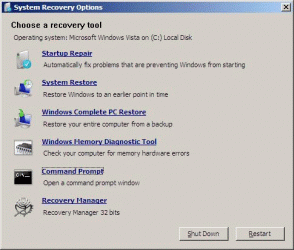
Dell Factory Tools should be under Command Prompt.


RecoveryPartition03.gif
Screenshot is a Gateway.
 

My Computer My Computer

At a glance

ME/XP/Vista/Win7
OS
ME/XP/Vista/Win7
Thank you for responding Theog,

Unfortunately there is nothing under Command Prompt. :confused:

P8081003.JPG
 

My Computer My Computer

At a glance

Windows 7
Computer type
PC/Desktop
Computer Manufacturer/Model Number
Dell Inspiron 1525
OS
Windows 7
Browser
google chrome
Windows has been already reinstalled, you can order Microsoft official Dell OEM Recovery disks from the Dell website.
 

My Computer My Computer

At a glance

ME/XP/Vista/Win7
OS
ME/XP/Vista/Win7
Thank you Gregrocker,
I am running the Diagnostics now, hopefully something good will come from it.

And thank you Theog,
I remember now, this laptop came with windows vista, and one of my friends installed windows 7 on it as a "surprise"...I hope this hasn't ruined my possibilities.
 

My Computer My Computer

At a glance

Windows 7
Computer type
PC/Desktop
Computer Manufacturer/Model Number
Dell Inspiron 1525
OS
Windows 7
Browser
google chrome
Did your friend provide you with a Product Key? If not do you know how it was activated? If it is not a bootleg copy then you can audit the legal Product Key using Belarc Advisor from the Clean Reinstall tutorial.

If you need to determine whether the install is legit, we can help you do this so you'll know if the key is legit. If after auditing the key the Product ID shows an OEM in its string, then it is likely illegal bootleg.

If you have the Product Key, then after getting the diagnostics results boot the installer provided to reinstall the licensed version, following the steps carefully to get it perfect.

If no Product Key and you can't come up with one or buy another, then I'd reinstall the licensed Vista version following the same steps to get the $100+ value of the license which came with the PC.
 
My friend did not provide me with a Product Key, he just did the whole thing and handed me my laptop the next day. I have no idea how he did any of it..

I'll try to find one online or something...
 

My Computer My Computer

At a glance

Windows 7
Computer type
PC/Desktop
Computer Manufacturer/Model Number
Dell Inspiron 1525
OS
Windows 7
Browser
google chrome
It sounds seriously like you have bootleg install since friends don't normally give a $100+ gift like that unless he is in the business and has access to lower cost licenses.

To find out for sure run this program, copy and post back its report: http://go.microsoft.com/fwlink/?linkid=52012

Is the Vista Product Key on COA sticker readable, and do you have access to a Vista installation DVD so you could reinstall the licensed OS if WIn7 is not legal?

Otherwise you will need to buy a copy of Win7 Upgrade version, which you don't need Vista on the HD to install, just another OS for it to see when you boot the installer to http://www.sevenforums.com/tutorials/1649-clean-install-windows-7-a.html. The copy you have on there will suffice, although you should delete all partitions during install using the Drive Options shown in Steps 7 and 8 to get the cleanest install.
http://www.sevenforums.com/tutorials/1649-clean-install-windows-7-a.html
 
Back
Top