
How Do I Get Listed USB Devices Attached in XP Mode?

Durango

New member
Member
Local time
3:43 PM
Messages
83
Location
North Central Arkansas
I am currently running Windows Virtual PC/XP Mode under Windows 7. When I try to attach any USB device in XP Mode, I get the following error message "Could not attach the USB device. You can attach the USB device to a different USB port or restart the VM and try again". Neither of these solutions works.

My computer has both 2.0 and 3.0 USB ports, supposedly properly labeled. I know VPC won't support 3.0 ports, so I have been careful to connect my devices to the 2.0 ports. But just to be sure, I have tried all the USB ports.

When I go to Device Manager, here is what I have under Universal Serial Bus Controller:
- Intel USB 3.0 eXtensible Host Controller
- Intel USB 3.0 Root Hub
- USB Composite Drive
- USB Mass Storage Device
- USB Printing Support
I also have under USB Virtualization
- USB Virtualization Connection Driver

Two of the USB devices to be shared are my printer and my external drive, which work fine in Win 7 but not in XP Mode.

Any advice on how to solve this problem would be sincerely appreciated.....I definitely need my printer and external drive in XP Mode.
 

My Computer My Computer

At a glance

win 7 proIntel Core i5-6600, 4 core @ 3.3GHz16 GB Crucial Ballistix2GB EVGA NVIDIA GeForce GTX950 GDDR5
Computer type
PC/Desktop
Computer Manufacturer/Model Number
Custom Build by Velocity Micro/Raptor Z55 SKYLAKE
OS
win 7 pro
CPU
Intel Core i5-6600, 4 core @ 3.3GHz
Motherboard
Asus Z170-P Intel Z170 base chipset
Memory
16 GB Crucial Ballistix
Graphics Card(s)
2GB EVGA NVIDIA GeForce GTX950 GDDR5
Sound Card
On-Board Integrated Realtek ALC887 7.1 Channel Audio
Monitor(s) Displays
Viewsonic 28"
Hard Drives
512GB Samsung 950 Pros PCIe 3.0 SSD
Two - 2TB 7200 SATA 600 with 64MB Cache
PSU
750 Watt EVGA SuperNOVA
Case
Full Sized ATX
Cooling
Intel High Performance Heatsink
Keyboard
Logitech Illuminated k740
Mouse
Logitech Wireless M310
Internet Speed
2.5 (slow DSL)
Antivirus
Microsoft Security Essentials, Malwarebytes
Browser
Internet Explorer 11
Other Info
TeamViewer installed
Acronis True Image installed
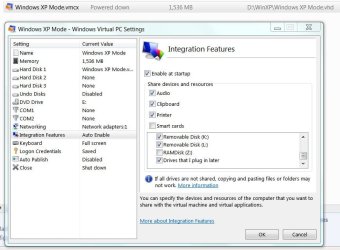
Could you please expand on what you are seeing in XP mode for the USB devices? "Doesn't work" is not very clear. Post an image of your Windows Virtual PC settings for Integration Features. It should look similar to the image below.
 

Attachments

  • Windows XP Mode-Settings.JPG
    Windows XP Mode-Settings.JPG
    73.4 KB · Views: 0

My Computer My Computer

At a glance

Windows 7 Pro-x64i7-2600 3.4GHz - 3.8GHz Turbo8Gb - 2x4GB, Muskin 991770 PC3-1333Integrated Intel HD 2000
Computer type
PC/Desktop
Computer Manufacturer/Model Number
Built 2/11/2011
OS
Windows 7 Pro-x64
CPU
i7-2600 3.4GHz - 3.8GHz Turbo
Motherboard
Intel DH67BL-B3
Memory
8Gb - 2x4GB, Muskin 991770 PC3-1333
Graphics Card(s)
Integrated Intel HD 2000
Sound Card
Integrated Intel 10.1 HD, RealTek ALC892
Monitor(s) Displays
Asus LCD VH222H, Haier HL24XSL2a
Screen Resolution
1920x1080, 1920x1080
Hard Drives
Crucial SSD C300-128Gb,
Western Digital WD5002AALX - 500Gb,
Western Digital WD7501AALS - 750Gb
PSU
Seasonic 650W 80+ Gold Modular
Case
Rosewill Defender
Cooling
Stock CPU, Four 120mm case fans, PCH fan added
Keyboard
Logitech EX100 Y-RBH94 Wireless
Mouse
Logitech EX100 M-RCE95 Wireless
Internet Speed
3.0/1.5 Mbs
Antivirus
Microsoft Security Essentials
Browser
Microsoft Internet Explorer 11
Other Info
Antec Veris Premier-Multimedia IR Station,
Cyber Accoustics-3602 Speakers,
AFT XM-5U Card Reader,
Hauppauge TV-HVR-2250,
Sony LX300 USB Turntable
Could you please expand on what you are seeing in XP mode for the USB devices? "Doesn't work" is not very clear. Post an image of your Windows Virtual PC settings for Integration Features. It should look similar to the image below.
Carwiz, thanks much for your response. I've never posted an image before. But my Virtual PC settings for Integration Features looks exactly like yours except for the drives listed under Integration Features to be enabled at startup. In my case, these drives are C: Win 7 Install, D: VPC Install, G: External Drive, and Drives That I May Plug In Later.

When I start Windows XP Mode and click the USB tab, my Printer and my External Drive are listed as devices to be shared (both of these devices are connected to USB 2.0 ports). But then when I click on one of these listed devices I get the error message "Could not attach the USB device. You can attach the USB device to a different USB port or restart the VM and try again". Neither of these solutions works.

From what I read elsewhere on the forum, I'm beginning to think the culprit might be the Intel USB 3.0 eXtensible Host Controller.

Again, thanks for your response, and any guidance you can give me would be appreciated.
 

My Computer My Computer

At a glance

win 7 proIntel Core i5-6600, 4 core @ 3.3GHz16 GB Crucial Ballistix2GB EVGA NVIDIA GeForce GTX950 GDDR5
Computer type
PC/Desktop
Computer Manufacturer/Model Number
Custom Build by Velocity Micro/Raptor Z55 SKYLAKE
OS
win 7 pro
CPU
Intel Core i5-6600, 4 core @ 3.3GHz
Motherboard
Asus Z170-P Intel Z170 base chipset
Memory
16 GB Crucial Ballistix
Graphics Card(s)
2GB EVGA NVIDIA GeForce GTX950 GDDR5
Sound Card
On-Board Integrated Realtek ALC887 7.1 Channel Audio
Monitor(s) Displays
Viewsonic 28"
Hard Drives
512GB Samsung 950 Pros PCIe 3.0 SSD
Two - 2TB 7200 SATA 600 with 64MB Cache
PSU
750 Watt EVGA SuperNOVA
Case
Full Sized ATX
Cooling
Intel High Performance Heatsink
Keyboard
Logitech Illuminated k740
Mouse
Logitech Wireless M310
Internet Speed
2.5 (slow DSL)
Antivirus
Microsoft Security Essentials, Malwarebytes
Browser
Internet Explorer 11
Other Info
TeamViewer installed
Acronis True Image installed
From what I read elsewhere on the forum, I'm beginning to think the culprit might be the Intel USB 3.0 eXtensible Host Controller.
I think you're right. There's no support for USB 3 in XP Mode. I didn't spot that on your hardware list. (USB 3.0 wasn't invented yet when XP came out.) Are there any other host controllers for USB 2 on your machine? You don't show any specs. ???

Added: Keep in mind that you will need to install printer drivers in XP for your printer. If you have a newer printer, the drivers may not be compatible with XP Mode either.
 

My Computer My Computer

At a glance

Windows 7 Pro-x64i7-2600 3.4GHz - 3.8GHz Turbo8Gb - 2x4GB, Muskin 991770 PC3-1333Integrated Intel HD 2000
Computer type
PC/Desktop
Computer Manufacturer/Model Number
Built 2/11/2011
OS
Windows 7 Pro-x64
CPU
i7-2600 3.4GHz - 3.8GHz Turbo
Motherboard
Intel DH67BL-B3
Memory
8Gb - 2x4GB, Muskin 991770 PC3-1333
Graphics Card(s)
Integrated Intel HD 2000
Sound Card
Integrated Intel 10.1 HD, RealTek ALC892
Monitor(s) Displays
Asus LCD VH222H, Haier HL24XSL2a
Screen Resolution
1920x1080, 1920x1080
Hard Drives
Crucial SSD C300-128Gb,
Western Digital WD5002AALX - 500Gb,
Western Digital WD7501AALS - 750Gb
PSU
Seasonic 650W 80+ Gold Modular
Case
Rosewill Defender
Cooling
Stock CPU, Four 120mm case fans, PCH fan added
Keyboard
Logitech EX100 Y-RBH94 Wireless
Mouse
Logitech EX100 M-RCE95 Wireless
Internet Speed
3.0/1.5 Mbs
Antivirus
Microsoft Security Essentials
Browser
Microsoft Internet Explorer 11
Other Info
Antec Veris Premier-Multimedia IR Station,
Cyber Accoustics-3602 Speakers,
AFT XM-5U Card Reader,
Hauppauge TV-HVR-2250,
Sony LX300 USB Turntable
From what I read elsewhere on the forum, I'm beginning to think the culprit might be the Intel USB 3.0 eXtensible Host Controller.
I think you're right. There's no support for USB 3 in XP Mode. I didn't spot that on your hardware list. (USB 3.0 wasn't invented yet when XP came out.) Are there any other host controllers for USB 2 on your machine? You don't show any specs. ???

Added: Keep in mind that you will need to install printer drivers in XP for your printer. If you have a newer printer, the drivers may not be compatible with XP Mode either.
Yea, I knew about the lack of USB 3.0 support. Since my new PC has both USB 2.0 ports (two) and USB 3.0 ports (four), I made certain that my printer and my external drive were both plugged into the USB 2.0 ports.

The only USB controllers I have are those listed in my first post........this is what Device Manager shows under USB Controller.

I've been running a virtual XP Mode machine on a 7-year old Win 7 computer for 7 years. It installled and ran with little difficulty, and it shows all my ports (all are 2.0) under the USB tab.....even my new iPhone. But I'll be darn if I can get USB capability on my new computer. I think I'm about to try VirtualBox.

Thanks for your response. If you think of anything I might try, please let me know.
 

My Computer My Computer

At a glance

win 7 proIntel Core i5-6600, 4 core @ 3.3GHz16 GB Crucial Ballistix2GB EVGA NVIDIA GeForce GTX950 GDDR5
Computer type
PC/Desktop
Computer Manufacturer/Model Number
Custom Build by Velocity Micro/Raptor Z55 SKYLAKE
OS
win 7 pro
CPU
Intel Core i5-6600, 4 core @ 3.3GHz
Motherboard
Asus Z170-P Intel Z170 base chipset
Memory
16 GB Crucial Ballistix
Graphics Card(s)
2GB EVGA NVIDIA GeForce GTX950 GDDR5
Sound Card
On-Board Integrated Realtek ALC887 7.1 Channel Audio
Monitor(s) Displays
Viewsonic 28"
Hard Drives
512GB Samsung 950 Pros PCIe 3.0 SSD
Two - 2TB 7200 SATA 600 with 64MB Cache
PSU
750 Watt EVGA SuperNOVA
Case
Full Sized ATX
Cooling
Intel High Performance Heatsink
Keyboard
Logitech Illuminated k740
Mouse
Logitech Wireless M310
Internet Speed
2.5 (slow DSL)
Antivirus
Microsoft Security Essentials, Malwarebytes
Browser
Internet Explorer 11
Other Info
TeamViewer installed
Acronis True Image installed
Back
Top