How do I get my documents folder off my desktop without deleting it fr

Kit2594

New member
Local time
12:08 PM
Messages
6
I've just started using windows 7 & somehow my documents folder ended up on my desktop along with the normal icon that links to the documents library. I've been trying to figure out how to get the documents folder off my desktop & just keep it in my documents library. Problem is that everything I've tried that gets the folder off my desktop also deletes all my documents from my documents library. I’m concerned that if my documents folder stays on my desktop at some point I’ll delete the entire thing since the only folders I usually keep on the desktop are ones that I need for a very short time, like a few hrs. Then I just delete them totally. How can I get my documents folder off my desktop & just keep it in my documents library??

Thanks for any help,
Kit
 

My Computer My Computer

At a glance

Windows 7 - 64 bit4 gb
Computer Manufacturer/Model Number
Acer Aspire 5742z-4685
OS
Windows 7 - 64 bit
Memory
4 gb
Browser
Firefox, Chrome
Is it really your my documents folder? Check properties to make sure it isn't a shortcut to your documents folder.
You can most likely remove it by right clicking the desktop and select Personalise > On the left, select Change desktop icons and making sure Users Files isn't ticked.

If it really is your documents folder you can move it by right clicking > properties and selecting the location tab and moving it that way.
 

My Computer My Computer

At a glance

windows 7 ultimate
OS
windows 7 ultimate
It's likely that the steps posted by fimble to remove the documents folder icon from your desktop will solve your problem. If you do relocate the (actual) Documents folder, be sure to follow the steps in this tutorial, especially step #9 in option 2, or you risk ending up with multiple Document folders.

James
 

My Computer My Computer

At a glance

Win7U 64 RTMQ95508GB GskillASUS|EAH4850/HTDI/1GD3/A
OS
Win7U 64 RTM
CPU
Q9550
Motherboard
GA-EP45-UD3R
Memory
8GB Gskill
Graphics Card(s)
ASUS|EAH4850/HTDI/1GD3/A
Sound Card
xfi Plat
Monitor(s) Displays
Dell 2405fpw
Screen Resolution
1920x1200
Hard Drives
Seagate & WD sata Drives
PSU
Antec
Case
Antec
Keyboard
MS Natural Ergonomic 4000
Mouse
Logitech MX610 USB Cordless
It's not the icon that I want to move, it's my documents folder.. I want it in the library without being on my desktop. Is it normal in Windows 7 for the actual documents folder to be on the desktop??
 

My Computer My Computer

At a glance

Windows 7 - 64 bit4 gb
Computer Manufacturer/Model Number
Acer Aspire 5742z-4685
OS
Windows 7 - 64 bit
Memory
4 gb
Browser
Firefox, Chrome
It's not the icon that I want to move, it's my documents folder.. I want it in the library without being on my desktop. Is it normal in Windows 7 for the actual documents folder to be on the desktop??
Open your library and drag the folder into it.
 

My Computer My Computer

At a glance

WIN7 x64 Home Premium SP1Intel Core i5-2400 processor(6MB Cache, 3.1GHz)8 GB RAM
Computer Manufacturer/Model Number
DELLXPS 8300
OS
WIN7 x64 Home Premium SP1
CPU
Intel Core i5-2400 processor(6MB Cache, 3.1GHz)
Memory
8 GB RAM
Hard Drives
1.5TB C Drive
The icon will be "Your Docoments", but it isn't. It's a direct path (link) as opposed to being a shortcut, which would open a folder from its true location.

Others will be able to explain it far better than I can!
 

My Computer My Computer

At a glance

windows 7 ultimate
OS
windows 7 ultimate
Just saw the tutorial & noticed that my user name isn't listed under the libraries as it shows in the tutorial.. I'm the only user of this computer. I'm thinking this could be part of the problem, how do I add my user name there? Oh, & yes it definitely is my document folder itself that is on my desktop (the normal documents icon shortcut is there also). I've tried deleting something from my documents file to see what would happen & then went & checked the document icon. The item I deleted from the file is then also missing from where the documents icon takes me to.
 

My Computer My Computer

At a glance

Windows 7 - 64 bit4 gb
Computer Manufacturer/Model Number
Acer Aspire 5742z-4685
OS
Windows 7 - 64 bit
Memory
4 gb
Browser
Firefox, Chrome
The default path for Documents is C:\Users\yourusername. If it is no longer in the default location, your best bet will be to restore it to the default location. Then, if you wish it to be in a different location, use the Change Default Location tutorial (same link as in my previous post) to move it to wherever you wish. I keep mine on a Data partition that gets backed up regularly. Again, when changing the default location, it's important to follow the instructions to avoid duplicate user folders.

James
 

My Computer My Computer

At a glance

Win7U 64 RTMQ95508GB GskillASUS|EAH4850/HTDI/1GD3/A
OS
Win7U 64 RTM
CPU
Q9550
Motherboard
GA-EP45-UD3R
Memory
8GB Gskill
Graphics Card(s)
ASUS|EAH4850/HTDI/1GD3/A
Sound Card
xfi Plat
Monitor(s) Displays
Dell 2405fpw
Screen Resolution
1920x1200
Hard Drives
Seagate & WD sata Drives
PSU
Antec
Case
Antec
Keyboard
MS Natural Ergonomic 4000
Mouse
Logitech MX610 USB Cordless
Before you keep experimenting with the risk of loosing it, I suggest you copy the folder to an external device or another partition- Then you have a safe fallback.

Next I would rename the one on the desktop and move it to the Documents library. If that does not work, try moving it from the backup and delete the one on the desktop.
 

My Computer My Computer

At a glance

Vista, Windows7, Mint Mate, Zorin, Windows 8from 1.6GHz Duo to i7
Computer Manufacturer/Model Number
HP, Dell, Gateway, Toshiba - 4 laptops and 2 desktops
OS
Vista, Windows7, Mint Mate, Zorin, Windows 8
CPU
from 1.6GHz Duo to i7
Monitor(s) Displays
2x HP w2207
Hard Drives
5x HDD, 7x SSD, 12x Externals
Keyboard
with trackball - no mices
Mouse
Trackball mice
Internet Speed
DSL 6000
In addition to the other good advice given in this thread, it's a good thing to remember that the "Desktop" is just a folder, and is very similar to other folders, in that if you want to move something off the Desktop but not delete it, one very effective way to do this is to open Windows Explorer, "Cut" the file/folder you want to move and "Paste" it wherever you want it. Voila!
 

My Computer My Computer

At a glance

Vista 64 bit and 32 bit (SP2)Intel(R) Core(TM)2 Duo Processor T9400 (2.53 GHz4GB DDR2 System Memory (2 Dimm)512 MB NVIDIA GeForce 9600M GT
Computer Manufacturer/Model Number
HP Pavillion dv5t (generation 1)
OS
Vista 64 bit and 32 bit (SP2)
CPU
Intel(R) Core(TM)2 Duo Processor T9400 (2.53 GHz
Memory
4GB DDR2 System Memory (2 Dimm)
Graphics Card(s)
512 MB NVIDIA GeForce 9600M GT
Monitor(s) Displays
15.4" diagonal WSXGA+ High-Definition HP BrightView Widescre
Screen Resolution
1680 x 1050
Hard Drives
320GB 5400RPM SATA Hard Drive with HP ProtectSmart Hard Drive Protection
Keyboard
Built-in HP
Mouse
Built in - Synaptics TouchPad V6.5 on PS/2 Port
Internet Speed
Max
Other Info
~ Intel Next-Gen Wireless-N Mini-card w/Bluetooth ~ Blu-Ray ROM DVD+/-R/RW ~ Integ. HDTV Hybrid Tuner ~ 12 Cell Battery ~ MS Office (Home Premium) 2007 ~
Right click on the icon and go to properties, select details and let us know the size, (1.0 KB, 10 MB or what every it is). This way we will know if it's just a icon directing to to the folder or the entire folder.
 

My Computer My Computer

At a glance

Windows 10 Pro. 64/ version 1709 Windows 7 Pr...Intel i7-6800K @ 4.3Corsair Platinum 16 gig @2400EVGA GTX 1070 OC
Computer type
PC/Desktop
Computer Manufacturer/Model Number
Home made Desktop
OS
Windows 10 Pro. 64/ version 1709 Windows 7 Pro/64
CPU
Intel i7-6800K @ 4.3
Motherboard
ASUS X-99 Deluxe II
Memory
Corsair Platinum 16 gig @2400
Graphics Card(s)
EVGA GTX 1070 OC
Monitor(s) Displays
Asus 27" LED LCD/VE278Q
Screen Resolution
1920-1080 or 1280-720 HDMI
Hard Drives
INTEL SSD 730-240 Gb Sata 3.0/
PSU
EVGA Platium 1200W
Case
Phanteks Luxe Tempered Glass 8 fans/ one radiator
Cooling
XSPC/ Water Cooled CPU
Keyboard
Das 4 Professional
Mouse
Logitech M705/MX Anywhere 2-S
Internet Speed
100 mbits
Antivirus
Microsoft Security Essentials/ Malwarebytes Premium 3.0/ SAS
Browser
I.E. 11 default/Firefox/ ISP Time Warner Cable/Spectrum
Other Info
LG BluRay Burner/
Sound system-KLipsch-THX/
Icy Dock ssd Hot Swap bays.
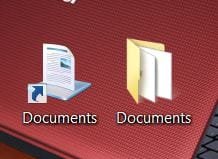
Right now the documents icon size is 1.07kb (this is what I want to keep on my desktop). My documents folder on my desktop is is at 41.9mbs. It's this folder that I want to move of my desktop.. I'm concerned that if it stays there I will at some point accidentally delete it. I have backed it up onto a disk but still want to find out how to get it into the library (or some place else) & off of my desktop.

I've attached an image of my desktop showing both the icon & the folder.
1.JPG
1.JPG
 

My Computer My Computer

At a glance

Windows 7 - 64 bit4 gb
Computer Manufacturer/Model Number
Acer Aspire 5742z-4685
OS
Windows 7 - 64 bit
Memory
4 gb
Browser
Firefox, Chrome
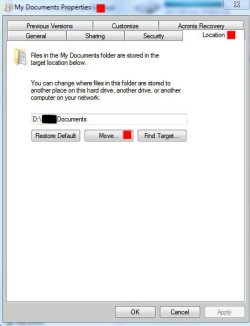
Right click on the Documents icon (not shortcut), choose properties, click on the Location tab (as in the screenshot):

Documents Properties.JPG

What is the current location? As you can see, there is a move button. The links to tutorials in my previous posts will demonstrate how to correctly change the location.

Also, your user name will not appear in Libraries.

Here is a list of tutorials for anything you want to know about Libraries:

http://www.sevenforums.com/tutorials/257-windows-7-tutorial-index-2.html#post1075

James
 
Last edited:

My Computer My Computer

At a glance

Win7U 64 RTMQ95508GB GskillASUS|EAH4850/HTDI/1GD3/A
OS
Win7U 64 RTM
CPU
Q9550
Motherboard
GA-EP45-UD3R
Memory
8GB Gskill
Graphics Card(s)
ASUS|EAH4850/HTDI/1GD3/A
Sound Card
xfi Plat
Monitor(s) Displays
Dell 2405fpw
Screen Resolution
1920x1200
Hard Drives
Seagate & WD sata Drives
PSU
Antec
Case
Antec
Keyboard
MS Natural Ergonomic 4000
Mouse
Logitech MX610 USB Cordless
I actually was just able to solve my problem by creating a new user name & putting my documents folder into that. For some reason the icon on my desktop still takes me to the folder which is good. But at least I was able to get the folder off my desktop! Thanks for the help!!
 

My Computer My Computer

At a glance

Windows 7 - 64 bit4 gb
Computer Manufacturer/Model Number
Acer Aspire 5742z-4685
OS
Windows 7 - 64 bit
Memory
4 gb
Browser
Firefox, Chrome
Back
Top