How do i improve my wireless network?

jingyin

New member
Member
Local time
10:40 PM
Messages
31
i recently ran a tool :

ICSI Netalyzr — Results

this is the result, but i am not very good in computer, so i want to know what i can do to improve my wireless network.

I have high latency when playing online games, and it happens usually at night
6~10 PM
and sometimes the internet drops (but i think it is because of my telephone interference)
 

My Computer

OS
Windows 7 Home Premium 64bit
In general wireless is not going to be a very good option for gaming, especially if there are walls between you and the access point or router. You would be far better off using a wired connection if possible.

The results from your Net analyzer show that you could be using a better DNS server. Google's DNS works well for me 8.8.8.8 and 8.8.4.4

It is possible to obtain a good reliable connection using wireless but everything needs to be optimized, no walls between you and wireless connection, choosing the best possible channel, updating equipment to the newer wireless N standard, updating hardware to the 5.0Ghz frequency in case the area has too many 2.4Ghz channels, 2.4Ghz is best in most cases but 5.0Ghz has the potential for much better band width although it's not very good at going through walls.

The links below explain in detail how to do this. The third link is a program that will show you which channels are in use in your area so you can choose the best possible wireless channel to use.

5 Ways To Fix Slow 802.11n Speed - SmallNetBuilder

What channel should I choose for my wireless network? Wireless Networking Forum FAQ | DSLReports.com, ISP Information

http://www.xirrus.com/Products/Wi-Fi-Inspector
 

My Computer

Computer type
PC/Desktop
Computer Manufacturer/Model Number
Home built
OS
Windows 7 Ult, Windows 8.1 Pro,
CPU
Q9650-4.275GHz, E8600 4.5GHz, E6750-3.8GHz
Motherboard
Evga 780i FTW
Memory
G.Skill PC2 9600 1200Mhz 5 5 5 15 2T
Graphics Card(s)
GTX480
Sound Card
Asus Xonar D2
Monitor(s) Displays
HannsG
Screen Resolution
1680X1050
Hard Drives
GSkill Phoenix Pro 120GB SSD
PSU
ThermalTake Toughpower 1000Watt modular
Case
ThermalTake XaserV
Cooling
Xigmatek S1283
Keyboard
Logitech G15
Mouse
Logitech G9
Internet Speed
T1
how do i know if a DNS server is good for me?
if i ping google.com, i get around 150ms
What does it do if i change my DNS server?
i already use the DNS server of my ISP

and i cant really change to 5Ghz since my laptop network adapter cant receive 5.0Ghz signals

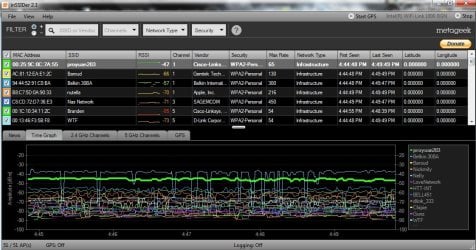
i am using inSSIDer to see my neighbors network.
 

My Computer

OS
Windows 7 Home Premium 64bit
how do i know if a DNS server is good for me?
if i ping google.com, i get around 150ms
What does it do if i change my DNS server?
i already use the DNS server of my ISP

and i cant really change to 5Ghz since my laptop network adapter cant receive 5.0Ghz signals

i am using inSSIDer to see my neighbors network.

You can use the DNS bench mark in the link to find the best DNS server in your area.
https://www.grc.com/dns/benchmark.htm

For me the fastest DNS was 4.2.2.5 and 4.2.2.6 but very little difference between that and Google's DNS.

There is no avoiding the fact that using a wired connection for gaming is the way to go if possible.

To improve your wireless connection it's more important to follow the recommendations on the first link. Also use WPA2 security and AES encryption, find the best channel using the guide I posted and eliminate walls between your machine and the wireless access point are what matters most. If you can't eliminate the walls then you should install an access point in the same room.

Channel bonding can sometimes be used to increase bandwidth, they are the 20mhz/40mhz settings in your router's set up page, but that only works correctly with an already very good connection.

Switching to wireless N only in the routers set up page will speeds things up considerably if no other machines need to connect using slower wireless standards like G, B. :)
 
Last edited:

My Computer

Computer type
PC/Desktop
Computer Manufacturer/Model Number
Home built
OS
Windows 7 Ult, Windows 8.1 Pro,
CPU
Q9650-4.275GHz, E8600 4.5GHz, E6750-3.8GHz
Motherboard
Evga 780i FTW
Memory
G.Skill PC2 9600 1200Mhz 5 5 5 15 2T
Graphics Card(s)
GTX480
Sound Card
Asus Xonar D2
Monitor(s) Displays
HannsG
Screen Resolution
1680X1050
Hard Drives
GSkill Phoenix Pro 120GB SSD
PSU
ThermalTake Toughpower 1000Watt modular
Case
ThermalTake XaserV
Cooling
Xigmatek S1283
Keyboard
Logitech G15
Mouse
Logitech G9
Internet Speed
T1
thank you for helping
i am living in a condo, so there are a lot of people around me with internet
i cant switch to 5.0 Ghz since my laptop adapter cant receive it..


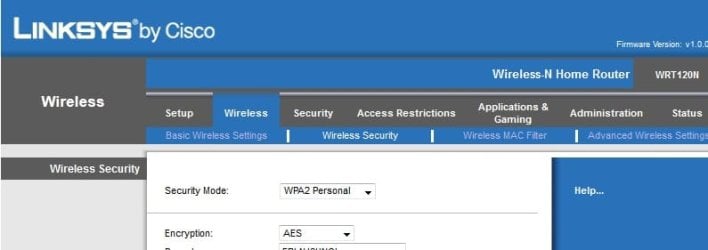
This is some settings that i have now :
Which DNS should i use? the Symantec ?

i have Intel 1000 BGN adapter
and Linksys WRT120N router
i have another netbook that im not sure what it is using
http://www.sevenforums.com/attachment.php?attachmentid=206930&stc=1&d=1334263865
 

Attachments

  • DNS.jpg
    DNS.jpg
    103.5 KB · Views: 18
  • routerset.jpg
    routerset.jpg
    35.6 KB · Views: 16
  • Router.jpg
    Router.jpg
    22.5 KB · Views: 13
  • inSSID.jpg
    inSSID.jpg
    125 KB · Views: 15
  • inssider.jpg
    inssider.jpg
    97.1 KB · Views: 12

My Computer

OS
Windows 7 Home Premium 64bit
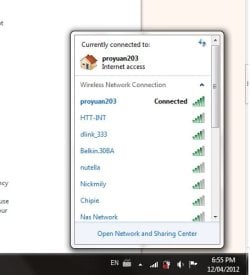
i think my signal is alright.
 

Attachments

  • signal.jpg
    signal.jpg
    20.1 KB · Views: 8

My Computer

OS
Windows 7 Home Premium 64bit
thank you for helping
i am living in a condo, so there are a lot of people around me with internet
i cant switch to 5.0 Ghz since my laptop adapter cant receive it..


This is some settings that i have now :
Which DNS should i use? the Symantec ?

i have Intel 1000 BGN adapter
and Linksys WRT120N router
i have another netbook that im not sure what it is using

In the picture where it says network mode "mixed" you will get much better speed by setting that to use wireless N only. The router has to slow down the signal in order to compensate for slower wireless like G, B or A.

You can only do this if you don't need wireless G, B, or A for any of your other wireless connections. :)
 

My Computer

Computer type
PC/Desktop
Computer Manufacturer/Model Number
Home built
OS
Windows 7 Ult, Windows 8.1 Pro,
CPU
Q9650-4.275GHz, E8600 4.5GHz, E6750-3.8GHz
Motherboard
Evga 780i FTW
Memory
G.Skill PC2 9600 1200Mhz 5 5 5 15 2T
Graphics Card(s)
GTX480
Sound Card
Asus Xonar D2
Monitor(s) Displays
HannsG
Screen Resolution
1680X1050
Hard Drives
GSkill Phoenix Pro 120GB SSD
PSU
ThermalTake Toughpower 1000Watt modular
Case
ThermalTake XaserV
Cooling
Xigmatek S1283
Keyboard
Logitech G15
Mouse
Logitech G9
Internet Speed
T1
ok thank you very much

You helped a lot ^_^

i think the netbook cant reiceive N signals,
ill test it out

EDIT: Do i use the Symantec DNS server?
 

My Computer

OS
Windows 7 Home Premium 64bit
ok thank you very much

You helped a lot ^_^

i think the netbook cant reiceive N signals,
ill test it out

EDIT: Do i use the Symantec DNS server?


Any of those DNS servers at the top of the list will work fine, the speed is very close so won't make much difference.
 

My Computer

Computer type
PC/Desktop
Computer Manufacturer/Model Number
Home built
OS
Windows 7 Ult, Windows 8.1 Pro,
CPU
Q9650-4.275GHz, E8600 4.5GHz, E6750-3.8GHz
Motherboard
Evga 780i FTW
Memory
G.Skill PC2 9600 1200Mhz 5 5 5 15 2T
Graphics Card(s)
GTX480
Sound Card
Asus Xonar D2
Monitor(s) Displays
HannsG
Screen Resolution
1680X1050
Hard Drives
GSkill Phoenix Pro 120GB SSD
PSU
ThermalTake Toughpower 1000Watt modular
Case
ThermalTake XaserV
Cooling
Xigmatek S1283
Keyboard
Logitech G15
Mouse
Logitech G9
Internet Speed
T1
Back
Top