How do i install ssd on my laptop?

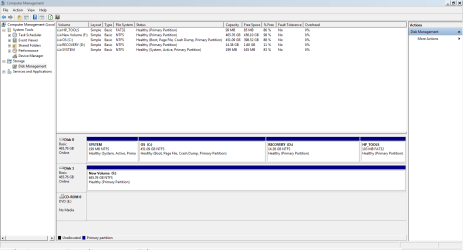
I think so, not sure, but in my existing system, there is a dedicated partition called recovery D:, do i need to copy and save these files?

also can any one please guide me how to save my bookmarks for website in google chrome?
 

My Computer My Computer

At a glance

windows 7 home premium 64 bitintel quad core i7 2630qm 2ghz8 gb ddr3AMD Radeon HD 6490M
Computer Manufacturer/Model Number
hp dv 7t 6154ae
OS
windows 7 home premium 64 bit
CPU
intel quad core i7 2630qm 2ghz
Motherboard
hp
Memory
8 gb ddr3
Graphics Card(s)
AMD Radeon HD 6490M
Monitor(s) Displays
17'' led
Hard Drives
samsung 840 250gb ssd
toshiba 500gb 5400rpm hdd
Internet Speed
fiber optic 40mb
If you are going to pull that hard drive, you will always have the recovery partition on it. So what`s the point of putting it somewhere else.

Save your favorites by copying the favorites file found here, to a usb drive.

start>computer>C:>users>your account>favorites

They would be your Internet Explorer favorites, not exactly sure about saving your Chrome favorites. Maybe this will help.


Go to : C:\Users\USER\Local Settings\Application Data\Google\Chrome\User Data\Default
where USER is the user name that you are logged in under.


http://support.google.com/chrome/bin/answer.py?hl=en&answer=96816
 

My Computer My Computer

At a glance

Windows 10 Pro x64Intel Core i7 6700KGSkill TridentZ RGB 16GB 3600 16-16-16-36EVGA GTX 980 Ti SC x2
Computer type
PC/Desktop
Computer Manufacturer/Model Number
Skylake Special #666
OS
Windows 10 Pro x64
CPU
Intel Core i7 6700K
Motherboard
Asus Sabertooth Z170 Mark 1
Memory
GSkill TridentZ RGB 16GB 3600 16-16-16-36
Graphics Card(s)
EVGA GTX 980 Ti SC x2
Sound Card
Realtek High Definition
Monitor(s) Displays
AOC G2460PG
Screen Resolution
1920 x 1080 144Hz
Hard Drives
Samsung 860 Pro 256GB, Seagate Barracuda 4TB x2
PSU
EVGA 1000 P2, EVGA White Custom Braided Cables
Case
Corsair Vengeance C70 Gunmetal Black
Cooling
Corsair H100i v2, Corsair ML120 x2, Thermal Grizzly Kryonaut
Keyboard
Logitech G910 Orion Spectrum
Mouse
Logitech G700s
Internet Speed
Verizon Fios Quantum Gateway 75/75
Antivirus
Windows Defender, Malwarebytes Free 3.8.3
Browser
Chrome
Other Info
Corsair SP120 x4, LG Blu-ray Drive, Durabrand HT-395 100 Watt Dolby Digital Amp, Corsair H2100 Wireless 7.1 Headset
about backing up my system drivers, I was told to download DRIVERMAX PROGRAM, which will do this job for me. is this the right way?
 

My Computer My Computer

At a glance

windows 7 home premium 64 bitintel quad core i7 2630qm 2ghz8 gb ddr3AMD Radeon HD 6490M
Computer Manufacturer/Model Number
hp dv 7t 6154ae
OS
windows 7 home premium 64 bit
CPU
intel quad core i7 2630qm 2ghz
Motherboard
hp
Memory
8 gb ddr3
Graphics Card(s)
AMD Radeon HD 6490M
Monitor(s) Displays
17'' led
Hard Drives
samsung 840 250gb ssd
toshiba 500gb 5400rpm hdd
Internet Speed
fiber optic 40mb
Windows 7 is pretty driver complete. I`ve never had to worry about drivers. Just run windows update and anything it doesn`t find, just go to the hp website. For instance, webcam drivers and software.

But it wouldn`t hurt to back them up.

You can put the recovery partition on the 500 gig hard drive using windows image backup.

start>control panel>backup and restore>create system image

The recovery partition will have to be assigned a letter.

There should be some software on your HP that allows you to make recovery discs. That would be the easiest way.
 

My Computer My Computer

At a glance

Windows 10 Pro x64Intel Core i7 6700KGSkill TridentZ RGB 16GB 3600 16-16-16-36EVGA GTX 980 Ti SC x2
Computer type
PC/Desktop
Computer Manufacturer/Model Number
Skylake Special #666
OS
Windows 10 Pro x64
CPU
Intel Core i7 6700K
Motherboard
Asus Sabertooth Z170 Mark 1
Memory
GSkill TridentZ RGB 16GB 3600 16-16-16-36
Graphics Card(s)
EVGA GTX 980 Ti SC x2
Sound Card
Realtek High Definition
Monitor(s) Displays
AOC G2460PG
Screen Resolution
1920 x 1080 144Hz
Hard Drives
Samsung 860 Pro 256GB, Seagate Barracuda 4TB x2
PSU
EVGA 1000 P2, EVGA White Custom Braided Cables
Case
Corsair Vengeance C70 Gunmetal Black
Cooling
Corsair H100i v2, Corsair ML120 x2, Thermal Grizzly Kryonaut
Keyboard
Logitech G910 Orion Spectrum
Mouse
Logitech G700s
Internet Speed
Verizon Fios Quantum Gateway 75/75
Antivirus
Windows Defender, Malwarebytes Free 3.8.3
Browser
Chrome
Other Info
Corsair SP120 x4, LG Blu-ray Drive, Durabrand HT-395 100 Watt Dolby Digital Amp, Corsair H2100 Wireless 7.1 Headset
If you are going to pull that hard drive, you will always have the recovery partition on it. So what`s the point of putting it somewhere else.


Import or export bookmarks - Google Chrome Help

I have 2 HDDs on my laptop. how can i find out on which hard drive this recovery partition exists? as I have put all my data like songs, pictures and software which i need on HDD 2 which i will keep with ssd. can I copy recovery files on to this HDD as well?
 

My Computer My Computer

At a glance

windows 7 home premium 64 bitintel quad core i7 2630qm 2ghz8 gb ddr3AMD Radeon HD 6490M
Computer Manufacturer/Model Number
hp dv 7t 6154ae
OS
windows 7 home premium 64 bit
CPU
intel quad core i7 2630qm 2ghz
Motherboard
hp
Memory
8 gb ddr3
Graphics Card(s)
AMD Radeon HD 6490M
Monitor(s) Displays
17'' led
Hard Drives
samsung 840 250gb ssd
toshiba 500gb 5400rpm hdd
Internet Speed
fiber optic 40mb
The recovery partition is on the same drive as windows. Open up disk management and you will see.

You already posted a pic a ways back.
 

My Computer My Computer

At a glance

Windows 10 Pro x64Intel Core i7 6700KGSkill TridentZ RGB 16GB 3600 16-16-16-36EVGA GTX 980 Ti SC x2
Computer type
PC/Desktop
Computer Manufacturer/Model Number
Skylake Special #666
OS
Windows 10 Pro x64
CPU
Intel Core i7 6700K
Motherboard
Asus Sabertooth Z170 Mark 1
Memory
GSkill TridentZ RGB 16GB 3600 16-16-16-36
Graphics Card(s)
EVGA GTX 980 Ti SC x2
Sound Card
Realtek High Definition
Monitor(s) Displays
AOC G2460PG
Screen Resolution
1920 x 1080 144Hz
Hard Drives
Samsung 860 Pro 256GB, Seagate Barracuda 4TB x2
PSU
EVGA 1000 P2, EVGA White Custom Braided Cables
Case
Corsair Vengeance C70 Gunmetal Black
Cooling
Corsair H100i v2, Corsair ML120 x2, Thermal Grizzly Kryonaut
Keyboard
Logitech G910 Orion Spectrum
Mouse
Logitech G700s
Internet Speed
Verizon Fios Quantum Gateway 75/75
Antivirus
Windows Defender, Malwarebytes Free 3.8.3
Browser
Chrome
Other Info
Corsair SP120 x4, LG Blu-ray Drive, Durabrand HT-395 100 Watt Dolby Digital Amp, Corsair H2100 Wireless 7.1 Headset
Capture.PNG
can i copy recovery files to the other HDD?
 

My Computer My Computer

At a glance

windows 7 home premium 64 bitintel quad core i7 2630qm 2ghz8 gb ddr3AMD Radeon HD 6490M
Computer Manufacturer/Model Number
hp dv 7t 6154ae
OS
windows 7 home premium 64 bit
CPU
intel quad core i7 2630qm 2ghz
Motherboard
hp
Memory
8 gb ddr3
Graphics Card(s)
AMD Radeon HD 6490M
Monitor(s) Displays
17'' led
Hard Drives
samsung 840 250gb ssd
toshiba 500gb 5400rpm hdd
Internet Speed
fiber optic 40mb
View attachment 246157
can i copy recovery files to the other HDD?

And there it is D:

If you want, copy that and the small tools partition over to the F: drive.

But like I said, what`s the point ? I would see if the software is there to put it on dvds.
 

My Computer My Computer

At a glance

Windows 10 Pro x64Intel Core i7 6700KGSkill TridentZ RGB 16GB 3600 16-16-16-36EVGA GTX 980 Ti SC x2
Computer type
PC/Desktop
Computer Manufacturer/Model Number
Skylake Special #666
OS
Windows 10 Pro x64
CPU
Intel Core i7 6700K
Motherboard
Asus Sabertooth Z170 Mark 1
Memory
GSkill TridentZ RGB 16GB 3600 16-16-16-36
Graphics Card(s)
EVGA GTX 980 Ti SC x2
Sound Card
Realtek High Definition
Monitor(s) Displays
AOC G2460PG
Screen Resolution
1920 x 1080 144Hz
Hard Drives
Samsung 860 Pro 256GB, Seagate Barracuda 4TB x2
PSU
EVGA 1000 P2, EVGA White Custom Braided Cables
Case
Corsair Vengeance C70 Gunmetal Black
Cooling
Corsair H100i v2, Corsair ML120 x2, Thermal Grizzly Kryonaut
Keyboard
Logitech G910 Orion Spectrum
Mouse
Logitech G700s
Internet Speed
Verizon Fios Quantum Gateway 75/75
Antivirus
Windows Defender, Malwarebytes Free 3.8.3
Browser
Chrome
Other Info
Corsair SP120 x4, LG Blu-ray Drive, Durabrand HT-395 100 Watt Dolby Digital Amp, Corsair H2100 Wireless 7.1 Headset
ok i will leave it then. all done now i am out and will be back with ssd running soon hopefully.
 

My Computer My Computer

At a glance

windows 7 home premium 64 bitintel quad core i7 2630qm 2ghz8 gb ddr3AMD Radeon HD 6490M
Computer Manufacturer/Model Number
hp dv 7t 6154ae
OS
windows 7 home premium 64 bit
CPU
intel quad core i7 2630qm 2ghz
Motherboard
hp
Memory
8 gb ddr3
Graphics Card(s)
AMD Radeon HD 6490M
Monitor(s) Displays
17'' led
Hard Drives
samsung 840 250gb ssd
toshiba 500gb 5400rpm hdd
Internet Speed
fiber optic 40mb
hi all
i am back every thing is working great. how can i take full advantage of SSD? performance and storage wise?
 

My Computer My Computer

At a glance

windows 7 home premium 64 bitintel quad core i7 2630qm 2ghz8 gb ddr3AMD Radeon HD 6490M
Computer Manufacturer/Model Number
hp dv 7t 6154ae
OS
windows 7 home premium 64 bit
CPU
intel quad core i7 2630qm 2ghz
Motherboard
hp
Memory
8 gb ddr3
Graphics Card(s)
AMD Radeon HD 6490M
Monitor(s) Displays
17'' led
Hard Drives
samsung 840 250gb ssd
toshiba 500gb 5400rpm hdd
Internet Speed
fiber optic 40mb

My Computer My Computer

At a glance

Win 7 Pro x64 / Win 10 ProIntel(R) Core(TM) i7-3630QM CPU @ 2.40GHz12 GB(1) Intel(R) HD Graphics 4000 (2) NVIDIA GeFo...
Computer type
Laptop
Computer Manufacturer/Model Number
Sager NP9170
OS
Win 7 Pro x64 / Win 10 Pro
CPU
Intel(R) Core(TM) i7-3630QM CPU @ 2.40GHz
Motherboard
CLEVO P170EM
Memory
12 GB
Graphics Card(s)
(1) Intel(R) HD Graphics 4000 (2) NVIDIA GeForce GTX 675M
Sound Card
(1) Realtek High Definition Audio (2) Intel(R) Display Aud
Monitor(s) Displays
17.3
Screen Resolution
1920x1080
Hard Drives
(1) Samsung 860 EVO 500GB(OS) (1) Samsung 860 EVO 500GB(Data)
Keyboard
Backlite
Antivirus
MSE, Malwarebytes Pro
Browser
Firefox
Other Info
DESKTOP: Custom-built.
OS: Win 10 Pro x64.
CASE: Rosewill R5.
CPU: Intel I5 4670K CPU @ 3.40GHz.
CPU COOLER: Cool Master Hyper 212 EVO.
MOTHERBOARD: Asus Z87-A.
MEMORY: Kingston HyperX 2x4 GB.
GPU: Nvidia Geforce 650 TI.
PSU: Corsair TX750.
DRIVES: (1) Samsung 840 120 GB SSD (2) Western Digital blue 500 GB 7200 RPM.
There is little you need to do regarding performance. Just leave the whole OS on the SSD and move the user files to the HDD.

Regarding storage you may get rid of the hiberfile. The command is powercfg -h off. You can also reduce the pagefile to 2GB.
 

My Computer My Computer

At a glance

Vista, Windows7, Mint Mate, Zorin, Windows 8from 1.6GHz Duo to i7
Computer Manufacturer/Model Number
HP, Dell, Gateway, Toshiba - 4 laptops and 2 desktops
OS
Vista, Windows7, Mint Mate, Zorin, Windows 8
CPU
from 1.6GHz Duo to i7
Monitor(s) Displays
2x HP w2207
Hard Drives
5x HDD, 7x SSD, 12x Externals
Keyboard
with trackball - no mices
Mouse
Trackball mice
Internet Speed
DSL 6000
I agree with WHS, I do very little to mine and get very good performance. Too many people 'tweek' their SSD to death. I disable hiberfile (hibernate) to save space on the SSD, set defrag to manual ( the OS should do that for you, but check), move my user folders to another hard drive, reduce the page file, and almost nothing else. Everything else will be taken care of by the OS.
 

My Computers My Computers

  • At a glance

    Windows 11 ProRyzen 9 5900X32GB G Skill DDR4-3600EVGA RTX 3080 FTW 3 Ultra
    Computer type
    PC/Desktop
    Computer Manufacturer/Model Number
    ALWAYS UNDER CONSTRUCTION
    OS
    Windows 11 Pro
    CPU
    Ryzen 9 5900X
    Motherboard
    Asus X570 Crosshair Viii Hero
    Memory
    32GB G Skill DDR4-3600
    Graphics Card(s)
    EVGA RTX 3080 FTW 3 Ultra
    Sound Card
    On Board/Sennheiser PC37X Headset
    Monitor(s) Displays
    3 X Asus 27"
    Screen Resolution
    2560x1440
    Hard Drives
    2 X 1 TB NVME drives
    PSU
    EVGA 850
    Case
    Phanteks Eclipse P400A
    Cooling
    EVGA 280 AIO
    Keyboard
    Logitech G510s/ Logitech G13
    Mouse
    Logitech G502
    Internet Speed
    24/1
    Antivirus
    ESET/MBAM Pro/SAS Pro
    Browser
    Chrome/ Firefox/ Edge
  • At a glance

    Windows 11 ProIntel Ultra 9 288V32 GB LPDDR5X 8533
    Computer type
    Laptop
    System Manufacturer/Model Number
    Dell 16 Plus
    OS
    Windows 11 Pro
    CPU
    Intel Ultra 9 288V
    Memory
    32 GB LPDDR5X 8533
    Monitor(s) Displays
    16" Mini-LED HDR600 Touch 90 Hz
    Screen Resolution
    2560X1600
    Hard Drives
    1 TB NVME
  • Like
Reactions: whs
when i install a new program should i install it on ssd drive or is it better to change path and install on the other drive?
 

My Computer My Computer

At a glance

windows 7 home premium 64 bitintel quad core i7 2630qm 2ghz8 gb ddr3AMD Radeon HD 6490M
Computer Manufacturer/Model Number
hp dv 7t 6154ae
OS
windows 7 home premium 64 bit
CPU
intel quad core i7 2630qm 2ghz
Motherboard
hp
Memory
8 gb ddr3
Graphics Card(s)
AMD Radeon HD 6490M
Monitor(s) Displays
17'' led
Hard Drives
samsung 840 250gb ssd
toshiba 500gb 5400rpm hdd
Internet Speed
fiber optic 40mb
Nah, put it on the SSD. That is one of the great effects of the SSD - fast program access.
 

My Computer My Computer

At a glance

Vista, Windows7, Mint Mate, Zorin, Windows 8from 1.6GHz Duo to i7
Computer Manufacturer/Model Number
HP, Dell, Gateway, Toshiba - 4 laptops and 2 desktops
OS
Vista, Windows7, Mint Mate, Zorin, Windows 8
CPU
from 1.6GHz Duo to i7
Monitor(s) Displays
2x HP w2207
Hard Drives
5x HDD, 7x SSD, 12x Externals
Keyboard
with trackball - no mices
Mouse
Trackball mice
Internet Speed
DSL 6000
so just change the user data paths and all new installs on ssd?
 

My Computer My Computer

At a glance

windows 7 home premium 64 bitintel quad core i7 2630qm 2ghz8 gb ddr3AMD Radeon HD 6490M
Computer Manufacturer/Model Number
hp dv 7t 6154ae
OS
windows 7 home premium 64 bit
CPU
intel quad core i7 2630qm 2ghz
Motherboard
hp
Memory
8 gb ddr3
Graphics Card(s)
AMD Radeon HD 6490M
Monitor(s) Displays
17'' led
Hard Drives
samsung 840 250gb ssd
toshiba 500gb 5400rpm hdd
Internet Speed
fiber optic 40mb
Right
 

My Computer My Computer

At a glance

Vista, Windows7, Mint Mate, Zorin, Windows 8from 1.6GHz Duo to i7
Computer Manufacturer/Model Number
HP, Dell, Gateway, Toshiba - 4 laptops and 2 desktops
OS
Vista, Windows7, Mint Mate, Zorin, Windows 8
CPU
from 1.6GHz Duo to i7
Monitor(s) Displays
2x HP w2207
Hard Drives
5x HDD, 7x SSD, 12x Externals
Keyboard
with trackball - no mices
Mouse
Trackball mice
Internet Speed
DSL 6000
I`m glad you did it HOORAY :p:p:p:D:D:D:D:D;););):thumbsup::thumbsup::thumbsup::thumbsup:

:thumbsup::thumbsup::thumbsup:

And it was pretty easy wassn`t it ?

Have you run windows update yet ?
 

My Computer My Computer

At a glance

Windows 10 Pro x64Intel Core i7 6700KGSkill TridentZ RGB 16GB 3600 16-16-16-36EVGA GTX 980 Ti SC x2
Computer type
PC/Desktop
Computer Manufacturer/Model Number
Skylake Special #666
OS
Windows 10 Pro x64
CPU
Intel Core i7 6700K
Motherboard
Asus Sabertooth Z170 Mark 1
Memory
GSkill TridentZ RGB 16GB 3600 16-16-16-36
Graphics Card(s)
EVGA GTX 980 Ti SC x2
Sound Card
Realtek High Definition
Monitor(s) Displays
AOC G2460PG
Screen Resolution
1920 x 1080 144Hz
Hard Drives
Samsung 860 Pro 256GB, Seagate Barracuda 4TB x2
PSU
EVGA 1000 P2, EVGA White Custom Braided Cables
Case
Corsair Vengeance C70 Gunmetal Black
Cooling
Corsair H100i v2, Corsair ML120 x2, Thermal Grizzly Kryonaut
Keyboard
Logitech G910 Orion Spectrum
Mouse
Logitech G700s
Internet Speed
Verizon Fios Quantum Gateway 75/75
Antivirus
Windows Defender, Malwarebytes Free 3.8.3
Browser
Chrome
Other Info
Corsair SP120 x4, LG Blu-ray Drive, Durabrand HT-395 100 Watt Dolby Digital Amp, Corsair H2100 Wireless 7.1 Headset
Congratulations. I know you are proud of yourself, and should be. And think about what you have learned. Now, you will no longer be nervous about doing a clean install. Well, done.
 

My Computers My Computers

  • At a glance

    Windows 11 ProRyzen 9 5900X32GB G Skill DDR4-3600EVGA RTX 3080 FTW 3 Ultra
    Computer type
    PC/Desktop
    Computer Manufacturer/Model Number
    ALWAYS UNDER CONSTRUCTION
    OS
    Windows 11 Pro
    CPU
    Ryzen 9 5900X
    Motherboard
    Asus X570 Crosshair Viii Hero
    Memory
    32GB G Skill DDR4-3600
    Graphics Card(s)
    EVGA RTX 3080 FTW 3 Ultra
    Sound Card
    On Board/Sennheiser PC37X Headset
    Monitor(s) Displays
    3 X Asus 27"
    Screen Resolution
    2560x1440
    Hard Drives
    2 X 1 TB NVME drives
    PSU
    EVGA 850
    Case
    Phanteks Eclipse P400A
    Cooling
    EVGA 280 AIO
    Keyboard
    Logitech G510s/ Logitech G13
    Mouse
    Logitech G502
    Internet Speed
    24/1
    Antivirus
    ESET/MBAM Pro/SAS Pro
    Browser
    Chrome/ Firefox/ Edge
  • At a glance

    Windows 11 ProIntel Ultra 9 288V32 GB LPDDR5X 8533
    Computer type
    Laptop
    System Manufacturer/Model Number
    Dell 16 Plus
    OS
    Windows 11 Pro
    CPU
    Intel Ultra 9 288V
    Memory
    32 GB LPDDR5X 8533
    Monitor(s) Displays
    16" Mini-LED HDR600 Touch 90 Hz
    Screen Resolution
    2560X1600
    Hard Drives
    1 TB NVME
yes thats true, what i have learned I will never forget, and yes proud too.:) but still lots to learn ahead.
thanks to all of you. this is the best forum i have ever been on.
 

My Computer My Computer

At a glance

windows 7 home premium 64 bitintel quad core i7 2630qm 2ghz8 gb ddr3AMD Radeon HD 6490M
Computer Manufacturer/Model Number
hp dv 7t 6154ae
OS
windows 7 home premium 64 bit
CPU
intel quad core i7 2630qm 2ghz
Motherboard
hp
Memory
8 gb ddr3
Graphics Card(s)
AMD Radeon HD 6490M
Monitor(s) Displays
17'' led
Hard Drives
samsung 840 250gb ssd
toshiba 500gb 5400rpm hdd
Internet Speed
fiber optic 40mb
Back
Top