- Local time
- 1:34 AM
- Messages
- 279
Hi Everyone!!
I refuse to quit!
For the missing background information to this new question:
This new issue:
See prior thread called: http://www.sevenforums.com/backup-r...-pe-lost-info-search-no-find-inmythreads.html
I did all the steps listed in Post # 7 for the Windows AIK Installation.
I need to do this to complete the AOMEI Program Backerupper Rescue Boot Disk with its Windows PE environment for rescuing the computer in the event of a catastrophic failure or loss of data.
I opened up the Windows AIK .iso Disk I created on a DVD burner with Roxio.
Only one choice... "click" on the box to open

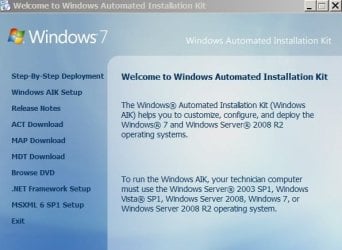
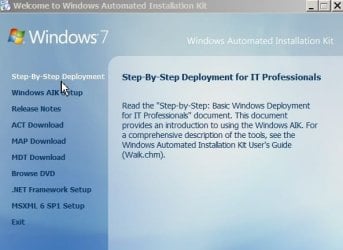
Then what??? lots of choices here.. I choose to read the step by step white paper
at this address:: View attachment Step-by-Step Basic Windows Deployment for IT Professionals TEXT DOC REMOVES ALL FORMATTING.txt
My mind
has been
totally
blown
away!
(sorry for the one word lines.... how else can I explain this is what the professional IT people I have associated myself with years (I'm a computer USER!! not IT) and they talk in this language 100% of the time and get paid yearly salaries 100K and upwards to do so!)
I am not stupid.. I can read and understand lots of this, thanks to lessons from the IT people over decades......
But now I'm first time in my life facing a bull in a bull ring all by myself....
I'm armed and ready.... I got a tiny red square and a toothpick....
Do YOU think I'm ready to tackle this kind of an operation all by myself????
Saving everyone lots of trouble explaining things.. I can read this and understand it.
Here in Screenshot:
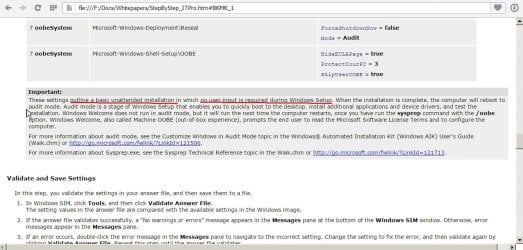
Underlined in RED
IS the answer... "Unintended installation" item..
But where is it hiding?
I see sectrion saying navigate on the DVD to "StartCD" but I did it. and the DVD Kept running and running and nothing else happened. I got frightened I did something wrong and tried to cancel the operation... All I could do after 15 minutes of frantic pushing buttons was to manually EJECT the DVD and there it is .. outside of the comupter and I wrote this question for someone to read through and figure out:
Question: How do I do it?
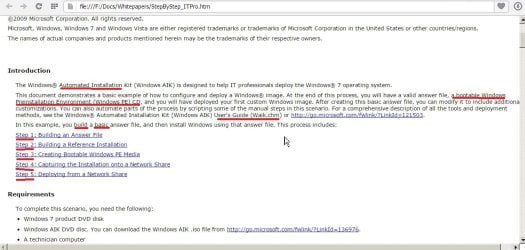
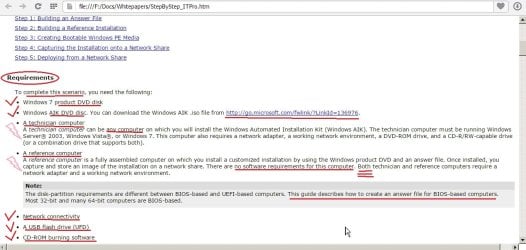
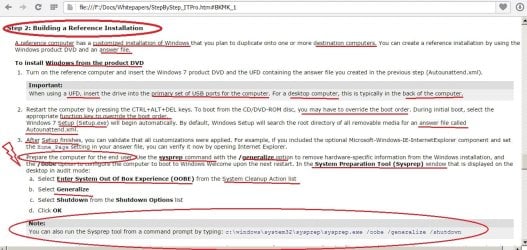
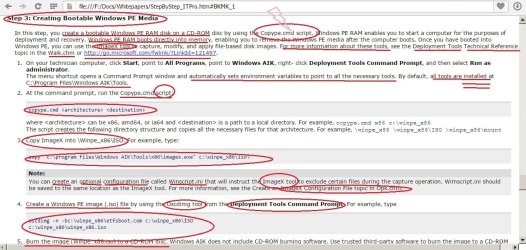
That answer appears to be hidden in all this complex computer lingo and language (see in red underlines) and Red Circles I have NO IDEA how to do or find these items and Thunderbolts in Orange---mean I DO NOT and CAN NOT have these items for financial or other reasons---so how can I complete the process?
I'm just not rated "A+" Certified technician (If I remember the CompTIA. testing system/rating system) for Windows 7!
Thanks for reading all of this... sorry for too many Screenshots and red underlining for a non "A+" Computer technician here!
I refuse to quit!
For the missing background information to this new question:
This new issue:
See prior thread called: http://www.sevenforums.com/backup-r...-pe-lost-info-search-no-find-inmythreads.html
I did all the steps listed in Post # 7 for the Windows AIK Installation.
I need to do this to complete the AOMEI Program Backerupper Rescue Boot Disk with its Windows PE environment for rescuing the computer in the event of a catastrophic failure or loss of data.
I opened up the Windows AIK .iso Disk I created on a DVD burner with Roxio.
Only one choice... "click" on the box to open
Then what??? lots of choices here.. I choose to read the step by step white paper
at this address:: View attachment Step-by-Step Basic Windows Deployment for IT Professionals TEXT DOC REMOVES ALL FORMATTING.txt
My mind
has been
totally
blown
away!
(sorry for the one word lines.... how else can I explain this is what the professional IT people I have associated myself with years (I'm a computer USER!! not IT) and they talk in this language 100% of the time and get paid yearly salaries 100K and upwards to do so!)
I am not stupid.. I can read and understand lots of this, thanks to lessons from the IT people over decades......
But now I'm first time in my life facing a bull in a bull ring all by myself....
I'm armed and ready.... I got a tiny red square and a toothpick....
Do YOU think I'm ready to tackle this kind of an operation all by myself????
Saving everyone lots of trouble explaining things.. I can read this and understand it.
Here in Screenshot:
Underlined in RED
IS the answer... "Unintended installation" item..
But where is it hiding?
I see sectrion saying navigate on the DVD to "StartCD" but I did it. and the DVD Kept running and running and nothing else happened. I got frightened I did something wrong and tried to cancel the operation... All I could do after 15 minutes of frantic pushing buttons was to manually EJECT the DVD and there it is .. outside of the comupter and I wrote this question for someone to read through and figure out:
Question: How do I do it?
That answer appears to be hidden in all this complex computer lingo and language (see in red underlines) and Red Circles I have NO IDEA how to do or find these items and Thunderbolts in Orange---mean I DO NOT and CAN NOT have these items for financial or other reasons---so how can I complete the process?
I'm just not rated "A+" Certified technician (If I remember the CompTIA. testing system/rating system) for Windows 7!
Thanks for reading all of this... sorry for too many Screenshots and red underlining for a non "A+" Computer technician here!
My Computer
At a glance
Windows7 Professional 64bitIntel(R) Core (TM) i5 CPU M 430 @2.27 Ghz8.0 GB
- Computer type
- Laptop
- Computer Manufacturer/Model Number
- SONY VAIO VPCS111FM
- OS
- Windows7 Professional 64bit
- CPU
- Intel(R) Core (TM) i5 CPU M 430 @2.27 Ghz
- Memory
- 8.0 GB
- Hard Drives
- Seagate 500GB Momentus
- Cooling
- Internal fan
- Mouse
- Logitech bluetooth trackball
- Browser
- Pale Moon Browser for x64