How do i install Windows 7 on the Lattepanda

Japster

New member
Local time
4:34 AM
Messages
5
Stuck on installation for 2 days Lattepanda SBP

Hello fellow Windows 7 fanatics,

Recently a friend and I bought a Lattepanda 4G/64GB for our Arduino weather station project.
We needed this single board computer to host a SQL server to store the data collected from the sensors. And we would like to see if we can use SQL server data analysis services to see if we can find any patterns. We also need this single board computer to run miscellaneous programs that can only run on Windows 7 (Windows 7 is a better OS anyways :p).
It would be a perfect device if we could get Windows 7 to run on it. Hardware-wise it should be able to run Windows 7.
We really need to make this device to work with Windows 7 or it would be completely useless for us.
We have tried a lot things to get the OS installed on this device but we just can't get it to work.

There doesn't really seem to be an option in the BIOS to turn on Legacy or CSM. We have turned off fast boot and secure boot but that didn't help either.
When trying to make a bootable USB device with Rufus with GPT support for UEFI it loads up until displays it starting Windows and then it locks up.

Here is a list of the other things we have tried in different combinations:

Rufus with several different options to make it UEFI compatible:
Hangs at starting Windows
Modifying an ISO making it UEFI compatible:
Same issue
Installing Windows 7 through the pre-installed Windows 10 and finding the possible driver asscociated with it (Intel SD Host Controller):
Won't pick up the driver (maybe the wrong driver?)
YUMI multiboot MBR and GPT:
Won't start from the USB device
Several ISO files including Windows server 2008:
Same issue
UBCD:
Won't start from the USB device
PLOP bootloader:
Won't start from the USB device
Windows install safemode:
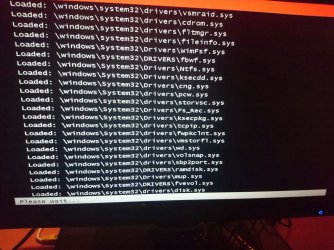
Hangs at disk.sys
Windows install ignoring bad driver signatures:
Same issue
Windows install with logs:
Can't find where the logs are located

If anyone has a solution to this problem we would be really grateful,
Japstert
 
Last edited:

My Computer My Computer

Computer type
PC/Desktop
OS
Windows 7 Ultimate
Possibility here:

Code:
(echo list disk
echo select disk N
echo clean
echo convert gpt
echo create partition efi size=100
echo format quick fs=fat32 label="System"
echo assign letter="S"
echo create partition primary
echo format quick fs=ntfs label="Windows"
echo assign letter="W"
echo exit ) | diskpart.exe

DISM.exe /Apply-Image /ImageFile:D:\W7_x64\sources\install.wim /Index:2 /ApplyDir:W:\
BCDboot.exe W:\Windows /s S:

rem disable vga.sys 640x480 16 colors
ren W:\windows\system32\drivers\vga.sys *.off
set Services=HKLM\loaded_SYSTEM\ControlSet001\Services
reg.exe load HKLM\loaded_SYSTEM W:\Windows\system32\config\system
reg.exe add "%Services%\Vga" /f /t REG_DWORD /v "Start" /d 4
reg.exe add "%Services%\VgaSave" /f /t REG_DWORD /v "Start" /d 4
reg.exe unload HKLM\loaded_SYSTEM

rem disable vgapnp.sys : novesa on
bcdedit.exe /store S:\efi\Microsoft\boot\bcd /set {default} bootlog yes
bcdedit.exe /store S:\efi\Microsoft\boot\bcd /set {default} bootstatuspolicy IgnoreAllFailures
bcdedit.exe /store S:\efi\Microsoft\boot\bcd /set {default} novesa on
bcdedit.exe /store S:\efi\Microsoft\boot\bcd /set {default} quietboot on

rem include graphics driver
Dism.exe /Image:W:\ /Add-Driver /Driver:D:\Drivers\C8HM70\Intel_Graphics\x64\Graphics\igdlh64.inf

Install Windows 7 at UEFI Graphics Output Protocol (GOP) hardware - Windows 7 - reboot.pro

Windows 7 x64 on UEFI without Legacy Support/CSM - YouTube

You may also need to install emmc drivers using dism as above.
 

My Computers My Computers

System One System Two

  • Computer type
    PC/Desktop
    OS
    7 X64
    CPU
    i5 8400
    Motherboard
    gigabyte b365m ds3h
    Memory
    2x8gb 3200mhz
    Hard Drives
    various
    PSU
    pure power 11 400w cm
    Case
    Coolermaster
    Cooling
    cryorig m9i
  • Computer type
    PC/Desktop
    OS
    7x64
    CPU
    g5400
    Motherboard
    ga b365m ds3h
    Memory
    8gb ddr4 2400
    PSU
    xfx pro 450w
If it is a Skylake or Kabylake MoBo you need to add the USB 3 and AHCI drivers to the Win 7 installation disk.
Please give us ALL hardware specs.
 

My Computers My Computers

System One System Two

  • Computer type
    PC/Desktop
    Computer Manufacturer/Model Number
    custom build
    OS
    Windows 7 HP 64
    CPU
    i5 6600K - 800MHz to 4200MHz
    Motherboard
    GA-Z170-HD3P
    Memory
    4+4G GSkill DDR4 3000
    Graphics Card(s)
    IG - Intel 530
    Monitor(s) Displays
    Samsung 226BW
    Screen Resolution
    1680x1050
    Hard Drives
    (1) -1 SM951 – 128GB M.2 AHCI PCIe SSD drive for Windows 7 and Lubuntu
    (2) -1 WD SATA 3 - 1T for Data
    (3) -1 WD SATA 3 - 1T for backup
    PSU
    Thermaltake 450W TR2 gold
    Keyboard
    Old and good Chicony mechanical keyboard
    Mouse
    Logitech mX performance - 9 buttons (had to disable some)
    Internet Speed
    500Mb/s
    Browser
    Firefox 64
    Other Info
    TinyWall firewall
  • Computer type
    Laptop
    System Manufacturer/Model Number
    Asus Q550LF
    OS
    Windows 7 Pro
    CPU
    i7-4500U 800MHz to 3.0GHz
    Motherboard
    Asus Q550LF
    Memory
    (4+4)G DDR3 1600
    Graphics Card(s)
    IG intel 4400 + NVIDIA GeForce GT 745M
    Sound Card
    Realtek
    Monitor(s) Displays
    LG Display LP156WF4-SPH1
    Screen Resolution
    1920 x 1080
    Hard Drives
    BX500 120G SSD for Windows and programs +
    1T HDD for data
    Internet Speed
    500 Mb/s
    Browser
    Firefox
    Other Info
    TinyWall firewall
Thanks for the possible solution but it doesn't seem to work.

We have tried this solution step for step with the drivers for the Lattepanda but once we reboot after those steps are done it gets stuck in a boot loop. It loads up only giving us an black screen for a while and then it gives us an orange bar at the top and then it loops. We can tell it reboots because it suddenly has a huge drop in current on our current meter.

The attached picture is from the orange bar that it shows while trying to load Windows. That picture was taken before we tried your solution but its the same bar that's on the top at the black screen when Windows 7 tries to boot after those steps from the tutorial.

We would really appreciate some extra help on this issue,
Japster
 

Attachments

  • ^6380918C7D808A07C91837C0280C1A2E647BE6815EA7C09D96^pimgpsh_fullsize_distr.jpg
    ^6380918C7D808A07C91837C0280C1A2E647BE6815EA7C09D96^pimgpsh_fullsize_distr.jpg
    136.8 KB · Views: 1
Last edited:

My Computer My Computer

Computer type
PC/Desktop
OS
Windows 7 Ultimate
The attached picture? Go Advanced (below) - Manage Attachments - Browse - Upload
ALL hardware specs???
 

My Computers My Computers

System One System Two

  • Computer type
    PC/Desktop
    Computer Manufacturer/Model Number
    custom build
    OS
    Windows 7 HP 64
    CPU
    i5 6600K - 800MHz to 4200MHz
    Motherboard
    GA-Z170-HD3P
    Memory
    4+4G GSkill DDR4 3000
    Graphics Card(s)
    IG - Intel 530
    Monitor(s) Displays
    Samsung 226BW
    Screen Resolution
    1680x1050
    Hard Drives
    (1) -1 SM951 – 128GB M.2 AHCI PCIe SSD drive for Windows 7 and Lubuntu
    (2) -1 WD SATA 3 - 1T for Data
    (3) -1 WD SATA 3 - 1T for backup
    PSU
    Thermaltake 450W TR2 gold
    Keyboard
    Old and good Chicony mechanical keyboard
    Mouse
    Logitech mX performance - 9 buttons (had to disable some)
    Internet Speed
    500Mb/s
    Browser
    Firefox 64
    Other Info
    TinyWall firewall
  • Computer type
    Laptop
    System Manufacturer/Model Number
    Asus Q550LF
    OS
    Windows 7 Pro
    CPU
    i7-4500U 800MHz to 3.0GHz
    Motherboard
    Asus Q550LF
    Memory
    (4+4)G DDR3 1600
    Graphics Card(s)
    IG intel 4400 + NVIDIA GeForce GT 745M
    Sound Card
    Realtek
    Monitor(s) Displays
    LG Display LP156WF4-SPH1
    Screen Resolution
    1920 x 1080
    Hard Drives
    BX500 120G SSD for Windows and programs +
    1T HDD for data
    Internet Speed
    500 Mb/s
    Browser
    Firefox
    Other Info
    TinyWall firewall
The attached picture? Go Advanced (below) - Manage Attachments - Browse - Upload
ALL hardware specs???

My apologies I was pretty sure I uploaded the picture but it didn't seem to get through.
And about the specs here is the list of specs from the Lattepanda Single Board Computer:

Processor: Intel Cherry Trail Z8300 Quad Core 1.8GHz
Operation System: Pre-installed full edition of Windows 10
Ram: 4GB DDR3L
Storage Capability: 64GB
GPU: Intel HD Graphics, 12 EUs @200-500 Mhz, single-channel memory
One USB3.0 port and two USB 2.0 ports
WiFi and Bluetooth 4.0
Built-in Arduino Co-processor: ATmega32u4
Video output: HDMI and MIPI-DSI
Onboard touch panel overlay connector
Supports 100Mbps Ethernet
GPIO:
6 GPIOs from Cherry Trail processor
20 GPIOs from Arduino Leonardo
6 Plug and play Gravity sensor connectors
Power: 5v/2A
 
Last edited:

My Computer My Computer

Computer type
PC/Desktop
OS
Windows 7 Ultimate
Some special devices are designed to have a specific OS.
It's possible that yours can't have win7 installed.
My suggestion:
- Contact the Lattepanda support and ask about the possibility of installing win 7 on it.
- Run your Win 7 programs under win 10 on compatibility mode. Install the program and right click on the shortcut created, choose compatibility mode and choose Win 7.
 

My Computers My Computers

System One System Two

  • Computer type
    PC/Desktop
    Computer Manufacturer/Model Number
    custom build
    OS
    Windows 7 HP 64
    CPU
    i5 6600K - 800MHz to 4200MHz
    Motherboard
    GA-Z170-HD3P
    Memory
    4+4G GSkill DDR4 3000
    Graphics Card(s)
    IG - Intel 530
    Monitor(s) Displays
    Samsung 226BW
    Screen Resolution
    1680x1050
    Hard Drives
    (1) -1 SM951 – 128GB M.2 AHCI PCIe SSD drive for Windows 7 and Lubuntu
    (2) -1 WD SATA 3 - 1T for Data
    (3) -1 WD SATA 3 - 1T for backup
    PSU
    Thermaltake 450W TR2 gold
    Keyboard
    Old and good Chicony mechanical keyboard
    Mouse
    Logitech mX performance - 9 buttons (had to disable some)
    Internet Speed
    500Mb/s
    Browser
    Firefox 64
    Other Info
    TinyWall firewall
  • Computer type
    Laptop
    System Manufacturer/Model Number
    Asus Q550LF
    OS
    Windows 7 Pro
    CPU
    i7-4500U 800MHz to 3.0GHz
    Motherboard
    Asus Q550LF
    Memory
    (4+4)G DDR3 1600
    Graphics Card(s)
    IG intel 4400 + NVIDIA GeForce GT 745M
    Sound Card
    Realtek
    Monitor(s) Displays
    LG Display LP156WF4-SPH1
    Screen Resolution
    1920 x 1080
    Hard Drives
    BX500 120G SSD for Windows and programs +
    1T HDD for data
    Internet Speed
    500 Mb/s
    Browser
    Firefox
    Other Info
    TinyWall firewall
Day 3

Some special devices are designed to have a specific OS.
It's possible that yours can't have win7 installed.
My suggestion:
- Contact the Lattepanda support and ask about the possibility of installing win 7 on it.
- Run your Win 7 programs under win 10 on compatibility mode. Install the program and right click on the shortcut created, choose compatibility mode and choose Win 7.
We have already sent a message to the manufacturer but thank you anyway for suggesting it.
Windows 10 isn't an option for us otherwise we wouldn't be posting on this forum to get this problem solved. Even if it took more then 3 weeks of trying to get this problem solved.
If it is designed for Windows 10 it shouldn't mean that that other operating systems should not work on it.


Possibility here:

Code:
(echo list disk
echo select disk N
echo clean
echo convert gpt
echo create partition efi size=100
echo format quick fs=fat32 label="System"
echo assign letter="S"
echo create partition primary
echo format quick fs=ntfs label="Windows"
echo assign letter="W"
echo exit ) | diskpart.exe

DISM.exe /Apply-Image /ImageFile:D:\W7_x64\sources\install.wim /Index:2 /ApplyDir:W:\
BCDboot.exe W:\Windows /s S:

rem disable vga.sys 640x480 16 colors
ren W:\windows\system32\drivers\vga.sys *.off
set Services=HKLM\loaded_SYSTEM\ControlSet001\Services
reg.exe load HKLM\loaded_SYSTEM W:\Windows\system32\config\system
reg.exe add "%Services%\Vga" /f /t REG_DWORD /v "Start" /d 4
reg.exe add "%Services%\VgaSave" /f /t REG_DWORD /v "Start" /d 4
reg.exe unload HKLM\loaded_SYSTEM

rem disable vgapnp.sys : novesa on
bcdedit.exe /store S:\efi\Microsoft\boot\bcd /set {default} bootlog yes
bcdedit.exe /store S:\efi\Microsoft\boot\bcd /set {default} bootstatuspolicy IgnoreAllFailures
bcdedit.exe /store S:\efi\Microsoft\boot\bcd /set {default} novesa on
bcdedit.exe /store S:\efi\Microsoft\boot\bcd /set {default} quietboot on

rem include graphics driver
Dism.exe /Image:W:\ /Add-Driver /Driver:D:\Drivers\C8HM70\Intel_Graphics\x64\Graphics\igdlh64.inf
Install Windows 7 at UEFI Graphics Output Protocol (GOP) hardware - Windows 7 - reboot.pro

Windows 7 x64 on UEFI without Legacy Support/CSM - YouTube

You may also need to install emmc drivers using dism as above.
Perhaps we could modify the original image from Lattepanda to load the Windows 7 image instead?

Edit: We have managed to install the Intel DS host controller drivers on Windows 10 and then started the Windows 7 installation but once it restarts after installing it gets stuck at the same point with the orange bar .
 

My Computer My Computer

Computer type
PC/Desktop
OS
Windows 7 Ultimate
you will need to install the video driver into the win7 image before trying to boot it up.

Did you install it into win7 install.wim ?
 

My Computers My Computers

System One System Two

  • Computer type
    PC/Desktop
    OS
    7 X64
    CPU
    i5 8400
    Motherboard
    gigabyte b365m ds3h
    Memory
    2x8gb 3200mhz
    Hard Drives
    various
    PSU
    pure power 11 400w cm
    Case
    Coolermaster
    Cooling
    cryorig m9i
  • Computer type
    PC/Desktop
    OS
    7x64
    CPU
    g5400
    Motherboard
    ga b365m ds3h
    Memory
    8gb ddr4 2400
    PSU
    xfx pro 450w
you will need to install the video driver into the win7 image before trying to boot it up.

Did you install it into win7 install.wim ?
Yes we have tried to put the video driver into the install.wim with DISM.exe before we flashed the image onto the drive but that also did not get us any further. It gets stuck in the same boot loop as last time.
 

My Computer My Computer

Computer type
PC/Desktop
OS
Windows 7 Ultimate
I think you were on the right track looking into Legacy boot capability.

I had a W8 / UEFI machine a few years ago; could install Linux + W7 RTM only in Legacy mode (with 1 or 2 other BIOS settings changed ??? ), and then afterward it would bring up the GRUB, for Linux or W7, but NOT W8.

W8 - the ORIGINAL OS, was bootable only by F12 @ startup, W8 boot manager (and it remained in Legacy Mode, for next boot-up).


edit - you said 'no Legacy option'; is Legacy option 'grayed out' / disabled? If so, there might be another BIOS Setting needing to be reset, to Enable the option. ?
 

My Computer My Computer

Computer type
PC/Desktop
OS
Windows XP
Hello fellow Windows 7 fanatics,

Recently a friend and I bought a Lattepanda 4G/64GB for our Arduino weather station project.
We needed this single board computer to host a SQL server to store the data collected from the sensors. And we would like to see if we can use SQL server data analysis services to see if we can find any patterns. We also need this single board computer to run miscellaneous programs that can only run on Windows 7 (Windows 7 is a better OS anyways :p).
It would be a perfect device if we could get Windows 7 to run on it. Hardware-wise it should be able to run Windows 7.
We really need to make this device to work with Windows 7 or it would be completely useless for us.
We have tried a lot things to get the OS installed on this device but we just can't get it to work.

There doesn't really seem to be an option in the BIOS to turn on Legacy or CSM. We have turned off fast boot and secure boot but that didn't help either.
When trying to make a bootable USB device with Rufus with GPT support for UEFI it loads up until displays it starting Windows and then it locks up.

Here is a list of the other things we have tried in different combinations:

Rufus with several different options to make it UEFI compatible:
Hangs at starting Windows
Modifying an ISO making it UEFI compatible:
Same issue
Installing Windows 7 through the pre-installed Windows 10 and finding the possible driver asscociated with it (Intel SD Host Controller):
Won't pick up the driver (maybe the wrong driver?)
YUMI multiboot MBR and GPT:
Won't start from the USB device
Several ISO files including Windows server 2008:
Same issue
UBCD:
Won't start from the USB device
PLOP bootloader:
Won't start from the USB device
Windows install safemode:
Hangs at disk.sys
Windows install ignoring bad driver signatures:
Same issue
Windows install with logs:
Can't find where the logs are located

If anyone has a solution to this problem we would be really grateful,
Japstert

how did everything go? I am trying myself to install windows 7 because i need it to work with some applications.
 

My Computer My Computer

Computer type
PC/Desktop
OS
Windows 7 Pro x64

My Computers My Computers

System One System Two

  • Computer type
    PC/Desktop
    OS
    7 X64
    CPU
    i5 8400
    Motherboard
    gigabyte b365m ds3h
    Memory
    2x8gb 3200mhz
    Hard Drives
    various
    PSU
    pure power 11 400w cm
    Case
    Coolermaster
    Cooling
    cryorig m9i
  • Computer type
    PC/Desktop
    OS
    7x64
    CPU
    g5400
    Motherboard
    ga b365m ds3h
    Memory
    8gb ddr4 2400
    PSU
    xfx pro 450w
This is like the issue with installing windows 7 on the gpd win. It has the new cherry trail atom cpu that has only windows 10 support. But besides that, it also uses emmc flash memory instead of proper pcie or sata ssd memory. So it only works with windows 10 as it needs the weird host controller driver that i was never able to get working. Intel sd host controller?
 

My Computer My Computer

Computer type
PC/Desktop
Computer Manufacturer/Model Number
Custom Build
OS
Windows 7 Ultimate x64 + XP Ultimate (Custom)
and i tried both those drivers for emmc in the previous post, neither would let me install windows 7 still.
 

My Computer My Computer

Computer type
PC/Desktop
Computer Manufacturer/Model Number
Custom Build
OS
Windows 7 Ultimate x64 + XP Ultimate (Custom)
Any updates on this issue? Were you able to install Windows 7 on LattePanda? If not, did you identify the issues blocking you?

We have some legacy hardware that we wanted to run off of a cheap PC. We may have mistakenly purchased the LattePanda assuming it could run older versions of Windows. If that's the case the LattePanda is useless to us. We will either need to hack the serial protocol or resurrect an old Dell tower that we just dusted off out of storage.

It seemed that LattePanda would have been a nice small cheap machine for running legacy Windows stuff .... but maybe not the case.
 

My Computer My Computer

Computer type
PC/Desktop
Computer Manufacturer/Model Number
Lattepanda
OS
Windows 10 32 Bit but hope to downgrade
I actually killed both my lattepandas after i realized that i could run a newer win 7 iso that had alot more drivers i.e. emmc drivers for the boot environment so it could see the emmc storage the lattepanda has which old win 7 isos could not. I did try it with my gpd win which essentially is the same thing as a latte panda but slightly newer version of the intel atom chip but same family. Windows 7 did install but would not boot, it would red screen, albeit it was so quick and distorted i could not make it out. Apprently the red screen is a graphics issue meaning windows 7 did not like the new cherry trail intel atom graphics likely and could not use them. Have not done much further testing since then as i have little idea how i can fix the issue.
 

My Computer My Computer

Computer type
PC/Desktop
Computer Manufacturer/Model Number
Custom Build
OS
Windows 7 Ultimate x64 + XP Ultimate (Custom)
I actually killed both my lattepandas after i realized that i could run a newer win 7 iso that had alot more drivers i.e. emmc drivers for the boot environment so it could see the emmc storage the lattepanda has which old win 7 isos could not. I did try it with my gpd win which essentially is the same thing as a latte panda but slightly newer version of the intel atom chip but same family. Windows 7 did install but would not boot, it would red screen, albeit it was so quick and distorted i could not make it out. Apprently the red screen is a graphics issue meaning windows 7 did not like the new cherry trail intel atom graphics likely and could not use them. Have not done much further testing since then as i have little idea how i can fix the issue.
should have stated by newer win7 iso it had all the new updates etc integrated into it. and much more driver support, same as current win10 iso.
 

My Computer My Computer

Computer type
PC/Desktop
Computer Manufacturer/Model Number
Custom Build
OS
Windows 7 Ultimate x64 + XP Ultimate (Custom)
how did everything go? I am trying myself to install windows 7 because i need it to work with some applications.
 

My Computer My Computer

Computer type
Laptop
Computer Manufacturer/Model Number
FJ
OS
Windows 7 Pro x64
CPU
T7200
Motherboard
Fj
Back
Top