I bought a new laptop two weeks ago, the os it is running now is windows 7. . There is only one hard disk insideit in 300 gb but in my computer file it is two seperate hard disk.
You can see that there are two hard disk one in 99.9 gb, and another is 198 gb. But the windows was installed in 99.9 gb but still i can access the files in 198 gb.
Now if i install windows 8 can i do the same thing ??? :sarc:
Also can anyone mention if i can split the hard drive into two, 150gb and 150 gb, and install win 7 on the first one and win 8 in the second one, But still i want to access the files in win 8 hard disk when i am using win 8 .....
Help me guys...
My Computer
At a glance
Windows 10 ProIntel Core i7 4770KCorsair Vengeance Pro 16GB (2 x 8GB) DDR3-186...Asus Radeon R9 290 4GB DirectCU II Video Card
Computer type
PC/Desktop
Computer Manufacturer/Model Number
Custom Build
OS
Windows 10 Pro
CPU
Intel Core i7 4770K
Motherboard
Asus Maximus VI Extreme ATX LGA1150 Motherboard
Memory
Corsair Vengeance Pro 16GB (2 x 8GB) DDR3-1866 Memory
Graphics Card(s)
Asus Radeon R9 290 4GB DirectCU II Video Card
Monitor(s) Displays
2
Screen Resolution
1920 x 1080
Hard Drives
Samsung 840 EVO 120GB 2.5" Solid State Drive
Samsung 840 EVO 500GB 2.5" Solid State Drive
Samsung 840 EVO 500GB 2.5" Solid State Drive
PSU
Corsair Professional Series Gold AX850 Power Supply
Case
Phanteks Enthoo Series Primo Aluminum ATX Full Tower Case
The 14.2gb drive seen there shouldn't even be seen as Local C but the hidden factory recovery partition to begin with. That contains all of the main prepackaged "bloat wares" as often they are referred to as well as the device drivers and utilities the manufacturer tosses into the mix of programs and options.
The D 197gb should be C not D for the main OS volume Windows is preinstalled on and the other 57.9mb volume is the System Reserved boot volume containing the BCD Store(Boot Configuration Data Store) and boot loader file.remaining items are for removable media. That looks to be about a 230gb drive you have there. When totalling up 197gb adding 14.9gb along with 57.9mb it comes upto far less then 300gb. 211.20579gb approximate
W7 Ultimate x64/W10 Pro x64/W11 Pro Triple Bo...AMD Phenom II X4 975 Deneb 3.6ghz - 965 2nd r...Kingston Hyper X DDR3 1600 1.5v 16gb - Hyper ...MSI HD Radeon 5750 1gb - MSI HD Radeon 6450 o...
Computer type
PC/Desktop
Computer Manufacturer/Model Number
Custom builds = 2
OS
W7 Ultimate x64/W10 Pro x64/W11 Pro Triple Boot - Main PC W7 Remote PC Micro ATX W7 Pro x64/W11 Pro
CPU
AMD Phenom II X4 975 Deneb 3.6ghz - 965 2nd remote pc
Motherboard
Gigabyte GA-790XTA-UD4-Gigabyte GA-880GM-D2H remote pc
Memory
Kingston Hyper X DDR3 1600 1.5v 16gb - Hyper X Fury 8gb 2nd
Graphics Card(s)
MSI HD Radeon 5750 1gb - MSI HD Radeon 6450 on mini tower
Sound Card
Creative Labs X-Fi Xtreme Audio P - Realtek onooard 2nd case
Monitor(s) Displays
ASUS VW199T-P 19" HP 2082a Main-HP 2082a 20" remote pc
Screen Resolution
Asus 1440x900 - HP 1600x900
Hard Drives
WD Black 1TB HD per OS W7, W10, and pending W11 presently on 500gb OS Drive - Pending Triple 1TB HDs for Spanned Storage/backup volume
Single 2TB external USB enclosure, single 1TB System 7 Host/Boot drive, Pending 8TB external HD for system image b
PSU
Corsair 750TX - primary / Corsair CX600 - second
Case
Antec 900-2 - SSD compatible / NZXT Vulcan mini tower
You have a typical modern setup with the OS on C and a data storage partition on D. This is all on one HD but divided into two partitions. There may even be other hidden partitions.
It would probably be best for us to see a Disk Mgmt screenshot to see if there are any possible problems we can't see in explorer. So type Disk Management in start search box, open it, maximize window, use the snipping Tool to draw a Rectangular box around the full drive map and listings, save file, attach back using Paper clip in reply box
Do not use the horrible white on black theme for the screenshot as it is trifling with critical information we must see unobstructed.
One question I could ask here would be the model number of the laptop. A look at the product page and specifications will show just what the laptop has for drives.
Generally with most laptops and pre-made desktops as well the small recovery partition and the System Reserved boot partition are hidden from view to start with. That prevents any corruption or accidental deletion of any recovery files or anything on the boot partition.
W7 Ultimate x64/W10 Pro x64/W11 Pro Triple Bo...AMD Phenom II X4 975 Deneb 3.6ghz - 965 2nd r...Kingston Hyper X DDR3 1600 1.5v 16gb - Hyper ...MSI HD Radeon 5750 1gb - MSI HD Radeon 6450 o...
Computer type
PC/Desktop
Computer Manufacturer/Model Number
Custom builds = 2
OS
W7 Ultimate x64/W10 Pro x64/W11 Pro Triple Boot - Main PC W7 Remote PC Micro ATX W7 Pro x64/W11 Pro
CPU
AMD Phenom II X4 975 Deneb 3.6ghz - 965 2nd remote pc
Motherboard
Gigabyte GA-790XTA-UD4-Gigabyte GA-880GM-D2H remote pc
Memory
Kingston Hyper X DDR3 1600 1.5v 16gb - Hyper X Fury 8gb 2nd
Graphics Card(s)
MSI HD Radeon 5750 1gb - MSI HD Radeon 6450 on mini tower
Sound Card
Creative Labs X-Fi Xtreme Audio P - Realtek onooard 2nd case
Monitor(s) Displays
ASUS VW199T-P 19" HP 2082a Main-HP 2082a 20" remote pc
Screen Resolution
Asus 1440x900 - HP 1600x900
Hard Drives
WD Black 1TB HD per OS W7, W10, and pending W11 presently on 500gb OS Drive - Pending Triple 1TB HDs for Spanned Storage/backup volume
Single 2TB external USB enclosure, single 1TB System 7 Host/Boot drive, Pending 8TB external HD for system image b
PSU
Corsair 750TX - primary / Corsair CX600 - second
Case
Antec 900-2 - SSD compatible / NZXT Vulcan mini tower
Please address us in full sentences which convey complete thoughts. Are you saying you installed WIn8 on C and now need to install Win7? Is there some reason you ignored the advice to install to D after backing up your files?
Please post back the DIsk Mgmt screenshot requested.
Please address us in full sentences which convey complete thoughts. Are you saying you installed WIn8 on C and now need to install Win7? Is there some reason you ignored the advice to install to D after backing up your files?
Please post back the DIsk Mgmt screenshot requested.
He was able to install 8 on the same drive likely shrinking the C primary to make enough room. When stating he could use 7 he wouldn't have any need to reinstall 7.
You have to read the post itself. greg quoting KKS21199 here
Thats ok, i installed win 8 and aso could use win 7
A better wording would have been: "I installed win 8 and can still use 7 or run 7" while the meaning is plain as day there.
A screenshot of the DM isn't necessary at this point since the laptop only has one main drive unless he ended up nuking the 14.2gb recovery partition which would have been ill advised.
The one thing that will help however now that 8 is on is that no problems come up when booting into 7 from the 8 boot options since 8 went on after the preinstalled 7. I have to caution about what was found when seeing dual boots of 7 with the Customer Preview at first loading 8 from the 7 boot options and later the Release Preview and 7 running into problems which caused both versions to start freezing up solid when booting into 7 from the 8 boot options instead.
The Disk Check tool was able to recover both from immediate freeze ups when going to click on anything once the desktop for each version was fully loaded showing some type of bug that needed to be worked by MS. If you start running into this type of problem KKS21199 schedule the chkdsk /r at a command prompt or right click on the main drive';s icon to go to Tools on the menu bar and click the Check now button under Error checking.
In the event you are not able to either while booted in 7 boot live with the 8 dvd you burnedand go into the repair tools/command prompt option to schedule it there with the "chkdsk c: /f" command and then press Y when prompted to run the tool there while booted live from disk. This type of vulnerability seems to be present when booting into 7 from the 8 boot option and not vice versa as no problems were found when booting into 8 when an entry for the new version was added into the 7 BCD.
W7 Ultimate x64/W10 Pro x64/W11 Pro Triple Bo...AMD Phenom II X4 975 Deneb 3.6ghz - 965 2nd r...Kingston Hyper X DDR3 1600 1.5v 16gb - Hyper ...MSI HD Radeon 5750 1gb - MSI HD Radeon 6450 o...
Computer type
PC/Desktop
Computer Manufacturer/Model Number
Custom builds = 2
OS
W7 Ultimate x64/W10 Pro x64/W11 Pro Triple Boot - Main PC W7 Remote PC Micro ATX W7 Pro x64/W11 Pro
CPU
AMD Phenom II X4 975 Deneb 3.6ghz - 965 2nd remote pc
Motherboard
Gigabyte GA-790XTA-UD4-Gigabyte GA-880GM-D2H remote pc
Memory
Kingston Hyper X DDR3 1600 1.5v 16gb - Hyper X Fury 8gb 2nd
Graphics Card(s)
MSI HD Radeon 5750 1gb - MSI HD Radeon 6450 on mini tower
Sound Card
Creative Labs X-Fi Xtreme Audio P - Realtek onooard 2nd case
Monitor(s) Displays
ASUS VW199T-P 19" HP 2082a Main-HP 2082a 20" remote pc
Screen Resolution
Asus 1440x900 - HP 1600x900
Hard Drives
WD Black 1TB HD per OS W7, W10, and pending W11 presently on 500gb OS Drive - Pending Triple 1TB HDs for Spanned Storage/backup volume
Single 2TB external USB enclosure, single 1TB System 7 Host/Boot drive, Pending 8TB external HD for system image b
PSU
Corsair 750TX - primary / Corsair CX600 - second
Case
Antec 900-2 - SSD compatible / NZXT Vulcan mini tower
Guys, i have successfully installed windows 8 on my computer and learned hoe to separate hard disks, i also could use win 7 in my laptop because i made a dual-boot.
But in windows 7 i can manage the hard disk with computer management,
How do i mange the the hard disk in windows 8.
My Computer
At a glance
Windows 10 ProIntel Core i7 4770KCorsair Vengeance Pro 16GB (2 x 8GB) DDR3-186...Asus Radeon R9 290 4GB DirectCU II Video Card
Computer type
PC/Desktop
Computer Manufacturer/Model Number
Custom Build
OS
Windows 10 Pro
CPU
Intel Core i7 4770K
Motherboard
Asus Maximus VI Extreme ATX LGA1150 Motherboard
Memory
Corsair Vengeance Pro 16GB (2 x 8GB) DDR3-1866 Memory
Graphics Card(s)
Asus Radeon R9 290 4GB DirectCU II Video Card
Monitor(s) Displays
2
Screen Resolution
1920 x 1080
Hard Drives
Samsung 840 EVO 120GB 2.5" Solid State Drive
Samsung 840 EVO 500GB 2.5" Solid State Drive
Samsung 840 EVO 500GB 2.5" Solid State Drive
PSU
Corsair Professional Series Gold AX850 Power Supply
Case
Phanteks Enthoo Series Primo Aluminum ATX Full Tower Case
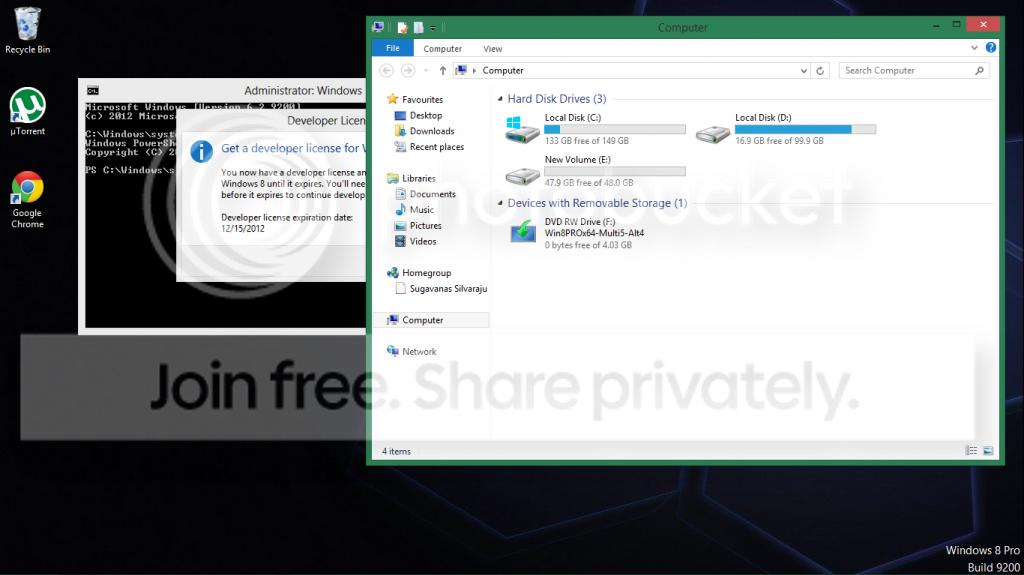
That shows the actual size of the drive much better in WE. The other screen you posted showed limited portions only as far as the actual drive size.
You are still working from one main drive but tell me you didn't install the Developer Preview? That was last seen in Sept. 2011 being an pre-beta build. You won't be able to much in that as you would if you had installed either the Customer Preview while that was out or the Release Preview. CP being equal to beta. RP equal to Release Candidate as far as 8 is concerned.
The recommendation here before adding the E partition would have been an option if you have an external drive available to store a full system image back up of the drive there before proceeding with other then the retail release for 8. Even with two retail versions any large drive change would be better off seeing an image created in case of any mishap.
I wouldn't be able to say if the DP build will be able to automatically add 7 into it's own boot options which is what you would normally see with a later build without problems since it was an early preview you could run on VM without any changes made on the drive. The evaluation with that will automatically expire on Dec. 15, 2012 as you will notice being 1 1/4yrs. after it's release. So you wouldn't have that on long.
W7 Ultimate x64/W10 Pro x64/W11 Pro Triple Bo...AMD Phenom II X4 975 Deneb 3.6ghz - 965 2nd r...Kingston Hyper X DDR3 1600 1.5v 16gb - Hyper ...MSI HD Radeon 5750 1gb - MSI HD Radeon 6450 o...
Computer type
PC/Desktop
Computer Manufacturer/Model Number
Custom builds = 2
OS
W7 Ultimate x64/W10 Pro x64/W11 Pro Triple Boot - Main PC W7 Remote PC Micro ATX W7 Pro x64/W11 Pro
CPU
AMD Phenom II X4 975 Deneb 3.6ghz - 965 2nd remote pc
Motherboard
Gigabyte GA-790XTA-UD4-Gigabyte GA-880GM-D2H remote pc
Memory
Kingston Hyper X DDR3 1600 1.5v 16gb - Hyper X Fury 8gb 2nd
Graphics Card(s)
MSI HD Radeon 5750 1gb - MSI HD Radeon 6450 on mini tower
Sound Card
Creative Labs X-Fi Xtreme Audio P - Realtek onooard 2nd case
Monitor(s) Displays
ASUS VW199T-P 19" HP 2082a Main-HP 2082a 20" remote pc
Screen Resolution
Asus 1440x900 - HP 1600x900
Hard Drives
WD Black 1TB HD per OS W7, W10, and pending W11 presently on 500gb OS Drive - Pending Triple 1TB HDs for Spanned Storage/backup volume
Single 2TB external USB enclosure, single 1TB System 7 Host/Boot drive, Pending 8TB external HD for system image b
PSU
Corsair 750TX - primary / Corsair CX600 - second
Case
Antec 900-2 - SSD compatible / NZXT Vulcan mini tower

 . There is only one hard disk insideit in 300 gb but in my computer file it is two seperate hard disk.