How do I keep the Folder as Tile and files in it as Detail?

iamc3k

New member
Local time
5:38 AM
Messages
91
Folks,

I am confused. I want my Folders to be Tiles, and the files inside those folders to be viewed as Details. In one of my W7 machines, that's how it is. In another, whatever change I make to the folder view takes effect on the files, and vice versa.

This is what I want for the folders:
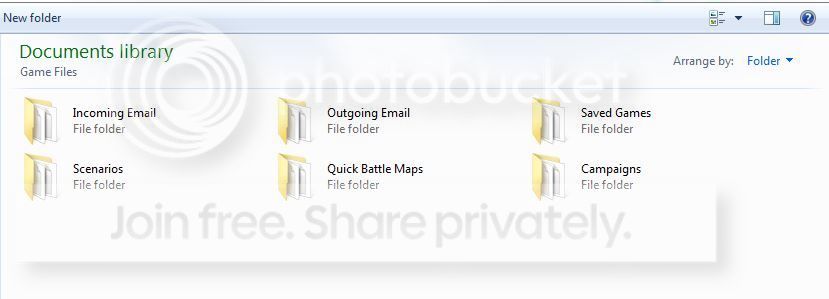


and inside it I want:
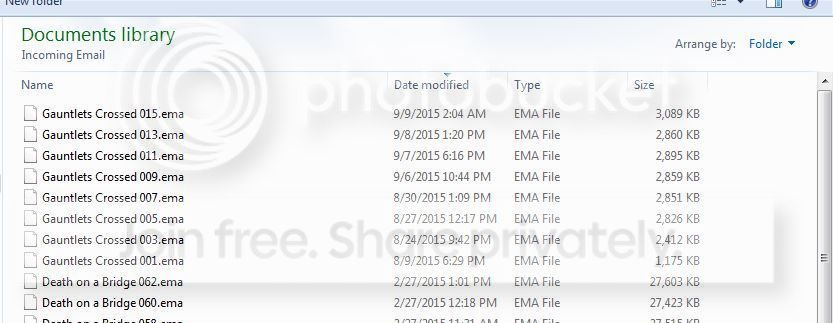


INSTEAD, if I have the folders as tiles, I get:
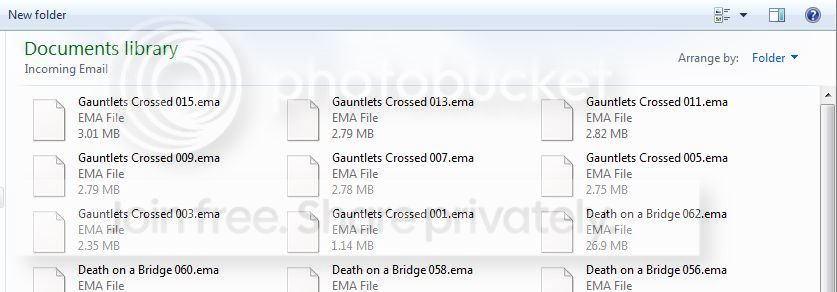


Well, if I change the view to this:


then the folders look like this:
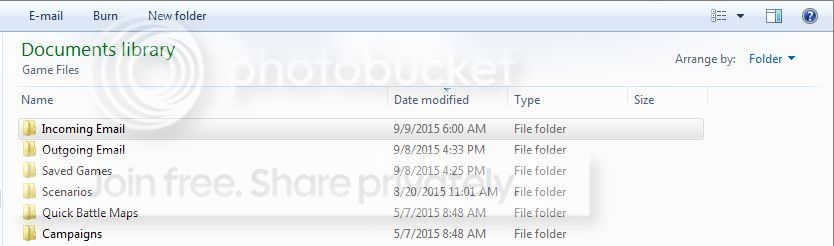


How do I get each view to "stick" when I select it for that folder/file view? (This is one of those screaming in the night Windows issues. One machine does it with no intervention. It just works. The other machine does not, nor can I find any option or menu function to do so.)

Thanks,
Ken
 

My Computer My Computer

At a glance

Microsoft Windows 7 Home Premium 64-bit 7601 ...AMD FX(tm)-8350 Eight-Core Processor16.00 GBNVIDIA GeForce GTX 670
Computer type
PC/Desktop
Computer Manufacturer/Model Number
Custom build
OS
Microsoft Windows 7 Home Premium 64-bit 7601 Multiprocessor Free Service Pack 1
CPU
AMD FX(tm)-8350 Eight-Core Processor
Motherboard
ASUSTeK Computer INC. M5A88-M
Memory
16.00 GB
Graphics Card(s)
NVIDIA GeForce GTX 670
Sound Card
(1) Realtek High Definition Audio (2) NVIDIA Virtual Audio
Monitor(s) Displays
Through AVR to one of two TV/Projector
Screen Resolution
1920 x 1080 x 32 bits (4294967296 colors) @ 60 Hz
Hard Drives
Samsung SSD 850 PRO 256G SATA Disk Device
Case
Silverstone GD09
Cooling
Air
Antivirus
Kaspersky Internet Security, 2015
The area in the registry keys where Windows tries to keep track of these settings can fill up and/or get messed up.

The easiest solution is to remove those registry keys via these steps:
http://www.sevenforums.com/tutorials/15692-folder-view-settings-reset-all-default.html

If you have a lot of objects (icons-shortcuts, files, folders) on your desktop and if those objects are arranged (as opposed to all being on the left), then carefully read the notes before doing those steps.

After the reset, set each folder with files to the Details view.


The first time that you open a folder, some info about that folder goes into those registry keys. If you rename or move a folder, the old info stays in those registry keys and more info is written to those keys for the new folder name/location. In the Details view, the width of each column is stored in those keys for each folder. It gets messy after years of use. There is a limit. Windows (file) Explorer gets flaky once the limit is reached.
 

My Computer My Computer

At a glance

W7 Pro SP1 64biti78GBIntel HD Graphics
Computer type
Laptop
Computer Manufacturer/Model Number
Employer provided Dell Latitude
OS
W7 Pro SP1 64bit
CPU
i7
Memory
8GB
Graphics Card(s)
Intel HD Graphics
Hard Drives
crappy SSD
Antivirus
Employer mandated Symantec Endpoint Protection
Browser
Pale Moon 64bit, IE11 64bit & Chrome 64bit
The area in the registry keys where Windows tries to keep track of these settings can fill up and/or get messed up.

The easiest solution is to remove those registry keys via these steps:
http://www.sevenforums.com/tutorials/15692-folder-view-settings-reset-all-default.html

If you have a lot of objects (icons-shortcuts, files, folders) on your desktop and if those objects are arranged (as opposed to all being on the left), then carefully read the notes before doing those steps.

After the reset, set each folder with files to the Details view.


The first time that you open a folder, some info about that folder goes into these registry keys. If you rename a folder, the old info stays in those registry keys and more info is written to those keys for the new folder name. If you move a folder, new info is written to those keys. In the Details view, the width of each column is stored in those keys for each folder. It gets messy after years of use.
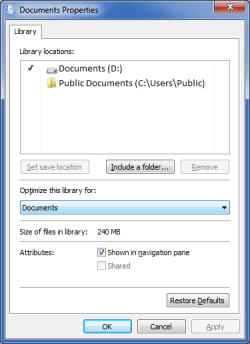
Doesn't a given Library have a single view setting for all of its content?
Library View.png
 
Last edited:

My Computer My Computer

At a glance

W7 Ultimate SP1, LM19.2 MATE, W10 Home 1703, ...AMD Phenom II x6 1100T, 3.3 GHz12GB DDR3 1333 G-Skill (4GB x 2), G-Skill (2G...NVIDIA GeForce GTX 660
Computer type
PC/Desktop
Computer Manufacturer/Model Number
n/a
OS
W7 Ultimate SP1, LM19.2 MATE, W10 Home 1703, W10 Pro 1703 VM, #All 64 bit
CPU
AMD Phenom II x6 1100T, 3.3 GHz
Motherboard
ASUS M4A88T-M/USB3 (AM3)
Memory
12GB DDR3 1333 G-Skill (4GB x 2), G-Skill (2GB x 2)
Graphics Card(s)
NVIDIA GeForce GTX 660
Sound Card
Realtek?
Monitor(s) Displays
Samsung S23B350
Screen Resolution
1920x1080
Hard Drives
WD Green 2TB (SATA), WD Green 3TB (SATA), WD Blue 4TB (SATA), WD Blue 6TB (SATA)
PSU
Cooler Master
Case
Antec GX300 Tower
Cooling
3x Antec TRICOOL 120mm Fans
Mouse
Wired Optical
Internet Speed
DSL
Antivirus
Avast
Browser
Pale Moon (64 bit)
Other Info
2018-12-27 Upgraded HDDs
2015-12-10 Upgraded case, graphics card, storage
2015-08-15 Upgraded motherboard & RAM
2015-07-15 Upgraded LM17.1 to LM17.2
Back
Top