Solved How do I kill a Trojan?

Elljay

New member
Power User
VIP
Local time
2:56 AM
Messages
417
Location
In the woods by the creek.
Hi there. I have been trying help my sister clean up her Dell Desktop Windows 7 for about a week now. Her PC started to freeze up. So I would shut it down and boot back up and I'd have about 5 minutes before everything would freeze up. This allowed me enough time to be able to run a few programs.
This is what I have done so far. I ran:
Adwcleaner and found nothing.
Malwarebytes and found nothing.
Super AntiSpyware found 131 adware/malware things and 3 Trojans.
Then I ran MSE deep scan and it found 2 adware/malware things and 1 Trojan.
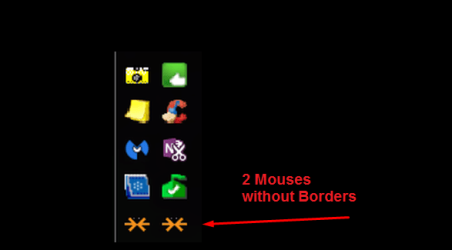
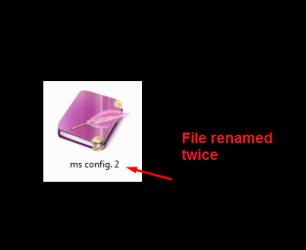
The PC isn't frozen anymore but weird things are happening. Like file renaming and there are 2 Mouses without Borders Icons. She uses Palemoon occasionally and when I rebooted. The Palemoon Icon appeared on her desktop as huge as the Moon in the sky. LOL! She does not have these shortcuts on her desktop.
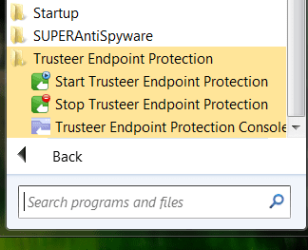
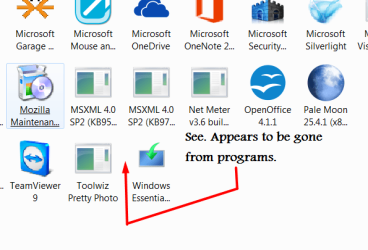
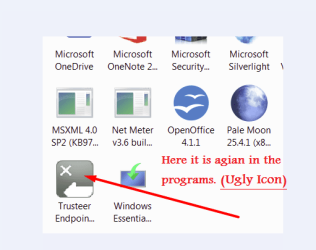
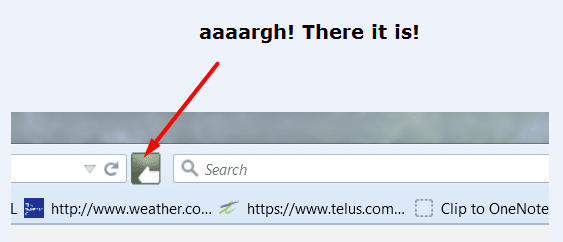
She has a malware or something called Trusteer. I could see the Icon in her programs. I tried to uninstall it with REVO. There was a pop up and I accidently hit it. So REVO couldn't uninstall it. Now the Icon has disappeared from the program list but it is still there. It has hijacked her Fire Fox Browser. I can also see conduit in msconfig Sartup.
I went out and bought the Fix It Sick. It didn't remove it.
I ran Kaspersky Rescue Disk 10, for 12 hours it didn't catch it.
I am out of ideas and ready to tear my hair out. Any suggestions on how to get rid of this thing?
 

Attachments
  • Screenshot_3.png
    Screenshot_3.png
    80.3 KB · Views: 3
  • Screenshot_2.png
    Screenshot_2.png
    53.6 KB · Views: 53
  • end point.png
    end point.png
    26 KB · Views: 53
Last edited:

My Computer

Computer type
Laptop
Computer Manufacturer/Model Number
HP 2000-150CA Notebook
OS
Windows 7 Home Premium (x64) Service Pack 1 (build 7601)
CPU
Intel Pentium P6200 2.13 GHz
Motherboard
HP 3674 28.49 1066 MH / BIOS: HP F.34
Memory
4.00 GB
Graphics Card(s)
Intel HD Graphics
Sound Card
Multimedia HD
Monitor(s) Displays
15.3
Screen Resolution
1366X768
Hard Drives
Hitachi HTS545050B9A300 ATA
(500.11 GB)
Keyboard
Standard PS2
Mouse
Synaptics PS2 Port Touch Pad / Microsoft HID-compliant mouse
Internet Speed
100 Mbps
Antivirus
MSE
Browser
PaleMoon / Fire Fox
Other Info
Purchased 2011
Trusteer seems to be a legit software, are you sure it is an infection? google it.
It may be possible to uninstall it with Download Rapport | Trusteer if this is the same software. Check for yourself.

There are also:
Adwcleaner
TDSSkiller
Rkill
to scan with.

Download from bleeping computers.

Note: Backup your data and perhaps make an image, I don't know how disruptive these programs can be trying to remove infections.
 

My Computer

Computer type
PC/Desktop
Computer Manufacturer/Model Number
Custom Build
OS
Windows 7 Ultimate x64 SP1
CPU
AMD Phenom 2 1090T
Motherboard
Gigabyte GA-890FXA-UD5
Memory
2x8GB Kingston HyperX Fury Black 1600Mhz Unganged
Graphics Card(s)
MSI GTX 970 Gaming 4G
Sound Card
Realtek On-Board HD 7.1 Audio / Logitech G35
Monitor(s) Displays
3xAcer GD245HQ
Screen Resolution
1920x1080
Hard Drives
Samsung 850 Pro 512GB SSD - OS /
WD Caviar Black SATA 3 - 1 TBx2 - Dynamic RAID 0 /
WD Caviar Green SATA 2 - 640GBx2 - Dynamic RAID 0 /
WD Caviar Green SATA 2 - 640GB - Internal Backup /
Seagate Barracude SATA 3 - 3TB - External Backup/ Sync
PSU
HighPower 1000W
Case
Cooler Master HAF 932
Cooling
Noctua NH-D14
Keyboard
Logitech G19
Mouse
Logitech G500
Internet Speed
100/4 Mbit Cable (100GB quota)
Antivirus
ZoneAlarm Extreme Security / MBAM Pro / MBAE Free / SAS Free
Browser
IE 11 - Firefox - Chrome
Other Info
Logitech F710/ G27/ G940/ Z5500 // TrackIR 5 // Nvidia 3D Surround Vision
Here is some of the weird stuff. That moon was huge!
 

Attachments

  • PALEMOON.png
    PALEMOON.png
    92.4 KB · Views: 53
  • mouses without borders.png
    mouses without borders.png
    34 KB · Views: 53
  • JOURNAL.png
    JOURNAL.png
    17.5 KB · Views: 53

My Computer

Computer type
Laptop
Computer Manufacturer/Model Number
HP 2000-150CA Notebook
OS
Windows 7 Home Premium (x64) Service Pack 1 (build 7601)
CPU
Intel Pentium P6200 2.13 GHz
Motherboard
HP 3674 28.49 1066 MH / BIOS: HP F.34
Memory
4.00 GB
Graphics Card(s)
Intel HD Graphics
Sound Card
Multimedia HD
Monitor(s) Displays
15.3
Screen Resolution
1366X768
Hard Drives
Hitachi HTS545050B9A300 ATA
(500.11 GB)
Keyboard
Standard PS2
Mouse
Synaptics PS2 Port Touch Pad / Microsoft HID-compliant mouse
Internet Speed
100 Mbps
Antivirus
MSE
Browser
PaleMoon / Fire Fox
Other Info
Purchased 2011
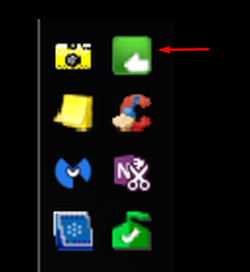
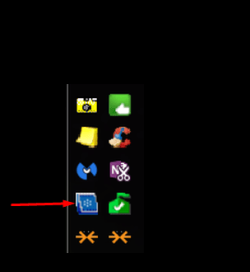
I think this is a fake. It says Intel Graphics Media Driver Accelerator. It's in her programs and in the Taskbar Startup icons. I don't have these icons on my PC. In msconfig I see conduit too.
 

Attachments

  • Screenshot_2.png
    Screenshot_2.png
    24.6 KB · Views: 52
  • CpWz 2015-05-15_15-56-59 (2).png
    CpWz 2015-05-15_15-56-59 (2).png
    8.7 KB · Views: 51
Last edited:

My Computer

Computer type
Laptop
Computer Manufacturer/Model Number
HP 2000-150CA Notebook
OS
Windows 7 Home Premium (x64) Service Pack 1 (build 7601)
CPU
Intel Pentium P6200 2.13 GHz
Motherboard
HP 3674 28.49 1066 MH / BIOS: HP F.34
Memory
4.00 GB
Graphics Card(s)
Intel HD Graphics
Sound Card
Multimedia HD
Monitor(s) Displays
15.3
Screen Resolution
1366X768
Hard Drives
Hitachi HTS545050B9A300 ATA
(500.11 GB)
Keyboard
Standard PS2
Mouse
Synaptics PS2 Port Touch Pad / Microsoft HID-compliant mouse
Internet Speed
100 Mbps
Antivirus
MSE
Browser
PaleMoon / Fire Fox
Other Info
Purchased 2011
Trusteer seems to be a legit software, are you sure it is an infection? google it.
It may be possible to uninstall it with Download Rapport | Trusteer if this is the same software. Check for yourself.

There are also:
Adwcleaner
TDSSkiller
Rkill
to scan with.

Download from bleeping computers.

Note: Backup your data and perhaps make an image, I don't know how disruptive these programs can be trying to remove infections.

It maybe be legit GokAy, but it is malware of some sort. I can't even use the windows snipping tool and it pops up and blocks me or the screen goes black.
GokAy, with all due respect ...I have researched this for a week now. I have been everywhere and I'm tired. They even have YouTube Videos for Godsake.
The Icon disappeared GokAy. There is nothing to uninstall.
 

My Computer

Computer type
Laptop
Computer Manufacturer/Model Number
HP 2000-150CA Notebook
OS
Windows 7 Home Premium (x64) Service Pack 1 (build 7601)
CPU
Intel Pentium P6200 2.13 GHz
Motherboard
HP 3674 28.49 1066 MH / BIOS: HP F.34
Memory
4.00 GB
Graphics Card(s)
Intel HD Graphics
Sound Card
Multimedia HD
Monitor(s) Displays
15.3
Screen Resolution
1366X768
Hard Drives
Hitachi HTS545050B9A300 ATA
(500.11 GB)
Keyboard
Standard PS2
Mouse
Synaptics PS2 Port Touch Pad / Microsoft HID-compliant mouse
Internet Speed
100 Mbps
Antivirus
MSE
Browser
PaleMoon / Fire Fox
Other Info
Purchased 2011
Download the one from my link, and install it. If it is the same thing, it may offer to modify/uninstall when you run the installer. If not then install first then uninstall. At worst they are different and you would have to install/reinstall.

Am I sure if this would get rid of it? No. But I would try nevertheless. That's all I tried to say in previous post. I guess it wasn't clear enough.

Edit: Oh and sorry for listing Adwcleaner for you to scan with, you mention you scanned with it in your first post.
 

My Computer

Computer type
PC/Desktop
Computer Manufacturer/Model Number
Custom Build
OS
Windows 7 Ultimate x64 SP1
CPU
AMD Phenom 2 1090T
Motherboard
Gigabyte GA-890FXA-UD5
Memory
2x8GB Kingston HyperX Fury Black 1600Mhz Unganged
Graphics Card(s)
MSI GTX 970 Gaming 4G
Sound Card
Realtek On-Board HD 7.1 Audio / Logitech G35
Monitor(s) Displays
3xAcer GD245HQ
Screen Resolution
1920x1080
Hard Drives
Samsung 850 Pro 512GB SSD - OS /
WD Caviar Black SATA 3 - 1 TBx2 - Dynamic RAID 0 /
WD Caviar Green SATA 2 - 640GBx2 - Dynamic RAID 0 /
WD Caviar Green SATA 2 - 640GB - Internal Backup /
Seagate Barracude SATA 3 - 3TB - External Backup/ Sync
PSU
HighPower 1000W
Case
Cooler Master HAF 932
Cooling
Noctua NH-D14
Keyboard
Logitech G19
Mouse
Logitech G500
Internet Speed
100/4 Mbit Cable (100GB quota)
Antivirus
ZoneAlarm Extreme Security / MBAM Pro / MBAE Free / SAS Free
Browser
IE 11 - Firefox - Chrome
Other Info
Logitech F710/ G27/ G940/ Z5500 // TrackIR 5 // Nvidia 3D Surround Vision
Download the one from my link, and install it. If it is the same thing, it may offer to modify/uninstall when you run the installer. If not then install first then uninstall. At worst they are different and you would have to install/reinstall.

Am I sure if this would get rid of it? No. But I would try nevertheless. That's all I tried to say in previous post. I guess it wasn't clear enough.

Edit: Oh and sorry for listing Adwcleaner for you to scan with, you mention you scanned with it in your first post.


OK GokAy. That makes sense, seeing that I did find their Icon in the programs before it vanished.
I never thought of that. I'll try this tomorrow.
I ran TDSkiller also.
Speaking of research, while I was trying to find information on this program, I found other people's comments about it being malware and others saying it is an all out nuisance. What I do know is that my sister did not download it.
She rarely downloads anything and she barely surfs the net. So when she gets infected, she kinda freaks out. That has happened several times to her. She uses her PC mainly to check email and do banking etc. So I'm inclined to think it must have been one of her kids on there doing something...again. No more though, she now has a password...finally.
Kids have their own machines anyways.
No need to be on Mom's.
 

My Computer

Computer type
Laptop
Computer Manufacturer/Model Number
HP 2000-150CA Notebook
OS
Windows 7 Home Premium (x64) Service Pack 1 (build 7601)
CPU
Intel Pentium P6200 2.13 GHz
Motherboard
HP 3674 28.49 1066 MH / BIOS: HP F.34
Memory
4.00 GB
Graphics Card(s)
Intel HD Graphics
Sound Card
Multimedia HD
Monitor(s) Displays
15.3
Screen Resolution
1366X768
Hard Drives
Hitachi HTS545050B9A300 ATA
(500.11 GB)
Keyboard
Standard PS2
Mouse
Synaptics PS2 Port Touch Pad / Microsoft HID-compliant mouse
Internet Speed
100 Mbps
Antivirus
MSE
Browser
PaleMoon / Fire Fox
Other Info
Purchased 2011
Well, this takes the cake. This so called legit Company @
IBM Security Trusteer Rapport
is for the worst of the worst. Be careful of this one folks!
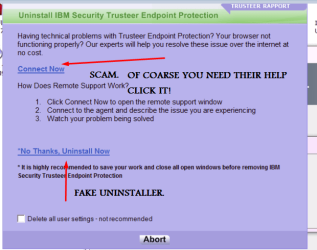
Never have I had this kind of crap...ever, trying to uninstall a program. I managed to finally download it again.
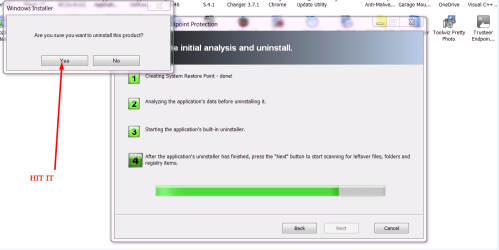
Choosing one of their options, "No, I'm trying to fix it". The icon showed up again in the installed programs. I tried 4x to uninstall it, after repeating the process yet again...and then again. 3 with Revo and once with CCleaner. It eluded both of them. When trying to uninstall, a small window appears asking "Are you sure you want to uninstall this product?" Revo was struggling to uninstall it for 1/2 hr. So, of coarse I had to hit the stupid button and then their other popup appears with more options. Click 'Yes' and Revo disappears and they take over. With CCleaner, they freeze the uninstall button.
I've been trying for a week already... Is there a Command I can give, to blast this program right off the planet?
 

Attachments

  • Screenshot_5.png
    Screenshot_5.png
    9 KB · Views: 33
  • Screenshot_4.png
    Screenshot_4.png
    62.9 KB · Views: 33
  • Screenshot_3.png
    Screenshot_3.png
    109.6 KB · Views: 33
  • Screenshot_2.png
    Screenshot_2.png
    100.7 KB · Views: 2
  • Screenshot_1.png
    Screenshot_1.png
    40.2 KB · Views: 32
  • Screenshot_6.png
    Screenshot_6.png
    15.2 KB · Views: 31
  • Screenshot_7.png
    Screenshot_7.png
    27.1 KB · Views: 31

My Computer

Computer type
Laptop
Computer Manufacturer/Model Number
HP 2000-150CA Notebook
OS
Windows 7 Home Premium (x64) Service Pack 1 (build 7601)
CPU
Intel Pentium P6200 2.13 GHz
Motherboard
HP 3674 28.49 1066 MH / BIOS: HP F.34
Memory
4.00 GB
Graphics Card(s)
Intel HD Graphics
Sound Card
Multimedia HD
Monitor(s) Displays
15.3
Screen Resolution
1366X768
Hard Drives
Hitachi HTS545050B9A300 ATA
(500.11 GB)
Keyboard
Standard PS2
Mouse
Synaptics PS2 Port Touch Pad / Microsoft HID-compliant mouse
Internet Speed
100 Mbps
Antivirus
MSE
Browser
PaleMoon / Fire Fox
Other Info
Purchased 2011

My Computer

Computer type
PC/Desktop
Computer Manufacturer/Model Number
Bruce ... somewhere in his 40's
OS
Windows 7 Ultimate 32bit SP1
CPU
Intel(R) Core(TM)2 Quad CPU @ 2.40GHz, 2400 MHz
Motherboard
INTEL/D975XBX2
Memory
4 GB
Graphics Card(s)
ATI Radeon HD 2600 Pro
Monitor(s) Displays
Samsung SyncMaster 914v
Screen Resolution
1280 x 1024
Hard Drives
2/500GB each ... ST3500630AS ATA Device.
One is not connected
PSU
Rocketfish 700 W
Case
G.Skill Gigabyte Chassis
Keyboard
Standard PS/2 Keyboard
Mouse
Microsoft PS/2 Mouse
Internet Speed
DSL
Antivirus
Avira Internet Security
Browser
IE 11
Other Info
ATI HDMI Audio
It's not a trojan - it's security software that some banks recommend to improve browser security when visiting secure sites.

The problem is that there's no way to shut it down and no way to remove it other than using the dedicated removal tool that you can get via the request form on their website.

Note: I just installed it to see if it could be removed. It's stated that it has self protection to protect itself from being removed by malware.

Well I can tell you that it resisted deletion even by some powerful removal tools that can delete files on boot.

One of my softwares did manage to force delete Trusteer Rapprort folders, files, serivces, drivers and registry entries.

Howsver that left the machine in a constant startup repair loop so I restored yesterday's system image backup.

Bottom line is - get the dedicated removal tool.
 

My Computer

Computer type
Laptop
Computer Manufacturer/Model Number
ASUS
OS
Microsoft Windows 7 Home Premium 64-bit 7601 Multiprocessor Free Service Pack 1
CPU
AMD C-60 APU with Radeon(tm) HD Graphics
Motherboard
ASUSTeK COMPUTER INC. X501U
Memory
4.00 GB
Graphics Card(s)
AMD Radeon HD 6290 Graphics
Sound Card
(1) AMD High Definition Audio Device (2) Realtek High Defi
Screen Resolution
1366 x 768 x 32 bits (4294967296 colors) @ 60 Hz
Hard Drives
Hitachi HTS545050A7E380 SATA Disk Device
Antivirus
Comodo CIS & FW, SecureAplus App Whitelisting, Threatfire
Browser
Cyberfox 64bit, Opera 64bit, Airfox
Other Info
Spy-The-Spy, HitmanPro.Alert, Norton Connect Safe, MJRegWatcher, BitDefender TrafficLight, Voodoo Shield, Zemana AntiMalware
Last edited:

My Computer

Computer type
Laptop
Computer Manufacturer/Model Number
HP 2000-150CA Notebook
OS
Windows 7 Home Premium (x64) Service Pack 1 (build 7601)
CPU
Intel Pentium P6200 2.13 GHz
Motherboard
HP 3674 28.49 1066 MH / BIOS: HP F.34
Memory
4.00 GB
Graphics Card(s)
Intel HD Graphics
Sound Card
Multimedia HD
Monitor(s) Displays
15.3
Screen Resolution
1366X768
Hard Drives
Hitachi HTS545050B9A300 ATA
(500.11 GB)
Keyboard
Standard PS2
Mouse
Synaptics PS2 Port Touch Pad / Microsoft HID-compliant mouse
Internet Speed
100 Mbps
Antivirus
MSE
Browser
PaleMoon / Fire Fox
Other Info
Purchased 2011
If you ask me you can't uninstall it via Control Panel. Tried that. Tried Geek Uninstaller and tried Force Removal.

Reproduced from the link you get taken to if you attempt to uninstall:

The uninstaller failed to remove Rapport.

Why?

Rapport includes anti-removal protection to prevent malware from removing it from your computer. This is the reason for the complex uninstall process. In some rare scenarios the uninstaller is unable to shut down the anti-removal protection and as a result fails to remove Rapport.

What's Next?

We have a special utility that safely removes Rapport from your computer - for downloading the utility, please fill out the following form. You will automatically receive an email with the download link for the utility.

https://www.trusteer.com/support/uninstall-troubleshooting
 
Last edited:

My Computer

Computer type
Laptop
Computer Manufacturer/Model Number
ASUS
OS
Microsoft Windows 7 Home Premium 64-bit 7601 Multiprocessor Free Service Pack 1
CPU
AMD C-60 APU with Radeon(tm) HD Graphics
Motherboard
ASUSTeK COMPUTER INC. X501U
Memory
4.00 GB
Graphics Card(s)
AMD Radeon HD 6290 Graphics
Sound Card
(1) AMD High Definition Audio Device (2) Realtek High Defi
Screen Resolution
1366 x 768 x 32 bits (4294967296 colors) @ 60 Hz
Hard Drives
Hitachi HTS545050A7E380 SATA Disk Device
Antivirus
Comodo CIS & FW, SecureAplus App Whitelisting, Threatfire
Browser
Cyberfox 64bit, Opera 64bit, Airfox
Other Info
Spy-The-Spy, HitmanPro.Alert, Norton Connect Safe, MJRegWatcher, BitDefender TrafficLight, Voodoo Shield, Zemana AntiMalware
It's not a trojan - it's security software that some banks recommend to improve browser security when visiting secure sites.

The problem is that there's no way to shut it down and no way to remove it other than using the dedicated removal tool that you can get via the request form on their website.

Note: I just installed it to see if it could be removed. It's stated that it has self protection to protect itself from being removed by malware.

Well I can tell you that it resisted deletion even by some powerful removal tools that can delete files on boot.

One of my softwares did manage to force delete Trusteer Rapprort folders, files, serivces, drivers and registry entries.

Howsver that left the machine in a constant startup repair loop so I restored yesterday's system image backup.

Bottom line is - get the dedicated removal tool.

Oh wow, thanks for taking the time to check that out Callender. Brave. :shock:
What erks me the most is that we did not download their program.
I know it wasn't her, she is simple and doesn't like trying new programs.
It must of got on her PC via ride on another program, from the the kids downloading something
while she was away in Mexico.
Previous to this annoying thing, I did uninstall some programs from her PC that I've never heard of and that she doesn't need...(and as I mentioned earlier, her PC was infected.)
I cleaned it up but couldn't get this off.
So, yeah, I think that's how that happened. Guess what? Mom finally has a password.
So, I guess I'll be doing that sometime tonight.
Thought about contacting them last night but it wouldn't have been nice...I had smoke coming out of my ears...would have been ugly. (I'm OK today though. Lol.)

Oh...and they shouldn't be so cheap. They should hire an Artist over @ Deviant Art to design a proper Icon for their Company. Looks trashy. (That's my 2 cents this annoyance) :zip:
Thanks again for your time Callender. Cheers.
 
Last edited:

My Computer

Computer type
Laptop
Computer Manufacturer/Model Number
HP 2000-150CA Notebook
OS
Windows 7 Home Premium (x64) Service Pack 1 (build 7601)
CPU
Intel Pentium P6200 2.13 GHz
Motherboard
HP 3674 28.49 1066 MH / BIOS: HP F.34
Memory
4.00 GB
Graphics Card(s)
Intel HD Graphics
Sound Card
Multimedia HD
Monitor(s) Displays
15.3
Screen Resolution
1366X768
Hard Drives
Hitachi HTS545050B9A300 ATA
(500.11 GB)
Keyboard
Standard PS2
Mouse
Synaptics PS2 Port Touch Pad / Microsoft HID-compliant mouse
Internet Speed
100 Mbps
Antivirus
MSE
Browser
PaleMoon / Fire Fox
Other Info
Purchased 2011
Done! Finally...geesh. YAY!
I can chill now, sort of.
VINO TIME.gif
 

My Computer

Computer type
Laptop
Computer Manufacturer/Model Number
HP 2000-150CA Notebook
OS
Windows 7 Home Premium (x64) Service Pack 1 (build 7601)
CPU
Intel Pentium P6200 2.13 GHz
Motherboard
HP 3674 28.49 1066 MH / BIOS: HP F.34
Memory
4.00 GB
Graphics Card(s)
Intel HD Graphics
Sound Card
Multimedia HD
Monitor(s) Displays
15.3
Screen Resolution
1366X768
Hard Drives
Hitachi HTS545050B9A300 ATA
(500.11 GB)
Keyboard
Standard PS2
Mouse
Synaptics PS2 Port Touch Pad / Microsoft HID-compliant mouse
Internet Speed
100 Mbps
Antivirus
MSE
Browser
PaleMoon / Fire Fox
Other Info
Purchased 2011
Great news!

Re: How did it get on your system.

As far as I know it doesn't come bundled with other software. It can be downloaded and installed manually and in my case it's offered via email from my bank and when I log into my bank account online.

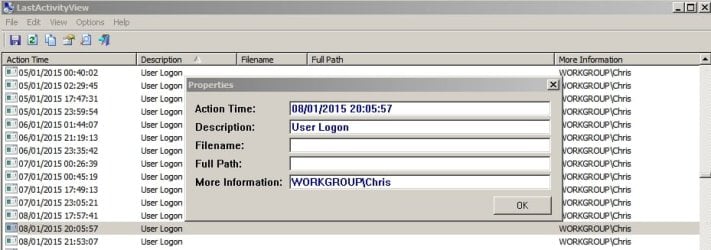
If you like you can try running some software to see when it was installed and who was logged on.

Software installation times:

Last Activity View 1.jpg

Logged on user times:

LastActivityView 2.jpg

Note: This software manufacturer's programs are often flagged up as undesirable by security products because some of their tools are classed as hacking tools. These are false positive detections and nothing to worry about if you personally installed the software. You just don't want other users installing without your knowledge!

Info and download:

LastActivityView

About those false positive detections:

Antivirus "False Positive" Problems

Note LastActivityView isn't listed but some security software flags up anything Nirsoft and may even block the website!
 

My Computer

Computer type
Laptop
Computer Manufacturer/Model Number
ASUS
OS
Microsoft Windows 7 Home Premium 64-bit 7601 Multiprocessor Free Service Pack 1
CPU
AMD C-60 APU with Radeon(tm) HD Graphics
Motherboard
ASUSTeK COMPUTER INC. X501U
Memory
4.00 GB
Graphics Card(s)
AMD Radeon HD 6290 Graphics
Sound Card
(1) AMD High Definition Audio Device (2) Realtek High Defi
Screen Resolution
1366 x 768 x 32 bits (4294967296 colors) @ 60 Hz
Hard Drives
Hitachi HTS545050A7E380 SATA Disk Device
Antivirus
Comodo CIS & FW, SecureAplus App Whitelisting, Threatfire
Browser
Cyberfox 64bit, Opera 64bit, Airfox
Other Info
Spy-The-Spy, HitmanPro.Alert, Norton Connect Safe, MJRegWatcher, BitDefender TrafficLight, Voodoo Shield, Zemana AntiMalware
Great news!

Re: How did it get on your system.

As far as I know it doesn't come bundled with other software. It can be downloaded and installed manually and in my case it's offered via email from my bank and when I log into my bank account online.

If you like you can try running some software to see when it was installed and who was logged on.

Software installation times:

View attachment 360056

Logged on user times:

View attachment 360057

Note: This software manufacturer's programs are often flagged up as undesirable by security products because some of their tools are classed as hacking tools. These are false positive detections and nothing to worry about if you personally installed the software. You just don't want other users installing without your knowledge!

Info and download:

LastActivityView

About those false positive detections:

Antivirus "False Positive" Problems

Note LastActivityView isn't listed but some security software flags up anything Nirsoft and may even block the website!

Yes indeed it's great news. It was giving me a tremendous headache fighting with my sisters PC.
(It's not over yet)
Aw Hah! Thanks for that knowledge Callender, I am narrowing it down.
It wasn't her kids/children...it was her Husband!
Banking and Stocks etc..............
Wise man, but challenged by PCs.

Ps. Auntie says sorry Kids.
 

My Computer

Computer type
Laptop
Computer Manufacturer/Model Number
HP 2000-150CA Notebook
OS
Windows 7 Home Premium (x64) Service Pack 1 (build 7601)
CPU
Intel Pentium P6200 2.13 GHz
Motherboard
HP 3674 28.49 1066 MH / BIOS: HP F.34
Memory
4.00 GB
Graphics Card(s)
Intel HD Graphics
Sound Card
Multimedia HD
Monitor(s) Displays
15.3
Screen Resolution
1366X768
Hard Drives
Hitachi HTS545050B9A300 ATA
(500.11 GB)
Keyboard
Standard PS2
Mouse
Synaptics PS2 Port Touch Pad / Microsoft HID-compliant mouse
Internet Speed
100 Mbps
Antivirus
MSE
Browser
PaleMoon / Fire Fox
Other Info
Purchased 2011
Thank you!
 

My Computer

Computer type
Laptop
Computer Manufacturer/Model Number
HP 2000-150CA Notebook
OS
Windows 7 Home Premium (x64) Service Pack 1 (build 7601)
CPU
Intel Pentium P6200 2.13 GHz
Motherboard
HP 3674 28.49 1066 MH / BIOS: HP F.34
Memory
4.00 GB
Graphics Card(s)
Intel HD Graphics
Sound Card
Multimedia HD
Monitor(s) Displays
15.3
Screen Resolution
1366X768
Hard Drives
Hitachi HTS545050B9A300 ATA
(500.11 GB)
Keyboard
Standard PS2
Mouse
Synaptics PS2 Port Touch Pad / Microsoft HID-compliant mouse
Internet Speed
100 Mbps
Antivirus
MSE
Browser
PaleMoon / Fire Fox
Other Info
Purchased 2011
~~~
...that left the machine in a constant startup repair loop so I restored yesterday's system image backup.

Bottom line is - get the dedicated removal tool.
Nice effort. We gotta get you to use virtual machines for this type of testing :-)


Great news!

Re: How did it get on your system.
~~~
~~~
It wasn't her kids/children...it was her Husband!
Banking and Stocks etc..............
Wise man, but challenged by PCs.

Ps. Auntie says sorry Kids.

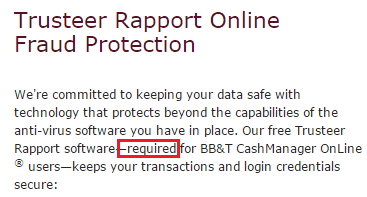
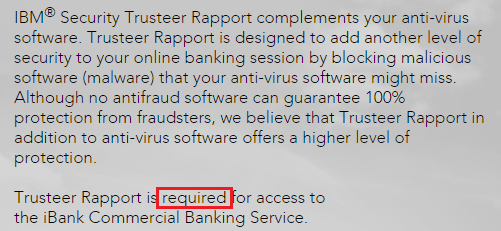
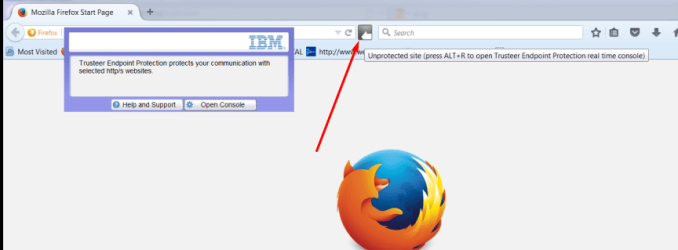
The Rapport (Trusteer/IBM) software is required by some websites. He may be unable to conduct transactions without the software installed.

tr1.png

tr2.png

tr3.png

The software does not always play nice with antivirus apps. Once the computer is free from other issues (i.e. seems to be clean of infections - as best we can tell), then see if the computer still locks up from time to time. If it does, contact the company that wants this Rapport software installed. They should offer some level of support for it (probably via a 3rd party computer support group). You might need to have him on the line before they will talk to you about this security software.
 

My Computer

Computer type
Laptop
Computer Manufacturer/Model Number
Employer provided Dell Latitude
OS
W7 Pro SP1 64bit
CPU
i7
Memory
8GB
Graphics Card(s)
Intel HD Graphics
Hard Drives
crappy SSD
Antivirus
Employer mandated Symantec Endpoint Protection
Browser
Pale Moon 64bit, IE11 64bit & Chrome 64bit
Back
Top