
How do I know if someone is watching me on the same network?

VIP

New member
Local time
2:12 PM
Messages
13
I have a feeling someone is watching me on the network Im on. They have access and theyre allowed to. Is there a way I can check? Im wired into the router, not sure if it makes a difference

I ran netstat -b and these are the results.
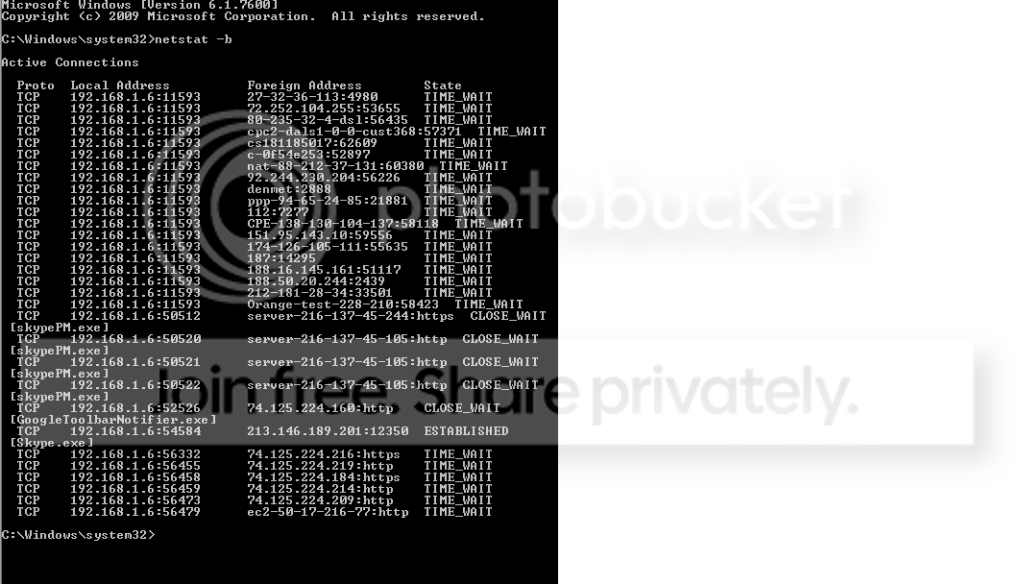
-b1.png


I dont know what any of it means but I assume it shows nothing. I also assume it would only show something if they are currently watching.


Is there a way I can prevent it? We are all on the same router.
 

My Computer My Computer

At a glance

64 home premiumIntel i7 9309gbati radeon hd 5850
OS
64 home premium
CPU
Intel i7 930
Memory
9gb
Graphics Card(s)
ati radeon hd 5850
Hard Drives
1.5tb
I should also mention as soon as I posted this my internet connection died, yet im wired in and there were no errors on the router.
 

My Computer My Computer

At a glance

64 home premiumIntel i7 9309gbati radeon hd 5850
OS
64 home premium
CPU
Intel i7 930
Memory
9gb
Graphics Card(s)
ati radeon hd 5850
Hard Drives
1.5tb
Who owns the router? Do you?
 

My Computer My Computer

At a glance

Windows 7 Ultimate x64 SP1Core i7-2670QM8GB DDR3 PC3-10600Intel HD Graphics 3000 + GeForce GT 540M
Computer Manufacturer/Model Number
Dell XPS 15 L502x
OS
Windows 7 Ultimate x64 SP1
CPU
Core i7-2670QM
Memory
8GB DDR3 PC3-10600
Graphics Card(s)
Intel HD Graphics 3000 + GeForce GT 540M
Screen Resolution
1920x1080
Hard Drives
1TB 5400RPM Seagate
I dont own it but the router and modem are in my room and Im the only one that can login to the settings.
 

My Computer My Computer

At a glance

64 home premiumIntel i7 9309gbati radeon hd 5850
OS
64 home premium
CPU
Intel i7 930
Memory
9gb
Graphics Card(s)
ati radeon hd 5850
Hard Drives
1.5tb
Well according to that screenshot there are no active connections from your machine to a local IP (192.168.1.*)

Fair warning; I don't really have a massive amount of knowledge on this, but like you I would assume it would show something.

Of course if you want to be REALLY sure, you could always configure your firewall to reject connection attempts from PC's in the 192.168.1.* range, apart from the router.

The internet dying could frankly be anything, from malware, through to a low SNR.
 

My Computer My Computer

At a glance

Windows 10 Pro x64Intel Core i5 7400 @ 3.00GHz8GB 2133Mhz DDR4 (OEM supplied)Gygabyte Windforce GTX 1050Ti (Factory Overcl...
Computer type
PC/Desktop
Computer Manufacturer/Model Number
Medion Erazer (note to self: insert model number) - with custom additions
OS
Windows 10 Pro x64
CPU
Intel Core i5 7400 @ 3.00GHz
Motherboard
OEM supllied with PC
Memory
8GB 2133Mhz DDR4 (OEM supplied)
Graphics Card(s)
Gygabyte Windforce GTX 1050Ti (Factory Overclocked)
Sound Card
Realtek
Monitor(s) Displays
Acer Al1980 + HKC
Screen Resolution
1360*768(HKC) / 1280*1024(Acer)
Hard Drives
1TB Toshiba
1TB WD Caviar Green
120GB Samsung Evo 840
PSU
OEM supplied (no power rating on case)
Case
OEM Supplied
Cooling
Stock
Keyboard
Logitech Wireless
Mouse
Logitect Wireless
Internet Speed
40Mb/s Down 10Mb/s Up
Antivirus
Defender
Browser
Firefox
Well according to that screenshot there are no active connections from your machine to a local IP (192.168.1.*)

Fair warning; I don't really have a massive amount of knowledge on this, but like you I would assume it would show something.

Of course if you want to be REALLY sure, you could always configure your firewall to reject connection attempts from PC's in the 192.168.1.* range, apart from the router.

The internet dying could frankly be anything, from malware, through to a low SNR.
I dont know a lot about the netstat -b but I assume it only shows what is currently there. At that time I did not think anyone would be looking.

I am going to look into blocking the ip, is there a specific way to do it? If I block the ip and reset the router it will be different.

I normally would think its something on my computer or wireless but I have a new computer thats 2 days old, today is 3 and its wired. It might be me looking for something.

This is the first time I have had windows 7. The person I think that is watching also has windows 7. I went into 'local area connections' and unselected 'file and printer sharing for microsoft networks. I dont know if they could go through that. If so thats a possibility and it was originally selected.
 

My Computer My Computer

At a glance

64 home premiumIntel i7 9309gbati radeon hd 5850
OS
64 home premium
CPU
Intel i7 930
Memory
9gb
Graphics Card(s)
ati radeon hd 5850
Hard Drives
1.5tb
Theoretically speaking, if I were to do this, I would go into the router settings (192.168.1.1 most likely) and set myself a static IP from the DCHP pool.

That isn't something I can really advise you on specifically, because every router is different. It should be somewhere in the LAN or Network settings though. When you find it, you should be able to select "Static" from a drop down list next to your computer's name. That would then "lock" your computer to that IP so it didn't change every time you reset the connection.

After that, I would use my software firewall to block all connections coming from a range of 192.168.1.* but make sure that I kept 192.168.1.1 clear. I don't think that WIndows Firewall can do that, but I know Comodo can. (In fact, Comodo would probably block an unsolicited attempt to connect straight away anyway, without my intervention)

Example; in your screenshot, your IP is 192.168.1.6. Assuming that your router is at 192.168.1.1 (they normally are) I would create a firewall rule to block all connection attempts from 192.168.2 - 192.168.1.5 and then another one to block all from 192.168.1.7 through to 192.168.1.253. We have to keep your IP and the router's IP unblocked, or you won't be able to get online.

Actually, you could probably get away with blocking your own IP too, but you know that nothing coming from your machine is going to harm it, or if it is that's already there.

I apologise if that went over your head, Im assuming at least a basic knowledge of networking here.
 

My Computer My Computer

At a glance

Windows 10 Pro x64Intel Core i5 7400 @ 3.00GHz8GB 2133Mhz DDR4 (OEM supplied)Gygabyte Windforce GTX 1050Ti (Factory Overcl...
Computer type
PC/Desktop
Computer Manufacturer/Model Number
Medion Erazer (note to self: insert model number) - with custom additions
OS
Windows 10 Pro x64
CPU
Intel Core i5 7400 @ 3.00GHz
Motherboard
OEM supllied with PC
Memory
8GB 2133Mhz DDR4 (OEM supplied)
Graphics Card(s)
Gygabyte Windforce GTX 1050Ti (Factory Overclocked)
Sound Card
Realtek
Monitor(s) Displays
Acer Al1980 + HKC
Screen Resolution
1360*768(HKC) / 1280*1024(Acer)
Hard Drives
1TB Toshiba
1TB WD Caviar Green
120GB Samsung Evo 840
PSU
OEM supplied (no power rating on case)
Case
OEM Supplied
Cooling
Stock
Keyboard
Logitech Wireless
Mouse
Logitect Wireless
Internet Speed
40Mb/s Down 10Mb/s Up
Antivirus
Defender
Browser
Firefox
  • Like
Reactions: VIP
In order to watch you, somebody must have installed some spy software on your box.
Try to run "Spybot Search and Destroy" on your computer, that one finds almost any of these programs.
 

My Computer My Computer

At a glance

Windows 7 Ultimate x64
OS
Windows 7 Ultimate x64
Not necessarily. If there is no active firewall, open ports can be considered vulnerabilities. You may not have access to the person's keyboard and mouse, but you can sniff and inject packets among other nasty things.
 

My Computer My Computer

At a glance

Windows 7 Enterprise 64-bitAMD Phenom II X4 3.0GHz8GB G-Skill Ripjaws DDR3 1333PNY GeForce 460 GTX 1GB OC - Enthusiast Edition
OS
Windows 7 Enterprise 64-bit
CPU
AMD Phenom II X4 3.0GHz
Motherboard
ASUS M5A97
Memory
8GB G-Skill Ripjaws DDR3 1333
Graphics Card(s)
PNY GeForce 460 GTX 1GB OC - Enthusiast Edition
Sound Card
VIA High Definition Audio
Monitor(s) Displays
Dell 19"
Screen Resolution
1280x1024
Hard Drives
1TB - Primary
160GB - Secondary
250GB - External backup for important files
PSU
OCZ Fata1ty 700W Modular PSU
Case
ASUS
Keyboard
Microsoft Wireless Keyboard 2000
Mouse
Microsoft Wireless Mouse 2000
Internet Speed
3 Mbps/768 kbps
Packet sniffing is always a possibility, especially if that person has physical access to the switch or router.
But to me it seemed like the OP was worried about literally being watched.
 

My Computer My Computer

At a glance

Windows 7 Ultimate x64
OS
Windows 7 Ultimate x64
Hey, I didnt get a notification email and I thought no one had replied! :)


Theoretically speaking, if I were to do this, I would go into the router settings (192.168.1.1 most likely) and set myself a static IP from the DCHP pool.

That isn't something I can really advise you on specifically, because every router is different. It should be somewhere in the LAN or Network settings though. When you find it, you should be able to select "Static" from a drop down list next to your computer's name. That would then "lock" your computer to that IP so it didn't change every time you reset the connection.

After that, I would use my software firewall to block all connections coming from a range of 192.168.1.* but make sure that I kept 192.168.1.1 clear. I don't think that WIndows Firewall can do that, but I know Comodo can. (In fact, Comodo would probably block an unsolicited attempt to connect straight away anyway, without my intervention)

Example; in your screenshot, your IP is 192.168.1.6. Assuming that your router is at 192.168.1.1 (they normally are) I would create a firewall rule to block all connection attempts from 192.168.2 - 192.168.1.5 and then another one to block all from 192.168.1.7 through to 192.168.1.253. We have to keep your IP and the router's IP unblocked, or you won't be able to get online.

Actually, you could probably get away with blocking your own IP too, but you know that nothing coming from your machine is going to harm it, or if it is that's already there.

I apologise if that went over your head, Im assuming at least a basic knowledge of networking here.
Thank you for the detailed explanation :)

I understood it and it makes sense. Ive got comondo, which seems like an great program and I am going to block the connections.

I do have a couple of questions. If I set my ip to static and block the connections, then reset the router. Everyone except me will have a different ip.

Do you think if I reset it now, make the new ip my static ip, reset again and block connections to that ip I will be totally safe? Basically if someone is watching they will not know the new ip I have, if they are watching now they obviously know it. I can do it when their computer is not in the house, its a laptop.

I just dont know what people can see if they are watching. From the sounds of things, the above choice would be my best option?


Another thing to mention, we are all now wired in, previously the person watching was wireless. I could force everyone to be wired if it makes a difference.


In order to watch you, somebody must have installed some spy software on your box.
Try to run "Spybot Search and Destroy" on your computer, that one finds almost any of these programs.
I dont know a lot about all of this but I thought thats to do with people outside the network? I think with wireshark you can watch the connections on the network which is what I think is happening.
Not necessarily. If there is no active firewall, open ports can be considered vulnerabilities. You may not have access to the person's keyboard and mouse, but you can sniff and inject packets among other nasty things.
I just got my computer and have no firewall, until now, I just got comodo which seems great!
Packet sniffing is always a possibility, especially if that person has physical access to the switch or router.
But to me it seemed like the OP was worried about literally being watched.
They do not have access to the physical router but I thought with wireshark you did not need it?

I have a feeling, a very good feeling, that someone is watching what everyone browses using a program. I assume its wireshark since its free and seems to be able to watch everyone on the same network.
 

My Computer My Computer

At a glance

64 home premiumIntel i7 9309gbati radeon hd 5850
OS
64 home premium
CPU
Intel i7 930
Memory
9gb
Graphics Card(s)
ati radeon hd 5850
Hard Drives
1.5tb
I have a feeling someone is watching me on the network Im on. They have access and theyre allowed to. Is there a way I can check? Im wired into the router, not sure if it makes a difference
Okay. So. I've skimmed this, and after all these questions and commentary, I had a few comments and questions of my own.

Firstly, if you have your own router, does it broadcast wireless?
If yes, and you don't use it. Turn it off. If no, then ignore, and advance.

Secondly, I detect paranoia. If you're worried for legal reasons, I would suggest stopping whatever it is. If you're worried for security reasons (developing the next world-changing device, whatever), then I'd suggest not connecting that machine to the internet, and getting a seperate one for business activities.

Thirdly, is this a work machine? If so, it may be your IT department. Many of them are required to monitor you. Nothing personal on our part but a legal thing for who they work for.

Fourthly, what you're attempting with staticing and resetting and static-ing isn't going to work, as far as I can tell. It just sounds like a headache.

Lastly, When you say "we" who all are you referring to? Is it room mates, coworkers, relatives? I don't need specific names, but understanding the enviroment I'm trying to assist with is useful. :)
 

My Computer My Computer

At a glance

W7 Professional x64Core 2 Duo 2.932 GBATI Radeon 4695
Computer Manufacturer/Model Number
HP 6000 Pro Micro Tower
OS
W7 Professional x64
CPU
Core 2 Duo 2.93
Memory
2 GB
Graphics Card(s)
ATI Radeon 4695
Monitor(s) Displays
Two HP 17's
Hard Drives
150GB Sata Drive
Case
Tiny. Kinda cute.
Keyboard
HP Supplied. Surprisingly nice.
Mouse
Gateway Mouse from an E2610D
Internet Speed
45 mbps
I have a feeling someone is watching me on the network Im on. They have access and theyre allowed to. Is there a way I can check? Im wired into the router, not sure if it makes a difference
Okay. So. I've skimmed this, and after all these questions and commentary, I had a few comments and questions of my own.

Firstly, if you have your own router, does it broadcast wireless?
If yes, and you don't use it. Turn it off. If no, then ignore, and advance.

Secondly, I detect paranoia. If you're worried for legal reasons, I would suggest stopping whatever it is. If you're worried for security reasons (developing the next world-changing device, whatever), then I'd suggest not connecting that machine to the internet, and getting a seperate one for business activities.

Thirdly, is this a work machine? If so, it may be your IT department. Many of them are required to monitor you. Nothing personal on our part but a legal thing for who they work for.

Fourthly, what you're attempting with staticing and resetting and static-ing isn't going to work, as far as I can tell. It just sounds like a headache.

Lastly, When you say "we" who all are you referring to? Is it room mates, coworkers, relatives? I don't need specific names, but understanding the enviroment I'm trying to assist with is useful. :)
Sure, when I saw we I mean roommates. I dont own the house so I cant turn off the router and refuse use others to it, I would be able to make everyone be wired. The router is in my room.

Im not paranoid for legal reasons.I dont want to be watched by someone else, especially when theyre not a family member. I also work online and I dont like people to know what Im doing (nothing illegal), which also means I have to be connected to the internet. My family lives in the UK so I only contact them through the internet and again I want privacy when writing emails to my family.

As far as getting another line for myself. I dont know if its possible because its a house and I imagine they would need to make more connections or add stuff to the house.

The reasons I think someone is watching

-The person always brings up what I just viewed on the internet the same day.
-Has made remarks like 'oh is that you' when I told them something about an account I have, you would think its the other roommate. When I asked why he said it like that he changed his story to mean 'oh thats you that has one of those accounts'.
-I watched 3 youtube videos and a bit later he brought them all up, very unusual.
-He is now wired into the router, I noticed on the router his wire had light up recently. When I was outside his room and could see the wire over his desk I mentioned I thought his laptop was wireless and I didnt think he used the wire. I know for a fact he always used wireless until yesterday. I can see it on the router and been in his room loads to watch movies, ect.
-He now takes his laptop with him when he leaves the house.
-Since I started looking into it he is very nervous.

It goes on and on and I am convinced that he is watching.


About the static ip, Do you mean that blocking connections using comodo wont work?

The only reason I mentioned resetting the router is because I assume its dynamic an I can get a different ip, I assume the person watching already knows mine. Once it has changed then make my ip static and reset the router so everyone had a different ip from me and block the entire range using comondo.

Also I am the only person that knows the login info for the router settings.
 

My Computer My Computer

At a glance

64 home premiumIntel i7 9309gbati radeon hd 5850
OS
64 home premium
CPU
Intel i7 930
Memory
9gb
Graphics Card(s)
ati radeon hd 5850
Hard Drives
1.5tb
Wireshark only picks up wireless traffic. If you connect your computer via ethernet cable, your roommate can't snoop. If you want to keep wireless going, a good way to prevent snooping is to always connect to a website via SSL (ie: https).

Since you control the router, you could simply unplug the cable going to his room, and force him to use wireless. Install wireshark yourself and do a little snooping yourself.
 

My Computer My Computer

At a glance

Windows 7 Ultimate x64 SP1Core i7-2670QM8GB DDR3 PC3-10600Intel HD Graphics 3000 + GeForce GT 540M
Computer Manufacturer/Model Number
Dell XPS 15 L502x
OS
Windows 7 Ultimate x64 SP1
CPU
Core i7-2670QM
Memory
8GB DDR3 PC3-10600
Graphics Card(s)
Intel HD Graphics 3000 + GeForce GT 540M
Screen Resolution
1920x1080
Hard Drives
1TB 5400RPM Seagate
  • Like
Reactions: VIP
I would make sure that allow remote connections is unchecked under-- system advanced setting, also do not allow connection to this computer. Check your router logs also for ip addresses you do not recognize.When you say you are the only one who knows the login info is it the default info or new user name and password.
 
Last edited:

My Computer My Computer

At a glance

Window's 7 Ultimate 64bitE8400 LappedKingston 4 gig2=ATI 5670Video Crossfire / HVR2250 TV Tuner ...
Computer Manufacturer/Model Number
Custom Build
OS
Window's 7 Ultimate 64bit
CPU
E8400 Lapped
Motherboard
P5Q Pro Turbo Asus
Memory
Kingston 4 gig
Graphics Card(s)
2=ATI 5670Video Crossfire / HVR2250 TV Tuner Card
Sound Card
HDMI sound
Monitor(s) Displays
Sony 46"
Screen Resolution
1280x720
Hard Drives
1 WD 160gig YS, 1 Black Edition 320gig and one 250gig WD YS Model plus external Caviar Black 640gig Drives
PSU
Antec 550 Modular
Case
Antec Custom 180B
Cooling
X-1283 Lapped Artic Silver 5
Keyboard
Wave Combo Logitech
Mouse
Logitech LX-8
Internet Speed
5mb down 768 up
Other Info
Custom side fan in case, plus moved middle lower fan to the front of hard drives , also installed a second intake fan in lower two optical drive slots. Rear fans are controlled by Fan mate controllers. temps inside case are monitored by probe and temps coming out the top exhaust are also monitored, temps as of right now 20c inside and 22.7 out the exhaust. Front intake fans are controlled by Asu
  • Like
Reactions: VIP
another thing you can do since you control the router is mac address filtering, yes it may only work for wireless but you can at least have peace of mind that there will be lower chance of anyone else using wireless to watch you, and set it up to block all and only allow your mac address. also if you got comodo personial fire wall put it in paranoid mode and go through and block all connections and only allow things you recognize/need to talk to your family/email or what ever you have to do on the web, and of course unplug the ethernet cable just enough so it looses connection to the router but appears to still be plugged in ;)


other ideas will be posted as i think of them...


oh yea could always set your router to only allow him access to the internet at specific times of the day, if you really wanted to start getting evil set up a home built firewall like PFsense or ClearOS (I use clearOS) and get really restrictive with his/her connection...
 

My Computer My Computer

At a glance

Windows 10 64bit UltimateIntel Core i7-4770K @3.50GHz8192 Mo, Type: DDR3, @669.7MHzSapphire 7990 6GB DDR3 PCIe 3.0
Computer type
PC/Desktop
Computer Manufacturer/Model Number
Custom Build
OS
Windows 10 64bit Ultimate
CPU
Intel Core i7-4770K @3.50GHz
Motherboard
GA-MA785GT-UD3H
Memory
8192 Mo, Type: DDR3, @669.7MHz
Graphics Card(s)
Sapphire 7990 6GB DDR3 PCIe 3.0
Sound Card
On board
Monitor(s) Displays
Monitor: 22'' Samsung, 2x 15" Touch screen (stored)
Screen Resolution
1600x1900 (Samsung)
Hard Drives
Kingston SSD, 120GB "SSD Now 300"
ADATA SP550
Samsung HM321HI
PSU
1000 Watt
Case
Antec Sonata III
Cooling
200MM side fan, 1 intake front
Keyboard
Naga Chroma Mechanical
Mouse
Razer Naga
Internet Speed
10 megs
Antivirus
Windows Defender
Browser
Chrome
Other Info
Optical drive (main): SONY DVD RW AW-G170S 1.72
  • Like
Reactions: VIP
Personally, I'd say just find a new room mate, or a new place to live. He sounds creepy. :P

However, given that rarely is that an ideal option, I'll provide a different avenue of approach:

Firstly, your router has four ports on the back, correct? If so, it's most likely a switch that's built in.
Switches, by their nature, do not share information to every port like an older hub would. He would, therefore, have to have some means of actively monitoring your usage. This would require either access to the router or your machine (i.e: something on your machine that sends him logs of your activity). I would change the password on the router, and check to see if your machine has any unidentified software.

Secondly, are you sure your paranoia is justified? I mean, if you post things to Facebook, or just leave your door open a lot, he'd know about them just as readily as if he was a creepy, creepy, awkward individual, wouldn't he? We can probably tell you how to figure out if he's monitoring you, but I'd say that it's most likely just a wierd concidence.
 

My Computer My Computer

At a glance

W7 Professional x64Core 2 Duo 2.932 GBATI Radeon 4695
Computer Manufacturer/Model Number
HP 6000 Pro Micro Tower
OS
W7 Professional x64
CPU
Core 2 Duo 2.93
Memory
2 GB
Graphics Card(s)
ATI Radeon 4695
Monitor(s) Displays
Two HP 17's
Hard Drives
150GB Sata Drive
Case
Tiny. Kinda cute.
Keyboard
HP Supplied. Surprisingly nice.
Mouse
Gateway Mouse from an E2610D
Internet Speed
45 mbps
  • Like
Reactions: VIP
Check your computer for software like logmein, team viewer, or any other well known remote viewers. Does he have physical access to your machine? Have you changed your password lately?
 

My Computer My Computer

At a glance

Windows 7 x86/x64, Server 2008r2, Web Server ...i7 v2 3930K Steping stone 2G.SKILL Ripjaws Z Series 32GBAMD HD 5770
Computer Manufacturer/Model Number
SMN-Productions
OS
Windows 7 x86/x64, Server 2008r2, Web Server 2008
CPU
i7 v2 3930K Steping stone 2
Motherboard
ASUS Rampage IV Extreme
Memory
G.SKILL Ripjaws Z Series 32GB
Graphics Card(s)
AMD HD 5770
Monitor(s) Displays
Acer 21" and Samsung 20"
Hard Drives
Patriot Pyro 80GB
PSU
1000 Watt
Case
HAF-X
Cooling
4 Fans
Keyboard
Black Widow Ultimate
do you even lock your computer when you walk away?
 

My Computer My Computer

At a glance

Windows 10 64bit UltimateIntel Core i7-4770K @3.50GHz8192 Mo, Type: DDR3, @669.7MHzSapphire 7990 6GB DDR3 PCIe 3.0
Computer type
PC/Desktop
Computer Manufacturer/Model Number
Custom Build
OS
Windows 10 64bit Ultimate
CPU
Intel Core i7-4770K @3.50GHz
Motherboard
GA-MA785GT-UD3H
Memory
8192 Mo, Type: DDR3, @669.7MHz
Graphics Card(s)
Sapphire 7990 6GB DDR3 PCIe 3.0
Sound Card
On board
Monitor(s) Displays
Monitor: 22'' Samsung, 2x 15" Touch screen (stored)
Screen Resolution
1600x1900 (Samsung)
Hard Drives
Kingston SSD, 120GB "SSD Now 300"
ADATA SP550
Samsung HM321HI
PSU
1000 Watt
Case
Antec Sonata III
Cooling
200MM side fan, 1 intake front
Keyboard
Naga Chroma Mechanical
Mouse
Razer Naga
Internet Speed
10 megs
Antivirus
Windows Defender
Browser
Chrome
Other Info
Optical drive (main): SONY DVD RW AW-G170S 1.72
Hi,

Once thing that hasn't yet been mentioned is whether you have any vulneabilities in your network ports.

Please go to ShieldsUp, click Proceed, and then run a scan using the ALL SERVICE PORTS option. Post the results here once its done.

Regards,
Golden
 

My Computer My Computer

At a glance

Windows 10 Pro x64 ; Xubuntu x64Intel i7 860 @ 2.80 GHz O/C'ed to 4.0GHz16GB Corsair Vengance DDR3 @ 661 MHz Dual Cha...EVGA NVidia GTX 560 1024MB
Computer type
PC/Desktop
Computer Manufacturer/Model Number
Golden Mk. I.4
OS
Windows 10 Pro x64 ; Xubuntu x64
CPU
Intel i7 860 @ 2.80 GHz O/C'ed to 4.0GHz
Motherboard
Gigabyte P55A-UD3R Rev.1. Award BIOS F13
Memory
16GB Corsair Vengance DDR3 @ 661 MHz Dual Channel (9-9-9-24)
Graphics Card(s)
EVGA NVidia GTX 560 1024MB
Sound Card
Realtek Integrated
Monitor(s) Displays
Dual Samsung SyncMaster 2494HS
Screen Resolution
1920*1080 and 1920*1080
Hard Drives
1*Samsung 840 EVO 120GB SSD;
1*OCZ Vertex 2 60GB SSD;
2*Samsung F3 SpinPoint 1TB in RAID0;
1*Samsung F1 SpinPoint 1TB;
2*Western Digital 1TB External USB 3.0
1*Western Digital 500GB External USB 3.0
1*Seagate 500GB External USB 2.0
PSU
Thermaltake ToughPower QFan 750W
Case
Thermaltake Element S VK60001W2Z
Cooling
Corsair H60 Water Cooling, 2*230mm and 2*80mm case fans
Keyboard
Logitech G110
Mouse
Logitech MX518
  • Like
Reactions: VIP
Back
Top