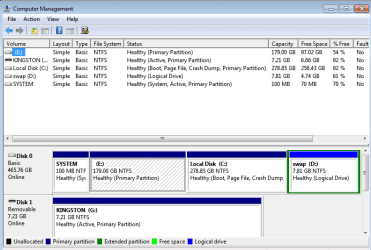
how do I know which volume to unshrink

Ajw

New member
Local time
1:29 AM
Messages
5
i reinstalled w7 on a laptop but now it seems I have two O.S.'s both w7, i did some searching and i found that someone else has shrunk the volume which is how I've come to have two operating systems. My problem is how do I know which volume do I unshrink. It seems that one OS has internet and when I load the other one there is no internet.

Computer Management says:
[C:] Simple Basic NTFS Healthy [Boot, Crash Dump, Primary Partition]
Local Disk [D:] Simple Basic NTFS Healthy [Primary Partition]
swap [Z:] Simple Basic NTFS Healthy [Page File, Logical Drive]
SYSTEM Simple Basic NTFS Healthy [System, Active, Primary Partition]

I know the SYSTEM is the start up (is this correct?), and needs to be left. I'm trying to restore to one volume with one OS. When I right click on the swap [Z:] there is no option to delete volume, it also has a green line around it, which I believe is 'Extended partition' but this is obviously the partition this person made, it is the same for C: - no option to delete volume but no green line around it. The only option to delete volume is on the Local Disk [D:], but isn't this the Primary partition with the working OS (with internet) on?
I do hope I've given enough info, I've tried to do a screenshot, but have failed miserably.
 

My Computer My Computer

At a glance

Windows 7 Home Premium 64 bitPentium b9504 gb
Computer type
Laptop
Computer Manufacturer/Model Number
Samsung
OS
Windows 7 Home Premium 64 bit
CPU
Pentium b950
Memory
4 gb
Normally the C: drive is the one that you are running Windows.
- In Win 7 the C: partition is the running OS and D: will be for the non running.

For example (may not be your case):
If you boot Win 7 (1), C: drive will be assigned to partition 1, and D: will be assigned to partition 2 for win 7 (2)

If you boot Win 7 (2), C: drive will be assigned to partition 2, and D: will be assigned to partition 1 for win 7 (1)

Please open disk manager, expand the columns and, with sniping tool, take a snapshot. Post here as an attachment. (Go Advanced - Manage Attachments - Browse - Upload)

Disk Management - Post a Screen Capture Image
 

My Computers My Computers

  • At a glance

    Windows 7 HP 64i5 6600K - 800MHz to 4200MHz4+4G GSkill DDR4 3000IG - Intel 530
    Computer type
    PC/Desktop
    Computer Manufacturer/Model Number
    custom build
    OS
    Windows 7 HP 64
    CPU
    i5 6600K - 800MHz to 4200MHz
    Motherboard
    GA-Z170-HD3P
    Memory
    4+4G GSkill DDR4 3000
    Graphics Card(s)
    IG - Intel 530
    Monitor(s) Displays
    Samsung 226BW
    Screen Resolution
    1680x1050
    Hard Drives
    (1) -1 SM951 – 128GB M.2 AHCI PCIe SSD drive for Windows 7 and Lubuntu
    (2) -1 WD SATA 3 - 1T for Data
    (3) -1 WD SATA 3 - 1T for backup
    PSU
    Thermaltake 450W TR2 gold
    Keyboard
    Old and good Chicony mechanical keyboard
    Mouse
    Logitech mX performance - 9 buttons (had to disable some)
    Internet Speed
    500Mb/s
    Browser
    Firefox 64
    Other Info
    TinyWall firewall
  • At a glance

    Windows 7 Proi7-4500U 800MHz to 3.0GHz(4+4)G DDR3 1600IG intel 4400 + NVIDIA GeForce GT 745M
    Computer type
    Laptop
    System Manufacturer/Model Number
    Asus Q550LF
    OS
    Windows 7 Pro
    CPU
    i7-4500U 800MHz to 3.0GHz
    Motherboard
    Asus Q550LF
    Memory
    (4+4)G DDR3 1600
    Graphics Card(s)
    IG intel 4400 + NVIDIA GeForce GT 745M
    Sound Card
    Realtek
    Monitor(s) Displays
    LG Display LP156WF4-SPH1
    Screen Resolution
    1920 x 1080
    Hard Drives
    BX500 120G SSD for Windows and programs +
    1T HDD for data
    Internet Speed
    500 Mb/s
    Browser
    Firefox
    Other Info
    TinyWall firewall
Hi Megahertz07, thanks for your reply, here is the screenshot as requested, (I finally managed to save on a flash drive as it wasn't being found when I saved it to the laptop)
 

Attachments

  • Screenshot.PNG
    Screenshot.PNG
    19.6 KB · Views: 2
Last edited:

My Computer My Computer

At a glance

Windows 7 Home Premium 64 bitPentium b9504 gb
Computer type
Laptop
Computer Manufacturer/Model Number
Samsung
OS
Windows 7 Home Premium 64 bit
CPU
Pentium b950
Memory
4 gb
Here is the screenshot of the Computer Management for the W7 (1) without the internet, it looks completely different
 

Attachments

  • Screenshot 2.PNG
    Screenshot 2.PNG
    17.6 KB · Views: 2

My Computer My Computer

At a glance

Windows 7 Home Premium 64 bitPentium b9504 gb
Computer type
Laptop
Computer Manufacturer/Model Number
Samsung
OS
Windows 7 Home Premium 64 bit
CPU
Pentium b950
Memory
4 gb
As I explained on post 2, C: drive letter is assigned to the partition that has the working Windows.
What you want to do? Delete the Windows without internet?
 

My Computers My Computers

  • At a glance

    Windows 7 HP 64i5 6600K - 800MHz to 4200MHz4+4G GSkill DDR4 3000IG - Intel 530
    Computer type
    PC/Desktop
    Computer Manufacturer/Model Number
    custom build
    OS
    Windows 7 HP 64
    CPU
    i5 6600K - 800MHz to 4200MHz
    Motherboard
    GA-Z170-HD3P
    Memory
    4+4G GSkill DDR4 3000
    Graphics Card(s)
    IG - Intel 530
    Monitor(s) Displays
    Samsung 226BW
    Screen Resolution
    1680x1050
    Hard Drives
    (1) -1 SM951 – 128GB M.2 AHCI PCIe SSD drive for Windows 7 and Lubuntu
    (2) -1 WD SATA 3 - 1T for Data
    (3) -1 WD SATA 3 - 1T for backup
    PSU
    Thermaltake 450W TR2 gold
    Keyboard
    Old and good Chicony mechanical keyboard
    Mouse
    Logitech mX performance - 9 buttons (had to disable some)
    Internet Speed
    500Mb/s
    Browser
    Firefox 64
    Other Info
    TinyWall firewall
  • At a glance

    Windows 7 Proi7-4500U 800MHz to 3.0GHz(4+4)G DDR3 1600IG intel 4400 + NVIDIA GeForce GT 745M
    Computer type
    Laptop
    System Manufacturer/Model Number
    Asus Q550LF
    OS
    Windows 7 Pro
    CPU
    i7-4500U 800MHz to 3.0GHz
    Motherboard
    Asus Q550LF
    Memory
    (4+4)G DDR3 1600
    Graphics Card(s)
    IG intel 4400 + NVIDIA GeForce GT 745M
    Sound Card
    Realtek
    Monitor(s) Displays
    LG Display LP156WF4-SPH1
    Screen Resolution
    1920 x 1080
    Hard Drives
    BX500 120G SSD for Windows and programs +
    1T HDD for data
    Internet Speed
    500 Mb/s
    Browser
    Firefox
    Other Info
    TinyWall firewall
Yes, I want to delete the non working windows then install a fresh copy of windows, and get rid of the logical dive also so that there is only one partition.
 

My Computer My Computer

At a glance

Windows 7 Home Premium 64 bitPentium b9504 gb
Computer type
Laptop
Computer Manufacturer/Model Number
Samsung
OS
Windows 7 Home Premium 64 bit
CPU
Pentium b950
Memory
4 gb
Make a backup of your Data on an external disk. Better be safe than sorry.

- Boot from Win 7 (that has internet) as you did on post 3
- Open Disk Manager
- Right click on the third partition (disk D:) and delete it.
- Right click on the second partition (disk C:) and extend the to maximum.

I won't delete the last partition (swap) because it can be a needed by BIOS that use a Linux program for maintenance. UNLESS you have installed a Linux version on the past.

To reinstall Windows you have two options:
- Make a reinstall. It will only replace Windows, keeping everything else (programs, data etc). To do so, under Windows, put your installation disk on and launch setup. Repair Install
- Do a clean install. Boot from the Win 7 installation disk, go to install, advanced - format the partition (it will clean ALL your partition) and then install on the formatted partition and then install the drivers and restore your data from the backup.

For the updates: MS releases SP2 for Windows 7
 

My Computers My Computers

  • At a glance

    Windows 7 HP 64i5 6600K - 800MHz to 4200MHz4+4G GSkill DDR4 3000IG - Intel 530
    Computer type
    PC/Desktop
    Computer Manufacturer/Model Number
    custom build
    OS
    Windows 7 HP 64
    CPU
    i5 6600K - 800MHz to 4200MHz
    Motherboard
    GA-Z170-HD3P
    Memory
    4+4G GSkill DDR4 3000
    Graphics Card(s)
    IG - Intel 530
    Monitor(s) Displays
    Samsung 226BW
    Screen Resolution
    1680x1050
    Hard Drives
    (1) -1 SM951 – 128GB M.2 AHCI PCIe SSD drive for Windows 7 and Lubuntu
    (2) -1 WD SATA 3 - 1T for Data
    (3) -1 WD SATA 3 - 1T for backup
    PSU
    Thermaltake 450W TR2 gold
    Keyboard
    Old and good Chicony mechanical keyboard
    Mouse
    Logitech mX performance - 9 buttons (had to disable some)
    Internet Speed
    500Mb/s
    Browser
    Firefox 64
    Other Info
    TinyWall firewall
  • At a glance

    Windows 7 Proi7-4500U 800MHz to 3.0GHz(4+4)G DDR3 1600IG intel 4400 + NVIDIA GeForce GT 745M
    Computer type
    Laptop
    System Manufacturer/Model Number
    Asus Q550LF
    OS
    Windows 7 Pro
    CPU
    i7-4500U 800MHz to 3.0GHz
    Motherboard
    Asus Q550LF
    Memory
    (4+4)G DDR3 1600
    Graphics Card(s)
    IG intel 4400 + NVIDIA GeForce GT 745M
    Sound Card
    Realtek
    Monitor(s) Displays
    LG Display LP156WF4-SPH1
    Screen Resolution
    1920 x 1080
    Hard Drives
    BX500 120G SSD for Windows and programs +
    1T HDD for data
    Internet Speed
    500 Mb/s
    Browser
    Firefox
    Other Info
    TinyWall firewall
Megahertz07 thank you, I had wondered if it was that easy, but I had read so much about the boot file and possibly needing some software to sort it that I lost all confidence. I'm just in the process of reinstalling w7, drivers and updates. I do not anticipate any more problems but I'd like to keep this thread open until I'm done, thank you once again.
 

My Computer My Computer

At a glance

Windows 7 Home Premium 64 bitPentium b9504 gb
Computer type
Laptop
Computer Manufacturer/Model Number
Samsung
OS
Windows 7 Home Premium 64 bit
CPU
Pentium b950
Memory
4 gb
There is maybe a better options for you to choose, instead of re-install again.


Partition: Reference: Post #3.

1. No drive letter. Label: SYSTEM. This is standard in Windows OS.

2. Drive letter: C:\ This is the Windows OS. Leave it alone.

3. Drive letter: D:\ This is the Windows OS without Internet. Remove the Drive letter. To be deleted.

4. Drive letter: Z:\ This may be the Recovery partition, as most laptop will placed in the last partition.
Remove the Drive letter. Rename to Recovery. Not to remove.


This method is to remove the D:\ letter from Windows Explorer.

This D:\ drive is the same as in Post #4 which is the C:\ drive without Internet.
Hence, temporary remove the drive letter.

Do some task &or play with the Computer to check if there is any issue.

Later, after testing for a few days /weeks and there is no problem in the System.
Then you may able to safely delete the partition, which is the 3rd partition.
Then you can use the 3rd partition for data, etc.
Or you can resize to max for C:\ drive to use and include this partition, as one large partition.

One basic rule.

The 1st Partition is reserve for Boot, known as SYSTEM.

The last partition should be the Recovery partition.

Both partition should be set Hidden, as it may not allow you to delete.

This is common for laptops setting WITHOUT any Recovery discs.


Edit / Added:
It is better to delete the 3rd partitions.
This is to avoid in case somehow that partition start to take over the system.
That is to say that you (or someone) add the drive letter and cause interference to the system.


This is how i normally play with these type of setting &or partitions.
 
Last edited:

My Computer My Computer

At a glance

Windows 7 x64
Computer type
Laptop
Computer Manufacturer/Model Number
Toshiba L630 and L735
OS
Windows 7 x64
Hard Drives
240 GB SSD
Back
Top