How do i know why Static IP address dropped and getting into DHCP

Vamz

New member
Local time
5:44 AM
Messages
11
Hi All,

I need assitance to find out why some of computer in my work place getting into DHCP. Let me give some insight. We have 1 Server 2008 R2 and 30 Windows 7 pro computer. All connected through network and PXE booted. WInpe and wim are stored in server.

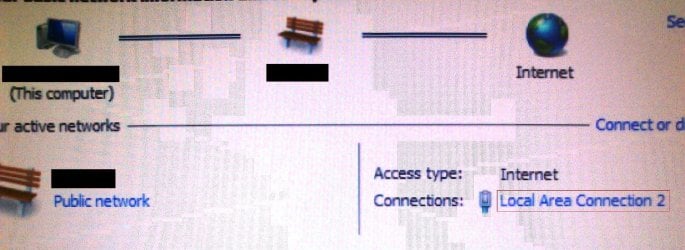
We have script to set IP address, gateway and DNS details wrote using WMI objects. i have found that some computers setting Static IP address however after reboot it loosing Static IP and getting into DHCP. Addition to that i even see When i do ipconfig "Ethernet adapter local area connection 2" when i am setting IP address after reboot it shows "Ethernet adapter local area connection" and this is going to DHCP and getting different ip address.

Additional Information:
--> WIndows 7 SP1
-->Same Mac address
-->checked form event logs couldn't able to get much information why did it dropped static IP
--> Only 1 NIC


I required help in finding why this is happening to some computer and it is very randomly:cry:. Please let me which event log location of LAN interface and How can i fix this issue because lot of other application are depend on this static ip which are getting failed.:(

Thanks,
Vamz
 

My Computer My Computer

At a glance

Windows 7 Professional 32bit
Computer type
PC/Desktop
OS
Windows 7 Professional 32bit
Welcome to Seven Forums,

Do you have a script applied in the GPO?

Select OU, in Group Policy Management Editor, expand User Configuration >> Policies >> Windows Settings >> Scripts.
 

My Computer My Computer

At a glance

Win7 & Win8 64bitIntel i5
Computer Manufacturer/Model Number
Lenovo Desktop/Samsung Laptop
OS
Win7 & Win8 64bit
CPU
Intel i5
Internet Speed
Charter-20 Mbps
Antivirus
Avast
Browser
FF, IE9 and Chrome
Hi,

NO, i checked location couldn't find any scripts.
 

My Computer My Computer

At a glance

Windows 7 Professional 32bit
Computer type
PC/Desktop
OS
Windows 7 Professional 32bit
That's probably what you'll need to do, create Script and apply in your GPO.
 

My Computer My Computer

At a glance

Win7 & Win8 64bitIntel i5
Computer Manufacturer/Model Number
Lenovo Desktop/Samsung Laptop
OS
Win7 & Win8 64bit
CPU
Intel i5
Internet Speed
Charter-20 Mbps
Antivirus
Avast
Browser
FF, IE9 and Chrome
I would have changed it but this is happening 1 in every 40 computers which have 39 computer set properly. Could you please help me with why it is happening random.
 

My Computer My Computer

At a glance

Windows 7 Professional 32bit
Computer type
PC/Desktop
OS
Windows 7 Professional 32bit
I thought from your initial post that there are more than one computers affected.
i have found that some computers setting Static IP address however after reboot it loosing Static IP and getting into DHCP.
I guess not?
I would have changed it but this is happening 1 in every 40 computers which have 39 computer set properly.
Anyway, have you tried uninstalling the ethernet adapter of the affected computer then install the latest driver?

You may also try disabling the DHCP Client service from the problematic computer.
 

My Computer My Computer

At a glance

Win7 & Win8 64bitIntel i5
Computer Manufacturer/Model Number
Lenovo Desktop/Samsung Laptop
OS
Win7 & Win8 64bit
CPU
Intel i5
Internet Speed
Charter-20 Mbps
Antivirus
Avast
Browser
FF, IE9 and Chrome
Sorry for the confusion. it is happening to 1 in 40 computers and it is common WIM file which is distributed across the network. Ethernet adapter driver were tested and installed prior hitting production and i dont think it could be with faulty drivers.

Any more inputs ?
 

My Computer My Computer

At a glance

Windows 7 Professional 32bit
Computer type
PC/Desktop
OS
Windows 7 Professional 32bit
Here is the screenshot which causing issue. Highlighted in red color.
There is no Local area connection created instead it is creating Local area connection 2.
Please advise
 

Attachments

  • Issue.JPG
    Issue.JPG
    477.9 KB · Views: 1

My Computer My Computer

At a glance

Windows 7 Professional 32bit
Computer type
PC/Desktop
OS
Windows 7 Professional 32bit
Any inputs on this issue?
 

My Computer My Computer

At a glance

Windows 7 Professional 32bit
Computer type
PC/Desktop
OS
Windows 7 Professional 32bit
Please see my advise on Post# 6.
 

My Computer My Computer

At a glance

Win7 & Win8 64bitIntel i5
Computer Manufacturer/Model Number
Lenovo Desktop/Samsung Laptop
OS
Win7 & Win8 64bit
CPU
Intel i5
Internet Speed
Charter-20 Mbps
Antivirus
Avast
Browser
FF, IE9 and Chrome
Hi 2xg,

It is very random and it is not specific to one computer. So it is hard for me to check each computer in production. Would you be able to tell me any other possiblity so that i can run all test all in one time in production.
 

My Computer My Computer

At a glance

Windows 7 Professional 32bit
Computer type
PC/Desktop
OS
Windows 7 Professional 32bit
To consolidate all my details about scenario. we have 1 serve and 40 computer connected to server in workgroup.
Every time when rebuild image of each computer we will run script to setup ip address and other application which are required by orgnization. At that time when setting ip static address it drops static ip address and gets into DHCP. I observed that it creates "Local area connection 2" instead of "Local area connection"
 

My Computer My Computer

At a glance

Windows 7 Professional 32bit
Computer type
PC/Desktop
OS
Windows 7 Professional 32bit
Sounds to me like it is creating a second local area connection when it reboots which is set to DHCP and not assigned a Static IP like you want. Why it creates a second one I'm not sure, but it sounds like it is disabling or uninstalling the first connection and when it reboots it reinstalls it again, hence it has a 2 on the end of it.

I'm not an expert on this so as has already been said try disabling the DHCP client on the affected machine, and I would personally try and set up the router to give a static IP to that PC's Hardware MAC address.
 

My Computer My Computer

At a glance

Windows 7 Ultimate x64Intil i7-86016Gb Corsair XMS3 1600MHzMSI N470GTXTwin FrozR II
Computer type
PC/Desktop
Computer Manufacturer/Model Number
Self Built
OS
Windows 7 Ultimate x64
CPU
Intil i7-860
Motherboard
Gigabyte GA-P55a-UD6
Memory
16Gb Corsair XMS3 1600MHz
Graphics Card(s)
MSI N470GTXTwin FrozR II
Monitor(s) Displays
Samsung S23A700D
Hard Drives
1x Samsung 840Pro SSD 256Gb for Windows
2x WD Green 2Tb (for Storage)
1x Western Digital Caviar Black 2 TB 7200 RPM (also for storage)
1x Samsung HD501LJ 500Gb for Ubuntu
PSU
Antec TruePower New Blue Modular 750W
Case
Antec 300
Cooling
Cosair H70
Internet Speed
60Mb/s DL, 3Mb/s UL
Antivirus
Norton Internet Security
Browser
IE, FF, Chrome
Thanks for your reply Steve..!!
It was designed to set Static IP as per our organization and what ever you said is true. I too dont know the reason of uninstalling first Lan connection.
Disabling the DHCP client, need to do on all computer because it is random and when i re-image same computer it gets static IP. From my observation some times it couldn't able to set the static IP that's why it is going to DHCP.
 

My Computer My Computer

At a glance

Windows 7 Professional 32bit
Computer type
PC/Desktop
OS
Windows 7 Professional 32bit
From your DHCP Server or Router (whatever is assigning Auto IPs), please check the setting on how the IP Addresses are excluded from the distribution outside the DHCP Scope, make sure that you have 40 Static IPs excluded (including the Router's IP) - i.e. 192.168.1.1-192.168.1.41, and your DHCP Scope perhaps should be something like - 192.168.1.42-192.168.100.
 

My Computer My Computer

At a glance

Win7 & Win8 64bitIntel i5
Computer Manufacturer/Model Number
Lenovo Desktop/Samsung Laptop
OS
Win7 & Win8 64bit
CPU
Intel i5
Internet Speed
Charter-20 Mbps
Antivirus
Avast
Browser
FF, IE9 and Chrome
Back
Top