How do I make a DOS / command prompt boot CD?!?

hucker

New member
Member
Local time
2:42 PM
Messages
73
I've looked everywhere on the web, and everything seems to apply to Windows 98 or earlier, and people with floppy disks!

I need a simple CD or USB drive (CD preferably as USB booting I can never get to work) so I can flash a BIOS. The computer has no flash function in BIOS setup, and no windows based flash program available, so I need a command prompt!!!

I tried a couple of free CD burning softwares, and the format utility in Windows 7, but none of them let me make the CD bootable! Those that do want a FLOPPY(!) as a source!

HELP!!!!!
 

My Computer

Computer Manufacturer/Model Number
Home made
OS
Windows 7 Ultimate x64
CPU
i7 940 2.9 GHz @ 3.45 GHz
Motherboard
Gigabyte GA-X58A-UD3R
Memory
24GB
Graphics Card(s)
Radeon HD 6790
Sound Card
Realtek HD onboard
Monitor(s) Displays
2 x 20" 4x3 aspect (I hate widescreen)
Hard Drives
2 x 1TB Western Digital Caviar Black (mirrored)
PSU
1 kW
Case
EZCool NA705B
Cooling
Stock CPU fan, plus 3 120mm and 2 80mm case fans
Internet Speed
2 Mbit

My Computer

Computer Manufacturer/Model Number
Dell XPS 15 L502x
OS
Windows 7 Home Premium 64bit (O.E.M)
CPU
Intel Core i7 2630QM @2.00GHz
Memory
6GB DDR3
Graphics Card(s)
Intel Intergrated Graphics 3000, nVidia GT525M (1GB)
Screen Resolution
1366x768
Hard Drives
750GB Seagate 7200rpm
Keyboard
Backlit Dell XPS 15 L502x Keyboard
Mouse
Microsoft Wireless Mobile Mouse 4000
Internet Speed
2.5 Mb/s down, 0.36 up
I'm not with this really. The mere fact that a .bin file exists on a CD or Floppy or USB should be sufficient for it to be acted upon. However there must some routine even via the BIOS setup screen which would then update the rom file.

Booting the thing won't help, you don't need anything loaded or running whilst flshing occurs.

Could you post the make and model of your board ? and let's see if we can't make this a tad easier.
 

My Computer

Computer Manufacturer/Model Number
DIY
OS
Windows 7 home premium x64
CPU
AMD FX-4100 AM3+ 3.6GHz 12MB Black Edition
Motherboard
Asus M5A97 Pro
Memory
Crsair vengeance 12Gb DDR3 1600MHz CL9
Graphics Card(s)
Asus GTX 560 1GB
Sound Card
Realtek onboard
Monitor(s) Displays
Hanns G 1680x1050 native
Hard Drives
OCZ 128Gb Petrol ssd
2x500 Gb Samsung
PSU
OCZ StealthXstream II 500W
Internet Speed
8Mb or better
Foxconn H55a

For every other computer, I've used the utility in the BIOS setup, or used a Windows based program from the motherboard manufacturer. The instructions for flashing the BIOS on the Foxconn site are way too complicated to follow, and I keep encountering a need for a floppy disk!!!
 

My Computer

Computer Manufacturer/Model Number
Home made
OS
Windows 7 Ultimate x64
CPU
i7 940 2.9 GHz @ 3.45 GHz
Motherboard
Gigabyte GA-X58A-UD3R
Memory
24GB
Graphics Card(s)
Radeon HD 6790
Sound Card
Realtek HD onboard
Monitor(s) Displays
2 x 20" 4x3 aspect (I hate widescreen)
Hard Drives
2 x 1TB Western Digital Caviar Black (mirrored)
PSU
1 kW
Case
EZCool NA705B
Cooling
Stock CPU fan, plus 3 120mm and 2 80mm case fans
Internet Speed
2 Mbit
Hmmm I tried that but I can't see the bios files I copied to it! Only command.com exists when I type dir.

There must be a simpler way. I thought of just using the "safe mode with command prompt" option by hitting F8 on starting. But for some reason this machine takes hours to not do this. I end up with a lovely black screen with just a mouse cursor. This is the reason I'm trying to flash the bios, there is a lot of bugs in the present one that are making this computer impossibly slow to work with.
 

My Computer

Computer Manufacturer/Model Number
Home made
OS
Windows 7 Ultimate x64
CPU
i7 940 2.9 GHz @ 3.45 GHz
Motherboard
Gigabyte GA-X58A-UD3R
Memory
24GB
Graphics Card(s)
Radeon HD 6790
Sound Card
Realtek HD onboard
Monitor(s) Displays
2 x 20" 4x3 aspect (I hate widescreen)
Hard Drives
2 x 1TB Western Digital Caviar Black (mirrored)
PSU
1 kW
Case
EZCool NA705B
Cooling
Stock CPU fan, plus 3 120mm and 2 80mm case fans
Internet Speed
2 Mbit
Is that the entire model number for your motherboard?
 

My Computer

Computer Manufacturer/Model Number
Dell XPS 15 L502x
OS
Windows 7 Ultimate x64 SP1
CPU
Core i7-2670QM
Memory
8GB DDR3 PC3-10600
Graphics Card(s)
Intel HD Graphics 3000 + GeForce GT 540M
Screen Resolution
1920x1080
Hard Drives
1TB 5400RPM Seagate

My Computer

Computer Manufacturer/Model Number
Home made
OS
Windows 7 Ultimate x64
CPU
i7 940 2.9 GHz @ 3.45 GHz
Motherboard
Gigabyte GA-X58A-UD3R
Memory
24GB
Graphics Card(s)
Radeon HD 6790
Sound Card
Realtek HD onboard
Monitor(s) Displays
2 x 20" 4x3 aspect (I hate widescreen)
Hard Drives
2 x 1TB Western Digital Caviar Black (mirrored)
PSU
1 kW
Case
EZCool NA705B
Cooling
Stock CPU fan, plus 3 120mm and 2 80mm case fans
Internet Speed
2 Mbit

My Computer

Computer type
Laptop
Computer Manufacturer/Model Number
Toshiba Laptop Qosimo X870
OS
Windows 7 Pro x64 SP1
CPU
Intel Core I7
Motherboard
Toshiba Qosmio
Memory
16 Gigs
Graphics Card(s)
NVIDIA GeForce GTX 670M
Monitor(s) Displays
17.7" laptop
Screen Resolution
1600 x 900
Hard Drives
256 Gig SanDisk SSD for C
256 Gig Intel SSD for D
Internet Speed
50/25 FIOS
Antivirus
Vipre (all you can eat for 10 machines)
Browser
IE and FF
Other Info
I have dos 6.22, wfwg 3.11, win98, 2000 and xp VHD's available for testing. MS's Virtual PC works great.
That's the motherboard of THIS computer. I'm trying to fix my other one, which has a Foxconn H55A board. For some reason Foxconn don't have windows flashing utilities like every other manufacturer!!!
 

My Computer

Computer Manufacturer/Model Number
Home made
OS
Windows 7 Ultimate x64
CPU
i7 940 2.9 GHz @ 3.45 GHz
Motherboard
Gigabyte GA-X58A-UD3R
Memory
24GB
Graphics Card(s)
Radeon HD 6790
Sound Card
Realtek HD onboard
Monitor(s) Displays
2 x 20" 4x3 aspect (I hate widescreen)
Hard Drives
2 x 1TB Western Digital Caviar Black (mirrored)
PSU
1 kW
Case
EZCool NA705B
Cooling
Stock CPU fan, plus 3 120mm and 2 80mm case fans
Internet Speed
2 Mbit
@Rich - He's not asking about his Gigabyte motherboard.
 

My Computer

Computer Manufacturer/Model Number
Dell XPS 15 L502x
OS
Windows 7 Ultimate x64 SP1
CPU
Core i7-2670QM
Memory
8GB DDR3 PC3-10600
Graphics Card(s)
Intel HD Graphics 3000 + GeForce GT 540M
Screen Resolution
1920x1080
Hard Drives
1TB 5400RPM Seagate

My Computer

Computer Manufacturer/Model Number
Dell XPS 15 L502x
OS
Windows 7 Ultimate x64 SP1
CPU
Core i7-2670QM
Memory
8GB DDR3 PC3-10600
Graphics Card(s)
Intel HD Graphics 3000 + GeForce GT 540M
Screen Resolution
1920x1080
Hard Drives
1TB 5400RPM Seagate
That seems to involve BUYING the files!
 

My Computer

Computer Manufacturer/Model Number
Home made
OS
Windows 7 Ultimate x64
CPU
i7 940 2.9 GHz @ 3.45 GHz
Motherboard
Gigabyte GA-X58A-UD3R
Memory
24GB
Graphics Card(s)
Radeon HD 6790
Sound Card
Realtek HD onboard
Monitor(s) Displays
2 x 20" 4x3 aspect (I hate widescreen)
Hard Drives
2 x 1TB Western Digital Caviar Black (mirrored)
PSU
1 kW
Case
EZCool NA705B
Cooling
Stock CPU fan, plus 3 120mm and 2 80mm case fans
Internet Speed
2 Mbit

My Computer

Computer Manufacturer/Model Number
Dell XPS 15 L502x
OS
Windows 7 Ultimate x64 SP1
CPU
Core i7-2670QM
Memory
8GB DDR3 PC3-10600
Graphics Card(s)
Intel HD Graphics 3000 + GeForce GT 540M
Screen Resolution
1920x1080
Hard Drives
1TB 5400RPM Seagate
Download and extract the Foxconn liveupdate from the bottom of their page for that board. Run it and it will update the Bios if required and restart.
No need to make anything.
 

My Computer

Computer Manufacturer/Model Number
DIY
OS
Windows 7 home premium x64
CPU
AMD FX-4100 AM3+ 3.6GHz 12MB Black Edition
Motherboard
Asus M5A97 Pro
Memory
Crsair vengeance 12Gb DDR3 1600MHz CL9
Graphics Card(s)
Asus GTX 560 1GB
Sound Card
Realtek onboard
Monitor(s) Displays
Hanns G 1680x1050 native
Hard Drives
OCZ 128Gb Petrol ssd
2x500 Gb Samsung
PSU
OCZ StealthXstream II 500W
Internet Speed
8Mb or better
Hi hucker,

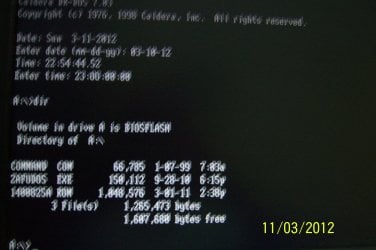
Just for curiosity's sake, I created a bootable CD exactly as outlined in Bios-boot-cd - Howto: BIOS-Update per bootable CD - www.biosflash.com

I booted my desktop from that CD.

(Sorry for the bad picture) The picture shows Command.com, Zafudos.exe and
*. ROM , the latter two being the Bios for my Zotac Mini PC.

So follow the procedure to the dot and you should be able to get the BIOS files into the CD and boot from it. Boot from the CD and check.

100_2564.JPG

If you can run the live update as indicated by cyclic, all the more fine. But I ran a quick check to verify the boot CD works or not. It does work.
 

My Computer

OS
Windows 7 Home Premium 32 bit
I did try that Jumanji, but it just didn't work for me. I ended up with only the command.com appearing.

I'm trying the fox liveupdate - I never realised that did BIOS too - why didn't they say that on the webpage?
 

My Computer

Computer Manufacturer/Model Number
Home made
OS
Windows 7 Ultimate x64
CPU
i7 940 2.9 GHz @ 3.45 GHz
Motherboard
Gigabyte GA-X58A-UD3R
Memory
24GB
Graphics Card(s)
Radeon HD 6790
Sound Card
Realtek HD onboard
Monitor(s) Displays
2 x 20" 4x3 aspect (I hate widescreen)
Hard Drives
2 x 1TB Western Digital Caviar Black (mirrored)
PSU
1 kW
Case
EZCool NA705B
Cooling
Stock CPU fan, plus 3 120mm and 2 80mm case fans
Internet Speed
2 Mbit
GRRRRRR...... the liveupdate has told me I'm running version P04 (this agrees with CPUID). There is a P06, but the online update function says "you are already up to date"! I tried the manual update (using the P06 files I downloaded), but it doesn't get to asking me to select the files, it just says something about enabling a jumper. Presumably it's referring to a jumper to enable writing to the BIOS, but according to the manual, there isn't one. The picture shown in the update program shows a jumper marked "MFG", but this is for the Intel Management engine, so nothing to do with BIOS updating.
 

My Computer

Computer Manufacturer/Model Number
Home made
OS
Windows 7 Ultimate x64
CPU
i7 940 2.9 GHz @ 3.45 GHz
Motherboard
Gigabyte GA-X58A-UD3R
Memory
24GB
Graphics Card(s)
Radeon HD 6790
Sound Card
Realtek HD onboard
Monitor(s) Displays
2 x 20" 4x3 aspect (I hate widescreen)
Hard Drives
2 x 1TB Western Digital Caviar Black (mirrored)
PSU
1 kW
Case
EZCool NA705B
Cooling
Stock CPU fan, plus 3 120mm and 2 80mm case fans
Internet Speed
2 Mbit
Back
Top