How do I make myself always administrator?

Excellent Resource Referrals!

WindowsStar,

Thanks for the excellent referrals! I will definitely check them out.

FWIW, I actually think that my point of view goes back to DOS, when you could do whatever you wanted on a machine, just by typing a simple command. :D And then Apple had to come along and screw it all up! :p I guess old habits die hard!
 

My Computer My Computer

At a glance

Microsoft Windows 7 Home Premium 32-bit 7601 ...Intel(R) Pentium(R) D CPU 2.80GHz2.00 GBNVIDIA GeForce 6200SE TurboCache(TM)
Computer Manufacturer/Model Number
HP Pavilion Media Center PC m7350n
OS
Microsoft Windows 7 Home Premium 32-bit 7601 Multiprocessor Free Service Pack 1
CPU
Intel(R) Pentium(R) D CPU 2.80GHz
Motherboard
ASUSTek Computer INC. EMERY
Memory
2.00 GB
Graphics Card(s)
NVIDIA GeForce 6200SE TurboCache(TM)
Sound Card
Realtek High Definition Audio
Monitor(s) Displays
HP L1710 LCD Display
Screen Resolution
1280 x 1024 x 32 bits (4294967296 colors) @ 60 Hz
Hard Drives
(1) SAMSUNG SP2504C (2) EPSON Stylus Storage USB Device (3) Generic USB CF Reader USB Device (4) Generic USB MS Reader USB Device (5) Generic USB SD Reader USB Device (6) Generic USB SM Reader USB Device (7) Seagate FA GoFlex Desk USB Dev
Internet Speed
20+mbps
Okay, guys, please excuse me for my ignorance, but I'm a little confused... :confused:

I thought that my one and only account on this computer, "Antonio", was the Administrator. Until, I got error messages telling me that I did not have administrator rights or privileges, and was denied access to view even simple TXT files. Then, following instructions on this forum, I "enabled?" the Administrator account, and after a couple of reboots, another login Account appeared on my Windows login screen, besides just mine. So, does this mean that I actually was not the Administrator, and did not have Administrator rights, but by creating the Administrator account, this account had them? Besides Windows limiting a "users" access to their own files, and wanting that, from a day-to-day standpoint, can you give me some examples of how I would use a separate Windows Administrator account?

And, just for clarification, can you please confirm that there are actually 3 different types of Windows Accounts, 2 of them being called "Administrator"? There is the User Account Administrator, the System Administrator Account, and the User Accounts, right? The User Account Administrator can create and modify User Accounts, but does not have System Administrator Privileges. Am I on the right track here in understanding this?

Thanks for your patience.

Due to the inclusion of UAC in win7 there are actually four account levels although two are actually part of the single user ...

Standard user
This user has limited rights and can access only files that are owned by them or available to everyone.

Administrator group account member running as standard user
This is the normal status of the administrator account formed on installation and any other user created as an administrator account. It has the same rights as the user above.
Administrator group account member running as Administrator
This is the same user as above but running in elevated mode this is either due to the UAC prompt or by right clicking an application icon and selecting "Run as Administrator". This user has access to all files and folders with administrator group or everyone permissions allocated

The hidden administrator account
This account works akin to the way that the administrator accounts did in XP or the Root account in *nix systems it is totally unaffected by UAC or permissions settings. This account is normally hidden (disabled), and is normally only enabled for special issuesHope this explains things :D
 

My Computers My Computers

  • At a glance

    Windows 11 Pro x64 [Latest Release and Releas...Ryzen 9 5950X, 3.8 - 5.2 MHz64GB [2 x 32GB] DDR4 3200MHz4GB NVIDIA GEFORCE GTX 1650 Ti
    Computer type
    PC/Desktop
    Computer Manufacturer/Model Number
    ChillBlast - Custom to my design
    OS
    Windows 11 Pro x64 [Latest Release and Release Preview]
    CPU
    Ryzen 9 5950X, 3.8 - 5.2 MHz
    Motherboard
    Asus Prime X570-Pro
    Memory
    64GB [2 x 32GB] DDR4 3200MHz
    Graphics Card(s)
    4GB NVIDIA GEFORCE GTX 1650 Ti
    Sound Card
    On-board SPDIF to 5.1 System + HDMI [5.1 system]
    Monitor(s) Displays
    32" UHD 32 Bit HDR Monitor + 43" UHD 4K 32Bit HDR TV
    Screen Resolution
    2 x 3840 x 2160 @60Hz
    Hard Drives
    1TB M2 SSD OS, 500GB Fast Access SSD, 2 x 8TB Data + Various Externals from 1TB to 4TB, 10TB NAS
    PSU
    NZXT C750 80 PLUS Gold 750W Modular PSU
    Case
    Workstation Case [Matt Black]
    Cooling
    NZXT Kraken X63 280mm CPU Cooler +2x Quiet Case fans
    Keyboard
    Logitech Wireless MX Keys & K400 + others
    Mouse
    Logitech Wireless MX Master 3S
    Internet Speed
    920 MB Down 50 MB Up
    Antivirus
    BitDefender Total Security Pro
    Browser
    Chrome (always run latest Non-Beta)
    Other Info
    Also run ...
    Laptop - Quad 8GB - Windows 10 Pro x64
    Nexus 7 Android tablet x2
    Samsung 10.2" tablet
    Blackview TAB 8 4G Android Tablet c/w Keyboard
    Wacom Intuos Pro Medium Pen Pad
    Wacom Intuos Pro Small Pen Pad
    Wacom Expresskeys Remote
    Loopdeck+ Graphics Controller
    Shuttle Pro v2 Control
  • At a glance

    Windows 11 Pro x64 Latest RPIntel I7 10750H 5.0GHz32GB [2x16GB] DDR4 2933 MHznVidia GTX1650Ti 4 GB GDDR6
    Computer type
    Laptop
    System Manufacturer/Model Number
    Dell XPS 17 10750H
    OS
    Windows 11 Pro x64 Latest RP
    CPU
    Intel I7 10750H 5.0GHz
    Motherboard
    Dell XPS
    Memory
    32GB [2x16GB] DDR4 2933 MHz
    Graphics Card(s)
    nVidia GTX1650Ti 4 GB GDDR6
    Sound Card
    Stock [Realtek] 4 Speaker
    Monitor(s) Displays
    17" IPS UHD+ Infinity Edge Touchscreen
    Screen Resolution
    3840 x 2400
    Hard Drives
    2TB M2 NVMe, 4TB External + various 500GB & 1TB External NVMe (also have access to spinner HDD from
    PSU
    Stock
    Case
    Stock XPS Aluminium & Carbon Fibre
    Cooling
    Stock - Active Fan Control
    Keyboard
    Backlit + Various Logitech
    Mouse
    Stock Track Pad + Logitech MX Trackball
    Internet Speed
    72 MB Down 18MB Up
    Browser
    Chrome
    Other Info
    Also run ...
    Laptop - Quad 8GB - Windows 10 Pro x64
    Nexus 7 Android tablet x2
    10.2" tablet
    Sony Z3 Android Smartphone
    Wacom Intuos Pro Medium Pen Pad
    Wacom Intuos Pro Small Pen Pad
    Wacom Expresskeys Remote
    Loopdeck+ Graphics Controller
    Shuttle Pro v2 Control Pad
    10TB NAS
Nigel,

Thanks for the clarification. This is kind of a moot point now, and may be a rare occurrence, but this is what is prompting me for just a little more clarification:

I ran the elevated command prompt, by right clicking and run as admin on command prompt accessory. Then I ran sfc /scannow, thinking that it would do something helpful [for my WMP and IE "issues"], and when it created a log file, I thought it would be helpful to read it. (What I learned after finally gaining access to it is that it was very cryptic.) Anyway, I double clicked on the TXT log file, and was told, "ACCESS DENIED". That irks me...it is just a txt file! You can't right click on this file and "run as admin" or "open as admin", so the only way I could figure, from the postings here, is to enable the hidden Administrator Account, which a poster here showed me how to do, and the Brink tutorial was helpful also. :)

So, I guess my question is: Is this "Access Denied" a rare occurrence, or should I have the hidden Administrator Account enabled for times like this? Or, put another way, are there other times when I might need the hidden Administrator Account, and should enable it, and have it already set up for those times?

Thanks for all the "hand-holding". I'm sorry for my ignorance. :o
 

My Computer My Computer

At a glance

Microsoft Windows 7 Home Premium 32-bit 7601 ...Intel(R) Pentium(R) D CPU 2.80GHz2.00 GBNVIDIA GeForce 6200SE TurboCache(TM)
Computer Manufacturer/Model Number
HP Pavilion Media Center PC m7350n
OS
Microsoft Windows 7 Home Premium 32-bit 7601 Multiprocessor Free Service Pack 1
CPU
Intel(R) Pentium(R) D CPU 2.80GHz
Motherboard
ASUSTek Computer INC. EMERY
Memory
2.00 GB
Graphics Card(s)
NVIDIA GeForce 6200SE TurboCache(TM)
Sound Card
Realtek High Definition Audio
Monitor(s) Displays
HP L1710 LCD Display
Screen Resolution
1280 x 1024 x 32 bits (4294967296 colors) @ 60 Hz
Hard Drives
(1) SAMSUNG SP2504C (2) EPSON Stylus Storage USB Device (3) Generic USB CF Reader USB Device (4) Generic USB MS Reader USB Device (5) Generic USB SD Reader USB Device (6) Generic USB SM Reader USB Device (7) Seagate FA GoFlex Desk USB Dev
Internet Speed
20+mbps

My Computer My Computer

At a glance

Windows 7 Ultimate 32 bitIntel(R) Pentium(R) 4 CPU 3.00GHz2.50 GB RAMNVIDIA GeForce 7600 GS
Computer Manufacturer/Model Number
Home built
OS
Windows 7 Ultimate 32 bit
CPU
Intel(R) Pentium(R) 4 CPU 3.00GHz
Motherboard
ASUS P4P800-VM Motherboard Chipset: Intel 865G + ICH5
Memory
2.50 GB RAM
Graphics Card(s)
NVIDIA GeForce 7600 GS
Sound Card
SoundMax Integrated Digital Audio (Chip)
Monitor(s) Displays
ViewSonic VX 1962 wm
Screen Resolution
1680 X 1050
Hard Drives
Seagate Barracuda 7200.10 80 GB
ST380215A ATA Device 18.6 GB
Western Digital "My Book" external hard drive 750 GB
Cooling
Fan based
Keyboard
Microsoft Comfort Curve Keyboard 2000 v10 USB
Mouse
Logitec optic USB
Internet Speed
3.01 Mb/s download 0.64 Mb/s upload
The access denied message is generated because of the location of the file you are trying to access - all of the system areas are administrator only, so any file that is saved in the windows32 folder will not be accessible for a standard user account - either the standard user or the un-elevated administrator account.

There are various methods to work around these problems

  • Use of the Take ownership option as suggested by Johnathon_King ( EDIT and carlTR6 :D )
  • Running windows explorer as administrator (type explorer into the start search bar right click on the shortcut that appears and run as Admin)
  • Switch off UAC temporarily
  • Use the hidden administrator

I would personally suggest that the order shown is my preferred order :)

I work a lot with system files on a daily basis and I run with UAC on and the Hidden administrator still hidden without any issues - so that would be my recommendation, but of course you should use whichever method works best for you.
 

My Computers My Computers

  • At a glance

    Windows 11 Pro x64 [Latest Release and Releas...Ryzen 9 5950X, 3.8 - 5.2 MHz64GB [2 x 32GB] DDR4 3200MHz4GB NVIDIA GEFORCE GTX 1650 Ti
    Computer type
    PC/Desktop
    Computer Manufacturer/Model Number
    ChillBlast - Custom to my design
    OS
    Windows 11 Pro x64 [Latest Release and Release Preview]
    CPU
    Ryzen 9 5950X, 3.8 - 5.2 MHz
    Motherboard
    Asus Prime X570-Pro
    Memory
    64GB [2 x 32GB] DDR4 3200MHz
    Graphics Card(s)
    4GB NVIDIA GEFORCE GTX 1650 Ti
    Sound Card
    On-board SPDIF to 5.1 System + HDMI [5.1 system]
    Monitor(s) Displays
    32" UHD 32 Bit HDR Monitor + 43" UHD 4K 32Bit HDR TV
    Screen Resolution
    2 x 3840 x 2160 @60Hz
    Hard Drives
    1TB M2 SSD OS, 500GB Fast Access SSD, 2 x 8TB Data + Various Externals from 1TB to 4TB, 10TB NAS
    PSU
    NZXT C750 80 PLUS Gold 750W Modular PSU
    Case
    Workstation Case [Matt Black]
    Cooling
    NZXT Kraken X63 280mm CPU Cooler +2x Quiet Case fans
    Keyboard
    Logitech Wireless MX Keys & K400 + others
    Mouse
    Logitech Wireless MX Master 3S
    Internet Speed
    920 MB Down 50 MB Up
    Antivirus
    BitDefender Total Security Pro
    Browser
    Chrome (always run latest Non-Beta)
    Other Info
    Also run ...
    Laptop - Quad 8GB - Windows 10 Pro x64
    Nexus 7 Android tablet x2
    Samsung 10.2" tablet
    Blackview TAB 8 4G Android Tablet c/w Keyboard
    Wacom Intuos Pro Medium Pen Pad
    Wacom Intuos Pro Small Pen Pad
    Wacom Expresskeys Remote
    Loopdeck+ Graphics Controller
    Shuttle Pro v2 Control
  • At a glance

    Windows 11 Pro x64 Latest RPIntel I7 10750H 5.0GHz32GB [2x16GB] DDR4 2933 MHznVidia GTX1650Ti 4 GB GDDR6
    Computer type
    Laptop
    System Manufacturer/Model Number
    Dell XPS 17 10750H
    OS
    Windows 11 Pro x64 Latest RP
    CPU
    Intel I7 10750H 5.0GHz
    Motherboard
    Dell XPS
    Memory
    32GB [2x16GB] DDR4 2933 MHz
    Graphics Card(s)
    nVidia GTX1650Ti 4 GB GDDR6
    Sound Card
    Stock [Realtek] 4 Speaker
    Monitor(s) Displays
    17" IPS UHD+ Infinity Edge Touchscreen
    Screen Resolution
    3840 x 2400
    Hard Drives
    2TB M2 NVMe, 4TB External + various 500GB & 1TB External NVMe (also have access to spinner HDD from
    PSU
    Stock
    Case
    Stock XPS Aluminium & Carbon Fibre
    Cooling
    Stock - Active Fan Control
    Keyboard
    Backlit + Various Logitech
    Mouse
    Stock Track Pad + Logitech MX Trackball
    Internet Speed
    72 MB Down 18MB Up
    Browser
    Chrome
    Other Info
    Also run ...
    Laptop - Quad 8GB - Windows 10 Pro x64
    Nexus 7 Android tablet x2
    10.2" tablet
    Sony Z3 Android Smartphone
    Wacom Intuos Pro Medium Pen Pad
    Wacom Intuos Pro Small Pen Pad
    Wacom Expresskeys Remote
    Loopdeck+ Graphics Controller
    Shuttle Pro v2 Control Pad
    10TB NAS
I actually just ran across the "take ownership tutorial" today, so no, I did not try that. But, I still wonder if I shouldn't just have the Administrator account on hand, or are these "Access Denied" messages pretty rare? FWIW, just from glancing over the tutorial, it seems easier to just execute the command to enable the hidden administrator account, than to do the take ownership tweak. :huh:
 

My Computer My Computer

At a glance

Microsoft Windows 7 Home Premium 32-bit 7601 ...Intel(R) Pentium(R) D CPU 2.80GHz2.00 GBNVIDIA GeForce 6200SE TurboCache(TM)
Computer Manufacturer/Model Number
HP Pavilion Media Center PC m7350n
OS
Microsoft Windows 7 Home Premium 32-bit 7601 Multiprocessor Free Service Pack 1
CPU
Intel(R) Pentium(R) D CPU 2.80GHz
Motherboard
ASUSTek Computer INC. EMERY
Memory
2.00 GB
Graphics Card(s)
NVIDIA GeForce 6200SE TurboCache(TM)
Sound Card
Realtek High Definition Audio
Monitor(s) Displays
HP L1710 LCD Display
Screen Resolution
1280 x 1024 x 32 bits (4294967296 colors) @ 60 Hz
Hard Drives
(1) SAMSUNG SP2504C (2) EPSON Stylus Storage USB Device (3) Generic USB CF Reader USB Device (4) Generic USB MS Reader USB Device (5) Generic USB SD Reader USB Device (6) Generic USB SM Reader USB Device (7) Seagate FA GoFlex Desk USB Dev
Internet Speed
20+mbps
Thanks again, Nigel!

The access denied message is generated because of the location of the file you are trying to access - all of the system areas are administrator only, so any file that is saved in the windows32 folder will not be accessible for a standard user account - either the standard user or the un-elevated administrator account.

There are various methods to work around these problems

  • Use of the Take ownership option as suggested by Johnathon_King ( EDIT and carlTR6 :D )
  • Running windows explorer as administrator (type explorer into the start search bar right click on the shortcut that appears and run as Admin)
  • Switch off UAC temporarily
  • Use the hidden administrator
I would personally suggest that the order shown is my preferred order :)

I work a lot with system files on a daily basis and I run with UAC on and the Hidden administrator still hidden without any issues - so that would be my recommendation, but of course you should use whichever method works best for you.

Nigel, Thanks a lot for outlining your routine. That explanation is most helpful, because I can see the methodology. And, if you keep your Hidden admin hidden, then I see no reason why I cannot do so also. I will use these as advised. It just makes sense now!

Thanks for your follow through, I appreciate it! :D

Take good care,
 

My Computer My Computer

At a glance

Microsoft Windows 7 Home Premium 32-bit 7601 ...Intel(R) Pentium(R) D CPU 2.80GHz2.00 GBNVIDIA GeForce 6200SE TurboCache(TM)
Computer Manufacturer/Model Number
HP Pavilion Media Center PC m7350n
OS
Microsoft Windows 7 Home Premium 32-bit 7601 Multiprocessor Free Service Pack 1
CPU
Intel(R) Pentium(R) D CPU 2.80GHz
Motherboard
ASUSTek Computer INC. EMERY
Memory
2.00 GB
Graphics Card(s)
NVIDIA GeForce 6200SE TurboCache(TM)
Sound Card
Realtek High Definition Audio
Monitor(s) Displays
HP L1710 LCD Display
Screen Resolution
1280 x 1024 x 32 bits (4294967296 colors) @ 60 Hz
Hard Drives
(1) SAMSUNG SP2504C (2) EPSON Stylus Storage USB Device (3) Generic USB CF Reader USB Device (4) Generic USB MS Reader USB Device (5) Generic USB SD Reader USB Device (6) Generic USB SM Reader USB Device (7) Seagate FA GoFlex Desk USB Dev
Internet Speed
20+mbps
WindowsStar,

Thanks for the excellent referrals! I will definitely check them out.

FWIW, I actually think that my point of view goes back to DOS, when you could do whatever you wanted on a machine, just by typing a simple command. :D And then Apple had to come along and screw it all up! :p I guess old habits die hard!

Wow DOS, yep a lot has changed since then. Back in DOS there was no malware and most of the viruses were just annoying, now-a-days they can destroy your machine or send 10 million SPAM. UGH!
 

My Computer My Computer

At a glance

Windows 7 Enterprise (x64); Windows Server 20...16GB
Computer type
PC/Desktop
Computer Manufacturer/Model Number
Dell OP7010
OS
Windows 7 Enterprise (x64); Windows Server 2008 R2 (x64)
Memory
16GB
Monitor(s) Displays
4 Dell 24" LCD
Screen Resolution
1280x1024
Keyboard
Dell
Mouse
Dell Optical
Internet Speed
40meg
I actually just ran across the "take ownership tutorial" today, so no, I did not try that. But, I still wonder if I shouldn't just have the Administrator account on hand, or are these "Access Denied" messages pretty rare? FWIW, just from glancing over the tutorial, it seems easier to just execute the command to enable the hidden administrator account, than to do the take ownership tweak. :huh:

It is not often that you have to use "Take Ownership". It is easier to use it than switch over to the hidden Admin account just to do one or two quick operations. I have found it works really well.

Not that I am comparing myself to Nigel by any means, but I use the same priorities he does. I rehid my hidden administrator account after experimenting with it for a few weeks.
 

My Computer My Computer

At a glance

Windows 7 Ultimate 32 bitIntel(R) Pentium(R) 4 CPU 3.00GHz2.50 GB RAMNVIDIA GeForce 7600 GS
Computer Manufacturer/Model Number
Home built
OS
Windows 7 Ultimate 32 bit
CPU
Intel(R) Pentium(R) 4 CPU 3.00GHz
Motherboard
ASUS P4P800-VM Motherboard Chipset: Intel 865G + ICH5
Memory
2.50 GB RAM
Graphics Card(s)
NVIDIA GeForce 7600 GS
Sound Card
SoundMax Integrated Digital Audio (Chip)
Monitor(s) Displays
ViewSonic VX 1962 wm
Screen Resolution
1680 X 1050
Hard Drives
Seagate Barracuda 7200.10 80 GB
ST380215A ATA Device 18.6 GB
Western Digital "My Book" external hard drive 750 GB
Cooling
Fan based
Keyboard
Microsoft Comfort Curve Keyboard 2000 v10 USB
Mouse
Logitec optic USB
Internet Speed
3.01 Mb/s download 0.64 Mb/s upload
You will want to read: Mandatory Integrity Control - Wikipedia, the free encyclopedia It explains how accounts can be Administrator without Administrator power all the time. Medium = Standard User Power, High = Administrator Power.

If I didn't know better, I would swear that you were testing me with this to see if I actually went to read it, which I did. ;) Unfortunately, it was talking about things that I am clueless about, for the most part. I got the 'gist' of it, however, so it was worthwhile. Thank you.
 

My Computer My Computer

At a glance

Microsoft Windows 7 Home Premium 32-bit 7601 ...Intel(R) Pentium(R) D CPU 2.80GHz2.00 GBNVIDIA GeForce 6200SE TurboCache(TM)
Computer Manufacturer/Model Number
HP Pavilion Media Center PC m7350n
OS
Microsoft Windows 7 Home Premium 32-bit 7601 Multiprocessor Free Service Pack 1
CPU
Intel(R) Pentium(R) D CPU 2.80GHz
Motherboard
ASUSTek Computer INC. EMERY
Memory
2.00 GB
Graphics Card(s)
NVIDIA GeForce 6200SE TurboCache(TM)
Sound Card
Realtek High Definition Audio
Monitor(s) Displays
HP L1710 LCD Display
Screen Resolution
1280 x 1024 x 32 bits (4294967296 colors) @ 60 Hz
Hard Drives
(1) SAMSUNG SP2504C (2) EPSON Stylus Storage USB Device (3) Generic USB CF Reader USB Device (4) Generic USB MS Reader USB Device (5) Generic USB SD Reader USB Device (6) Generic USB SM Reader USB Device (7) Seagate FA GoFlex Desk USB Dev
Internet Speed
20+mbps
Hi all

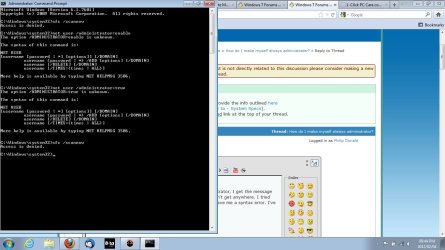
When I type sfc /scannow from cmd prompt run as administrator, I get the message Access is Denied. I have full administrator rights, but I don't get anywhere. I tried the command net user /administrator:enable (and with true at the end) but that gave me a syntax error. I've included a screen shot with both outcomes. Please help.

Grace and peace
Philip
 

Attachments

  • sfc scannow problem.jpg
    sfc scannow problem.jpg
    100.2 KB · Views: 37

My Computer My Computer

At a glance

Windows 7 Starter 32 bitAMD Dual-Core Processor C60 with Turbo CORE T...4GB DDR3 Memory
Computer Manufacturer/Model Number
Acer Aspire One
OS
Windows 7 Starter 32 bit
CPU
AMD Dual-Core Processor C60 with Turbo CORE Technology
Memory
4GB DDR3 Memory
Okay, just activated the Hidden Administrator and still getting the Access is Denied message. Is something seriously wrong here? I even tried running the sfc /scannow from various directories to see if I could get a positive response. Help!
 

My Computer My Computer

At a glance

Windows 7 Starter 32 bitAMD Dual-Core Processor C60 with Turbo CORE T...4GB DDR3 Memory
Computer Manufacturer/Model Number
Acer Aspire One
OS
Windows 7 Starter 32 bit
CPU
AMD Dual-Core Processor C60 with Turbo CORE Technology
Memory
4GB DDR3 Memory
Did you disable UAC?
 

My Computer My Computer

At a glance

windows sevenPhenom II x2 3.14 gigsNvidia GTS 250
Computer Manufacturer/Model Number
iBuyPower
OS
windows seven
CPU
Phenom II x2 3.1
Motherboard
asus
Memory
4 gigs
Graphics Card(s)
Nvidia GTS 250
Monitor(s) Displays
23in Acre
It appears the version of Windows was installed without license (by dealer) and it was a badly hacked version. Must get a new version of Windows.
 

My Computer My Computer

At a glance

Windows 7 Starter 32 bitAMD Dual-Core Processor C60 with Turbo CORE T...4GB DDR3 Memory
Computer Manufacturer/Model Number
Acer Aspire One
OS
Windows 7 Starter 32 bit
CPU
AMD Dual-Core Processor C60 with Turbo CORE Technology
Memory
4GB DDR3 Memory

My Computer My Computer

At a glance

Microsoft Windows 7 Ultimate 64-bit 7601 Mult...Intel(R) Core(TM) i5 CPU M 450 @ 2.40GHz4.00 GBAMD Radeon HD 6500M/5600/5700 Series
Computer type
Laptop
Computer Manufacturer/Model Number
dell studio 1749
OS
Microsoft Windows 7 Ultimate 64-bit 7601 Multiprocessor Free Service Pack 1
CPU
Intel(R) Core(TM) i5 CPU M 450 @ 2.40GHz
Motherboard
Dell Inc. 0KVMW2
Memory
4.00 GB
Graphics Card(s)
AMD Radeon HD 6500M/5600/5700 Series
Sound Card
(1) AMD High Definition Audio Device (2) IDT High Definiti
Screen Resolution
1600 x 900 x 32 bits (4294967296 colors) @ 60 Hz
Hard Drives
(1) TOSHIBA MK5056GSY ATA Device (2) Seagate Expansion Desk USB Device
Antivirus
Avast
Browser
google chrome
Any more problems Linda :D
 

My Computer My Computer

At a glance

windows 7 home 64bitINTEL-CORE I716GB
Computer Manufacturer/Model Number
W530-3630QM1
OS
windows 7 home 64bit
CPU
INTEL-CORE I7
Memory
16GB
Hard Drives
750GB
Browser
Chrome
Hiya pal :D
Im doing great, Im on my laptop and its running great , its like it was when new ( 3 years) once i had got that AMD graphics adapter i was up and running, shame it wasn't on my drivers disc or the website under my named laptop which could have caused less:banghead: and i never even had a dram through it all lol Tonight I will start putting back on my most used programs and browsing , so glad to have come across you, you do the group proud by giving your support and knowledge , that's important me when you come to these communities to pick your brains lol The help has been wonderful, thank you.
ps., I even took your advice, got the link here for backing up and thats what i done. There is so much info on here its amazing, you are a great team, i will stay in touch from Bonnie Dundee :0)
Linda :thumbsup:
 

My Computer My Computer

At a glance

Microsoft Windows 7 Ultimate 64-bit 7601 Mult...Intel(R) Core(TM) i5 CPU M 450 @ 2.40GHz4.00 GBAMD Radeon HD 6500M/5600/5700 Series
Computer type
Laptop
Computer Manufacturer/Model Number
dell studio 1749
OS
Microsoft Windows 7 Ultimate 64-bit 7601 Multiprocessor Free Service Pack 1
CPU
Intel(R) Core(TM) i5 CPU M 450 @ 2.40GHz
Motherboard
Dell Inc. 0KVMW2
Memory
4.00 GB
Graphics Card(s)
AMD Radeon HD 6500M/5600/5700 Series
Sound Card
(1) AMD High Definition Audio Device (2) IDT High Definiti
Screen Resolution
1600 x 900 x 32 bits (4294967296 colors) @ 60 Hz
Hard Drives
(1) TOSHIBA MK5056GSY ATA Device (2) Seagate Expansion Desk USB Device
Antivirus
Avast
Browser
google chrome
Hiya Linda There are many Tutorials on the Forum you should find them very helpful . There is also Experts in every category .. So if you ever need help in the future you know where to come .. Everyone here is just glad to help in any way they can .. Good luck for tonight dont Install to many programs at once do it gradually over the next few days :)
 

My Computer My Computer

At a glance

windows 7 home 64bitINTEL-CORE I716GB
Computer Manufacturer/Model Number
W530-3630QM1
OS
windows 7 home 64bit
CPU
INTEL-CORE I7
Memory
16GB
Hard Drives
750GB
Browser
Chrome
Little help please :P

Hello,
I would appreciate if someone could help me with getting my administrator rights back. I have my laptop but because i'm still in University , my mother put on the time limit (please don't judge :D ) and i cant turn it off.It seems she was able to stop me from using the cmd, local groups and any other possibility to get my admin rights back. If there is any way i can , please help :)
 

My Computer My Computer

At a glance

Windows 7
Computer type
Laptop
Computer Manufacturer/Model Number
Dell
OS
Windows 7
Yes, I know this is an old thread....but I came across it, so....

the unhappy faces are ('s :'s I didn't have time to figure out how to fix it....
To be completely elevated ans admin right click on the command prompt icon, click "run as administrator". It should already be at "c:\windows\system32" if it isn't then get there. Once there, type "net user administrator /active:yes/no" Yes turns it on obviously. Then Log off and when you reach the login screen you will see a new account called Administrator. This administrator is the Hidden Admin and has full access to the computer especially above the admin accounts you can or have created.
Use the Hidden Admin for what you need done, then go back to command prompt and turn off the Hidden Admin. You don't, or shouldn't, want to leave that open and available to anyone accessing your computer physically or through back doors, like your firewall. Your computer can be basically destroyed and if you don't have a windows installation disc, which seems common these days for some dame reason, then you're screwed.

Other scenario: If you need to open a file but you're getting the "access denied" prompt, click on Start, then click on All Programs, then click on Accessories, then Right click on Windows Explorer, then navigate to the item you wish to open....you should be able to open it. HOWEVER, I have been having a constant battle with my computer about what permissions I am allowed to have. Microsoft simply dumbfounds me on a regular, not always, but regular occasions such as this.

In any event, if all else fails and you want to control a specific folder, drive, or document, whip out the Hidden Administrator, right click Command Prompt TWICE...two windows, it's easier trust me.....set the windows side by side by dragging them to the sides of the screen, in the right window type ICACLS and that will bring up a large instructional sheet on how to use it. Play with it later but be extremely careful, for now focus on the "permissions" and center them in the screen so you can refer to them easily.
Next, in the Left window type ICACLS "file/drive/folder name" /grant[:r] "name of user":(and begin typing in every permissions you want that user to have from the top of the stack to the very bottom) then type /T /C that will give you control of everything. There.
This is an example of the string c:\icacls Pictures /grant[:r] Luke:(f,m,rx,r,w,d,de,rc,wdac,wo,s,as,ma,gr,gw,ge,ga,rd,wd,ad,rea,wea,x,dc,ra,wa) /T /C

This will give the user "Luke" full access And full Special permissions to the "Pictures" folder. You could take ownership, but I've found that it grants me no more rights than a normal, useless administrator account and I've been dealing with for a long time. I wish someone could teach me some more things lol

But, when it is done, hit the Up Arrow to display your last command and remove everything after the name of the user and type ":(NP) /T /C" This will stop inheritance which I've run into a huge amount of problems with as well.

Hope this helps. I found this thread looking to permanently elevate my admins also but I don't see an answer that I haven't already tried. If anyone knows how to actually, literally elevate all normal admins please let me know...I want to run my computer instead of forcing it to do what I want every time......
Hopes this helps someone....... luv ya all

 
Last edited by a moderator:

My Computer My Computer

At a glance

Windows 7 Home Premium edition 64 bitAMD Athlon II (X2) 240 Processor 2.80 GHZ6gbATI Radeon HD 4200
Computer type
PC/Desktop
Computer Manufacturer/Model Number
Dell
OS
Windows 7 Home Premium edition 64 bit
CPU
AMD Athlon II (X2) 240 Processor 2.80 GHZ
Motherboard
?
Memory
6gb
Graphics Card(s)
ATI Radeon HD 4200
Antivirus
McAfee
Browser
Chrome, Firefrox, IE
Back
Top