Yes, I know this is an old thread....but I came across it, so....
the unhappy faces are ('s :'s I didn't have time to figure out how to fix it....
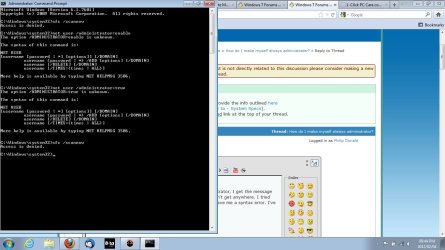
To be completely elevated ans admin right click on the command prompt icon, click "run as administrator". It should already be at "c:\windows\system32" if it isn't then get there. Once there, type "net user administrator /active:yes/no" Yes turns it on obviously. Then Log off and when you reach the login screen you will see a new account called Administrator. This administrator is the Hidden Admin and has full access to the computer especially above the admin accounts you can or have created.
Use the Hidden Admin for what you need done, then go back to command prompt and turn off the Hidden Admin. You don't, or shouldn't, want to leave that open and available to anyone accessing your computer physically or through back doors, like your firewall. Your computer can be basically destroyed and if you don't have a windows installation disc, which seems common these days for some dame reason, then you're screwed.
Other scenario: If you need to open a file but you're getting the "access denied" prompt, click on Start, then click on All Programs, then click on Accessories, then Right click on Windows Explorer, then navigate to the item you wish to open....you should be able to open it. HOWEVER, I have been having a constant battle with my computer about what permissions I am allowed to have. Microsoft simply dumbfounds me on a regular, not always, but regular occasions such as this.
In any event, if all else fails and you want to control a specific folder, drive, or document, whip out the Hidden Administrator, right click Command Prompt TWICE...two windows, it's easier trust me.....set the windows side by side by dragging them to the sides of the screen, in the right window type ICACLS and that will bring up a large instructional sheet on how to use it. Play with it later but be extremely careful, for now focus on the "permissions" and center them in the screen so you can refer to them easily.
Next, in the Left window type ICACLS "file/drive/folder name" /grant[:r] "name of user"

and begin typing in every permissions you want that user to have from the top of the stack to the very bottom) then type /T /C that will give you control of everything. There.
This is an example of the string c:\icacls Pictures /grant[:r] Luke
f,m,rx,r,w,d,de,rc,wdac,wo,s,as,ma,gr,gw,ge,ga,rd,wd,ad,rea,wea,x,dc,ra,wa) /T /C
This will give the user "Luke" full access And full Special permissions to the "Pictures" folder. You could take ownership, but I've found that it grants me no more rights than a normal, useless administrator account and I've been dealing with for a long time. I wish someone could teach me some more things lol
But, when it is done, hit the Up Arrow to display your last command and remove everything after the name of the user and type "
NP) /T /C" This will stop inheritance which I've run into a huge amount of problems with as well.
Hope this helps. I found this thread looking to permanently elevate my admins also but I don't see an answer that I haven't already tried. If anyone knows how to actually, literally elevate all normal admins please let me know...I want to run my computer instead of forcing it to do what I want every time......
Hopes this helps someone....... luv ya all


 And then Apple had to come along and screw it all up!
  I guess old habits die hard!


 Unfortunately, it was talking about things that I am clueless about, for the most part. I got the 'gist' of it, however, so it was worthwhile. Thank you.