Solved How do i make the " key work properly?

MazterZz

New member
Local time
6:08 AM
Messages
5
Hi,
I recently got a dell inspiron laptop for work with windows 7. Was wondering how do i make the " key display the quotation mark with out having to push it twice which results in two of them coming up like this "". So in a nutshell problem is when i hold shift and push the quotation key once nothing displays, push it again and two show up where cursor was. I want it to output just ONE for me! Is there a way to change this setting? I would like it to work properly because use the key a fair amount for writing numbers with "" key behind it to represent inches. Much handier then writing it out when i need to save space. Please help me.

Sorry for the long post
 

My Computer

Computer Manufacturer/Model Number
Dell
OS
windows 7, 64 bit
CPU
i5
Memory
6 gig
Graphics Card(s)
integrated
Monitor(s) Displays
laptop
Hard Drives
320 gig
Welcome to Seven Forums MazterZz.

You might see if the " key can be safely removed and check for dirt under it. Alternatively you can invert the laptop and gently tap it on a hard surface to dislodge dirt.
 

My Computer

Computer type
PC/Desktop
Computer Manufacturer/Model Number
Home Built Desktop By DataTech
OS
Windows 7 Ultimate X64 SP1
CPU
Intel i5-2550K, Differing ~4.4-4.8GHz No built in GPU
Motherboard
ASUS P8Z68-V PRO/GEN3
Memory
16GB G.Skill Sniper 1866MHz @ 2133MHz 2x8GB
Graphics Card(s)
ASUS GTX650TIB-DC2OC-2GD5, (650TI Boost)
Sound Card
Onboard Realtek 5-1
Monitor(s) Displays
Samsung P2570HD
Screen Resolution
1920x1080
Hard Drives
Samsung 840 Pro 256GB SSD for OS, 500GB Seagate Constellation (Enterprise drive) for Data
PSU
Corsair HX650W
Case
Inwin Dragon Rider
Cooling
Hyper 212 EVO w/two Noctua fans, push-pull, @1300 RPM
Keyboard
E-Z Eyes, bright yellow keys with large characters
Mouse
steelseries SENSEI Laser Pro Gaming
Internet Speed
48-51Mbs Mbs down, 11 Mbs up Xfinity Cable
Antivirus
Norton Internet Security 2013
Browser
IE 10, Opera, Pale Moon if needed
Other Info
4 case fans, LG BluRay-RE, ASUS DVD-RW, Mr. Fusion power supply, 1.21 gigawatts.
Go to: Control Panel - Region and Language - Click on Keyboard and Languages tab, - Then click Change Keyboards.

whats your default input language set to?

Untitled.jpg
 

My Computer

Computer Manufacturer/Model Number
Cooler Master
OS
Windows 7 Home Premium 64 Bit
CPU
Core I7 1155 3.4GHZ
Memory
8GB DDR 1600
Hard Drives
64 GB SSD - OS
1TB - DATA
PSU
340 Watt Corsair
Case
Cooler Master
Cooling
Cooler Master
language set to US, US-International
and i don't think it is dirt or something else lodged, because every time i push quotation key, first time nothing shows up, then second time, which is right in a row, two quotations show up on screen. I think it is some messed up setting in windows
 

My Computer

Computer Manufacturer/Model Number
Dell
OS
windows 7, 64 bit
CPU
i5
Memory
6 gig
Graphics Card(s)
integrated
Monitor(s) Displays
laptop
Hard Drives
320 gig
I don't think it is Windows 7. If you have a usb port try another keyboard.
 

My Computer

Computer type
PC/Desktop
Computer Manufacturer/Model Number
Home made Desktop
OS
Windows 10 Pro. 64/ version 1709 Windows 7 Pro/64
CPU
Intel i7-6800K @ 4.3
Motherboard
ASUS X-99 Deluxe II
Memory
Corsair Platinum 16 gig @2400
Graphics Card(s)
EVGA GTX 1070 OC
Monitor(s) Displays
Asus 27" LED LCD/VE278Q
Screen Resolution
1920-1080 or 1280-720 HDMI
Hard Drives
INTEL SSD 730-240 Gb Sata 3.0/
PSU
EVGA Platium 1200W
Case
Phanteks Luxe Tempered Glass 8 fans/ one radiator
Cooling
XSPC/ Water Cooled CPU
Keyboard
Das 4 Professional
Mouse
Logitech M705/MX Anywhere 2-S
Internet Speed
100 mbits
Antivirus
Microsoft Security Essentials/ Malwarebytes Premium 3.0/ SAS
Browser
I.E. 11 default/Firefox/ ISP Time Warner Cable/Spectrum
Other Info
LG BluRay Burner/
Sound system-KLipsch-THX/
Icy Dock ssd Hot Swap bays.
Hi Marterzz, welcome to the Seven Forums.

Your keyboard is working exactly as it should work when keyboard layout EN-US International is selected. In this layout when pressing an apostrophe key on keyboard, system waits another key to be pressed to join selected apostrophe with that second character. This is to make writing letters like á, à, é and è possible.

When you press " (also an apostrophe), system waits another key to be pressed. If you in this case press another ", system types them following each other because this apostrophe can not be joined with another ", as for instance an ' could be joined with letter E to produce É.

As such you have no issue. You keyboard is working according to the selected keyboard layout EN-US International. You need to switch to simple EN-US keyboard to get apostrophes typed as soon as you have pressed an apostrophe key instead of waiting for the next character to be pressed.

Example: Typing my friend Ándre's name here, I needed EN-US International keyboard layout to get it correct. Using normal EN-US keyboard, pressing the same six keys (one ' and five letters) would produce 'Andre.

Read this post: http://www.sevenforums.com/hardware-devices/47912-issue-keyboard-input.html#post450833 for more information.
Also here something to read for you: http://www.sevenforums.com/hardware...massive-delay-en-uk-keyboard.html#post2240202

Kari
 
Last edited:

My Computer

Computer type
Laptop
Computer Manufacturer/Model Number
HP ENVY 17-1150eg
OS
Windows 10 Pro x64 EN-GB
CPU
1.6 GHz Intel Core i7-720QM Processor
Memory
6 GB
Graphics Card(s)
ATI Mobility Radeon HD 5850 Graphics
Sound Card
Beats sound system with integrated subwoofer
Monitor(s) Displays
17" laptop display, 22" LED and 32" Full HD TV through HDMI
Screen Resolution
1600*900 (1), 1920*1080 (2&3)
Hard Drives
Internal: 2 x 500 GB SATA Hard Disk Drive 7200 rpm
External: 2TB for backups, 3TB USB3 network drive for media
Cooling
As Envy runs a bit warm, I have it on a Cooler Master pad
Keyboard
Logitech diNovo Media Desktop Laser (bluetooth)
Mouse
Logitech Performance Mouse MX
Internet Speed
50/10 Mbps VDSL
Antivirus
Windows Defender 4.3.9431.0
Browser
Maxthon 3.5.2., IE11
language set to US, US-International
and i don't think it is dirt or something else lodged, because every time i push quotation key, first time nothing shows up, then second time, which is right in a row, two quotations show up on screen. I think it is some messed up setting in windows

Hi MazterZz,

Please check the functionality of the " key in 'Command Prompt' (System Recovery Options). If it were a 'software issue', keyboard would perform perfectly in that 'environment'; it runs independent of the 'Operating System'.

You may want to refer to the following steps:
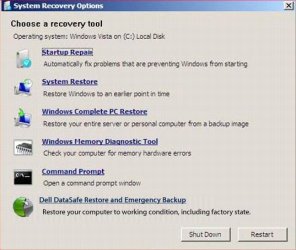
- Power off the laptop > Power it back on and at Dell Splash screen, repeatedly tap 'F8 key' > Select 'Repair your Computer' > Add account 'Username/Password' if prompted to log-in > 'System Recovery Options' appear (A similar looking page appears, as mentioned below)

1.JPG

- Select 'Command Prompt' and check the working of (") key here

Do reply with the findings; would be glad to assist.
 

My Computer

OS
Windows 7 64bit
language set to US, US-International
and i don't think it is dirt or something else lodged, because every time i push quotation key, first time nothing shows up, then second time, which is right in a row, two quotations show up on screen. I think it is some messed up setting in windows

Hi MazterZz,

Please check the functionality of the " key in 'Command Prompt' (System Recovery Options). If it were a 'software issue', keyboard would perform perfectly in that 'environment'; it runs independent of the 'Operating System'.

You may want to refer to the following steps:
- Power off the laptop > Power it back on and at Dell Splash screen, repeatedly tap 'F8 key' > Select 'Repair your Computer' > Add account 'Username/Password' if prompted to log-in > 'System Recovery Options' appear (A similar looking page appears, as mentioned below)

View attachment 252138

- Select 'Command Prompt' and check the working of (") key here

Do reply with the findings; would be glad to assist.
I am sorry, nothing personal here but this OP has absolutely no need to do all that.

His issue is very clearly a non-issue as I have described in my previous post having absolutely nothing to do with the fact that OP has a Dell computer. His selected keyboard layout is at the moment functioning exactly as it is designed to function. The only valid solution is to start using EN-US keyboard layout instead of EN-US International.

EN-US International and EN-US keyboard layouts are two different things and work exactly the same way in all Windows 7 computers. En-US International waits an another keypress when an apostrophe is pressed, EN-US not.

I feel it is a complete waste of OP's time and very misleading to offer solutions that have nothing to do with issue described. Especially when there really is no issue, just a simple selection user needs to make.

Kari
 
Last edited:

My Computer

Computer type
Laptop
Computer Manufacturer/Model Number
HP ENVY 17-1150eg
OS
Windows 10 Pro x64 EN-GB
CPU
1.6 GHz Intel Core i7-720QM Processor
Memory
6 GB
Graphics Card(s)
ATI Mobility Radeon HD 5850 Graphics
Sound Card
Beats sound system with integrated subwoofer
Monitor(s) Displays
17" laptop display, 22" LED and 32" Full HD TV through HDMI
Screen Resolution
1600*900 (1), 1920*1080 (2&3)
Hard Drives
Internal: 2 x 500 GB SATA Hard Disk Drive 7200 rpm
External: 2TB for backups, 3TB USB3 network drive for media
Cooling
As Envy runs a bit warm, I have it on a Cooler Master pad
Keyboard
Logitech diNovo Media Desktop Laser (bluetooth)
Mouse
Logitech Performance Mouse MX
Internet Speed
50/10 Mbps VDSL
Antivirus
Windows Defender 4.3.9431.0
Browser
Maxthon 3.5.2., IE11
Thank you Kari. I learned something today. I always wondered how some one got those little lines above a letter. Good post.
 

My Computer

Computer type
PC/Desktop
Computer Manufacturer/Model Number
Home made Desktop
OS
Windows 10 Pro. 64/ version 1709 Windows 7 Pro/64
CPU
Intel i7-6800K @ 4.3
Motherboard
ASUS X-99 Deluxe II
Memory
Corsair Platinum 16 gig @2400
Graphics Card(s)
EVGA GTX 1070 OC
Monitor(s) Displays
Asus 27" LED LCD/VE278Q
Screen Resolution
1920-1080 or 1280-720 HDMI
Hard Drives
INTEL SSD 730-240 Gb Sata 3.0/
PSU
EVGA Platium 1200W
Case
Phanteks Luxe Tempered Glass 8 fans/ one radiator
Cooling
XSPC/ Water Cooled CPU
Keyboard
Das 4 Professional
Mouse
Logitech M705/MX Anywhere 2-S
Internet Speed
100 mbits
Antivirus
Microsoft Security Essentials/ Malwarebytes Premium 3.0/ SAS
Browser
I.E. 11 default/Firefox/ ISP Time Warner Cable/Spectrum
Other Info
LG BluRay Burner/
Sound system-KLipsch-THX/
Icy Dock ssd Hot Swap bays.
You are welcome.

This is one of the most typical "issues" with US English keyboard layouts. It is wrongly interpreted as an issue, a fault on Windows or in physical keyboard itself.

To put this very simple:
  • EN-US keyboard layout: an apostrophe character is typed when the key is pressed. Pressing an ' and an A types 'A.
  • EN-US International layout: an apostrophe key when pressed waits the next character to then join them together to type the selected letter - apostrophe combination. If joining apostrope character with the next character is grammatically not correct (combined character not recognized) the characters are typed following each other. Pressing an ' and an A types Á, pressing a " and A types Ä but pressing " and " types "" because a " can not be joined together with another ".

Kari
 

My Computer

Computer type
Laptop
Computer Manufacturer/Model Number
HP ENVY 17-1150eg
OS
Windows 10 Pro x64 EN-GB
CPU
1.6 GHz Intel Core i7-720QM Processor
Memory
6 GB
Graphics Card(s)
ATI Mobility Radeon HD 5850 Graphics
Sound Card
Beats sound system with integrated subwoofer
Monitor(s) Displays
17" laptop display, 22" LED and 32" Full HD TV through HDMI
Screen Resolution
1600*900 (1), 1920*1080 (2&3)
Hard Drives
Internal: 2 x 500 GB SATA Hard Disk Drive 7200 rpm
External: 2TB for backups, 3TB USB3 network drive for media
Cooling
As Envy runs a bit warm, I have it on a Cooler Master pad
Keyboard
Logitech diNovo Media Desktop Laser (bluetooth)
Mouse
Logitech Performance Mouse MX
Internet Speed
50/10 Mbps VDSL
Antivirus
Windows Defender 4.3.9431.0
Browser
Maxthon 3.5.2., IE11
Well done Kari. :party:
 

My Computer

Computer type
PC/Desktop
Computer Manufacturer/Model Number
Home Built Desktop By DataTech
OS
Windows 7 Ultimate X64 SP1
CPU
Intel i5-2550K, Differing ~4.4-4.8GHz No built in GPU
Motherboard
ASUS P8Z68-V PRO/GEN3
Memory
16GB G.Skill Sniper 1866MHz @ 2133MHz 2x8GB
Graphics Card(s)
ASUS GTX650TIB-DC2OC-2GD5, (650TI Boost)
Sound Card
Onboard Realtek 5-1
Monitor(s) Displays
Samsung P2570HD
Screen Resolution
1920x1080
Hard Drives
Samsung 840 Pro 256GB SSD for OS, 500GB Seagate Constellation (Enterprise drive) for Data
PSU
Corsair HX650W
Case
Inwin Dragon Rider
Cooling
Hyper 212 EVO w/two Noctua fans, push-pull, @1300 RPM
Keyboard
E-Z Eyes, bright yellow keys with large characters
Mouse
steelseries SENSEI Laser Pro Gaming
Internet Speed
48-51Mbs Mbs down, 11 Mbs up Xfinity Cable
Antivirus
Norton Internet Security 2013
Browser
IE 10, Opera, Pale Moon if needed
Other Info
4 case fans, LG BluRay-RE, ASUS DVD-RW, Mr. Fusion power supply, 1.21 gigawatts.
Thanks for the feedback people, I think kari was right with his reply. In languages and keyboard, in control panel, i selected English US, instead of English US-International in the drop down box, and it seems to have fixed it. Thanks, it wasn't a huge issue, more of just an annoyance, so thanks for your time.
 

My Computer

Computer Manufacturer/Model Number
Dell
OS
windows 7, 64 bit
CPU
i5
Memory
6 gig
Graphics Card(s)
integrated
Monitor(s) Displays
laptop
Hard Drives
320 gig
You are welcome, nice to hear you got it sorted out.

Kari
 

My Computer

Computer type
Laptop
Computer Manufacturer/Model Number
HP ENVY 17-1150eg
OS
Windows 10 Pro x64 EN-GB
CPU
1.6 GHz Intel Core i7-720QM Processor
Memory
6 GB
Graphics Card(s)
ATI Mobility Radeon HD 5850 Graphics
Sound Card
Beats sound system with integrated subwoofer
Monitor(s) Displays
17" laptop display, 22" LED and 32" Full HD TV through HDMI
Screen Resolution
1600*900 (1), 1920*1080 (2&3)
Hard Drives
Internal: 2 x 500 GB SATA Hard Disk Drive 7200 rpm
External: 2TB for backups, 3TB USB3 network drive for media
Cooling
As Envy runs a bit warm, I have it on a Cooler Master pad
Keyboard
Logitech diNovo Media Desktop Laser (bluetooth)
Mouse
Logitech Performance Mouse MX
Internet Speed
50/10 Mbps VDSL
Antivirus
Windows Defender 4.3.9431.0
Browser
Maxthon 3.5.2., IE11
Back
Top