How do I make WMP automatically play the next file?

kurkosdr

New member
Local time
11:40 PM
Messages
2
Is there a plugin or something that makes WMP automatically play the next file? Aka, if I have a two files in a folder, a.mp3 and b.mp3, and I am playing a.mp3, a plugin that would make WMP automatically movie to b.mp3 when a.mp3 ends.

Without having to right click -> Play with Windows Media Player on the folder every time, or create playlists.

My parents are whining about this missing feature. I have told them about the right click on folder -> play with Windows Media Player feature, but they would find it more convinient to select songs from windows explorer, not from WMP, and have WMP move to the next song when the current song ends.
 

My Computer My Computer

At a glance

Windows 7 Home Premium 64bit
Computer Manufacturer/Model Number
HP
OS
Windows 7 Home Premium 64bit
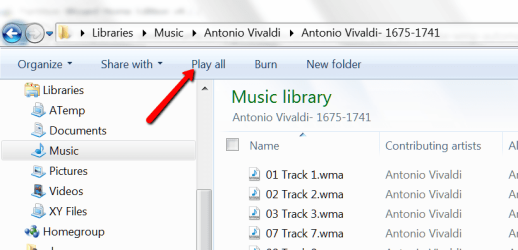
Open the folder in Music and clisk on "Play All".
 

Attachments

  • 2012-04-11_1556.png
    2012-04-11_1556.png
    31.8 KB · Views: 8

My Computer My Computer

At a glance

Vista, Windows7, Mint Mate, Zorin, Windows 8from 1.6GHz Duo to i7
Computer Manufacturer/Model Number
HP, Dell, Gateway, Toshiba - 4 laptops and 2 desktops
OS
Vista, Windows7, Mint Mate, Zorin, Windows 8
CPU
from 1.6GHz Duo to i7
Monitor(s) Displays
2x HP w2207
Hard Drives
5x HDD, 7x SSD, 12x Externals
Keyboard
with trackball - no mices
Mouse
Trackball mice
Internet Speed
DSL 6000
Open the folder in Music and clisk on "Play All".
Doesn't work.

I open the folder that has the music, I click "Play all", but if i decide to select a song from Windows explorer (by double clicking on it), the ability to automatically play next file vanishes, so I am back to square zero. So, I still can't select files from Windows Explorer. Only from WMP.

Essentialy, this is like right clicking on the folder --> Play with Windows Media Player.
 

My Computer My Computer

At a glance

Windows 7 Home Premium 64bit
Computer Manufacturer/Model Number
HP
OS
Windows 7 Home Premium 64bit
Hmm, don't know what to say. It works here. I just tested it.
 

My Computer My Computer

At a glance

Vista, Windows7, Mint Mate, Zorin, Windows 8from 1.6GHz Duo to i7
Computer Manufacturer/Model Number
HP, Dell, Gateway, Toshiba - 4 laptops and 2 desktops
OS
Vista, Windows7, Mint Mate, Zorin, Windows 8
CPU
from 1.6GHz Duo to i7
Monitor(s) Displays
2x HP w2207
Hard Drives
5x HDD, 7x SSD, 12x Externals
Keyboard
with trackball - no mices
Mouse
Trackball mice
Internet Speed
DSL 6000
if you select play all and the selected tracks are playing, then use the media players next track arrow to do it (skip to next track).
double clicking on a single file in explorer will only open the single file. select several different tracks by holding down ctrl when choosing tracks this will highlight the tracks you wish to play ,then click play all
 

My Computer My Computer

At a glance

Microsoft Windows 7 Home Premium 64-bit 7600IIx4 amd athelon 635 processor2x2gbati radeon HD 5450
Computer Manufacturer/Model Number
Hewlett packard/p6512uk
OS
Microsoft Windows 7 Home Premium 64-bit 7600
CPU
IIx4 amd athelon 635 processor
Motherboard
FOXCONN 2AA9
Memory
2x2gb
Graphics Card(s)
ati radeon HD 5450
Sound Card
(1) Realtek High Definition Audio (2) AMD High Definition
Monitor(s) Displays
samsung lcd tv 32"
Screen Resolution
1360x 768
Hard Drives
(1) WDC WD10 01FAES-60Z2A0 SATA Disk Device (2) Maxtor OneTouch USB Device (3) ST310003 33AS USB Device (4) WD My Book 1111 USB Device
PSU
?
Cooling
air!
Keyboard
wireless hp
Mouse
wireless Hp,optical
Internet Speed
1.10mb/s
Antivirus
MSE
Browser
Firefox
Julian, here it will play all without selecting anything. If I start at the folder top of the folder, it plays everything in the folder. If I start in the middle, it plays everything from there on.

I am a bit baffled by the OPs problem. But maybe your method will help.
 

My Computer My Computer

At a glance

Vista, Windows7, Mint Mate, Zorin, Windows 8from 1.6GHz Duo to i7
Computer Manufacturer/Model Number
HP, Dell, Gateway, Toshiba - 4 laptops and 2 desktops
OS
Vista, Windows7, Mint Mate, Zorin, Windows 8
CPU
from 1.6GHz Duo to i7
Monitor(s) Displays
2x HP w2207
Hard Drives
5x HDD, 7x SSD, 12x Externals
Keyboard
with trackball - no mices
Mouse
Trackball mice
Internet Speed
DSL 6000
Back
Top