Solved How do I move the default position of "coping files/moving files" note

freedom2

New member
Local time
12:11 PM
Messages
3
How do I move the default position of "coping files/moving files" note

I have googled extensively to try to figure this out, but I don't know the correct terminology to ask this without being extremely verbose, so here goes...
You know that box that always appears right in the middle of the screen, blocking all future progress until your files or folders have finished being moved/copied/deleted, etc? (or until you pull it aside while muttering curses because you've had to move it AGAIN for the millionth time) Is there a way to make that appear in a different place by default? (ie the lower left or right corner of the screen, or ANYWHERE that's not right in the middle of what you're trying to see?)

Any help would be greatly appreciated.
 

My Computer My Computer

At a glance

Windows 7 Ultimate x64
Computer type
PC/Desktop
OS
Windows 7 Ultimate x64
Registry Hack?

As far as I can work out - it's no bother to simply minimize the window?

Copy Dialog.jpg

Also depending on how many windows you've got open and are working on - just press ALT+TAB to switch windows.
 

My Computer My Computer

At a glance

Microsoft Windows 7 Home Premium 64-bit 7601 ...AMD C-60 APU with Radeon(tm) HD Graphics4.00 GBAMD Radeon HD 6290 Graphics
Computer type
Laptop
Computer Manufacturer/Model Number
ASUS
OS
Microsoft Windows 7 Home Premium 64-bit 7601 Multiprocessor Free Service Pack 1
CPU
AMD C-60 APU with Radeon(tm) HD Graphics
Motherboard
ASUSTeK COMPUTER INC. X501U
Memory
4.00 GB
Graphics Card(s)
AMD Radeon HD 6290 Graphics
Sound Card
(1) AMD High Definition Audio Device (2) Realtek High Defi
Screen Resolution
1366 x 768 x 32 bits (4294967296 colors) @ 60 Hz
Hard Drives
Hitachi HTS545050A7E380 SATA Disk Device
Antivirus
Comodo CIS & FW, SecureAplus App Whitelisting, Threatfire
Browser
Cyberfox 64bit, Opera 64bit, Airfox
Other Info
Spy-The-Spy, HitmanPro.Alert, Norton Connect Safe, MJRegWatcher, BitDefender TrafficLight, Voodoo Shield, Zemana AntiMalware
So... the answer to my question is "no, you can't have it appear in a different position by default"?

I'd like to know that the file transfer/delete/whatever is still in progress, but not have it right in my face, or have to do an extra find-a-tiny-button-and-click-it every time, but I guess there just aren't enough people who sort through/move/delete lots of files & folders to make this any sort of an issue for MS(?)

Any second opinions out there? I'm comfortable with a Registry Hack if it will get the job done once-and-for-all.

PS Thanks Callender for your prompt reply!
 

My Computer My Computer

At a glance

Windows 7 Ultimate x64
Computer type
PC/Desktop
OS
Windows 7 Ultimate x64
Welcome to Seven Forums freedom2. Right off, I'll say not that I am aware of. The coding is written in the OS itself

About Dialog Boxes (Windows)

I believe windows position is stored in HKEY_CURRENT_USER\Software\Classes\Local Settings\Software\Microsoft\Windows\Shell\Bags

However, since the dialog does not save it's last closed position, this will not apply to windows own dialogs. The irony is, many multiple monitor users have issues with dialog placement being off center. You will find lots of posts about people trying to fix that. You already know you will find very little about the default opening position of Windows dialogs. Sorry. A Guy
 

My Computer My Computer

At a glance

Windows 10 Home x64INTEL Core i5-750 Quad-Core 3.37GHzHyperX Fury Black Series 8GB (2 x 4GB) 1866MhzEVGA GeForce GTX 750 Superclocked 1GB 128-Bit...
Computer type
PC/Desktop
OS
Windows 10 Home x64
CPU
INTEL Core i5-750 Quad-Core 3.37GHz
Motherboard
ASUS P7P55D
Memory
HyperX Fury Black Series 8GB (2 x 4GB) 1866Mhz
Graphics Card(s)
EVGA GeForce GTX 750 Superclocked 1GB 128-Bit GDDR5
Monitor(s) Displays
LG 32MA68HY 32" IPS
Screen Resolution
1920 x 1080
Hard Drives
Samsung 840 Evo 120GB, SEAGATE 500GB Barracuda® 7200.12, SATA 3 Gb/s, 7200 RPM, 16MB cache
PSU
ANTEC TruePower New TP-550, 80 PLUS, 550W
Case
ANTEC Three Hundred Illusion
Cooling
COOLER MASTER Hyper 212 Plus, 4 x 120mm 1 x 140mm Noctua's
Internet Speed
85 + Mbps
Antivirus
Avast
Browser
Vivaldi
Copy File Window

A Guy is correct (as usual) - that particular file copy window is created in such a way that it's not possible to lock or remember it's position. I've tested using various software that can indeed lock and remember window positions but a new unique window is created each time a file is copied and these programs can only remember the window position for the last copied file. If you copy the same file to the same location again - the window position is remembered. If you copy a different file you get a new window with a new position.

One possible solution to consider:

Install Teracopy and additionally consider a portable file manager - Q-Dir. Teracopy will do the job in it's own right but Q-Dir makes file copying multiple files from multiple locations much easier.

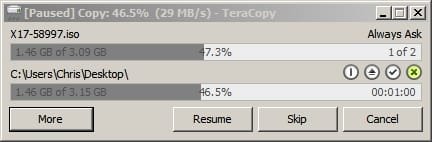
Teracopy: You get the option to use it or not when copying. Copy window position is remembered when using Teracopy.

Screenshots:

Two files being copied.

TeraCopy_ 1.jpg

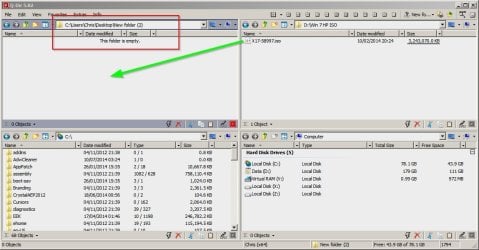
One file that I want to copy using Q-Dir

Q-Dir1.jpg

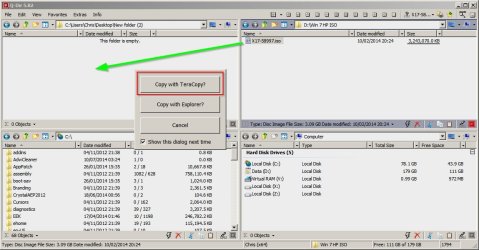
Attempting to copy gives the option to use Teracopy.

Q-Dir2.jpg

So it's not what you asked for but hopefully you might think that it's a decent enough workaround!

Download links:

TeraCopy

The TeraCopy installer will offer to install the full version on a trial basis. There's no need to select this option.

Q-Dir

Q-Dir is portable and can be run on demand from a shortcut or an elevated shortcut or can be run on startup if you place a shorcut into tour startup programs folder. The choice is yours - if you decide to try it.
 

My Computer My Computer

At a glance

Microsoft Windows 7 Home Premium 64-bit 7601 ...AMD C-60 APU with Radeon(tm) HD Graphics4.00 GBAMD Radeon HD 6290 Graphics
Computer type
Laptop
Computer Manufacturer/Model Number
ASUS
OS
Microsoft Windows 7 Home Premium 64-bit 7601 Multiprocessor Free Service Pack 1
CPU
AMD C-60 APU with Radeon(tm) HD Graphics
Motherboard
ASUSTeK COMPUTER INC. X501U
Memory
4.00 GB
Graphics Card(s)
AMD Radeon HD 6290 Graphics
Sound Card
(1) AMD High Definition Audio Device (2) Realtek High Defi
Screen Resolution
1366 x 768 x 32 bits (4294967296 colors) @ 60 Hz
Hard Drives
Hitachi HTS545050A7E380 SATA Disk Device
Antivirus
Comodo CIS & FW, SecureAplus App Whitelisting, Threatfire
Browser
Cyberfox 64bit, Opera 64bit, Airfox
Other Info
Spy-The-Spy, HitmanPro.Alert, Norton Connect Safe, MJRegWatcher, BitDefender TrafficLight, Voodoo Shield, Zemana AntiMalware
Thanks for all your help, I will check out the 3rd party solutions offered and mark this thread as solved.
 

My Computer My Computer

At a glance

Windows 7 Ultimate x64
Computer type
PC/Desktop
OS
Windows 7 Ultimate x64
Back
Top