Change the default position of the task bar in Windows 7

Stubaker09

New member
Local time
9:14 AM
Messages
5
Change the default position of the task bar for all new user profiles

I am customising the default user profile in windows 7 so when a new user creates a profile they have a slightly different UI than the standard one. I am planning to implement the changes through group policy editor and have had some success with this already.

However I am struggling to move the default position of the taskbar to the right hand side of the screen. Is it possible to do this through regedit or group policy editor and any other method (although I would prefer to do this manually or without third party software if at all possible)? I know the new user is able to move the taskbar themselves once the profile has been created, however I want it to be on the right hand side as default.


Any help/advice would be great!
 
Last edited:

My Computer My Computer

At a glance

Windows 7 Home Premium 64 bit
OS
Windows 7 Home Premium 64 bit
This is how you do it,
First,

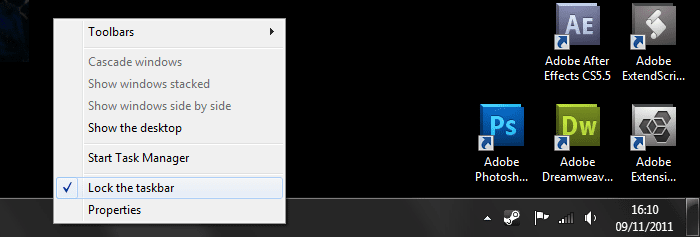
step 1.png

Right click on the taskbar, and make sure the option that says 'lock the taskbar' is un-checked,

Next,

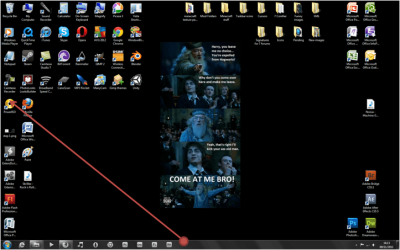
step 2.png

Drag it to the side you want, (i've done it to the left-side)

And finally,

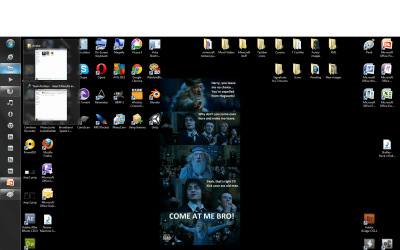
step 3.png

Enjoy your taskbar!

Hope this helps,
Rowan

P.S: Reply if this helped!
 

My Computer My Computer

At a glance

Windows 7 Proffesional 64 bit
OS
Windows 7 Proffesional 64 bit
Motherboard
Asus M2N MX SE Plus
Internet Speed
Virgin Media 10MB broadband
Hi Rowan1,

Thanks for your reply. However it is not exactly what I am after. I have already changed the position of the task bar using the same method as you suggested above.

What I want to do is make the default position of the taskbar on the right hand side. Currently when a new user profile is created on a computer the normal windows settings are applied and the task bar is at the bottom.

I want to change this (without using 3rd party software if possible) maybe by editing the registry?, so that every time a new user profile is created the taskbar is on the right hand side by default.

Do you know if this is possible?

Thanks
 

My Computer My Computer

At a glance

Windows 7 Home Premium 64 bit
OS
Windows 7 Home Premium 64 bit
p.s

I have also looked at using the group policy editor. As I understand it you can lock the task bar to a certain position using this method on more than one profile after each user have moved it to their desired position themselves. (using the method above)

But am not sure you can move it there by default (before the user profile is created) using this method.
 

My Computer My Computer

At a glance

Windows 7 Home Premium 64 bit
OS
Windows 7 Home Premium 64 bit
I'll have a look into it, sorry if what I posted was not what you wanted. I'll try and find a option in the registory to change the default position.
Thanks for the feedback,

Rowan
 

My Computer My Computer

At a glance

Windows 7 Proffesional 64 bit
OS
Windows 7 Proffesional 64 bit
Motherboard
Asus M2N MX SE Plus
Internet Speed
Virgin Media 10MB broadband
Thanks Rowan.

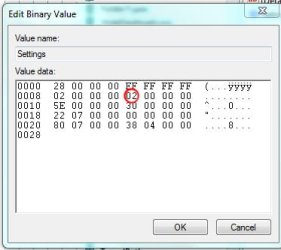
I have researched it a bit before posting on this forum and found that by following this path in the registry: HKEY_CURRENT_USER\software\microsoft\windows\currentversion\explorer\StuckRects2

You can see the values that change when you move the taskbar. The thirteenth digit relates to the position of the taskbar, and 02 means it is on the right hand side. I have attached an image that shows this.

It also appears that you cannot edit this as when you restart the computer the values reset.

Hope that makes sense.
 

Attachments

  • Registry Code.jpg
    Registry Code.jpg
    44.2 KB · Views: 6

My Computer My Computer

At a glance

Windows 7 Home Premium 64 bit
OS
Windows 7 Home Premium 64 bit
Thanks Ill Check it out
 

My Computer My Computer

At a glance

Windows 7 Home Premium 64 bit
OS
Windows 7 Home Premium 64 bit
I see. But I cant seem to find the 'StuckRect2' attribute in the Registory. Im not sure where it is, but I hope the link that I sent to you helps:-)

Rowan
 

My Computer My Computer

At a glance

Windows 7 Proffesional 64 bit
OS
Windows 7 Proffesional 64 bit
Motherboard
Asus M2N MX SE Plus
Internet Speed
Virgin Media 10MB broadband
Back
Top