
How do I optimize the page file for an SSD? Windows 7 x64

cpowell

New member
Local time
3:57 PM
Messages
13
Hi there.

I've been trying to figure out a way to optimize my page file on my SSD for the last few days. I keep ending up with MEMORY_MANAGEMENT errors or PAGE FAULT IN NON PAGED AREA.

I'm running an OCZ Vertex 3 128gb with only the OS and Adobe Web Design Premium suite installed on it and i'm already down to 60Gb.

The OS is automatically creating a 16GB-20GB page file on the HDD. I don't get why it's doing this because I have 16GB of RAM that barely goes past 30% usage even when I've got Photoshop, Dreamweaver and Illustrator open at the same time.

I've tried reducing the page file size to something like 4gb, and then i start getting those BSODS i mentioned, i tried moving it to my 2gb storage HDD, but I get BSODS.

I really have no idea what to do :confused:

Any help and advice would be great! Thanks guys :)

Also just to save time, I've ran MemTestx86 several times and had no errors, along with Windows Memory Diagnostic. This is brand new RAM that i bought a week ago, 16GB dual channel Corsair Vengeance, 4x 4GB sticks, all in a matched kit.
 
Last edited:

My Computer My Computer

At a glance

Windows 7 Pro x64AMD Phenom(tm) II X6 1055T Processor (6 CPUs)...16GB DDR3 Corsair Vengeance 1600 MHz CAS 9 XMPBFG NVIDIA GeForce 9800 GTX/9800 GTX+
Computer Manufacturer/Model Number
Me
OS
Windows 7 Pro x64
CPU
AMD Phenom(tm) II X6 1055T Processor (6 CPUs), ~2.8GHz
Motherboard
ASUS M4A87TD/USB 3
Memory
16GB DDR3 Corsair Vengeance 1600 MHz CAS 9 XMP
Graphics Card(s)
BFG NVIDIA GeForce 9800 GTX/9800 GTX+
Hard Drives
OCZ Vertex 3 SSD 128gb (OS)
2gb Seagate Barracuda 7200rpm NCQ (Storage)
hi cpowell

Does your SSD and Windows have TRIM enabled ??

TRIM is a "command [that] allows an operating system to inform a solid-state drive (SSD) which blocks of data are no longer considered in use and can be wiped internally." In general, TRIM is the first line of defense in keeping your SSD alive

To check for windows try the below in the command prompt

fsutil behavior query disabledeletenotify

If the result is "DisableDeleteNotify = 0", that means that the OS is using TRIM..

To Check if your SSD support this feature try the CrystalDiskInfo - Software - Crystal Dew World
 

My Computer My Computer

At a glance

Windows 7 ultimate x64
Computer Manufacturer/Model Number
Nothing specific....what ever the clients provide for Repair
OS
Windows 7 ultimate x64
Hi again

I checked both of those just now.

The reply in command prompt was indeed: "DisableDeleteNotify = 0"

And you can see the screenshot attached to this post for CrystalDiskInfo.

It looks like it supports TRIM also.
 

Attachments

  • Capture.PNG
    Capture.PNG
    33.5 KB · Views: 122

My Computer My Computer

At a glance

Windows 7 Pro x64AMD Phenom(tm) II X6 1055T Processor (6 CPUs)...16GB DDR3 Corsair Vengeance 1600 MHz CAS 9 XMPBFG NVIDIA GeForce 9800 GTX/9800 GTX+
Computer Manufacturer/Model Number
Me
OS
Windows 7 Pro x64
CPU
AMD Phenom(tm) II X6 1055T Processor (6 CPUs), ~2.8GHz
Motherboard
ASUS M4A87TD/USB 3
Memory
16GB DDR3 Corsair Vengeance 1600 MHz CAS 9 XMP
Graphics Card(s)
BFG NVIDIA GeForce 9800 GTX/9800 GTX+
Hard Drives
OCZ Vertex 3 SSD 128gb (OS)
2gb Seagate Barracuda 7200rpm NCQ (Storage)
All right now that its sorted out of the way... there are 2 things you can do.....

As per your post.... you did mention that on an average your memory usage is 30% of total memory even when ur heavily using the system.... So to avoid excessive writes to your SSD try below

First is Disabling the page file

1. Right click ‘My Computer' and click ‘Properties'.
2. Go to the ‘Advanced System Settings' tab.
3. Click Settings in the ‘Performance' fieldset, then go to the Advanced tab.
4. Click Change in the ‘Virtual memory' fieldset.
5. Click on your SSD drive, select ‘No paging file' and click ‘Set'.
6. Click OK when you're done.

Secondly move the page file from your SSD to a storage hard drive

1. First disable the page file as described above.
2. Then, click on your preferred HDD drive, select ‘System managed size' (unless you know what you're doing) and click ‘Set'.
3. Click OK when you're done.

On an average based on your usage it could be anywhere between 1 to 2 GB. You probably would also need to check this once to tweak it more... how your usage is ? if its more than 2 GB..... then i guess your Storage HDD needs to be more than 2 GB...for stability.

Try these and let me know...
 

My Computer My Computer

At a glance

Windows 7 ultimate x64
Computer Manufacturer/Model Number
Nothing specific....what ever the clients provide for Repair
OS
Windows 7 ultimate x64
Why do you think the paging/memory errors are related to the SSD?
Need more history, like what apps cause it, are the apps newly installed, etc.
 

My Computer My Computer

At a glance

Windows 7 Ultimate x64QuadCore Intel Core i7 920, 2666 MHz (20 x 133)6134 MB (DDR3-1333 DDR3 SDRAM)(2 - SLI) NVIDIA GeForce GTS 250 (1024 MB)
Computer Manufacturer/Model Number
Home Built
OS
Windows 7 Ultimate x64
CPU
QuadCore Intel Core i7 920, 2666 MHz (20 x 133)
Motherboard
Asus P6T
Memory
6134 MB (DDR3-1333 DDR3 SDRAM)
Graphics Card(s)
(2 - SLI) NVIDIA GeForce GTS 250 (1024 MB)
Sound Card
Onboard Realtek ALC888/1200 @ Intel 82801JB IC
Monitor(s) Displays
HDMII
Screen Resolution
1280 x 800
Hard Drives
Crucial M4 (64 GB SSD)
WD Caviar Blacks
WD5001AALS-00J7B1 ATA Device (465 GB)
WD5001AALS-00L3B2 ATA Device (465 GB)
WD Elements USB External (250 GB)
PSU
Corsair 550
Case
iStarUSA S-10000BL Black
Why do you think the paging/memory errors are related to the SSD?
Need more history, like what apps cause it, are the apps newly installed, etc.

Hi victor

Cpowell's concern is more related to how he needs to manage the pagefile on the SSD. As he already has 16GB memory...and windows is managing his pagefile... which puts is 16 - 20GB... thats a hit on the SDD space..

Second when he is trying to reduce the pagefile or moving the pagefile.... he gets BSOD's... hence i think they are more related to paging and memory errors rather than applications...
 

My Computer My Computer

At a glance

Windows 7 ultimate x64
Computer Manufacturer/Model Number
Nothing specific....what ever the clients provide for Repair
OS
Windows 7 ultimate x64
Basically in a nutshell every time I have tried to change the paging file in any way, for example move it to the storage HDD or just reduce it's size I end up at some point getting a BSOD which is either MEMORY_MANAGEMENT or PAGE FAULT IN NON PAGED AREA.

centaur78... That's probably what i'll try now, but I've read in a few articles that you should leave some sort of page file on the OS drive (SSD) to store memory dumps etc? It's a little of out my knowledge zone so excuse me if I'm saying/asking fairly dumb things...haha.

Is there any truth to that?
 

My Computer My Computer

At a glance

Windows 7 Pro x64AMD Phenom(tm) II X6 1055T Processor (6 CPUs)...16GB DDR3 Corsair Vengeance 1600 MHz CAS 9 XMPBFG NVIDIA GeForce 9800 GTX/9800 GTX+
Computer Manufacturer/Model Number
Me
OS
Windows 7 Pro x64
CPU
AMD Phenom(tm) II X6 1055T Processor (6 CPUs), ~2.8GHz
Motherboard
ASUS M4A87TD/USB 3
Memory
16GB DDR3 Corsair Vengeance 1600 MHz CAS 9 XMP
Graphics Card(s)
BFG NVIDIA GeForce 9800 GTX/9800 GTX+
Hard Drives
OCZ Vertex 3 SSD 128gb (OS)
2gb Seagate Barracuda 7200rpm NCQ (Storage)
Why do you think the paging/memory errors are related to the SSD?
Need more history, like what apps cause it, are the apps newly installed, etc.

Hi victor

Cpowell's concern is more related to how he needs to manage the pagefile on the SSD. As he already has 16GB memory...and windows is managing his pagefile... which puts is 16 - 20GB... thats a hit on the SDD space..

Second when he is trying to reduce the pagefile or moving the pagefile.... he gets BSOD's... hence i think they are more related to paging and memory errors rather than applications...

That's exactly it :)
 

My Computer My Computer

At a glance

Windows 7 Pro x64AMD Phenom(tm) II X6 1055T Processor (6 CPUs)...16GB DDR3 Corsair Vengeance 1600 MHz CAS 9 XMPBFG NVIDIA GeForce 9800 GTX/9800 GTX+
Computer Manufacturer/Model Number
Me
OS
Windows 7 Pro x64
CPU
AMD Phenom(tm) II X6 1055T Processor (6 CPUs), ~2.8GHz
Motherboard
ASUS M4A87TD/USB 3
Memory
16GB DDR3 Corsair Vengeance 1600 MHz CAS 9 XMP
Graphics Card(s)
BFG NVIDIA GeForce 9800 GTX/9800 GTX+
Hard Drives
OCZ Vertex 3 SSD 128gb (OS)
2gb Seagate Barracuda 7200rpm NCQ (Storage)
Basically in a nutshell every time I have tried to change the paging file in any way, for example move it to the storage HDD or just reduce it's size I end up at some point getting a BSOD which is either MEMORY_MANAGEMENT or PAGE FAULT IN NON PAGED AREA.

centaur78... That's probably what i'll try now, but I've read in a few articles that you should leave some sort of page file on the OS drive (SSD) to store memory dumps etc? It's a little of out my knowledge zone so excuse me if I'm saying/asking fairly dumb things...haha.

Is there any truth to that?

Well.... let me put it this way.... memory dump will not be produced if the paging file is in another partition or drive. In that case you would need to uncheck "Automatic Restart" under System failure.... you can atleast see whats in BSOD...

If you want it... that defeats the whole purpose of what your trying to achieve ;)
 

My Computer My Computer

At a glance

Windows 7 ultimate x64
Computer Manufacturer/Model Number
Nothing specific....what ever the clients provide for Repair
OS
Windows 7 ultimate x64
Okay, didn't know where he was because he said Win put the page file on "HDD."
You got him on the right track.
Don't know why BSOD when changing page settings unless an app using it was open. I've fiddled with page file setting often enough and never had an issue.
I have 8GB ram and keep a 500-1000 mb page file on a spinner.
No reason I can think of to put the page file on my SSD.
Never had an issue, but I don't run his apps.
 

My Computer My Computer

At a glance

Windows 7 Ultimate x64QuadCore Intel Core i7 920, 2666 MHz (20 x 133)6134 MB (DDR3-1333 DDR3 SDRAM)(2 - SLI) NVIDIA GeForce GTS 250 (1024 MB)
Computer Manufacturer/Model Number
Home Built
OS
Windows 7 Ultimate x64
CPU
QuadCore Intel Core i7 920, 2666 MHz (20 x 133)
Motherboard
Asus P6T
Memory
6134 MB (DDR3-1333 DDR3 SDRAM)
Graphics Card(s)
(2 - SLI) NVIDIA GeForce GTS 250 (1024 MB)
Sound Card
Onboard Realtek ALC888/1200 @ Intel 82801JB IC
Monitor(s) Displays
HDMII
Screen Resolution
1280 x 800
Hard Drives
Crucial M4 (64 GB SSD)
WD Caviar Blacks
WD5001AALS-00J7B1 ATA Device (465 GB)
WD5001AALS-00L3B2 ATA Device (465 GB)
WD Elements USB External (250 GB)
PSU
Corsair 550
Case
iStarUSA S-10000BL Black
Okay, didn't know where he was because he said Win put the page file on "HDD."
You got him on the right track.
Don't know why BSOD when changing page settings unless an app using it was open. I've fiddled with page file setting often enough and never had an issue.
I have 8GB ram and keep a 500-1000 mb page file on a spinner.
No reason I can think of to put the page file on my SSD.
Never had an issue, but I don't run his apps.

Sorry victor you're right I did mean SSD instead of HDD :).
 

My Computer My Computer

At a glance

Windows 7 Pro x64AMD Phenom(tm) II X6 1055T Processor (6 CPUs)...16GB DDR3 Corsair Vengeance 1600 MHz CAS 9 XMPBFG NVIDIA GeForce 9800 GTX/9800 GTX+
Computer Manufacturer/Model Number
Me
OS
Windows 7 Pro x64
CPU
AMD Phenom(tm) II X6 1055T Processor (6 CPUs), ~2.8GHz
Motherboard
ASUS M4A87TD/USB 3
Memory
16GB DDR3 Corsair Vengeance 1600 MHz CAS 9 XMP
Graphics Card(s)
BFG NVIDIA GeForce 9800 GTX/9800 GTX+
Hard Drives
OCZ Vertex 3 SSD 128gb (OS)
2gb Seagate Barracuda 7200rpm NCQ (Storage)
"PAGE FAULT IN NON PAGED AREA" sounds like its time to run memtest for some loops...
 

My Computer My Computer

At a glance

Microsoft Windows 10 Professional / Windows 7...Intel i5-357016GB DDR3AMD Radeon HD 7850 2GB
Computer type
PC/Desktop
OS
Microsoft Windows 10 Professional / Windows 7 Professional
CPU
Intel i5-3570
Motherboard
Lenovo Mahobay
Memory
16GB DDR3
Graphics Card(s)
AMD Radeon HD 7850 2GB
Sound Card
(1) Realtek HD Audio (2) AMD HD Audio
Monitor(s) Displays
LG LS192WS
Screen Resolution
1440 x 900 @ 32bit color
Hard Drives
(1) SUV300S37A/120G (2) ST3500413AS SATA Disk Device AHCI mode enabled.
PSU
Corsair HX620
Case
Thermaltake V4 Black Edition
Cooling
Cooler Master Hyper 212 + Artic Silver 5 on CPU/GPU
Keyboard
Dell SK-8115
Mouse
Razer Copperhead with MAPED mat (awesome!)
Internet Speed
100 Mbps up/down
Browser
Chrome
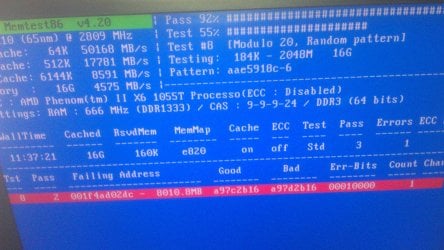
Well I just ran MemTest for nearly 4 passes. And i got one error. Which I guess means my brand new RAM is faulty?

I'm not actually running the RAM at the speed it's intended, i'm using the motheboards failsafe settings, the RAM is meant to be 1600mhz, but the board has set it to 1333mhz.

Do you think it's definitely the RAM or could it be motherboard/CPU?

It's so annoying cause I won't be able to work while waiting for the new RAM to arrive! Eughh!!
 

Attachments

  • IMAG0025.jpg
    IMAG0025.jpg
    817.2 KB · Views: 25

My Computer My Computer

At a glance

Windows 7 Pro x64AMD Phenom(tm) II X6 1055T Processor (6 CPUs)...16GB DDR3 Corsair Vengeance 1600 MHz CAS 9 XMPBFG NVIDIA GeForce 9800 GTX/9800 GTX+
Computer Manufacturer/Model Number
Me
OS
Windows 7 Pro x64
CPU
AMD Phenom(tm) II X6 1055T Processor (6 CPUs), ~2.8GHz
Motherboard
ASUS M4A87TD/USB 3
Memory
16GB DDR3 Corsair Vengeance 1600 MHz CAS 9 XMP
Graphics Card(s)
BFG NVIDIA GeForce 9800 GTX/9800 GTX+
Hard Drives
OCZ Vertex 3 SSD 128gb (OS)
2gb Seagate Barracuda 7200rpm NCQ (Storage)
Hmmm Seems odd .... based on the initial post you did mention that there were no errors why doing memtest and windows diagnostics..

anyways... one of the 4 GB sticks has got errors..., try individually testing them to seee which one is faulty.
 

My Computer My Computer

At a glance

Windows 7 ultimate x64
Computer Manufacturer/Model Number
Nothing specific....what ever the clients provide for Repair
OS
Windows 7 ultimate x64
Well the thing is, I only ran it for two passes.

I think I really WANTED to believe it wasn't the RAM again after spending £90 to get some new stuff.

This time I left it on over night and woke up to that.

It's matched set anyway so i'd have to send it all back at once.

Could this problem be caused by the CPU or motherboard as well or is it very unlikely?
 

My Computer My Computer

At a glance

Windows 7 Pro x64AMD Phenom(tm) II X6 1055T Processor (6 CPUs)...16GB DDR3 Corsair Vengeance 1600 MHz CAS 9 XMPBFG NVIDIA GeForce 9800 GTX/9800 GTX+
Computer Manufacturer/Model Number
Me
OS
Windows 7 Pro x64
CPU
AMD Phenom(tm) II X6 1055T Processor (6 CPUs), ~2.8GHz
Motherboard
ASUS M4A87TD/USB 3
Memory
16GB DDR3 Corsair Vengeance 1600 MHz CAS 9 XMP
Graphics Card(s)
BFG NVIDIA GeForce 9800 GTX/9800 GTX+
Hard Drives
OCZ Vertex 3 SSD 128gb (OS)
2gb Seagate Barracuda 7200rpm NCQ (Storage)
There are different reasons why your RAM can go kaput....... like voltage fluctuation, humidity, temperature or could be a combination of all these in your system(or indirectly on your to motherboard) or could all as well be manufacturing defect on one of chip(s)... its just difficult to pinpoint or theorize on why this happened.....

Its not necessary to send them all back.... but...if you are getting it replaced under warranty... then its ok !!

I wonder... after all the fixes above are you still getting page faults ???? any kind of errors ????
 

My Computer My Computer

At a glance

Windows 7 ultimate x64
Computer Manufacturer/Model Number
Nothing specific....what ever the clients provide for Repair
OS
Windows 7 ultimate x64
Ok here's what I'm doing now. I'm testing each of the sticks individually in slot one with motherboard set to factory default settings. I'm leaving MemTest to run for about 4 passes per stick. Do you think that's enough? It takes about 4hrs 30min each stick doing it like that. I'm on the second stick now...
 

My Computer My Computer

At a glance

Windows 7 Pro x64AMD Phenom(tm) II X6 1055T Processor (6 CPUs)...16GB DDR3 Corsair Vengeance 1600 MHz CAS 9 XMPBFG NVIDIA GeForce 9800 GTX/9800 GTX+
Computer Manufacturer/Model Number
Me
OS
Windows 7 Pro x64
CPU
AMD Phenom(tm) II X6 1055T Processor (6 CPUs), ~2.8GHz
Motherboard
ASUS M4A87TD/USB 3
Memory
16GB DDR3 Corsair Vengeance 1600 MHz CAS 9 XMP
Graphics Card(s)
BFG NVIDIA GeForce 9800 GTX/9800 GTX+
Hard Drives
OCZ Vertex 3 SSD 128gb (OS)
2gb Seagate Barracuda 7200rpm NCQ (Storage)
He Cpowell

I guess 4 pass per stick should be enough....as per your image you got your errors at the 2 or 3 passes...

one thing to do note is the with this experiment... you could confirm if the rams or the slots at fault...

let us know your feedback when finished...
 

My Computer My Computer

At a glance

Windows 7 ultimate x64
Computer Manufacturer/Model Number
Nothing specific....what ever the clients provide for Repair
OS
Windows 7 ultimate x64
I'm on the third stick now and thus far no errors. I guess to test each slot I'll just put one of the sticks that already passed into two, three and four individually. It's going to be a very long and boring evening it seems...
=/
 

My Computer My Computer

At a glance

Windows 7 Pro x64AMD Phenom(tm) II X6 1055T Processor (6 CPUs)...16GB DDR3 Corsair Vengeance 1600 MHz CAS 9 XMPBFG NVIDIA GeForce 9800 GTX/9800 GTX+
Computer Manufacturer/Model Number
Me
OS
Windows 7 Pro x64
CPU
AMD Phenom(tm) II X6 1055T Processor (6 CPUs), ~2.8GHz
Motherboard
ASUS M4A87TD/USB 3
Memory
16GB DDR3 Corsair Vengeance 1600 MHz CAS 9 XMP
Graphics Card(s)
BFG NVIDIA GeForce 9800 GTX/9800 GTX+
Hard Drives
OCZ Vertex 3 SSD 128gb (OS)
2gb Seagate Barracuda 7200rpm NCQ (Storage)
Well if you are at the third stick... then what i suggest is ... wait till you individually test the 4th one as well.... in that case... if all the ram's pass... then you can atleast be sure ... that slots are the culprit..
 

My Computer My Computer

At a glance

Windows 7 ultimate x64
Computer Manufacturer/Model Number
Nothing specific....what ever the clients provide for Repair
OS
Windows 7 ultimate x64
Back
Top