My computer is lagging. How do I optimize the memory/ram?

bd74

New member
Member
Local time
9:23 AM
Messages
59
For example, I used to be able to have two different web browsers open at the same time, with no problem. But now, whenever I do that, both browsers run slow. Is there a way to optimize the memory/ram in windows 7? There was a way to do that in windows xp involving something called the page file. But I have no idea how to do it in windows 7.
 

My Computer

Computer type
PC/Desktop
Computer Manufacturer/Model Number
Compaq Presario CQ5205Y Desktop PC
OS
Windows 7 Home Premium 64-bit SP1
CPU
AMD Sempron Processor LE-1300 2.30 GHz
Memory
4 GB RAM
Graphics Card(s)
Integrated graphics using nVidia GeForce 6150SE
Sound Card
Integrated Realtek ALC888S Audio
Screen Resolution
1280x1024
Hard Drives
250 GB
Internet Speed
12 Mbps
Browser
Firefox
Hello. You want to increase you're page file or?
Also it's not same with XP and 7. Win7 uses more ram memory that XP. I'm also runing with 2GB of ram and don't have any problems up to 60% of ram usage.
Can you post Screenshot from Task Manager while you're running 2 browsers,I mean when you feel lag in pc?
 

My Computer

Computer type
PC/Desktop
Computer Manufacturer/Model Number
Custom Build
OS
Windows 10 Pro x64
CPU
Intel Core i5 4440 @Stock
Motherboard
Gigabyte Z97 D3H
Memory
4 x 4GB HyperX Fury DDR3
Graphics Card(s)
Gigabyte GTX 1050Ti O4G
Sound Card
Integrated
Monitor(s) Displays
Dell P2417H
Screen Resolution
1920 x 1080
Hard Drives
Samsung EVO 850 120GB / Toshiba DT01ACA050 1TB 7200prm 32MB
PSU
Riotoro Onyx 750W
Case
NZXT H500 Black-Red
Cooling
Stock CPU + NZXT 120mm + 2x120mm red fans
Keyboard
Modecom Volcano Lanparty
Mouse
Asus ROG Gladius / DeepCool E-Pad Plus
Internet Speed
DOCSIS 50/3 Mbit
Browser
Google Chrome
Other Info
Asus K55VJ(i5 3210M, GT635M / 2GB, 8GB DDR3, 500GB HDD)
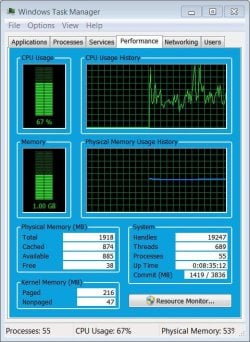
I currently have two browsers open, as well as windows media player running. I haven't particularly noticed a lag during the last several minutes. However, looking at these settings in the following screenshot, is there anything that I can adjust?
 

Attachments

  • Capture.JPG
    Capture.JPG
    75.6 KB · Views: 52

My Computer

Computer type
PC/Desktop
Computer Manufacturer/Model Number
Compaq Presario CQ5205Y Desktop PC
OS
Windows 7 Home Premium 64-bit SP1
CPU
AMD Sempron Processor LE-1300 2.30 GHz
Memory
4 GB RAM
Graphics Card(s)
Integrated graphics using nVidia GeForce 6150SE
Sound Card
Integrated Realtek ALC888S Audio
Screen Resolution
1280x1024
Hard Drives
250 GB
Internet Speed
12 Mbps
Browser
Firefox
You are far too short in memory. Adjusting the page file in either XP or win 7 will have little if any effect on that in either OS.

Win 7 is far more adept at handling memory than XP. Your best best is to upgrade the memory.
 

My Computer

Computer Manufacturer/Model Number
HP Pavillion dv-7 1005 Tx
OS
Win 8 Release candidate 8400
CPU
[email protected]
Memory
4 gigs
Graphics Card(s)
Nvidia 9600M
Sound Card
HD built-in
Monitor(s) Displays
17" Wxga
Screen Resolution
1440x900
Cooling
none
Internet Speed
45Mb down 5Mb up
I agree with zigzag. Let Windows 7 take care of the page filing and ram usage. I would add more ram that is matched and of quality. If your motherboard will allow it I would install 4 gigs of ram according to the motherboards specs.
 

My Computer

Computer type
PC/Desktop
Computer Manufacturer/Model Number
Home made Desktop
OS
Windows 10 Pro. 64/ version 1709 Windows 7 Pro/64
CPU
Intel i7-6800K @ 4.3
Motherboard
ASUS X-99 Deluxe II
Memory
Corsair Platinum 16 gig @2400
Graphics Card(s)
EVGA GTX 1070 OC
Monitor(s) Displays
Asus 27" LED LCD/VE278Q
Screen Resolution
1920-1080 or 1280-720 HDMI
Hard Drives
INTEL SSD 730-240 Gb Sata 3.0/
PSU
EVGA Platium 1200W
Case
Phanteks Luxe Tempered Glass 8 fans/ one radiator
Cooling
XSPC/ Water Cooled CPU
Keyboard
Das 4 Professional
Mouse
Logitech M705/MX Anywhere 2-S
Internet Speed
100 mbits
Antivirus
Microsoft Security Essentials/ Malwarebytes Premium 3.0/ SAS
Browser
I.E. 11 default/Firefox/ ISP Time Warner Cable/Spectrum
Other Info
LG BluRay Burner/
Sound system-KLipsch-THX/
Icy Dock ssd Hot Swap bays.
LBB

Thanks for the backup

Windows requires a minimum of 1gig for 32bit and 2 gigs for 64bit. That is before any apps, or other things are run.

You can see that you are very close to the minimum.
 

My Computer

Computer Manufacturer/Model Number
HP Pavillion dv-7 1005 Tx
OS
Win 8 Release candidate 8400
CPU
[email protected]
Memory
4 gigs
Graphics Card(s)
Nvidia 9600M
Sound Card
HD built-in
Monitor(s) Displays
17" Wxga
Screen Resolution
1440x900
Cooling
none
Internet Speed
45Mb down 5Mb up
I do not see a problem with your memory and I seriously doubt it is the cause of the lag. I would say it is either the CPU or I/O with the hard drive.
 

My Computer

Computer type
PC/Desktop
Computer Manufacturer/Model Number
Alienware Aurora ALX R4
OS
Windows 10 Pro (x64)
CPU
Intel Core i7-3930K (3.2GHz - 4.5GHz)
Motherboard
Alienware Aurora-R4 x79
Memory
4x Samsung 4GB PC3-12800 DDR3 (16GB 1600MHz)
Graphics Card(s)
Nvidia Geforce GTX 690
Sound Card
SteelSeries Siberia Elite
Monitor(s) Displays
Dell UltraSharp U3011
Screen Resolution
2560x1600
Hard Drives
Samsung 850 Pro 256 GB, Seagate 1TB Desktop Hybrid HDD, 2x Western Digital 4TB Green HDD
PSU
875W Some Dell PSU <.<
Case
Alienware Aurora ALX
Cooling
Custom Liquid Cooling (EK CPU & GPU blocks) dual EK 480RAD
Keyboard
Logitech G710+ Mechanical
Mouse
Logitech G700s
Internet Speed
Verizon Fios (50 mbps average)
Other Info
Server: Intel NUC D54250WYK: i5-4250U, 16GB, 256 GB mSATA, Windows Server 2012 R2
There is nothing wrong with the ram memory. I just can notice a bit high cpu usage.
If you're planing to use 64bit os,then upgrate your ram memory. Install 32bit on that system. You have just 2GB of ram and all 2Gb(I mean 1.97GB) is readed,so you don't need 64bit.
 

My Computer

Computer type
PC/Desktop
Computer Manufacturer/Model Number
Custom Build
OS
Windows 10 Pro x64
CPU
Intel Core i5 4440 @Stock
Motherboard
Gigabyte Z97 D3H
Memory
4 x 4GB HyperX Fury DDR3
Graphics Card(s)
Gigabyte GTX 1050Ti O4G
Sound Card
Integrated
Monitor(s) Displays
Dell P2417H
Screen Resolution
1920 x 1080
Hard Drives
Samsung EVO 850 120GB / Toshiba DT01ACA050 1TB 7200prm 32MB
PSU
Riotoro Onyx 750W
Case
NZXT H500 Black-Red
Cooling
Stock CPU + NZXT 120mm + 2x120mm red fans
Keyboard
Modecom Volcano Lanparty
Mouse
Asus ROG Gladius / DeepCool E-Pad Plus
Internet Speed
DOCSIS 50/3 Mbit
Browser
Google Chrome
Other Info
Asus K55VJ(i5 3210M, GT635M / 2GB, 8GB DDR3, 500GB HDD)
Back
Top