How do i permanently delete the virus from the system?

comptech

Banned
Local time
10:00 AM
Messages
149
Location
Mauritius
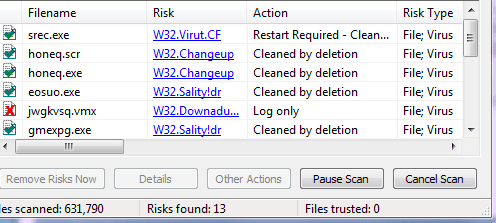
see this image...
some of the infected files with virus showed as moved to qurantine in Norton Endpoint v11 protection...
some of them get deleted by itself...
I scan the files that contained in the network with Norton it showed like this...
Here what is log only means?...
Whether the quarantined virus did not permanently get deleted from the server?...:mad:
 

Attachments

  • 4.PNG
    4.PNG
    8.1 KB · Views: 39

My Computer My Computer

At a glance

Windows 7 Ultimate 64 bitIntel pentium 32GB RAM DDR 3Intel HD Graphics
Computer type
PC/Desktop
OS
Windows 7 Ultimate 64 bit
CPU
Intel pentium 3
Motherboard
MSI
Memory
2GB RAM DDR 3
Graphics Card(s)
Intel HD Graphics
Sound Card
Realtek Audio
Monitor(s) Displays
zenware
Screen Resolution
1680x1050
Hard Drives
80 GB
Case
i-Max
Cooling
Cooler Master
Keyboard
A4TECH
Mouse
edvan
Antivirus
Avast Anti virus 2015
Browser
Google chrome
The cleaned ones is easy, they've already been deleted, so no problem here.
There is another that says it's required to reboot, so restarting the computer should get rid of this one.

And then the "log only". Without knowing a lot about this program specific, it seems to me that the AV could not delete it so only notified you without taking further actions (so yes, the file is still there doing it things). If the file is in a server, it's most likely that it's in use by other users or you don't have enough permissions to delete it, in which case the antivirus could do nothing about it.

The safest approach is to look at the results screen for the path of that offending file, the go manually there and try to delete it yourself. Ask system administrators if you can't if the file is in use. From the server itself (rather than remotely) it's possible to force closing the file and delete it.
 

My Computer My Computer

At a glance

Windows 7 Ultimate x64Intel Core i7-740QM8 GB DDR3NVIDIA GeForce 330GT
Computer type
Laptop
Computer Manufacturer/Model Number
Toshiba Sattelite A665-S6092
OS
Windows 7 Ultimate x64
CPU
Intel Core i7-740QM
Memory
8 GB DDR3
Graphics Card(s)
NVIDIA GeForce 330GT
Screen Resolution
1366x768
Hard Drives
Samsung 840 SSD 500GB
1TB USB3 external HD
Cooling
Coolermaster Notepal U3 notebook cooling pad
Internet Speed
3mbps ASDL
Antivirus
ClamWin 0.98.7
Browser
Opera 12.17 x86 (main), Firefox 38 (sec), IE11 (last resort)
Hello comptech:

That computer really hit the Superfecta if it truly is infected by the Sality file infector, Virut.CF botnet, Conficker and the Changeup worm. Far too many registry keys, system files and settings have been changed/added to waste your time on this one.

From a Linux LiveCD, run dd to get copies of the user's data files, if needed, and then restore from a known good full system backup or rebuild the system from Microsoft's installer media.

Even though you could have mitigated the Conficker and the Changeup worm malware, you will save time/money in the long run and if this is a server, as you mention, the network clients will need to be checked too.

Cheers :)
 

My Computer My Computer

At a glance

W7
Computer type
PC/Desktop
OS
W7
The user is banned, So :X
 

My Computer My Computer

At a glance

Windows 7 Home Premium 64-BITAMD A8 7200P8GB 1600mhzRadeon R5 (APU) + Radeon R5 M230 2GB Dual Gra...
Computer type
PC/Desktop
Computer Manufacturer/Model Number
ASUS X550ZE
OS
Windows 7 Home Premium 64-BIT
CPU
AMD A8 7200P
Motherboard
N/A
Memory
8GB 1600mhz
Graphics Card(s)
Radeon R5 (APU) + Radeon R5 M230 2GB Dual Graphics
Sound Card
Realtek ALC269 with SonicMaster
Monitor(s) Displays
Laptop Display
Screen Resolution
1920 x 1080 @60hz
Hard Drives
WDC WD50 00LPVX-80V0TT0 (500GB)
PSU
Laptop Charger
Mouse
ARMAGGEDON TEXTRON SCORPION 7
Internet Speed
100 mbps DOWN / 50 mbps UP
Antivirus
Windows Defender
Browser
Mozzila FireFox, Valve Steam in-game internet browser
Back
Top