how do I prevent one of two Windows 7 from booting on a computer

lansing

New member
Local time
10:38 AM
Messages
2
I have two drives, a hard disk and a ssd, both have Windows 7 installed, and I only want the system to boot from the ssd, how do i disable os of the hdd from booting?
I tried to set higher boot priority to the ssd in BIOS, but after a reboot, the hdd one takes priority again.
 

My Computer My Computer

At a glance

Windows 7 Ultimate x64
OS
Windows 7 Ultimate x64
The cleanest way is to delete the HD OS in Disk Mgmt, after making sure the SSD Win7 has its System Active flags showing that the boot files are on its partition and not booting off the HD Win7.

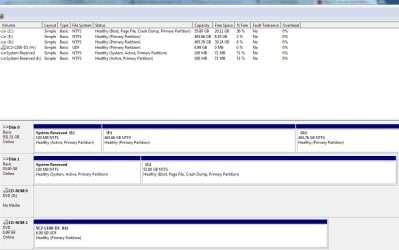
If you'll post back a screenshot of your maximized Disk mgmt drive map we can advise you further on this option or whatever else you want to do.

To only remove the Dual Boot menu to to Start, rightclick Computer, go to Properties, select Advanced System Settings, then Startup settings, uncheck the Time to Display list of OS's. You then have a path back to restoring it there.
 
F drive is the hdd that has the other OS. I don't want to simply delete the whole OS, because I haven't move all the files yet and I have no extra drive space to move them to other drives.
 

Attachments

  • disk mgmt.jpg
    disk mgmt.jpg
    77.8 KB · Views: 27

My Computer My Computer

At a glance

Windows 7 Ultimate x64
OS
Windows 7 Ultimate x64
F is currently booting off the the System Reserved partition on Disk1 which was installed with C - as signified by it holding the System flag. So C has everything it needs to boot on its own.

You can hide the Dual Boot menu as given in my previous post so that you can turn it back on to boot it if needed. When ready you can delete E and F in Disk Mgmt to repartition for storage. Then make sure no partitions on Disk0 become marked Active or they could derail the system boot files if you run Repair. It's actually safest for this reason to have your OS on Disk0 so you could also swap the data cables for the two HD's, making sure the HD with C remains HD set to boot first in BIOS setup.

It's far easier to delete an OS by it's partition, however if you want to try to delete the OS on F piecemeal you will find that some files won't delete without first rightclicking to use this Take Ownership Shortcut . It becomes quite a chore where you have to go into subfolders to do this first before they'll let you delete the parent folder. You would want to delete Windows folder plus anything else you dont' want. Easier to buy or borrow an external HD which it looks like you could use, and also is useful to back up a Win7 system image to use in place of reinstall.

If you haven't already done so, you can link your User folders on F to C by rightclicking each one to add it to related Library - Include a Folder - Windows 7 Forums.
 
Back
Top