How do I program Task Scheduler to randomly cycle through theme?

Weboh

New member
Member
VIP
Local time
1:27 AM
Messages
112
Location
Central Florida
I know it's possible to make Task Scheduler change themes at certain times, and I've seen various tutorials on it. However, the only thing I've seen has been changing to a specific theme at a specific time. How can I make it randomly choose one, and how do I make it do it every 2 hours or so? The lowest interval I see in there is a one day. And if I can't easily do it this way, is there another program that I can use to do it? Preferably a configurable one so I can tell it to switch Classic Shell XMLs with the theme.
 

My Computer

Computer type
Laptop
Computer Manufacturer/Model Number
Lenovo Thinkpad E540
OS
Windows 7 Ultimate x64
CPU
i7-4702M
Antivirus
Norton 360
Browser
Pale Moon

My Computer

Computer type
PC/Desktop
Computer Manufacturer/Model Number
Custom
OS
Dual Boot: Windows 8.1 & Server 2012r2 VMs: Kali Linux, Backbox, Matriux, Windows 8.1
CPU
A10 7700 Kavari SteamRoller
Motherboard
ASUS A88XM-PLUS (FM2+ )
Memory
8GB DDR3 SDRAM PC3-8500
Graphics Card(s)
1024MB ATI AMD Radeon R7 Graphics
Sound Card
Realtek High Definition Audio
Monitor(s) Displays
Samsung
Hard Drives
SSD Crucial 120gb
WD VelociRaptor 1tb
PSU
Rosewill Gaming 650w
Case
Rosewill Galaxy 2
Internet Speed
55/12
Antivirus
Malwarebytes, MSE, SAS
Browser
FireFox, Chrome
Yeah, that's one of the first things that showed up on Google for me too. It doesn't tell me how to tell it to randomly pick themes or intervals less than a day though.
 

My Computer

Computer type
Laptop
Computer Manufacturer/Model Number
Lenovo Thinkpad E540
OS
Windows 7 Ultimate x64
CPU
i7-4702M
Antivirus
Norton 360
Browser
Pale Moon
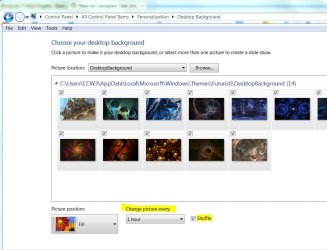
Right click on your desk top and select Personalize.

Select a group or theme package you want to use.

At bottom left, click on Desktop Background (Slide Show)

Choose the frequency from the dropdown menu and check the Shuffle box for random or leave blank for sequential.
 

Attachments

  • Desk Top Shuffle.JPG
    Desk Top Shuffle.JPG
    113.2 KB · Views: 0

My Computer

Computer type
PC/Desktop
Computer Manufacturer/Model Number
Built 2/11/2011
OS
Windows 7 Pro-x64
CPU
i7-2600 3.4GHz - 3.8GHz Turbo
Motherboard
Intel DH67BL-B3
Memory
8Gb - 2x4GB, Muskin 991770 PC3-1333
Graphics Card(s)
Integrated Intel HD 2000
Sound Card
Integrated Intel 10.1 HD, RealTek ALC892
Monitor(s) Displays
Asus LCD VH222H, Haier HL24XSL2a
Screen Resolution
1920x1080, 1920x1080
Hard Drives
Crucial SSD C300-128Gb,
Western Digital WD5002AALX - 500Gb,
Western Digital WD7501AALS - 750Gb
PSU
Seasonic 650W 80+ Gold Modular
Case
Rosewill Defender
Cooling
Stock CPU, Four 120mm case fans, PCH fan added
Keyboard
Logitech EX100 Y-RBH94 Wireless
Mouse
Logitech EX100 M-RCE95 Wireless
Internet Speed
3.0/1.5 Mbs
Antivirus
Microsoft Security Essentials
Browser
Microsoft Internet Explorer 11
Other Info
Antec Veris Premier-Multimedia IR Station,
Cyber Accoustics-3602 Speakers,
AFT XM-5U Card Reader,
Hauppauge TV-HVR-2250,
Sony LX300 USB Turntable
That's to cycle backgrounds. I want it to do that for THEMES. You know, areo/classic, and the wallpapers and sounds and screensavers that all switch together?
 

My Computer

Computer type
Laptop
Computer Manufacturer/Model Number
Lenovo Thinkpad E540
OS
Windows 7 Ultimate x64
CPU
i7-4702M
Antivirus
Norton 360
Browser
Pale Moon
Ok, I misunderstood what you were trying to do. :o

There's no way to "play" the themes randomly that I know of unless you write your own program. You could setup a task schedule for each theme you want and off-set the start times and/or recurrence. You have to use Create Task and not Basic Task to allow using the recurrence frequency of less than a day.
 

My Computer

Computer type
PC/Desktop
Computer Manufacturer/Model Number
Built 2/11/2011
OS
Windows 7 Pro-x64
CPU
i7-2600 3.4GHz - 3.8GHz Turbo
Motherboard
Intel DH67BL-B3
Memory
8Gb - 2x4GB, Muskin 991770 PC3-1333
Graphics Card(s)
Integrated Intel HD 2000
Sound Card
Integrated Intel 10.1 HD, RealTek ALC892
Monitor(s) Displays
Asus LCD VH222H, Haier HL24XSL2a
Screen Resolution
1920x1080, 1920x1080
Hard Drives
Crucial SSD C300-128Gb,
Western Digital WD5002AALX - 500Gb,
Western Digital WD7501AALS - 750Gb
PSU
Seasonic 650W 80+ Gold Modular
Case
Rosewill Defender
Cooling
Stock CPU, Four 120mm case fans, PCH fan added
Keyboard
Logitech EX100 Y-RBH94 Wireless
Mouse
Logitech EX100 M-RCE95 Wireless
Internet Speed
3.0/1.5 Mbs
Antivirus
Microsoft Security Essentials
Browser
Microsoft Internet Explorer 11
Other Info
Antec Veris Premier-Multimedia IR Station,
Cyber Accoustics-3602 Speakers,
AFT XM-5U Card Reader,
Hauppauge TV-HVR-2250,
Sony LX300 USB Turntable

My Computer

Computer type
PC/Desktop
OS
Windows 10 Home x64
CPU
INTEL Core i5-750 Quad-Core 3.37GHz
Motherboard
ASUS P7P55D
Memory
HyperX Fury Black Series 8GB (2 x 4GB) 1866Mhz
Graphics Card(s)
EVGA GeForce GTX 750 Superclocked 1GB 128-Bit GDDR5
Monitor(s) Displays
LG 32MA68HY 32" IPS
Screen Resolution
1920 x 1080
Hard Drives
Samsung 840 Evo 120GB, SEAGATE 500GB Barracuda® 7200.12, SATA 3 Gb/s, 7200 RPM, 16MB cache
PSU
ANTEC TruePower New TP-550, 80 PLUS, 550W
Case
ANTEC Three Hundred Illusion
Cooling
COOLER MASTER Hyper 212 Plus, 4 x 120mm 1 x 140mm Noctua's
Internet Speed
85 + Mbps
Antivirus
Avast
Browser
Vivaldi
@A Guy
That just shows how to do a certain theme at a certain time of day. I want to be able to do random themes at 2 hour intervals.
 

My Computer

Computer type
Laptop
Computer Manufacturer/Model Number
Lenovo Thinkpad E540
OS
Windows 7 Ultimate x64
CPU
i7-4702M
Antivirus
Norton 360
Browser
Pale Moon
Read post #6. :rolleyes:
 

My Computer

Computer type
PC/Desktop
Computer Manufacturer/Model Number
Built 2/11/2011
OS
Windows 7 Pro-x64
CPU
i7-2600 3.4GHz - 3.8GHz Turbo
Motherboard
Intel DH67BL-B3
Memory
8Gb - 2x4GB, Muskin 991770 PC3-1333
Graphics Card(s)
Integrated Intel HD 2000
Sound Card
Integrated Intel 10.1 HD, RealTek ALC892
Monitor(s) Displays
Asus LCD VH222H, Haier HL24XSL2a
Screen Resolution
1920x1080, 1920x1080
Hard Drives
Crucial SSD C300-128Gb,
Western Digital WD5002AALX - 500Gb,
Western Digital WD7501AALS - 750Gb
PSU
Seasonic 650W 80+ Gold Modular
Case
Rosewill Defender
Cooling
Stock CPU, Four 120mm case fans, PCH fan added
Keyboard
Logitech EX100 Y-RBH94 Wireless
Mouse
Logitech EX100 M-RCE95 Wireless
Internet Speed
3.0/1.5 Mbs
Antivirus
Microsoft Security Essentials
Browser
Microsoft Internet Explorer 11
Other Info
Antec Veris Premier-Multimedia IR Station,
Cyber Accoustics-3602 Speakers,
AFT XM-5U Card Reader,
Hauppauge TV-HVR-2250,
Sony LX300 USB Turntable
I did, but I didn't like your solution, and you admitted you weren't an expert on the subject, so I'm leaving it open. If all else fails, I'll do that though. ;)
 

My Computer

Computer type
Laptop
Computer Manufacturer/Model Number
Lenovo Thinkpad E540
OS
Windows 7 Ultimate x64
CPU
i7-4702M
Antivirus
Norton 360
Browser
Pale Moon
You're right. I admit I'm no expert on absurd logic. Do as you wish.
 

My Computer

Computer type
PC/Desktop
Computer Manufacturer/Model Number
Built 2/11/2011
OS
Windows 7 Pro-x64
CPU
i7-2600 3.4GHz - 3.8GHz Turbo
Motherboard
Intel DH67BL-B3
Memory
8Gb - 2x4GB, Muskin 991770 PC3-1333
Graphics Card(s)
Integrated Intel HD 2000
Sound Card
Integrated Intel 10.1 HD, RealTek ALC892
Monitor(s) Displays
Asus LCD VH222H, Haier HL24XSL2a
Screen Resolution
1920x1080, 1920x1080
Hard Drives
Crucial SSD C300-128Gb,
Western Digital WD5002AALX - 500Gb,
Western Digital WD7501AALS - 750Gb
PSU
Seasonic 650W 80+ Gold Modular
Case
Rosewill Defender
Cooling
Stock CPU, Four 120mm case fans, PCH fan added
Keyboard
Logitech EX100 Y-RBH94 Wireless
Mouse
Logitech EX100 M-RCE95 Wireless
Internet Speed
3.0/1.5 Mbs
Antivirus
Microsoft Security Essentials
Browser
Microsoft Internet Explorer 11
Other Info
Antec Veris Premier-Multimedia IR Station,
Cyber Accoustics-3602 Speakers,
AFT XM-5U Card Reader,
Hauppauge TV-HVR-2250,
Sony LX300 USB Turntable
Hey, that was uncalled for! :( What part of my logic is absurd? You not being an expert? You said there was no way that you knew of--implying that there might be other ways you don't know of, which means A: You aren't an expert, and B: There might be other ways. So how is it wrong to ask if someone else knows another way? I know this is the internet, but still.
 

My Computer

Computer type
Laptop
Computer Manufacturer/Model Number
Lenovo Thinkpad E540
OS
Windows 7 Ultimate x64
CPU
i7-4702M
Antivirus
Norton 360
Browser
Pale Moon
@A Guy
That just shows how to do a certain theme at a certain time of day. I want to be able to do random themes at 2 hour intervals.

No, if you watch it, he's saying do it for each theme, and they will all change. I can't confirm how it will work, as I pick my themes ;) But his video shows he has set the tasks for all his themes, and he claims they all change, not just at a certain time each day. No way to do random at 2 hour intervals I'm afraid.

A Guy
 

My Computer

Computer type
PC/Desktop
OS
Windows 10 Home x64
CPU
INTEL Core i5-750 Quad-Core 3.37GHz
Motherboard
ASUS P7P55D
Memory
HyperX Fury Black Series 8GB (2 x 4GB) 1866Mhz
Graphics Card(s)
EVGA GeForce GTX 750 Superclocked 1GB 128-Bit GDDR5
Monitor(s) Displays
LG 32MA68HY 32" IPS
Screen Resolution
1920 x 1080
Hard Drives
Samsung 840 Evo 120GB, SEAGATE 500GB Barracuda® 7200.12, SATA 3 Gb/s, 7200 RPM, 16MB cache
PSU
ANTEC TruePower New TP-550, 80 PLUS, 550W
Case
ANTEC Three Hundred Illusion
Cooling
COOLER MASTER Hyper 212 Plus, 4 x 120mm 1 x 140mm Noctua's
Internet Speed
85 + Mbps
Antivirus
Avast
Browser
Vivaldi
All right, I have it set up to randomly change themes using this script, but I don't know how to work the arguments to make it change Classic Shell's settings depending on which theme is applied. From Classic Shell's forums, I've learned where the settings registry key is stored, and I have the regedit files ready. I just need to know how to tell it to apply different ones of those depending on what theme it randomly selected (Is there a file Windows makes somewhere telling which theme is applied? Can I use that file as a reference in "arguments"?)
 
Last edited:

My Computer

Computer type
Laptop
Computer Manufacturer/Model Number
Lenovo Thinkpad E540
OS
Windows 7 Ultimate x64
CPU
i7-4702M
Antivirus
Norton 360
Browser
Pale Moon
Bumping it up so that someone else has the opportunity to answer.
 

My Computer

Computer type
Laptop
Computer Manufacturer/Model Number
Lenovo Thinkpad E540
OS
Windows 7 Ultimate x64
CPU
i7-4702M
Antivirus
Norton 360
Browser
Pale Moon
Back
Top