zarfs
New member
I'm running Windows 7 Pro with all updates.
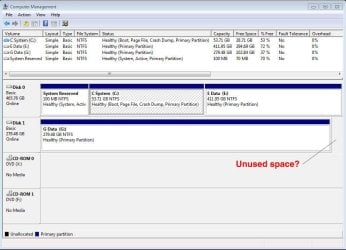
I noticed in Disk Management (see attached screen shot) that my second hard drive (Drive G) seems to have a section that is going unused. It's not listed as unallocated space; it's not identified in any way.
I've been overhauling my computer and wonder whether in the process I've allowed a virtual drive or clone drive or something like that to be created.
Is that really unused space? If so, how do I reclaim it?
PS: That hard drive used to be a dynamic drive. I changed it back to basic drive while retaining the data. The unused space appeared in the dynamic drive as well.
I noticed in Disk Management (see attached screen shot) that my second hard drive (Drive G) seems to have a section that is going unused. It's not listed as unallocated space; it's not identified in any way.
I've been overhauling my computer and wonder whether in the process I've allowed a virtual drive or clone drive or something like that to be created.
Is that really unused space? If so, how do I reclaim it?
PS: That hard drive used to be a dynamic drive. I changed it back to basic drive while retaining the data. The unused space appeared in the dynamic drive as well.
Attachments
My Computer
At a glance
Windows 7, 64-bitIntel Core i3-3240 CPU @ 3.40GHz, 3404 GBIn motherboard
- Computer type
- PC/Desktop
- Computer Manufacturer/Model Number
- Dell Inspiron 660
- OS
- Windows 7, 64-bit
- CPU
- Intel Core i3-3240 CPU @ 3.40GHz, 340
- Memory
- 4 GB
- Graphics Card(s)
- In motherboard
- Sound Card
- In motherboard
- Monitor(s) Displays
- NEC MultiSync FE992 CRT
- Screen Resolution
- 1280 x 1024
- Hard Drives
- Main drive: Manufacturer not specified. Model ST500DM002-1BD142 SATA 500 GB
Supplemental drive: Maxtor 6L300S0 SATA 300 GB
- Cooling
- 1 CPU fan, 1 chassis fan.
- Keyboard
- Standard
- Mouse
- Dell optical USB
- Internet Speed
- 11 Mb/sec
- Antivirus
- Norton Internet Security 20.4.0.40
- Browser
- Firefox