how do I recover data from a non responsive hard drive?

@Icit2, I thought I had already answered this question in my post #113.

"If our suspicion that the HDD is developing bad sectors is true, some of the files copied either with TestDisk or live Linux will be corrupt even if we succeed in copying.

ddrescue while cloning the drive tries to repeatedly read the bad sectors and extract the data in it, which conventional cloning software like Macrium Reflect will not do.The algorithm used in ddrescue is different with focus on bad sector recovery as it clones. First pass clones all good sectors. Subsequent passes - as many as you can order - will target only the bad sectors as logged in its logfile - and try to extract the feeble data in it."

Normally 3 passes is considered sufficient to extract data from a bad sector the assumption being if in three passes a bad sector cannot be recovered, more number of passes may not do anything better except increasing the recovery time..That bad sector is considered irrecoverable and naturally some files recovered will remain corrupted. But the best has been done to recover bad sectors.

I am only interested in seeing how many passes Anshad is going to recommend based on his personal experience.
Yep I was too busy concentrating on something else - sorry:o
 

My Computer My Computer

At a glance

Desk1 7 Home Prem / Desk2 10 Pro / Main lap A...Desk1 i5 3750K / Laptop i7 GTX 860M / Desk2 i...Desk1 8GB (1866) / Desk2 16GB (1333) / Laptop...Desk 1& 2NVidia GTX 650 & Laptops on board Intel
Computer type
PC/Desktop
Computer Manufacturer/Model Number
Own build (new) Desk1 / Asus ROG Win 7 / Desk2 1st build
OS
Desk1 7 Home Prem / Desk2 10 Pro / Main lap Asus ROG 10 Pro 2 laptop Toshiba 7 Pro Asus P2520 7 & 10
CPU
Desk1 i5 3750K / Laptop i7 GTX 860M / Desk2 i5 2500
Motherboard
Desk1 Asus P877-V / Desk2 Gigabyte H67 UD3H / Laptop ?
Memory
Desk1 8GB (1866) / Desk2 16GB (1333) / Laptop 8Gb DDR3
Graphics Card(s)
Desk 1& 2NVidia GTX 650 & Laptops on board Intel
Sound Card
Desk 1 & 2 -XONAR DG Realtek High Def audio Laptop
Monitor(s) Displays
Desk 1 Benq HD 2450 / Desk2 Philips 24" / Laptop 17.5"
Screen Resolution
1920x1080 D1 & D2 & Laptop 1
Hard Drives
Desk1 Samsung 120GB 830 SSD
Asus ROG 256GB 850 Pro SSD
Desk2 Samsung 840 256 SSD
Toshiba 120GB EVO
PSU
Desk 1 Corsair HX 1050/ Laptop ? / Desk 2 Corsair HX 650
Case
Desk 1 Cooler HAF XM ? Toshiba laptop / Desk2 Coolermaster
Cooling
Fans on all Desk1 -2 Desk2 - all Coolermasters 5 Laptop ?
Keyboard
Desk 1 MS Sidewinder X6 Desk 2 MS Sidewinder X 4
Mouse
Desk 1&2 - Gigabyte MS 900 gamer - laptop - Logitec wireless
Internet Speed
ADSL2+
Other Info
One other Desktop (tester) and spare Toshba laptop both with SSD's
Running Kaspersky 2016 ISS on all machines config'd identically
Logitec audio stereo systems on each machine (x3)
Canon MG5250MFC
Router/modem TP-Link running WPA2SK

My Computer My Computer

At a glance

Windows 7x64 Home Premium SP1Intel i7 2600kG.Skill Ripjaws (DDR3-1600) 2x4GBNvidia GeForce GTS 450; Intel HD Graphics 300...
Computer type
PC/Desktop
Computer Manufacturer/Model Number
Own build
OS
Windows 7x64 Home Premium SP1
CPU
Intel i7 2600k
Motherboard
ASUS P8Z68 Deluxe
Memory
G.Skill Ripjaws (DDR3-1600) 2x4GB
Graphics Card(s)
Nvidia GeForce GTS 450; Intel HD Graphics 3000(GT2+)
Monitor(s) Displays
Dell Ultrasharp IPS panel U2311H, Samsung SyncMaster P2350
Screen Resolution
1920x1080
Hard Drives
Samsung 850 Pro SSD 256GB, Samsung SSD 840 120GB, Seagates 1TB Barracuda ST31000528AS x2
PSU
Seasonic M12II 520W
Case
Lian Li Lancool PC-K60
Cooling
Case: 1x120mm, 3x140mm CPU: Hyper 212+
Keyboard
Logitech MK520 (wireless)
Mouse
Logitech MK520
Internet Speed
6-7 Mbps
Antivirus
Norton Security Premium, Malwarebytes on 2 (MSE on 3rd PC)
Browser
FireFox
Other Info
Audio: Logitech Z523 2.1
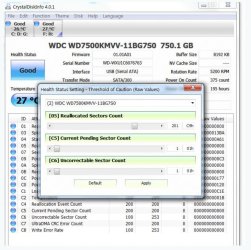
Anshad, et al: CrystalDiskInfo can affect Smart values. This might improve disk access time and also buy a bit more time before SMART flags he disk.
CrystalDiskInfo is a reporting tool. This is how you might use it to monitor the ongoing health of your drive.
http://www.sevenforums.com/hardware...disk-s-m-r-t-capability-benefits-risks-3.html
If you continue to get reallocated sector count increases it's time to dump the drive.

That's what I thought too - reporting tool, but was convinced otherwise. Now, I'm not sure.

If I read your post on the thread you pointed to, it sounds more as though the sliders affect CrystalDisk reporting health status (good, bad, etc). That makes sense to me.

I'll have to play with it again - move the sliders in CrystalDisk and check SMART with another utility (I thought I did that over a year ago, but..... I'll do it soon for my own satisfaction)

Thanks for the correction, someone has to keep me honest ;)

Bill
 

My Computer My Computer

At a glance

x64 (6.3.9600) Win8.1 Pro & soon dual boot x6...AMD A6-3420M APU with Radeon(tm) HD Graphics6.00 GBAMD Radeon(TM) HD 6520G
Computer type
Laptop
Computer Manufacturer/Model Number
HP Pavilion dv6-6c10us
OS
x64 (6.3.9600) Win8.1 Pro & soon dual boot x64 (6.1.7601) Win7_SP1 HomePrem
CPU
AMD A6-3420M APU with Radeon(tm) HD Graphics
Motherboard
Hewlett-Packard 1805
Memory
6.00 GB
Graphics Card(s)
AMD Radeon(TM) HD 6520G
Sound Card
(1) AMD High Definition Audio Device (2) IDT High Definiti
Monitor(s) Displays
HP W2072a 20" LCD (1600 x 900) @ 60 Hz
Screen Resolution
1366 x 768 x 32 bits (4294967296 colors) @ 60 Hz
Hard Drives
ST640LM0 00 HM641JI SATA Disk Device
Keyboard
Logitech k520 wireless KB
Mouse
Logitech m320 wireless mouse (bundled with KB)
Internet Speed
15/5 | 54 MB Wireless 'n'
Antivirus
Realtime: Defender or Avast | On-demand: Malwarebytes, ESET
Browser
IE 11 on Win8, IE 10 on win 7
Other Info
Media: [Gimp, Audacity, VLC] || Comm: [WEmail 2012, Skype] || Productivity: [OpenOffice,| Textpad] || Utils: [Sysinternals, cCleaner, Speccy, Defraggler]
Hey hey... remember me? I am now the proud owner of a new 2TB hard drive.

So I'm ready to do the data recovery from my old drive.

I would like to make this my boot drive... so how do I do that? and do I do it before, or after we attempt the data recovery?

Thanks again guys.
 

My Computer My Computer

At a glance

Windows 7 Home Premium 32 bitIntel(R) Core(TM)2 Duo CPU E6750 @ 2.66GHz4.00 GB with 3.25 GB available(1) Radeon X1950 Series (Microsoft Corporatio...
OS
Windows 7 Home Premium 32 bit
CPU
Intel(R) Core(TM)2 Duo CPU E6750 @ 2.66GHz
Motherboard
ASUSTeK Computer INC. P5E
Memory
4.00 GB with 3.25 GB available
Graphics Card(s)
(1) Radeon X1950 Series (Microsoft Corporation - WDDM) (
Sound Card
High Definition Audio Device
Hard Drives
(1) WDC WD7501AALS-00J7B0 ATA Device
Anshad, et al: CrystalDiskInfo can affect Smart values. This might improve disk access time and also buy a bit more time before SMART flags he disk.

One member reportedly used it on a failing drive and the drive has been fine for 5 years. SMART isn't all that smart sometimes. I recently applied this method to a troublesome ext WD drive - the results are inconclusive, but the symptoms were completely different.

Actually SMART is only a log of the HDD activities and if you know what each attributes are meant and which one of them are important, you will be able to develop an idea about the health condition of a disk in question. The number one rule when reading SMART is to not use a tool which predicts disks health based on SMART attribute's values. For example there is "HDD Sentinal" which predicts approximately how many days a disk will work which is not reliable at all. In fact SMART never give us an estimate about the remaining life of a disk but by analysing the attributes, we will can build a fairly good idea. For example, if SMART shows too may head seek failures, that clearly indicates that internals of the disk are not in a good condition and the head may got completely stuck on some day so make sure to take backup of important data.

Among all other attributes, i will always pay special attention to "Current Pending Sector" as that attribute will give us an idea about the disk's surface condition. On an ideal disk it should be zero. If it is a non zero value, it means either there are no more spare sectors to remap ( G-List is full )or the sectors are so defective and hence the disk can't read the data stored on them before marking them as bad.

When we run HD manufacturer's diagnostic tool or use "Crystal DiskInfo" to reset the counter, SMART chip will actually ignore the data stored on the bad sectors and will remap them forcefully. With the bad sectors "disappeared", the disk will be usable again but it's reliability will be compromised. Some works for months and some may last long for years. My general recommendation is to not use the disk for storing critically important data.

Perhaps, Anshad is learning a bit from our input as well.

In fact a lot ;). I learned a lot from various tech support forums including "Sevenforums". The quality of support people get here always amazed me but i never had the courage to post in here mainly because i know my English sucks.
 

My Computer My Computer

At a glance

Windows 7 Ultimate x64
Computer type
PC/Desktop
OS
Windows 7 Ultimate x64
@Canuck67

Using the new 2TB disk as a boot drive is not possible at this time. Our first goal should be is to rescue data from the failing disk to the new one using "DDrescue". Once the data is safely extracted to the new 2 TB disk, you can copy all data to the free partition of your main OS disk and then re-partition the new 2 TB and install Windows to it.

It is midnight in my place- retire for now. I will post detailed instructions about the cloning process tomorrow.
 

My Computer My Computer

At a glance

Windows 7 Ultimate x64
Computer type
PC/Desktop
OS
Windows 7 Ultimate x64
@Canuck67

Using the new 2TB disk as a boot drive is not possible at this time. Our first goal should be is to rescue data from the failing disk to the new one using "DDrescue". Once the data is safely extracted to the new 2 TB disk, you can copy all data to the free partition of your main OS disk and then re-partition the new 2 TB and install Windows to it.

It is midnight in my place- retire for now. I will post detailed instructions about the cloning process tomorrow.

nice. thank you. sleep well.
 

My Computer My Computer

At a glance

Windows 7 Home Premium 32 bitIntel(R) Core(TM)2 Duo CPU E6750 @ 2.66GHz4.00 GB with 3.25 GB available(1) Radeon X1950 Series (Microsoft Corporatio...
OS
Windows 7 Home Premium 32 bit
CPU
Intel(R) Core(TM)2 Duo CPU E6750 @ 2.66GHz
Motherboard
ASUSTeK Computer INC. P5E
Memory
4.00 GB with 3.25 GB available
Graphics Card(s)
(1) Radeon X1950 Series (Microsoft Corporation - WDDM) (
Sound Card
High Definition Audio Device
Hard Drives
(1) WDC WD7501AALS-00J7B0 ATA Device
I have one major rule about a hard drive.
If I have doubts about it I will try to get the information off of it within reason and then take a hammer to it. Done.
If you don't have a backup well you have also learned a lesson.
 

My Computer My Computer

At a glance

Windows 10 Pro. 64/ version 1709 Windows 7 Pr...Intel i7-6800K @ 4.3Corsair Platinum 16 gig @2400EVGA GTX 1070 OC
Computer type
PC/Desktop
Computer Manufacturer/Model Number
Home made Desktop
OS
Windows 10 Pro. 64/ version 1709 Windows 7 Pro/64
CPU
Intel i7-6800K @ 4.3
Motherboard
ASUS X-99 Deluxe II
Memory
Corsair Platinum 16 gig @2400
Graphics Card(s)
EVGA GTX 1070 OC
Monitor(s) Displays
Asus 27" LED LCD/VE278Q
Screen Resolution
1920-1080 or 1280-720 HDMI
Hard Drives
INTEL SSD 730-240 Gb Sata 3.0/
PSU
EVGA Platium 1200W
Case
Phanteks Luxe Tempered Glass 8 fans/ one radiator
Cooling
XSPC/ Water Cooled CPU
Keyboard
Das 4 Professional
Mouse
Logitech M705/MX Anywhere 2-S
Internet Speed
100 mbits
Antivirus
Microsoft Security Essentials/ Malwarebytes Premium 3.0/ SAS
Browser
I.E. 11 default/Firefox/ ISP Time Warner Cable/Spectrum
Other Info
LG BluRay Burner/
Sound system-KLipsch-THX/
Icy Dock ssd Hot Swap bays.
Sector count changes over time is what really matters. CrystalDiskInfo is a monitoring/reporting tool that allows you reset the warning thresholds. Resetting the thresholds will cause the warning lights to disappear but you need to carefully monitor the drive. If the thresholds are exceeded again in say 6 months then the drive should probably be discarded.
Capture.JPG
 

My Computer My Computer

At a glance

Windows 7x64 Home Premium SP1Intel i7 2600kG.Skill Ripjaws (DDR3-1600) 2x4GBNvidia GeForce GTS 450; Intel HD Graphics 300...
Computer type
PC/Desktop
Computer Manufacturer/Model Number
Own build
OS
Windows 7x64 Home Premium SP1
CPU
Intel i7 2600k
Motherboard
ASUS P8Z68 Deluxe
Memory
G.Skill Ripjaws (DDR3-1600) 2x4GB
Graphics Card(s)
Nvidia GeForce GTS 450; Intel HD Graphics 3000(GT2+)
Monitor(s) Displays
Dell Ultrasharp IPS panel U2311H, Samsung SyncMaster P2350
Screen Resolution
1920x1080
Hard Drives
Samsung 850 Pro SSD 256GB, Samsung SSD 840 120GB, Seagates 1TB Barracuda ST31000528AS x2
PSU
Seasonic M12II 520W
Case
Lian Li Lancool PC-K60
Cooling
Case: 1x120mm, 3x140mm CPU: Hyper 212+
Keyboard
Logitech MK520 (wireless)
Mouse
Logitech MK520
Internet Speed
6-7 Mbps
Antivirus
Norton Security Premium, Malwarebytes on 2 (MSE on 3rd PC)
Browser
FireFox
Other Info
Audio: Logitech Z523 2.1
Sector count changes over time is what really matters. CrystalDiskInfo is a monitoring/reporting tool that allows you reset the warning thresholds. Resetting the thresholds will cause the warning lights to disappear but you need to carefully monitor the drive.

I don't use "CrystalDiskInfo" so never played with the counter resetting tricks. The firm i am working for undertakes "Annual Maintenance Contracts". I have to deal with failing hard drives almost every day. If the number of bad sectors exceeds 10, i will dump the drive and replace it with a new one. If it is around 10, i would run manufacturer's diagnostic tool to repair the defects. "Seagate Seatool" , "WD Data lifeguard Diagnostic" and "Hitachi Drive Fitness Test" supports repairing bad sectors by remapping them. One can also use "Victoria" , "MHDD" or "Vivard" to do the same job. If the total number of bad sectors are less than 10, usually the repaired drive will work some more time - some disks i fixed 3-4 years ago still works. If "CrystolDiskInfo" only resets the "Threshold" without actually remapping the pending sectors, the disk won't last longer. I should check whether it performs remapping the next time i get a failing disk.
 
Last edited:

My Computer My Computer

At a glance

Windows 7 Ultimate x64
Computer type
PC/Desktop
OS
Windows 7 Ultimate x64
I have one major rule about a hard drive.
If I have doubts about it I will try to get the information off of it within reason and then take a hammer to it. Done.
If you don't have a backup well you have also learned a lesson.

I don't ever bother check my HDDs' health. I make frequent data backups—at least once a day—and system backups—at least once a week—so if a drive fails on me, I won't lose data. If I add or change data to my computer that can't be otherwise replaced, I immediately back it up instead of waiting for my daily backup; it only takes a few minutes. If a drive starts acting up any, it's history. I'll install a new one and repurpose the old one (I have three dead 3.5" drives I keep around for making PSU SATA power cables). The fourth drive to die on me (I've had only three die so far) will probably be kept around for the same purpose as the other three and any after that will probably get dissected for the magnets, etc.
 

My Computer My Computer

At a glance

Win 7 Ultimate 64 bitIntel i7-3930KKingston HyperX Genesis 32GB Kit (8x4GB Modul...MSI R7850 Twin Frozr 2GD5/OC Radeon HD 7850 2...
Computer type
PC/Desktop
Computer Manufacturer/Model Number
Custom Build
OS
Win 7 Ultimate 64 bit
CPU
Intel i7-3930K
Motherboard
ASUS P9X79 WS
Memory
Kingston HyperX Genesis 32GB Kit (8x4GB Modules) 1600MHz DDR
Graphics Card(s)
MSI R7850 Twin Frozr 2GD5/OC Radeon HD 7850 2GB 256-bit GDDR
Sound Card
Asus Xonar Essence STX
Monitor(s) Displays
3x Asus VG248QE 24", Vizio 32" TV
Screen Resolution
1920 x 1080, ?
Hard Drives
Samsung 128GB 840 Pro SSD (1),
Samsung 4TB 850 EVO SSDs (4)
Samsung 4TB 850 EVO SSDs (16) external backup drives used in 2.5" hot swap bays in the computer.
PSU
Corsair HX750w
Case
Antec Two Hundred v2 (modified)
Cooling
Cooler Master GeminII S524 120mm (fan replaced with a 140mm)
Keyboard
Logitech G510s
Mouse
Logitech M525 (two in use)
Internet Speed
=< 32Mbps down, 8Mbps up
Antivirus
AVAST!, MBAM, SAS, Spybot S&D (all but MBAM free) Glary Util
Browser
IE11
Other Info
LSI 9211-8i HBA card (8 SATA III ports), 2.5" & 3.5" Hot Swap Bays, HooToo HT-CR001 PCI-E to USB 3.0 Internal Hub + 6 Slot Card Reader, and LG Model CH12LS28 BD-ROM Optical Drive. Also, ScanSnap S1500 ADF duplexing scanner, Canon 9000F flat bed scanner, Corsair SP2500 2.1 speakers, Samsung CLP 415nw laser color printer, Cyberpower PP2200SW UPS
I am with Lady F I do weekly back up and really once the data is saved as Layback Bear says just trash the old rive.

The cloning is easy enough but all you need to do si install and then download the back up stuff.
 

My Computer My Computer

At a glance

Desk1 7 Home Prem / Desk2 10 Pro / Main lap A...Desk1 i5 3750K / Laptop i7 GTX 860M / Desk2 i...Desk1 8GB (1866) / Desk2 16GB (1333) / Laptop...Desk 1& 2NVidia GTX 650 & Laptops on board Intel
Computer type
PC/Desktop
Computer Manufacturer/Model Number
Own build (new) Desk1 / Asus ROG Win 7 / Desk2 1st build
OS
Desk1 7 Home Prem / Desk2 10 Pro / Main lap Asus ROG 10 Pro 2 laptop Toshiba 7 Pro Asus P2520 7 & 10
CPU
Desk1 i5 3750K / Laptop i7 GTX 860M / Desk2 i5 2500
Motherboard
Desk1 Asus P877-V / Desk2 Gigabyte H67 UD3H / Laptop ?
Memory
Desk1 8GB (1866) / Desk2 16GB (1333) / Laptop 8Gb DDR3
Graphics Card(s)
Desk 1& 2NVidia GTX 650 & Laptops on board Intel
Sound Card
Desk 1 & 2 -XONAR DG Realtek High Def audio Laptop
Monitor(s) Displays
Desk 1 Benq HD 2450 / Desk2 Philips 24" / Laptop 17.5"
Screen Resolution
1920x1080 D1 & D2 & Laptop 1
Hard Drives
Desk1 Samsung 120GB 830 SSD
Asus ROG 256GB 850 Pro SSD
Desk2 Samsung 840 256 SSD
Toshiba 120GB EVO
PSU
Desk 1 Corsair HX 1050/ Laptop ? / Desk 2 Corsair HX 650
Case
Desk 1 Cooler HAF XM ? Toshiba laptop / Desk2 Coolermaster
Cooling
Fans on all Desk1 -2 Desk2 - all Coolermasters 5 Laptop ?
Keyboard
Desk 1 MS Sidewinder X6 Desk 2 MS Sidewinder X 4
Mouse
Desk 1&2 - Gigabyte MS 900 gamer - laptop - Logitec wireless
Internet Speed
ADSL2+
Other Info
One other Desktop (tester) and spare Toshba laptop both with SSD's
Running Kaspersky 2016 ISS on all machines config'd identically
Logitec audio stereo systems on each machine (x3)
Canon MG5250MFC
Router/modem TP-Link running WPA2SK
If "CrystolDiskInfo" only resets the "Threshold" without actually remapping the pending sectors, the disk won't last longer.
It is a reporting tool only as far as I am aware and I believe it is the HDD firmware that does remapping. I also understand that HDDs can have bad sectors that are mapped out before they leave the factory and you never see them in the SMART data. Some people who come to this forum are not flushed with cash and may want to think twice before totally discarding a HDD. If one of my drives developed a reallocated sector I'd use it for less data critical activities and monitor its condition.

Backing up data is a different issue to deciding when to dump a drive. I have numerous images on 2 external drives using 2 imaging programs but I still occasionally look at the health of my drives. If one was acting up I'd be watching more closely.
 

My Computer My Computer

At a glance

Windows 7x64 Home Premium SP1Intel i7 2600kG.Skill Ripjaws (DDR3-1600) 2x4GBNvidia GeForce GTS 450; Intel HD Graphics 300...
Computer type
PC/Desktop
Computer Manufacturer/Model Number
Own build
OS
Windows 7x64 Home Premium SP1
CPU
Intel i7 2600k
Motherboard
ASUS P8Z68 Deluxe
Memory
G.Skill Ripjaws (DDR3-1600) 2x4GB
Graphics Card(s)
Nvidia GeForce GTS 450; Intel HD Graphics 3000(GT2+)
Monitor(s) Displays
Dell Ultrasharp IPS panel U2311H, Samsung SyncMaster P2350
Screen Resolution
1920x1080
Hard Drives
Samsung 850 Pro SSD 256GB, Samsung SSD 840 120GB, Seagates 1TB Barracuda ST31000528AS x2
PSU
Seasonic M12II 520W
Case
Lian Li Lancool PC-K60
Cooling
Case: 1x120mm, 3x140mm CPU: Hyper 212+
Keyboard
Logitech MK520 (wireless)
Mouse
Logitech MK520
Internet Speed
6-7 Mbps
Antivirus
Norton Security Premium, Malwarebytes on 2 (MSE on 3rd PC)
Browser
FireFox
Other Info
Audio: Logitech Z523 2.1
@Canuck67

Please perform the below steps.

1. From Windows, rename your "Parted Magic" USB disk's label to "pmagic".

2. Disconnect the boot drive and connect failing HDD to SATA port one and new HDD to SATA port 2.

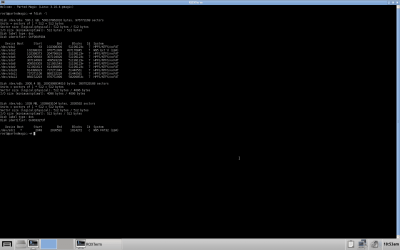
3. Boot to "Parted Magic" and open a terminal Window. Ente "fdisk -l" and capture a screenshot using the screenshot tool. Make sure to capture "Active Window" to capture only the terminal window.

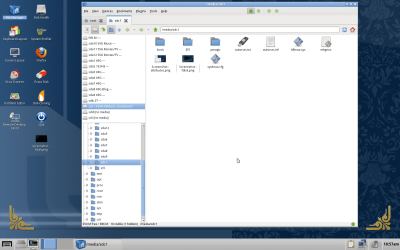
4. Open "File Manager" and you will see all recognizable partitions are listed on the left pane.


menu.png


Open your USB flash disk labeled "Pmagic" and tak full screen screenshot.

Post both screenshots with next reply ( Make sure to not unplug the disks or connecting new one )
 

My Computer My Computer

At a glance

Windows 7 Ultimate x64
Computer type
PC/Desktop
OS
Windows 7 Ultimate x64
okay. I'll remove the working drive and replace it with the faulty one, and install the brand new one.

then reboot using the usb and take the screenshots.

while still there, I'll open up firefox and post the screenshots here without disconnecting anything.
 

My Computer My Computer

At a glance

Windows 7 Home Premium 32 bitIntel(R) Core(TM)2 Duo CPU E6750 @ 2.66GHz4.00 GB with 3.25 GB available(1) Radeon X1950 Series (Microsoft Corporatio...
OS
Windows 7 Home Premium 32 bit
CPU
Intel(R) Core(TM)2 Duo CPU E6750 @ 2.66GHz
Motherboard
ASUSTeK Computer INC. P5E
Memory
4.00 GB with 3.25 GB available
Graphics Card(s)
(1) Radeon X1950 Series (Microsoft Corporation - WDDM) (
Sound Card
High Definition Audio Device
Hard Drives
(1) WDC WD7501AALS-00J7B0 ATA Device
here they are...
 

Attachments

  • Screenshot - fdisk.png
    Screenshot - fdisk.png
    29.3 KB · Views: 4
  • Screenshot - pmagic.png
    Screenshot - pmagic.png
    188.8 KB · Views: 4

My Computer My Computer

At a glance

Windows 7 Home Premium 32 bitIntel(R) Core(TM)2 Duo CPU E6750 @ 2.66GHz4.00 GB with 3.25 GB available(1) Radeon X1950 Series (Microsoft Corporatio...
OS
Windows 7 Home Premium 32 bit
CPU
Intel(R) Core(TM)2 Duo CPU E6750 @ 2.66GHz
Motherboard
ASUSTeK Computer INC. P5E
Memory
4.00 GB with 3.25 GB available
Graphics Card(s)
(1) Radeon X1950 Series (Microsoft Corporation - WDDM) (
Sound Card
High Definition Audio Device
Hard Drives
(1) WDC WD7501AALS-00J7B0 ATA Device
Let's start the cloning process with "ddrescue". A typical "ddrescue" command line format will be like this ;

ddrescue <source disK> <destination disk> <log file>

Log file is optional but it will provide resume functionality. The screenshot you uploaded shows following info.

/dev/sda is the 500 GB sized source disk.

/dev/sdb is the 2000 GB sized destination drive.

/dev/sdc is the USB flash drive. It is mounted on the mount point /media/sdc1. Mount point is similar to drive letters on Windows. Just like we need to access partitions through drive letters in Windows, we access partitions in Linux via mount points.

Now open a terminal Window and enter the below command exactly.

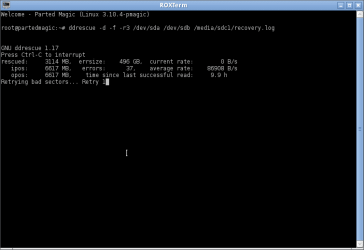
ddrescue -d -f -r3 /dev/sda /dev/sdb /media/sdc1/recovery.log

You will see a Window similar to the below example.

ddrescue-guide4.png


Depending on the level of surface damage, it may take several hours to complete the cloning. When the last time i used "ddrescue" to clone a 500 Gb HDD with lot of bad sectors, it took almost one day to rescue as much as readable sectors. So wait patiently until it shows the "finished" message and then post a screenshot of the active window.

Btw, if "Time since last successful read" shows more than 3 hours, it means the cloning process hanged. In that case, press "ctrl + c" to abort the cloning and post a screenshot of the window.
 

My Computer My Computer

At a glance

Windows 7 Ultimate x64
Computer type
PC/Desktop
OS
Windows 7 Ultimate x64
okay, I'll open a window and enter...

ddrescue -d -f -r3 /dev/sda /dev/sdb /media/sdc1/recovery.log

I'll post back here with a screenshot when finished, whenever that is...

have a good sleep.
 

My Computer My Computer

At a glance

Windows 7 Home Premium 32 bitIntel(R) Core(TM)2 Duo CPU E6750 @ 2.66GHz4.00 GB with 3.25 GB available(1) Radeon X1950 Series (Microsoft Corporatio...
OS
Windows 7 Home Premium 32 bit
CPU
Intel(R) Core(TM)2 Duo CPU E6750 @ 2.66GHz
Motherboard
ASUSTeK Computer INC. P5E
Memory
4.00 GB with 3.25 GB available
Graphics Card(s)
(1) Radeon X1950 Series (Microsoft Corporation - WDDM) (
Sound Card
High Definition Audio Device
Hard Drives
(1) WDC WD7501AALS-00J7B0 ATA Device
so after about 10 hours.... the screen changed to this... it looks like it started over???
 

Attachments

  • Screenshot - retry 1.png
    Screenshot - retry 1.png
    6.8 KB · Views: 1

My Computer My Computer

At a glance

Windows 7 Home Premium 32 bitIntel(R) Core(TM)2 Duo CPU E6750 @ 2.66GHz4.00 GB with 3.25 GB available(1) Radeon X1950 Series (Microsoft Corporatio...
OS
Windows 7 Home Premium 32 bit
CPU
Intel(R) Core(TM)2 Duo CPU E6750 @ 2.66GHz
Motherboard
ASUSTeK Computer INC. P5E
Memory
4.00 GB with 3.25 GB available
Graphics Card(s)
(1) Radeon X1950 Series (Microsoft Corporation - WDDM) (
Sound Card
High Definition Audio Device
Hard Drives
(1) WDC WD7501AALS-00J7B0 ATA Device
when I last looked at it, the ipos: and opos: were both close to 500000 MB
 

My Computer My Computer

At a glance

Windows 7 Home Premium 32 bitIntel(R) Core(TM)2 Duo CPU E6750 @ 2.66GHz4.00 GB with 3.25 GB available(1) Radeon X1950 Series (Microsoft Corporatio...
OS
Windows 7 Home Premium 32 bit
CPU
Intel(R) Core(TM)2 Duo CPU E6750 @ 2.66GHz
Motherboard
ASUSTeK Computer INC. P5E
Memory
4.00 GB with 3.25 GB available
Graphics Card(s)
(1) Radeon X1950 Series (Microsoft Corporation - WDDM) (
Sound Card
High Definition Audio Device
Hard Drives
(1) WDC WD7501AALS-00J7B0 ATA Device
Back
Top