how do I recover data from a non responsive hard drive?

Very thorough analysis, as always, jumanji.

Cloning would be my first choice. I have no experience with ddrescue, so I defer to the experience of Anshad and yourself. It will be a learning experience as I watch the progress of the thread.

The other methods on your list are good fall back options. I think you listed the methods in the order I would try due to the advantages / disadvantages.

My vote is cast for cloning :geek:

I do have a post in a thread for Data Recovery using Linux Mint Mate, it's workable, but not polished. This would be the first use of it in the wild (it's easy for me to follow because I wrote it) ;)
If it is needed, I will supply a link.

Bill
.
 

My Computer My Computer

At a glance

x64 (6.3.9600) Win8.1 Pro & soon dual boot x6...AMD A6-3420M APU with Radeon(tm) HD Graphics6.00 GBAMD Radeon(TM) HD 6520G
Computer type
Laptop
Computer Manufacturer/Model Number
HP Pavilion dv6-6c10us
OS
x64 (6.3.9600) Win8.1 Pro & soon dual boot x64 (6.1.7601) Win7_SP1 HomePrem
CPU
AMD A6-3420M APU with Radeon(tm) HD Graphics
Motherboard
Hewlett-Packard 1805
Memory
6.00 GB
Graphics Card(s)
AMD Radeon(TM) HD 6520G
Sound Card
(1) AMD High Definition Audio Device (2) IDT High Definiti
Monitor(s) Displays
HP W2072a 20" LCD (1600 x 900) @ 60 Hz
Screen Resolution
1366 x 768 x 32 bits (4294967296 colors) @ 60 Hz
Hard Drives
ST640LM0 00 HM641JI SATA Disk Device
Keyboard
Logitech k520 wireless KB
Mouse
Logitech m320 wireless mouse (bundled with KB)
Internet Speed
15/5 | 54 MB Wireless 'n'
Antivirus
Realtime: Defender or Avast | On-demand: Malwarebytes, ESET
Browser
IE 11 on Win8, IE 10 on win 7
Other Info
Media: [Gimp, Audacity, VLC] || Comm: [WEmail 2012, Skype] || Productivity: [OpenOffice,| Textpad] || Utils: [Sysinternals, cCleaner, Speccy, Defraggler]
I would also suggest cloning the disk to another known good empty drive using "ddrescue". The destination drive should be with same or more LBA numbers. As the source disk is a 500 GB one, a 750 or 1 TB drive is recommended as destination disk.

To save the log file, the same bootable USB key can be used ( either "System Rescue CD" or "Parted Magic" - i am more comfortable in using "Parted Magic" and it came with some nice extra tools- last free version will do fine ). Usually the log file will be only a few KB in size.

Before starting the cloning process, i would like to confirm whether there is any difference with a brand new SATA data cable.
 

My Computer My Computer

At a glance

Windows 7 Ultimate x64
Computer type
PC/Desktop
OS
Windows 7 Ultimate x64
Thanks for everyone chiming in on this.... I don't really understand most of it, but then again, that's why I'm here :)

a couple of points...

1. I've tried replacing the SATA cable with no effect. That was one of the first things I did before posting here. Apologies if it wasn't previously mentioned.

2. with regards to needing another drive... will the other internal hard drive be sufficient for any cloning or other tasks?
It has approximately 460 GB of the 698GB listed according to when I bring it up in the library.
On the 500GB drive in question... it has maybe 300-350GB of data on it.

EDIT:
3. my main concern right now is data recovery. if I lose the drive.... so be it.
 

My Computer My Computer

At a glance

Windows 7 Home Premium 32 bitIntel(R) Core(TM)2 Duo CPU E6750 @ 2.66GHz4.00 GB with 3.25 GB available(1) Radeon X1950 Series (Microsoft Corporatio...
OS
Windows 7 Home Premium 32 bit
CPU
Intel(R) Core(TM)2 Duo CPU E6750 @ 2.66GHz
Motherboard
ASUSTeK Computer INC. P5E
Memory
4.00 GB with 3.25 GB available
Graphics Card(s)
(1) Radeon X1950 Series (Microsoft Corporation - WDDM) (
Sound Card
High Definition Audio Device
Hard Drives
(1) WDC WD7501AALS-00J7B0 ATA Device
Thanks for everyone chiming in on this.... I don't really understand most of it, but then again, that's why I'm here :)

a couple of points...

1. I've tried replacing the SATA cable with no effect. That was one of the first things I did before posting here. Apologies if it wasn't previously mentioned.

2. with regards to needing another drive... will the other internal hard drive be sufficient for any cloning or other tasks?
It has approximately 460 GB of the 698GB listed according to when I bring it up in the library.
On the 500GB drive in question... it has maybe 300-350GB of data on it.

EDIT:
3. my main concern right now is data recovery. if I lose the drive.... so be it.

You might have mentioned the SATA cable swap, way back when, thanks for confirming that again. Anshad might ask about the type or rating of the cable you used, he gave some specifics on the post he suggested it.

This is a cloning operation, so the drive has to equal or exceed the capacity of the faulty drive (500 GB).
A 750 GB - 1 TB was recommended as a safety factor. After the clone, the extra space can be used however you choose. The concern is that the process might require 500 GB + 10 MB (I just picked a number over 500 GB) and since the process takes a long time, it would be a shame to loose the time due to a small overhead factor.

The other thing you should know is that a clone is different from a copy. In a clone, the disk is read sector by sector and written sector by sector, so the clone partition has to be a separate partition. In other words, you can't clone to your C: partition, but you could copy to it (not recommended though - I'm working with another member who did that and it got messy... the last time I checked he was doing a clean install of Windows restoring his machine to factory condition.)

The answer: No you cannot use the other internal drive, there isn't enough free space to create a partition to be the clone of the faulty drive.

It was a very good question asked at the right time :D
 
Last edited:

My Computer My Computer

At a glance

x64 (6.3.9600) Win8.1 Pro & soon dual boot x6...AMD A6-3420M APU with Radeon(tm) HD Graphics6.00 GBAMD Radeon(TM) HD 6520G
Computer type
Laptop
Computer Manufacturer/Model Number
HP Pavilion dv6-6c10us
OS
x64 (6.3.9600) Win8.1 Pro & soon dual boot x64 (6.1.7601) Win7_SP1 HomePrem
CPU
AMD A6-3420M APU with Radeon(tm) HD Graphics
Motherboard
Hewlett-Packard 1805
Memory
6.00 GB
Graphics Card(s)
AMD Radeon(TM) HD 6520G
Sound Card
(1) AMD High Definition Audio Device (2) IDT High Definiti
Monitor(s) Displays
HP W2072a 20" LCD (1600 x 900) @ 60 Hz
Screen Resolution
1366 x 768 x 32 bits (4294967296 colors) @ 60 Hz
Hard Drives
ST640LM0 00 HM641JI SATA Disk Device
Keyboard
Logitech k520 wireless KB
Mouse
Logitech m320 wireless mouse (bundled with KB)
Internet Speed
15/5 | 54 MB Wireless 'n'
Antivirus
Realtime: Defender or Avast | On-demand: Malwarebytes, ESET
Browser
IE 11 on Win8, IE 10 on win 7
Other Info
Media: [Gimp, Audacity, VLC] || Comm: [WEmail 2012, Skype] || Productivity: [OpenOffice,| Textpad] || Utils: [Sysinternals, cCleaner, Speccy, Defraggler]
I too have no experience with "ddrescue" and it may be the best way to go.
However:
If all else fails you have the option to image using Macrium with the option of ignoring bad sectors. You must select this option to ignore otherwise Macrium imaging will halt on a bad sector. Go straight to "Force Macrium Reflect to ignore bad sectors" and don't run chkdsk. This link shows how to select the option.
v5: Imaging disks with bad sectors (Bad Sectors)

I'd store the image on an external HDD. Then disconnect your faulty HDD to save it from further wear & tear.
Boot from the Macrium Rescue pe DVD and mount the image. If it mounts ok then transfer your data. You could even try reimaging to a new HDD and see how you go.

As a Macrium user I'd be trying this first. However, "ddrescue" is worth knowing about.
 
Last edited:

My Computer My Computer

At a glance

Windows 7x64 Home Premium SP1Intel i7 2600kG.Skill Ripjaws (DDR3-1600) 2x4GBNvidia GeForce GTS 450; Intel HD Graphics 300...
Computer type
PC/Desktop
Computer Manufacturer/Model Number
Own build
OS
Windows 7x64 Home Premium SP1
CPU
Intel i7 2600k
Motherboard
ASUS P8Z68 Deluxe
Memory
G.Skill Ripjaws (DDR3-1600) 2x4GB
Graphics Card(s)
Nvidia GeForce GTS 450; Intel HD Graphics 3000(GT2+)
Monitor(s) Displays
Dell Ultrasharp IPS panel U2311H, Samsung SyncMaster P2350
Screen Resolution
1920x1080
Hard Drives
Samsung 850 Pro SSD 256GB, Samsung SSD 840 120GB, Seagates 1TB Barracuda ST31000528AS x2
PSU
Seasonic M12II 520W
Case
Lian Li Lancool PC-K60
Cooling
Case: 1x120mm, 3x140mm CPU: Hyper 212+
Keyboard
Logitech MK520 (wireless)
Mouse
Logitech MK520
Internet Speed
6-7 Mbps
Antivirus
Norton Security Premium, Malwarebytes on 2 (MSE on 3rd PC)
Browser
FireFox
Other Info
Audio: Logitech Z523 2.1
Bit late in here been sick so I was going to say before just to clone the thing even with faults the thing is not going to give up the ghost eh?

My particular favourite is Macrium for cloning and then perhaps run the tests in the old drive even if only for curiosities sake - but that is just me being a tad pedantic I suppose.

These are some I found but haven't yet tried them all Best Free Hard Drive Health Monitoring and Diagnostic Programs
 

My Computer My Computer

At a glance

Desk1 7 Home Prem / Desk2 10 Pro / Main lap A...Desk1 i5 3750K / Laptop i7 GTX 860M / Desk2 i...Desk1 8GB (1866) / Desk2 16GB (1333) / Laptop...Desk 1& 2NVidia GTX 650 & Laptops on board Intel
Computer type
PC/Desktop
Computer Manufacturer/Model Number
Own build (new) Desk1 / Asus ROG Win 7 / Desk2 1st build
OS
Desk1 7 Home Prem / Desk2 10 Pro / Main lap Asus ROG 10 Pro 2 laptop Toshiba 7 Pro Asus P2520 7 & 10
CPU
Desk1 i5 3750K / Laptop i7 GTX 860M / Desk2 i5 2500
Motherboard
Desk1 Asus P877-V / Desk2 Gigabyte H67 UD3H / Laptop ?
Memory
Desk1 8GB (1866) / Desk2 16GB (1333) / Laptop 8Gb DDR3
Graphics Card(s)
Desk 1& 2NVidia GTX 650 & Laptops on board Intel
Sound Card
Desk 1 & 2 -XONAR DG Realtek High Def audio Laptop
Monitor(s) Displays
Desk 1 Benq HD 2450 / Desk2 Philips 24" / Laptop 17.5"
Screen Resolution
1920x1080 D1 & D2 & Laptop 1
Hard Drives
Desk1 Samsung 120GB 830 SSD
Asus ROG 256GB 850 Pro SSD
Desk2 Samsung 840 256 SSD
Toshiba 120GB EVO
PSU
Desk 1 Corsair HX 1050/ Laptop ? / Desk 2 Corsair HX 650
Case
Desk 1 Cooler HAF XM ? Toshiba laptop / Desk2 Coolermaster
Cooling
Fans on all Desk1 -2 Desk2 - all Coolermasters 5 Laptop ?
Keyboard
Desk 1 MS Sidewinder X6 Desk 2 MS Sidewinder X 4
Mouse
Desk 1&2 - Gigabyte MS 900 gamer - laptop - Logitec wireless
Internet Speed
ADSL2+
Other Info
One other Desktop (tester) and spare Toshba laptop both with SSD's
Running Kaspersky 2016 ISS on all machines config'd identically
Logitec audio stereo systems on each machine (x3)
Canon MG5250MFC
Router/modem TP-Link running WPA2SK
And so it would seem cloning with ddrescue is suggested by most.

Since Anshad is comfortable with running ddrescue from Parted Magic, he may lead the OP into it. We can also learn how to do it. ( I just downloaded the free version, from Download Parted Magic - MajorGeeks, created the bootable pendrive with Rufus and booted from it. Even I would need further guidance :D.)

And so over to Anshad Edavana to lead. ( Since you want to have the logfile in the pendrive, you may specify the size of pendrive the OP may need.)

Thanks.
 

My Computer My Computer

At a glance

Windows 7 Home Premium 32 bit
OS
Windows 7 Home Premium 32 bit
Since "Partition Wizard" bootable CD can detect the partitions, there is a good chance for "Parted Magic" to see and explore the partitions. In that case cloning won't be necessary.

I would like to know the result of :

1. Disconnect all hard drives except the failing one and then boot from "Parted Magic" ( CD/USB).

Download Parted Magic - MajorGeeks

Open "File Manager" and check whether you can browse the partitions.

2. Open "Disk Health" from Desktop and double click on the drive icon.

main_ok.png


3. Navigate to the "Attributes" tab and click on "Save As" button. Save the file with the name SMART on our flash drive and attach it with your next reply.

info_failing.png
 

My Computer My Computer

At a glance

Windows 7 Ultimate x64
Computer type
PC/Desktop
OS
Windows 7 Ultimate x64
Hmm must try as I must admit I have only ever used it for wiping drives:)
 

My Computer My Computer

At a glance

Desk1 7 Home Prem / Desk2 10 Pro / Main lap A...Desk1 i5 3750K / Laptop i7 GTX 860M / Desk2 i...Desk1 8GB (1866) / Desk2 16GB (1333) / Laptop...Desk 1& 2NVidia GTX 650 & Laptops on board Intel
Computer type
PC/Desktop
Computer Manufacturer/Model Number
Own build (new) Desk1 / Asus ROG Win 7 / Desk2 1st build
OS
Desk1 7 Home Prem / Desk2 10 Pro / Main lap Asus ROG 10 Pro 2 laptop Toshiba 7 Pro Asus P2520 7 & 10
CPU
Desk1 i5 3750K / Laptop i7 GTX 860M / Desk2 i5 2500
Motherboard
Desk1 Asus P877-V / Desk2 Gigabyte H67 UD3H / Laptop ?
Memory
Desk1 8GB (1866) / Desk2 16GB (1333) / Laptop 8Gb DDR3
Graphics Card(s)
Desk 1& 2NVidia GTX 650 & Laptops on board Intel
Sound Card
Desk 1 & 2 -XONAR DG Realtek High Def audio Laptop
Monitor(s) Displays
Desk 1 Benq HD 2450 / Desk2 Philips 24" / Laptop 17.5"
Screen Resolution
1920x1080 D1 & D2 & Laptop 1
Hard Drives
Desk1 Samsung 120GB 830 SSD
Asus ROG 256GB 850 Pro SSD
Desk2 Samsung 840 256 SSD
Toshiba 120GB EVO
PSU
Desk 1 Corsair HX 1050/ Laptop ? / Desk 2 Corsair HX 650
Case
Desk 1 Cooler HAF XM ? Toshiba laptop / Desk2 Coolermaster
Cooling
Fans on all Desk1 -2 Desk2 - all Coolermasters 5 Laptop ?
Keyboard
Desk 1 MS Sidewinder X6 Desk 2 MS Sidewinder X 4
Mouse
Desk 1&2 - Gigabyte MS 900 gamer - laptop - Logitec wireless
Internet Speed
ADSL2+
Other Info
One other Desktop (tester) and spare Toshba laptop both with SSD's
Running Kaspersky 2016 ISS on all machines config'd identically
Logitec audio stereo systems on each machine (x3)
Canon MG5250MFC
Router/modem TP-Link running WPA2SK
Since "Partition Wizard" bootable CD can detect the partitions, there is a good chance for "Parted Magic" to see and explore the partitions. In that case cloning won't be necessary.

.....

This might help Canuck, in that he has free space available on his other internal drive that he could use in a copy operation. I haven't looked at that drive partition scheme close enough (or recently) to advise on creating a partition specific to the copy.

I will leave it up to Anshad to determine the best scenario. I hope everything goes well and you can recover all or most of your data. Good luck, I'm back to the shadows.

Bill
.
 

My Computer My Computer

At a glance

x64 (6.3.9600) Win8.1 Pro & soon dual boot x6...AMD A6-3420M APU with Radeon(tm) HD Graphics6.00 GBAMD Radeon(TM) HD 6520G
Computer type
Laptop
Computer Manufacturer/Model Number
HP Pavilion dv6-6c10us
OS
x64 (6.3.9600) Win8.1 Pro & soon dual boot x64 (6.1.7601) Win7_SP1 HomePrem
CPU
AMD A6-3420M APU with Radeon(tm) HD Graphics
Motherboard
Hewlett-Packard 1805
Memory
6.00 GB
Graphics Card(s)
AMD Radeon(TM) HD 6520G
Sound Card
(1) AMD High Definition Audio Device (2) IDT High Definiti
Monitor(s) Displays
HP W2072a 20" LCD (1600 x 900) @ 60 Hz
Screen Resolution
1366 x 768 x 32 bits (4294967296 colors) @ 60 Hz
Hard Drives
ST640LM0 00 HM641JI SATA Disk Device
Keyboard
Logitech k520 wireless KB
Mouse
Logitech m320 wireless mouse (bundled with KB)
Internet Speed
15/5 | 54 MB Wireless 'n'
Antivirus
Realtime: Defender or Avast | On-demand: Malwarebytes, ESET
Browser
IE 11 on Win8, IE 10 on win 7
Other Info
Media: [Gimp, Audacity, VLC] || Comm: [WEmail 2012, Skype] || Productivity: [OpenOffice,| Textpad] || Utils: [Sysinternals, cCleaner, Speccy, Defraggler]
okay, I used rufus to make a boot drive with that new Parted Magic file... I will crack the case and swap out the working drive with the dead one and get that screenshot if everything goes according to plan.

I won't have time until later tonight... but I'll post it as soon as I can.
 

My Computer My Computer

At a glance

Windows 7 Home Premium 32 bitIntel(R) Core(TM)2 Duo CPU E6750 @ 2.66GHz4.00 GB with 3.25 GB available(1) Radeon X1950 Series (Microsoft Corporatio...
OS
Windows 7 Home Premium 32 bit
CPU
Intel(R) Core(TM)2 Duo CPU E6750 @ 2.66GHz
Motherboard
ASUSTeK Computer INC. P5E
Memory
4.00 GB with 3.25 GB available
Graphics Card(s)
(1) Radeon X1950 Series (Microsoft Corporation - WDDM) (
Sound Card
High Definition Audio Device
Hard Drives
(1) WDC WD7501AALS-00J7B0 ATA Device
Since "Partition Wizard" bootable CD can detect the partitions, there is a good chance for "Parted Magic" to see and explore the partitions. In that case cloning won't be necessary.

Yep well the Partition Wizard maybe of help as it will detect the partitons but I am unsure of how the copy partition works in it.
 

My Computer My Computer

At a glance

Desk1 7 Home Prem / Desk2 10 Pro / Main lap A...Desk1 i5 3750K / Laptop i7 GTX 860M / Desk2 i...Desk1 8GB (1866) / Desk2 16GB (1333) / Laptop...Desk 1& 2NVidia GTX 650 & Laptops on board Intel
Computer type
PC/Desktop
Computer Manufacturer/Model Number
Own build (new) Desk1 / Asus ROG Win 7 / Desk2 1st build
OS
Desk1 7 Home Prem / Desk2 10 Pro / Main lap Asus ROG 10 Pro 2 laptop Toshiba 7 Pro Asus P2520 7 & 10
CPU
Desk1 i5 3750K / Laptop i7 GTX 860M / Desk2 i5 2500
Motherboard
Desk1 Asus P877-V / Desk2 Gigabyte H67 UD3H / Laptop ?
Memory
Desk1 8GB (1866) / Desk2 16GB (1333) / Laptop 8Gb DDR3
Graphics Card(s)
Desk 1& 2NVidia GTX 650 & Laptops on board Intel
Sound Card
Desk 1 & 2 -XONAR DG Realtek High Def audio Laptop
Monitor(s) Displays
Desk 1 Benq HD 2450 / Desk2 Philips 24" / Laptop 17.5"
Screen Resolution
1920x1080 D1 & D2 & Laptop 1
Hard Drives
Desk1 Samsung 120GB 830 SSD
Asus ROG 256GB 850 Pro SSD
Desk2 Samsung 840 256 SSD
Toshiba 120GB EVO
PSU
Desk 1 Corsair HX 1050/ Laptop ? / Desk 2 Corsair HX 650
Case
Desk 1 Cooler HAF XM ? Toshiba laptop / Desk2 Coolermaster
Cooling
Fans on all Desk1 -2 Desk2 - all Coolermasters 5 Laptop ?
Keyboard
Desk 1 MS Sidewinder X6 Desk 2 MS Sidewinder X 4
Mouse
Desk 1&2 - Gigabyte MS 900 gamer - laptop - Logitec wireless
Internet Speed
ADSL2+
Other Info
One other Desktop (tester) and spare Toshba laptop both with SSD's
Running Kaspersky 2016 ISS on all machines config'd identically
Logitec audio stereo systems on each machine (x3)
Canon MG5250MFC
Router/modem TP-Link running WPA2SK
@ICit2, PW can only explore and show the files in partitions present as well as those lost and found by Partition Recovery Wizard but there is no way to copy the files. The OP had already seen the files show.If TestDisk shows the files, it can copy the files.( method II in my post #100)

http://www.sevenforums.com/software...ive-turned-raw-partition-wizard-testdisk.html

In OP's case the suspicion is that his HDD may be slowly developing bad sectors making it difficult to read by Windows.We have seen Windows fumbling and tumbling.

Reason why we want to clone the drive immediately and attempt any data recovery on the cloned drive.

Parted Magic is again a sort of Linux distro - much like your Ubuntu :) - and that is why Anshad is saying let us see if it shows the files in which case we will copy those. ( method III in post #100)

If our suspicion that the HDD is developing bad sectors is true, some of the files copied either with TestDisk or live Linux will be corrupt even if we succeed in copying.

ddrescue while cloning the drive tries to repeatedly read the bad sectors and extract the data in it, which conventional cloning software like Macrium Reflect will not do.The algorithm used in ddrescue is different with focus on bad sector recovery as it clones. First pass clones all good sectors. Subsequent passes - as many as you can order - will target only the bad sectors as logged in its logfile - and try to extract the feeble data in it.
 

My Computer My Computer

At a glance

Windows 7 Home Premium 32 bit
OS
Windows 7 Home Premium 32 bit
Ok Jumanji the only one I know one can copy / paste is the Ubuntu method as I have used it with totally dead or non accessible drives but I reckon you have it under control:D
 

My Computer My Computer

At a glance

Desk1 7 Home Prem / Desk2 10 Pro / Main lap A...Desk1 i5 3750K / Laptop i7 GTX 860M / Desk2 i...Desk1 8GB (1866) / Desk2 16GB (1333) / Laptop...Desk 1& 2NVidia GTX 650 & Laptops on board Intel
Computer type
PC/Desktop
Computer Manufacturer/Model Number
Own build (new) Desk1 / Asus ROG Win 7 / Desk2 1st build
OS
Desk1 7 Home Prem / Desk2 10 Pro / Main lap Asus ROG 10 Pro 2 laptop Toshiba 7 Pro Asus P2520 7 & 10
CPU
Desk1 i5 3750K / Laptop i7 GTX 860M / Desk2 i5 2500
Motherboard
Desk1 Asus P877-V / Desk2 Gigabyte H67 UD3H / Laptop ?
Memory
Desk1 8GB (1866) / Desk2 16GB (1333) / Laptop 8Gb DDR3
Graphics Card(s)
Desk 1& 2NVidia GTX 650 & Laptops on board Intel
Sound Card
Desk 1 & 2 -XONAR DG Realtek High Def audio Laptop
Monitor(s) Displays
Desk 1 Benq HD 2450 / Desk2 Philips 24" / Laptop 17.5"
Screen Resolution
1920x1080 D1 & D2 & Laptop 1
Hard Drives
Desk1 Samsung 120GB 830 SSD
Asus ROG 256GB 850 Pro SSD
Desk2 Samsung 840 256 SSD
Toshiba 120GB EVO
PSU
Desk 1 Corsair HX 1050/ Laptop ? / Desk 2 Corsair HX 650
Case
Desk 1 Cooler HAF XM ? Toshiba laptop / Desk2 Coolermaster
Cooling
Fans on all Desk1 -2 Desk2 - all Coolermasters 5 Laptop ?
Keyboard
Desk 1 MS Sidewinder X6 Desk 2 MS Sidewinder X 4
Mouse
Desk 1&2 - Gigabyte MS 900 gamer - laptop - Logitec wireless
Internet Speed
ADSL2+
Other Info
One other Desktop (tester) and spare Toshba laptop both with SSD's
Running Kaspersky 2016 ISS on all machines config'd identically
Logitec audio stereo systems on each machine (x3)
Canon MG5250MFC
Router/modem TP-Link running WPA2SK
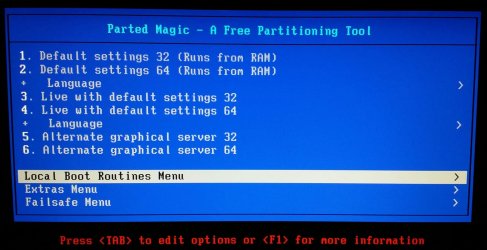
okay... so I switched out hard drives, and booted up using the Parted Magic flash drive... but did NOT get any screens or information that I was supposed to be looking for...

the first screen cap shows the menu I had, the second shows the options I thought might be right, but aren't... somewhere, I guess I did something wrong.... again....
 

Attachments

  • pm2.jpg
    pm2.jpg
    151.3 KB · Views: 20
  • pm1.jpg
    pm1.jpg
    181.8 KB · Views: 1

My Computer My Computer

At a glance

Windows 7 Home Premium 32 bitIntel(R) Core(TM)2 Duo CPU E6750 @ 2.66GHz4.00 GB with 3.25 GB available(1) Radeon X1950 Series (Microsoft Corporatio...
OS
Windows 7 Home Premium 32 bit
CPU
Intel(R) Core(TM)2 Duo CPU E6750 @ 2.66GHz
Motherboard
ASUSTeK Computer INC. P5E
Memory
4.00 GB with 3.25 GB available
Graphics Card(s)
(1) Radeon X1950 Series (Microsoft Corporation - WDDM) (
Sound Card
High Definition Audio Device
Hard Drives
(1) WDC WD7501AALS-00J7B0 ATA Device
Try #1 Default Settings 32

This should load Linux into memory and run there as a virtual disk.

If I'm right, you can post the screen shot Anshad requested.

If I'm wrong , you''ll just have to boot Parted Magic and wait for Anshad.
 

My Computer My Computer

At a glance

x64 (6.3.9600) Win8.1 Pro & soon dual boot x6...AMD A6-3420M APU with Radeon(tm) HD Graphics6.00 GBAMD Radeon(TM) HD 6520G
Computer type
Laptop
Computer Manufacturer/Model Number
HP Pavilion dv6-6c10us
OS
x64 (6.3.9600) Win8.1 Pro & soon dual boot x64 (6.1.7601) Win7_SP1 HomePrem
CPU
AMD A6-3420M APU with Radeon(tm) HD Graphics
Motherboard
Hewlett-Packard 1805
Memory
6.00 GB
Graphics Card(s)
AMD Radeon(TM) HD 6520G
Sound Card
(1) AMD High Definition Audio Device (2) IDT High Definiti
Monitor(s) Displays
HP W2072a 20" LCD (1600 x 900) @ 60 Hz
Screen Resolution
1366 x 768 x 32 bits (4294967296 colors) @ 60 Hz
Hard Drives
ST640LM0 00 HM641JI SATA Disk Device
Keyboard
Logitech k520 wireless KB
Mouse
Logitech m320 wireless mouse (bundled with KB)
Internet Speed
15/5 | 54 MB Wireless 'n'
Antivirus
Realtime: Defender or Avast | On-demand: Malwarebytes, ESET
Browser
IE 11 on Win8, IE 10 on win 7
Other Info
Media: [Gimp, Audacity, VLC] || Comm: [WEmail 2012, Skype] || Productivity: [OpenOffice,| Textpad] || Utils: [Sysinternals, cCleaner, Speccy, Defraggler]
Try #1 Default Settings 32

If I'm right, you can post the screen shot Anshad requested.

If I'm wrong , you''ll just have to boot again.

LOL... you mean completely take the darn thing apart and put it back together again... ahhh... the joys of computers.

Back in a few hopefully.
 

My Computer My Computer

At a glance

Windows 7 Home Premium 32 bitIntel(R) Core(TM)2 Duo CPU E6750 @ 2.66GHz4.00 GB with 3.25 GB available(1) Radeon X1950 Series (Microsoft Corporatio...
OS
Windows 7 Home Premium 32 bit
CPU
Intel(R) Core(TM)2 Duo CPU E6750 @ 2.66GHz
Motherboard
ASUSTeK Computer INC. P5E
Memory
4.00 GB with 3.25 GB available
Graphics Card(s)
(1) Radeon X1950 Series (Microsoft Corporation - WDDM) (
Sound Card
High Definition Audio Device
Hard Drives
(1) WDC WD7501AALS-00J7B0 ATA Device
Oh no.... I meant select option #1 on the screen in post 115

322668d1403418266-how-do-i-recover-data-non-responsive-hard-drive-pm2.jpg


Don't take anything apart
 

My Computer My Computer

At a glance

x64 (6.3.9600) Win8.1 Pro & soon dual boot x6...AMD A6-3420M APU with Radeon(tm) HD Graphics6.00 GBAMD Radeon(TM) HD 6520G
Computer type
Laptop
Computer Manufacturer/Model Number
HP Pavilion dv6-6c10us
OS
x64 (6.3.9600) Win8.1 Pro & soon dual boot x64 (6.1.7601) Win7_SP1 HomePrem
CPU
AMD A6-3420M APU with Radeon(tm) HD Graphics
Motherboard
Hewlett-Packard 1805
Memory
6.00 GB
Graphics Card(s)
AMD Radeon(TM) HD 6520G
Sound Card
(1) AMD High Definition Audio Device (2) IDT High Definiti
Monitor(s) Displays
HP W2072a 20" LCD (1600 x 900) @ 60 Hz
Screen Resolution
1366 x 768 x 32 bits (4294967296 colors) @ 60 Hz
Hard Drives
ST640LM0 00 HM641JI SATA Disk Device
Keyboard
Logitech k520 wireless KB
Mouse
Logitech m320 wireless mouse (bundled with KB)
Internet Speed
15/5 | 54 MB Wireless 'n'
Antivirus
Realtime: Defender or Avast | On-demand: Malwarebytes, ESET
Browser
IE 11 on Win8, IE 10 on win 7
Other Info
Media: [Gimp, Audacity, VLC] || Comm: [WEmail 2012, Skype] || Productivity: [OpenOffice,| Textpad] || Utils: [Sysinternals, cCleaner, Speccy, Defraggler]
Oh no.... I meant select option #1 on the screen in post 115
Don't take anything apart

so maybe I'm confused here.... but I was told to remove the good drive, install the dead drive, reboot using the PM flash drive, then take screen shots.

I then have to power down, take out the dead drive, re install the good drive, re boot, and sign in here.......
 

My Computer My Computer

At a glance

Windows 7 Home Premium 32 bitIntel(R) Core(TM)2 Duo CPU E6750 @ 2.66GHz4.00 GB with 3.25 GB available(1) Radeon X1950 Series (Microsoft Corporatio...
OS
Windows 7 Home Premium 32 bit
CPU
Intel(R) Core(TM)2 Duo CPU E6750 @ 2.66GHz
Motherboard
ASUSTeK Computer INC. P5E
Memory
4.00 GB with 3.25 GB available
Graphics Card(s)
(1) Radeon X1950 Series (Microsoft Corporation - WDDM) (
Sound Card
High Definition Audio Device
Hard Drives
(1) WDC WD7501AALS-00J7B0 ATA Device
I'm going to get some sleep.... let me know if I should try again with the dead drive and what to look for.
 

My Computer My Computer

At a glance

Windows 7 Home Premium 32 bitIntel(R) Core(TM)2 Duo CPU E6750 @ 2.66GHz4.00 GB with 3.25 GB available(1) Radeon X1950 Series (Microsoft Corporatio...
OS
Windows 7 Home Premium 32 bit
CPU
Intel(R) Core(TM)2 Duo CPU E6750 @ 2.66GHz
Motherboard
ASUSTeK Computer INC. P5E
Memory
4.00 GB with 3.25 GB available
Graphics Card(s)
(1) Radeon X1950 Series (Microsoft Corporation - WDDM) (
Sound Card
High Definition Audio Device
Hard Drives
(1) WDC WD7501AALS-00J7B0 ATA Device
Back
Top