

Hi,
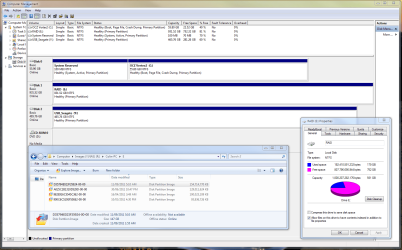
I have a single partition (E) on a 1TB hardware RAID0.
This drive contains some installed programs and data. I would like to resize the existing partition, and then create a new partition such that I have:
E: ~500GB
F: ~500GB
I booted from a YUMI USB multi-boot and opened Partition Wizard 7. In PW7, I see the two disks that make up the RAID0. One disk is shown as empty, the other is shown as full. When I select either, the option to re-size these are greyed out - in fact, there doesn't appear to be much I can do with these disks. I'm guessing it's because they are in a RAID configuration, or perhaps I'm missing something in PW7?? Are there other tools that might accomplish this job?
Am I better off wiping the existing partition altogether, and then re-partioning using DISKPART? The existing E: partition is imaged using Macrium Reflect. If I wipe the existing E: and then use DISKPART to reconfigure a new E: and F: from scratch, will Macrium have problems restoring the image to the newer, smaller E:? My latest Macrium image for E: is 147GB, so presumably Macrium won't have an issue restoring to a new fresh 500GB partition?
I realise that simply using the two seperate disks outside of a RAID0 is the easiest thing to do, but I have a specific need for the IO speed that the RAID0 configuration delivers which is related to my work.
Thanks,
Golden
I have a single partition (E) on a 1TB hardware RAID0.
This drive contains some installed programs and data. I would like to resize the existing partition, and then create a new partition such that I have:
E: ~500GB
F: ~500GB
I booted from a YUMI USB multi-boot and opened Partition Wizard 7. In PW7, I see the two disks that make up the RAID0. One disk is shown as empty, the other is shown as full. When I select either, the option to re-size these are greyed out - in fact, there doesn't appear to be much I can do with these disks. I'm guessing it's because they are in a RAID configuration, or perhaps I'm missing something in PW7?? Are there other tools that might accomplish this job?
Am I better off wiping the existing partition altogether, and then re-partioning using DISKPART? The existing E: partition is imaged using Macrium Reflect. If I wipe the existing E: and then use DISKPART to reconfigure a new E: and F: from scratch, will Macrium have problems restoring the image to the newer, smaller E:? My latest Macrium image for E: is 147GB, so presumably Macrium won't have an issue restoring to a new fresh 500GB partition?
I realise that simply using the two seperate disks outside of a RAID0 is the easiest thing to do, but I have a specific need for the IO speed that the RAID0 configuration delivers which is related to my work.
Thanks,
Golden
Attachments
My Computer
At a glance
Windows 10 Pro x64 ; Xubuntu x64Intel i7 860 @ 2.80 GHz O/C'ed to 4.0GHz16GB Corsair Vengance DDR3 @ 661 MHz Dual Cha...EVGA NVidia GTX 560 1024MB
- Computer type
- PC/Desktop
- Computer Manufacturer/Model Number
- Golden Mk. I.4
- OS
- Windows 10 Pro x64 ; Xubuntu x64
- CPU
- Intel i7 860 @ 2.80 GHz O/C'ed to 4.0GHz
- Motherboard
- Gigabyte P55A-UD3R Rev.1. Award BIOS F13
- Memory
- 16GB Corsair Vengance DDR3 @ 661 MHz Dual Channel (9-9-9-24)
- Graphics Card(s)
- EVGA NVidia GTX 560 1024MB
- Sound Card
- Realtek Integrated
- Monitor(s) Displays
- Dual Samsung SyncMaster 2494HS
- Screen Resolution
- 1920*1080 and 1920*1080
- Hard Drives
- 1*Samsung 840 EVO 120GB SSD;
1*OCZ Vertex 2 60GB SSD;
2*Samsung F3 SpinPoint 1TB in RAID0;
1*Samsung F1 SpinPoint 1TB;
2*Western Digital 1TB External USB 3.0
1*Western Digital 500GB External USB 3.0
1*Seagate 500GB External USB 2.0
- PSU
- Thermaltake ToughPower QFan 750W
- Case
- Thermaltake Element S VK60001W2Z
- Cooling
- Corsair H60 Water Cooling, 2*230mm and 2*80mm case fans
- Keyboard
- Logitech G110
- Mouse
- Logitech MX518


