
How do I restore desktop?

tathraman

New member
Local time
4:07 AM
Messages
17
I did a complete backup of my C drive and now am trying to restore them.
I selected the folders I wanted to restore and clicked to restore them to the original location C. I assumed that I'd then be able to operate as I had previously but on clicking My Documents, for instance, the folder is empty.
And the desktop remains devoid of any of the icons that were there previously.
How can I restore everything to where it was before?
 

My Computer

Computer type
PC/Desktop
Computer Manufacturer/Model Number
Dell
OS
windows 7 home premium 64 bit
CPU
Intel(R)Core(TM)[email protected]
Motherboard
Dell Inc. 0GDG8Y
Memory
4.00GB Usable 3.91
Graphics Card(s)
Intel(R) HD Graphics
Sound Card
(1)Conexant HD Audio 2. (Intel(R) Display Audio (3)Audials S
Hello tathraman and welcome to Seven Forums. Some things you could check:

1. Do your desktop icons appear under C:\Users\%USERPROFILE%\Desktop? If "yes", copy the files to the desktop.

2. Several internet searches for missing icons show that a 3rd party software called InfraRecorder is set by default to not show the icons. If you're using this software it might be to blame.

3. You could try rebuilding your icon cache and restoring default icons to your folders.

http://www.sevenforums.com/tutorials/49819-icon-cache-rebuild.html

http://www.sevenforums.com/tutorials/16312-user-folders-restore-default-icon.html

4. You could also see this tutorial for gadgets if they're also affected:

http://www.sevenforums.com/tutorials/8114-gadgets-turn-off.html

5. And if you changed your theme, especially to a 3rd party theme, that could affect if your icons appear or not.

http://www.sevenforums.com/tutorials/280-theme-change-save.html

6. You could try to right click desktop > view > show desktop items or right click desktop > personalization > change desktop icons > restore default > ok.

7. I also think I remember reading that if User Account Control is turned off there can be issues with gadgets showing and customizing folder icons. If this is also an issue you might check if UAC is turned off. If it is, try using the least invasive setting.

http://www.sevenforums.com/tutorials/299-user-account-control-uac-change-notification-settings.html

Appreciate it if you'd post back to let us know if anything helped or not. Others with similar problems could benefit from your results.
 

My Computer

Computer type
Laptop
Computer Manufacturer/Model Number
Sony Vaio VPCEB47GM Laptop
OS
Win 7 Pro 64-bit
CPU
Intel i5 2.4 Ghz
Memory
8GB DDR3
Graphics Card(s)
Intel HD 3000
Sound Card
IDT High Definition
Monitor(s) Displays
15.6 WGXA Anti-Glare LED
Screen Resolution
1280x800
Hard Drives
640Gb 7200rpm
Antivirus
MSE
Browser
Opera (primary) with IE9 backup
How do I restore desktop

Thanks for your welcome and your detailed reply. I fear it's a bit over my head!
> Do your desktop icons appear under C:\Users\%USERPROFILE%\Desktop?
No.
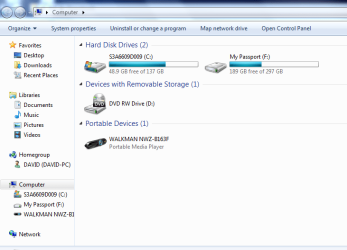
When I click computer it shows Hard disc drives (2) *********(C) - I expect this has some significance?
I wonder if I were to restore my system to before I tried to restore the backup and then tried again - would that be a good idea?
 

My Computer

Computer type
PC/Desktop
Computer Manufacturer/Model Number
Dell
OS
windows 7 home premium 64 bit
CPU
Intel(R)Core(TM)[email protected]
Motherboard
Dell Inc. 0GDG8Y
Memory
4.00GB Usable 3.91
Graphics Card(s)
Intel(R) HD Graphics
Sound Card
(1)Conexant HD Audio 2. (Intel(R) Display Audio (3)Audials S
How did you originally produce this backup. Is that an image, e.g. from Windows7 imaging ??
 

My Computer

Computer Manufacturer/Model Number
HP, Dell, Gateway, Toshiba - 4 laptops and 2 desktops
OS
Vista, Windows7, Mint Mate, Zorin, Windows 8
CPU
from 1.6GHz Duo to i7
Monitor(s) Displays
2x HP w2207
Hard Drives
5x HDD, 7x SSD, 12x Externals
Keyboard
with trackball - no mices
Mouse
Trackball mice
Internet Speed
DSL 6000
How did you originally produce this backup

I used Windows Backup and Restore to an external hard drive.
 

My Computer

Computer type
PC/Desktop
Computer Manufacturer/Model Number
Dell
OS
windows 7 home premium 64 bit
CPU
Intel(R)Core(TM)[email protected]
Motherboard
Dell Inc. 0GDG8Y
Memory
4.00GB Usable 3.91
Graphics Card(s)
Intel(R) HD Graphics
Sound Card
(1)Conexant HD Audio 2. (Intel(R) Display Audio (3)Audials S
I used Windows Backup and Restore to an external hard drive.
This is still not clear. Did you backup data folders or did you make an image of your system.
 

My Computer

Computer Manufacturer/Model Number
HP, Dell, Gateway, Toshiba - 4 laptops and 2 desktops
OS
Vista, Windows7, Mint Mate, Zorin, Windows 8
CPU
from 1.6GHz Duo to i7
Monitor(s) Displays
2x HP w2207
Hard Drives
5x HDD, 7x SSD, 12x Externals
Keyboard
with trackball - no mices
Mouse
Trackball mice
Internet Speed
DSL 6000
Restore desktop

I think it was 'create a system image'
 

My Computer

Computer type
PC/Desktop
Computer Manufacturer/Model Number
Dell
OS
windows 7 home premium 64 bit
CPU
Intel(R)Core(TM)[email protected]
Motherboard
Dell Inc. 0GDG8Y
Memory
4.00GB Usable 3.91
Graphics Card(s)
Intel(R) HD Graphics
Sound Card
(1)Conexant HD Audio 2. (Intel(R) Display Audio (3)Audials S
That's what I figured. You are the 4th victim of Windows imaging today. That thing is just a pain because it does not work as one would expect.

As a first step let's mount the VHD and see whether it can be recovered.

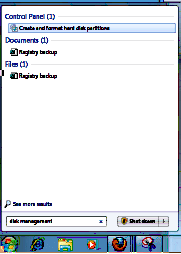
1. Open Disk Management (type disk management into start/search and hit enter)
2. Go to the top left next to File and click on Action - then on Attach VHD
3. Click Browse and navigate to your image on your external disk
4. The image is in the root of your external disk and is called WindowsImageBackup
5. Open that folder and the subsequent folders that are called Your PC name, Backup with a date
6. The last one (the big one) is the VHD, double click on that and say OK in disk mgmt


Now go out of Disk Management and into Computer

1. Double click on the mounted VHD and you should see your system
2. Double click on Users and then on your name
3. Check in e.g. Documents whether your files are there. Check the other folders too.

Post back and report what you saw.
 

My Computer

Computer Manufacturer/Model Number
HP, Dell, Gateway, Toshiba - 4 laptops and 2 desktops
OS
Vista, Windows7, Mint Mate, Zorin, Windows 8
CPU
from 1.6GHz Duo to i7
Monitor(s) Displays
2x HP w2207
Hard Drives
5x HDD, 7x SSD, 12x Externals
Keyboard
with trackball - no mices
Mouse
Trackball mice
Internet Speed
DSL 6000
Glad to know it's not just me. Attached is screenshot of window when I try disk management....
Capture.PNG
 

My Computer

Computer type
PC/Desktop
Computer Manufacturer/Model Number
Dell
OS
windows 7 home premium 64 bit
CPU
Intel(R)Core(TM)[email protected]
Motherboard
Dell Inc. 0GDG8Y
Memory
4.00GB Usable 3.91
Graphics Card(s)
Intel(R) HD Graphics
Sound Card
(1)Conexant HD Audio 2. (Intel(R) Display Audio (3)Audials S
I see nothing wrong. Just hit Enter
 

My Computer

Computer Manufacturer/Model Number
HP, Dell, Gateway, Toshiba - 4 laptops and 2 desktops
OS
Vista, Windows7, Mint Mate, Zorin, Windows 8
CPU
from 1.6GHz Duo to i7
Monitor(s) Displays
2x HP w2207
Hard Drives
5x HDD, 7x SSD, 12x Externals
Keyboard
with trackball - no mices
Mouse
Trackball mice
Internet Speed
DSL 6000
On opening Computer/Hard Disk Drives(3) ********G/Users, there are 4.
Administrator
Bill - (c'est moi)
David
Public.

On opening Bill,
My
Documents is OK
Desktop is empty as is Downloads

Administrator has 'em all. Is there a way now to restore the desktop?
 

My Computer

Computer type
PC/Desktop
Computer Manufacturer/Model Number
Dell
OS
windows 7 home premium 64 bit
CPU
Intel(R)Core(TM)[email protected]
Motherboard
Dell Inc. 0GDG8Y
Memory
4.00GB Usable 3.91
Graphics Card(s)
Intel(R) HD Graphics
Sound Card
(1)Conexant HD Audio 2. (Intel(R) Display Audio (3)Audials S
There is nothing to restore from. I would delete the Bill account and make a new one. Then get the docs and whatever else from the VHD.

PS: Just be aware that the VHD in Computer will disappear with the next reboot. But you can of course reattach it.
 

My Computer

Computer Manufacturer/Model Number
HP, Dell, Gateway, Toshiba - 4 laptops and 2 desktops
OS
Vista, Windows7, Mint Mate, Zorin, Windows 8
CPU
from 1.6GHz Duo to i7
Monitor(s) Displays
2x HP w2207
Hard Drives
5x HDD, 7x SSD, 12x Externals
Keyboard
with trackball - no mices
Mouse
Trackball mice
Internet Speed
DSL 6000
'Fraid I've got my computer in a hellluva mess and would like to delete the hard drive G - how do I do this?
 

My Computer

Computer type
PC/Desktop
Computer Manufacturer/Model Number
Dell
OS
windows 7 home premium 64 bit
CPU
Intel(R)Core(TM)[email protected]
Motherboard
Dell Inc. 0GDG8Y
Memory
4.00GB Usable 3.91
Graphics Card(s)
Intel(R) HD Graphics
Sound Card
(1)Conexant HD Audio 2. (Intel(R) Display Audio (3)Audials S
Deleting a partition is easy. Just right click on it in Disk Management. But before you do that and maybe create more problems, tell us what is on that partition. Must be nothing really worth keeping if you want to delete it.
 

My Computer

Computer Manufacturer/Model Number
HP, Dell, Gateway, Toshiba - 4 laptops and 2 desktops
OS
Vista, Windows7, Mint Mate, Zorin, Windows 8
CPU
from 1.6GHz Duo to i7
Monitor(s) Displays
2x HP w2207
Hard Drives
5x HDD, 7x SSD, 12x Externals
Keyboard
with trackball - no mices
Mouse
Trackball mice
Internet Speed
DSL 6000
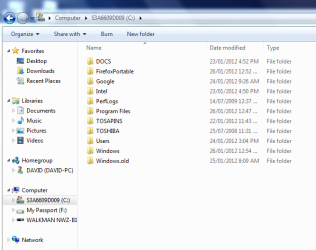
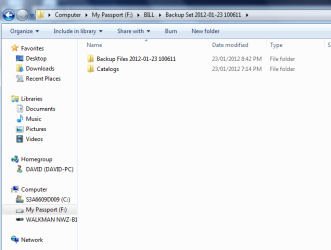
OK. I've done a system restore which has taken me back to just before I tried to restore through Windows Backup and Restore.
These screenshots are what I now have
Capture1.PNG

Capture2.PNG

Capture3.PNG:

How sould I go about trying to restore from the external hard drive. In the long run, I'm most concerned about my bookmarks in Firefox. :)
 

My Computer

Computer type
PC/Desktop
Computer Manufacturer/Model Number
Dell
OS
windows 7 home premium 64 bit
CPU
Intel(R)Core(TM)[email protected]
Motherboard
Dell Inc. 0GDG8Y
Memory
4.00GB Usable 3.91
Graphics Card(s)
Intel(R) HD Graphics
Sound Card
(1)Conexant HD Audio 2. (Intel(R) Display Audio (3)Audials S
So I assume you have a running system now - less your files. Is that right?

What you have on your Passport looks like it comes from a file backup with Windows. It does not look like an image and that is too bad.

Have you tried to restore from that backup since you restored the system - because this is the only way you can do anything with those backup files. They are Windows proprietary and quasi inaccessible otherwise.

If it were an image, that would be easy. But is isn't.
 

My Computer

Computer Manufacturer/Model Number
HP, Dell, Gateway, Toshiba - 4 laptops and 2 desktops
OS
Vista, Windows7, Mint Mate, Zorin, Windows 8
CPU
from 1.6GHz Duo to i7
Monitor(s) Displays
2x HP w2207
Hard Drives
5x HDD, 7x SSD, 12x Externals
Keyboard
with trackball - no mices
Mouse
Trackball mice
Internet Speed
DSL 6000
As you think that your computer is badly messed up, I think you should begin all over again. And this is what I would have done.

You must first create two boot disks, one for partitioning and the other for imaging using good and dependent partitioning and imaging programs. Acronis provides a combined imaging and partitioning boot disk that is very reliable and there may be other developers who may be doing the same.

Once you opt for imaging then the next thing you should do is to turn off Windows System Restore. It is a very rudimentary program that in my opinion only hogs disk space and does nothing else besides.

After that on your 250 gig hard disk create another partition (say E) of about 10 or 15 gigs or more towards the end of the HDD and copy all the data like documents, graphics and applications etc. that you want to install later to this newly created partition.

After that resize the C and F partitions (better to rename optical drive as F, F as D and the newly created partition as E) so that C is about 80 to 85 gigs and F becomes about 150 gigs. Then reformat them using the partitioning boot disk.

Now install your Windows 7 on C drive that is about 80 gigs in size. After making the Internet connection and updating Windows take an image immediately and store it on a separate folder either in F or preferably on an external drive. This may be named Basic Image if you have used an OEM DVD or Factory Setup as suggested by Langa if you have used a Recovery DVD.

Then follow the imaging procedure outlined by Langa in his letter at Langa Letter: System Setup Secrets For Windows XP - - - Informationweek for Windows XP which applies in toto to Windows 7.

'Fraid I've got my computer in a hellluva mess and would like to delete the hard drive G - how do I do this?
 

My Computer

Computer Manufacturer/Model Number
Custom Built
OS
Windows 7 Pro with SP1 32bit
Motherboard
Intel D845GVS1 X86-based PC
Memory
2 gigs of RAM
Graphics Card(s)
Intel(R) 82845G/GL/GE/PE/GV Graphics Controller
Sound Card
Realtek AC'97 Audio
Monitor(s) Displays
Samsung SyncMaster 931BF Black 19" LCD Monitor
Screen Resolution
1280X960
Hard Drives
1. SAMSUNG SP0822N ATA Device ~ 80 GigaBytes

2. Seagate FreeAgent Go USB Device ~ 500 GigaBytes
Keyboard
COMPAQ Standard PS/2 Keyboard
Mouse
iBall Laser Precise Speedster
Internet Speed
4 mb/sec
Restored

I have done a restore from the backup and it looks like all the files are there. I thoough the dektop didplay would reflect this, but no, although everything is listed in the desktop file. Can I get the desktop display back?
 

My Computer

Computer type
PC/Desktop
Computer Manufacturer/Model Number
Dell
OS
windows 7 home premium 64 bit
CPU
Intel(R)Core(TM)[email protected]
Motherboard
Dell Inc. 0GDG8Y
Memory
4.00GB Usable 3.91
Graphics Card(s)
Intel(R) HD Graphics
Sound Card
(1)Conexant HD Audio 2. (Intel(R) Display Audio (3)Audials S

My Computer

Computer Manufacturer/Model Number
HP, Dell, Gateway, Toshiba - 4 laptops and 2 desktops
OS
Vista, Windows7, Mint Mate, Zorin, Windows 8
CPU
from 1.6GHz Duo to i7
Monitor(s) Displays
2x HP w2207
Hard Drives
5x HDD, 7x SSD, 12x Externals
Keyboard
with trackball - no mices
Mouse
Trackball mice
Internet Speed
DSL 6000
Thanks -

Thing is, I want to restore my Firefox bookmarks, not IE favourites.
I can locate my bookmarks in Firefox profiles, but they are in .json and I can't open them. Grrr
 

My Computer

Computer type
PC/Desktop
Computer Manufacturer/Model Number
Dell
OS
windows 7 home premium 64 bit
CPU
Intel(R)Core(TM)[email protected]
Motherboard
Dell Inc. 0GDG8Y
Memory
4.00GB Usable 3.91
Graphics Card(s)
Intel(R) HD Graphics
Sound Card
(1)Conexant HD Audio 2. (Intel(R) Display Audio (3)Audials S
Back
Top