Solved how do i restore factory capacity on wd external drive?

ucma

New member
Local time
12:15 PM
Messages
15
i have a wd 250Gb external drive using with 32bit win7 laptop. due to reasons unknown it is presently showing 149Gb.

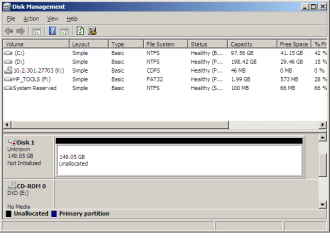
for information, i have tried disk management<volume expand>, used data lifeguard diagnostic tests and all passed, but the figure still remains the same.

also tried AOMEI partition help to expand and remove partitions if any invisible, tried wiping it and adding zeros both in the short and long versions, but to no avail.

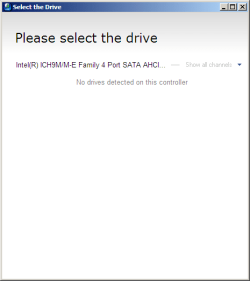
finally in seven forums i went over a similar problem and complied with the suggestion to try HDD capacity restore, but the website does not mention win7 compatibility; moreover it does install well but does not recognize any disks, either internal or external,

It would be appreciative if i can get hold of a similar solution which restores it back to factory settings.
thx. in anticipation.
 

My Computer My Computer

At a glance

Windows 7 32bitIntel Core2 Duo T6570 @2.10GHz2 GB RAM
Computer type
Laptop
Computer Manufacturer/Model Number
COMPAQ 420
OS
Windows 7 32bit
CPU
Intel Core2 Duo T6570 @2.10GHz
Memory
2 GB RAM
Hard Drives
WDC WD3200BEKT-60V5T1 ATA
Antivirus
Microsoft Security Essentials and 360 degree
Browser
Google Chrome

My Computer My Computer

At a glance

Desk1 7 Home Prem / Desk2 10 Pro / Main lap A...Desk1 i5 3750K / Laptop i7 GTX 860M / Desk2 i...Desk1 8GB (1866) / Desk2 16GB (1333) / Laptop...Desk 1& 2NVidia GTX 650 & Laptops on board Intel
Computer type
PC/Desktop
Computer Manufacturer/Model Number
Own build (new) Desk1 / Asus ROG Win 7 / Desk2 1st build
OS
Desk1 7 Home Prem / Desk2 10 Pro / Main lap Asus ROG 10 Pro 2 laptop Toshiba 7 Pro Asus P2520 7 & 10
CPU
Desk1 i5 3750K / Laptop i7 GTX 860M / Desk2 i5 2500
Motherboard
Desk1 Asus P877-V / Desk2 Gigabyte H67 UD3H / Laptop ?
Memory
Desk1 8GB (1866) / Desk2 16GB (1333) / Laptop 8Gb DDR3
Graphics Card(s)
Desk 1& 2NVidia GTX 650 & Laptops on board Intel
Sound Card
Desk 1 & 2 -XONAR DG Realtek High Def audio Laptop
Monitor(s) Displays
Desk 1 Benq HD 2450 / Desk2 Philips 24" / Laptop 17.5"
Screen Resolution
1920x1080 D1 & D2 & Laptop 1
Hard Drives
Desk1 Samsung 120GB 830 SSD
Asus ROG 256GB 850 Pro SSD
Desk2 Samsung 840 256 SSD
Toshiba 120GB EVO
PSU
Desk 1 Corsair HX 1050/ Laptop ? / Desk 2 Corsair HX 650
Case
Desk 1 Cooler HAF XM ? Toshiba laptop / Desk2 Coolermaster
Cooling
Fans on all Desk1 -2 Desk2 - all Coolermasters 5 Laptop ?
Keyboard
Desk 1 MS Sidewinder X6 Desk 2 MS Sidewinder X 4
Mouse
Desk 1&2 - Gigabyte MS 900 gamer - laptop - Logitec wireless
Internet Speed
ADSL2+
Other Info
One other Desktop (tester) and spare Toshba laptop both with SSD's
Running Kaspersky 2016 ISS on all machines config'd identically
Logitec audio stereo systems on each machine (x3)
Canon MG5250MFC
Router/modem TP-Link running WPA2SK
thanks dear ICIT2LOL!

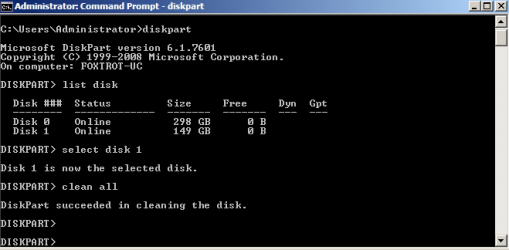
i tried doing through the tutorial. i just used 'clean' and not 'clean all', the size all the same withstanding.no changes.
can you help out with some software alike to 'HDD capacity restore' which works for 32bit win7?

all suggestions are welcome sir.... -ucma
 

My Computer My Computer

At a glance

Windows 7 32bitIntel Core2 Duo T6570 @2.10GHz2 GB RAM
Computer type
Laptop
Computer Manufacturer/Model Number
COMPAQ 420
OS
Windows 7 32bit
CPU
Intel Core2 Duo T6570 @2.10GHz
Memory
2 GB RAM
Hard Drives
WDC WD3200BEKT-60V5T1 ATA
Antivirus
Microsoft Security Essentials and 360 degree
Browser
Google Chrome
Now the clean or clean all should include the whole disk I just don't know why it didn't. The clean is a little bit different from clean all in that clean all is way more thorough than a plain clean but all the same the clean should have freed up that unusable space.

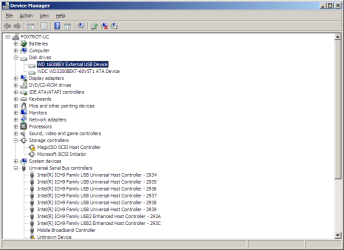
Now can you send a shot of the drive in Device Manager please?

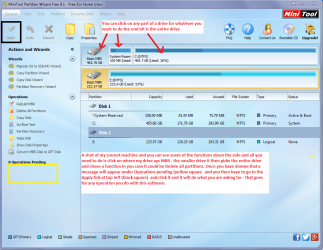
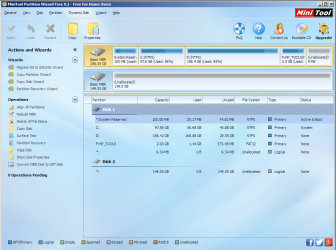
Another way to see just what is going on is to use Partition Wizard Best Free Partition Manager for Windows | MiniTool Partition Free a shot of that drive in that would be helpful too. I am just interested in the content of that unusable space. Also with PW you can actually increase and decrease the partition spaces amongst many other functions - a very handy tool to have installed for many things.
See my pic for a very rough idea of what you will see
 

Attachments

  • PW.PNG
    PW.PNG
    185.6 KB · Views: 2

My Computer My Computer

At a glance

Desk1 7 Home Prem / Desk2 10 Pro / Main lap A...Desk1 i5 3750K / Laptop i7 GTX 860M / Desk2 i...Desk1 8GB (1866) / Desk2 16GB (1333) / Laptop...Desk 1& 2NVidia GTX 650 & Laptops on board Intel
Computer type
PC/Desktop
Computer Manufacturer/Model Number
Own build (new) Desk1 / Asus ROG Win 7 / Desk2 1st build
OS
Desk1 7 Home Prem / Desk2 10 Pro / Main lap Asus ROG 10 Pro 2 laptop Toshiba 7 Pro Asus P2520 7 & 10
CPU
Desk1 i5 3750K / Laptop i7 GTX 860M / Desk2 i5 2500
Motherboard
Desk1 Asus P877-V / Desk2 Gigabyte H67 UD3H / Laptop ?
Memory
Desk1 8GB (1866) / Desk2 16GB (1333) / Laptop 8Gb DDR3
Graphics Card(s)
Desk 1& 2NVidia GTX 650 & Laptops on board Intel
Sound Card
Desk 1 & 2 -XONAR DG Realtek High Def audio Laptop
Monitor(s) Displays
Desk 1 Benq HD 2450 / Desk2 Philips 24" / Laptop 17.5"
Screen Resolution
1920x1080 D1 & D2 & Laptop 1
Hard Drives
Desk1 Samsung 120GB 830 SSD
Asus ROG 256GB 850 Pro SSD
Desk2 Samsung 840 256 SSD
Toshiba 120GB EVO
PSU
Desk 1 Corsair HX 1050/ Laptop ? / Desk 2 Corsair HX 650
Case
Desk 1 Cooler HAF XM ? Toshiba laptop / Desk2 Coolermaster
Cooling
Fans on all Desk1 -2 Desk2 - all Coolermasters 5 Laptop ?
Keyboard
Desk 1 MS Sidewinder X6 Desk 2 MS Sidewinder X 4
Mouse
Desk 1&2 - Gigabyte MS 900 gamer - laptop - Logitec wireless
Internet Speed
ADSL2+
Other Info
One other Desktop (tester) and spare Toshba laptop both with SSD's
Running Kaspersky 2016 ISS on all machines config'd identically
Logitec audio stereo systems on each machine (x3)
Canon MG5250MFC
Router/modem TP-Link running WPA2SK
Hi ucma,

1. Please furnish full details of your WD external drive. Model No: Model name like My Book, Elements. Passport?

2. 250GB showing 149GB now. Was it showing Full 250GB before?

3. As requested by ICIT2LOL post a screenshot of Device Manager.

4. Also post a screenshot of Windows Disk Management. Follow the guidelines here http://www.sevenforums.com/tutorials/274797-disk-management-post-screen-capture-image.html to present a full screenshot with all the information.

5. Run Partition Wizard and post a screenshot of the first screen that appears when you launch PW.

As for Atola Capacity Restore is concerned it can't be run on external drives. So give up on it. We have to investigate and look into other ways of doing it.

Post all the info requested.
 
Last edited:

My Computer My Computer

At a glance

Windows 7 Home Premium 32 bit
OS
Windows 7 Home Premium 32 bit
How to restore Factory Capacity of a HDD?

The OP seems to have seen my post but has not responded.

I guess he wrongly reported the drive capacity as 250GB where in fact his drive was only 160 GB. When a 160GB HDD is formatted, it will only be 160X0.93132 = 149 Binary GB. ( When I asked him what is the model No: ( something like WD1600AAJS) and whether he had seen it as a 250 GB drive before, he must have woken up to that fact :))

Anyway for those who have really really lost HDD space mysteriously (???) and no conventional partitioning/formatting tool can retrieve it means, the lost space is actually in a " Host Protected Area" of the HDD,.

No conventional formatting tool can retrieve such "lost" space. No wiping tool/ zero write tool whether diskpart clean all or any third party tool like HDD Lowlevel Format Tool, not even DBAN can retrieve it.

If one suspects some such mishap has taken place, he should run HDAT2/CBL Hard Disk Repair Utility . It can be tried in Demo mode on Windows. If it shows the HPA area - wherein the "lost" space :) is there -he has to boot in DOS and run it. (No execute command will work on Windows. Will work on DOS only.) Using the SET Max Command in DOS mode, will remove the Host Protected Area and annexe the hidden space to the drive, restoring the HDD to full factory capacity.

A success story here: http://www.sevenforums.com/hardware...0-gb-disk-only-371-gb-un-allocated-space.html
 
Last edited:

My Computer My Computer

At a glance

Windows 7 Home Premium 32 bit
OS
Windows 7 Home Premium 32 bit
recheckedstatus with pics

to ICIT2LOL!

i tried your last suggestion and am sending the snippets for the same.
sorry for the delay as i was out of town and could not check my drive. moreover, shd i try the 'power data recovery' also? as at the end of the long check it mentioned to try it if i was nor satisfied by the results.

thx shawn
 

Attachments

  • device manager.png
    device manager.png
    16.8 KB · Views: 0
  • clean all.png
    clean all.png
    6 KB · Views: 26
  • pw.png
    pw.png
    192.3 KB · Views: 1

My Computer My Computer

At a glance

Windows 7 32bitIntel Core2 Duo T6570 @2.10GHz2 GB RAM
Computer type
Laptop
Computer Manufacturer/Model Number
COMPAQ 420
OS
Windows 7 32bit
CPU
Intel Core2 Duo T6570 @2.10GHz
Memory
2 GB RAM
Hard Drives
WDC WD3200BEKT-60V5T1 ATA
Antivirus
Microsoft Security Essentials and 360 degree
Browser
Google Chrome
re:

hi jumanji!

pls have a look at the screens asked for. the others can be seen in my preceeding post. your suggestions are valuable! thx.

i am aware of the power of two inequations for the drive data capacity and i was not in slumber; but my inquiry for you is specifically for the HDD.

Thx for letting know that it does not work for external drives. It does not show the internal drive(s) also (sent a snippet of that also). I tried it with utmost caution(as told in their site) to reboot and then try it without any applications running. So, i think that it does not really run in win7 as you suggested in the forum earlier, and only for other win versions before 7.

Forgetting about it, as you mentioned, i would certainly try your insight and get back......thank you again!
 

Attachments

  • disk management.png
    disk management.png
    11.5 KB · Views: 23
  • HDD cap restore.png
    HDD cap restore.png
    5.5 KB · Views: 23

My Computer My Computer

At a glance

Windows 7 32bitIntel Core2 Duo T6570 @2.10GHz2 GB RAM
Computer type
Laptop
Computer Manufacturer/Model Number
COMPAQ 420
OS
Windows 7 32bit
CPU
Intel Core2 Duo T6570 @2.10GHz
Memory
2 GB RAM
Hard Drives
WDC WD3200BEKT-60V5T1 ATA
Antivirus
Microsoft Security Essentials and 360 degree
Browser
Google Chrome
As stated above you have a 160 GB (decimal) external HDD not a 250 GB. The decimal to binary results in the 149 GB. That is why a WD1600BEV shows in Device manager.
 
Last edited:

My Computer My Computer

At a glance

Windows 7x64 Home Premium SP1Intel i7 2600kG.Skill Ripjaws (DDR3-1600) 2x4GBNvidia GeForce GTS 450; Intel HD Graphics 300...
Computer type
PC/Desktop
Computer Manufacturer/Model Number
Own build
OS
Windows 7x64 Home Premium SP1
CPU
Intel i7 2600k
Motherboard
ASUS P8Z68 Deluxe
Memory
G.Skill Ripjaws (DDR3-1600) 2x4GB
Graphics Card(s)
Nvidia GeForce GTS 450; Intel HD Graphics 3000(GT2+)
Monitor(s) Displays
Dell Ultrasharp IPS panel U2311H, Samsung SyncMaster P2350
Screen Resolution
1920x1080
Hard Drives
Samsung 850 Pro SSD 256GB, Samsung SSD 840 120GB, Seagates 1TB Barracuda ST31000528AS x2
PSU
Seasonic M12II 520W
Case
Lian Li Lancool PC-K60
Cooling
Case: 1x120mm, 3x140mm CPU: Hyper 212+
Keyboard
Logitech MK520 (wireless)
Mouse
Logitech MK520
Internet Speed
6-7 Mbps
Antivirus
Norton Security Premium, Malwarebytes on 2 (MSE on 3rd PC)
Browser
FireFox
Other Info
Audio: Logitech Z523 2.1
What I suspected was correct. Your WD 1600BEV is only a 160GB drive. So 149GB is the total space. You haven't lost anything.

This is the reason why you should always give the full details of the HDD like Model No , Model Name etc.,

You have simply taken us for a ride. ( excluding me :). I refuse free rides and free lunch.;) )

Anyway you now know how to retrieve any lost space, - if it is really lost and lies in the Host Protected Area.

Read BigFatBoy's Thread here http://www.sevenforums.com/hardware...0-gb-disk-only-371-gb-un-allocated-space.html where he really lost 129GB space in his HDD, Checked with Windows Version of HDAT2 and then retrieved it by running HDAT2 in DOS mode with Setmax Command. So I have given you the answer how to retrieve any realy really lost space.

You can check your HDD with Windows Version of HDAT2. It won't show any lost space - since nothing has been lost.
 
Last edited:

My Computer My Computer

At a glance

Windows 7 Home Premium 32 bit
OS
Windows 7 Home Premium 32 bit
Under that case i really apologize.
Thank you @ ICIT2LOL, jumanji and mjf!

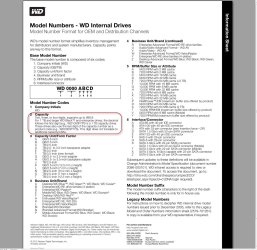
It seems i've been taken for a ride as i took the drive at face value without checking. I tried looking at the wd site but could not get this model for details...is there any derivative for the 1600 extension in the drive name itself?
 

My Computer My Computer

At a glance

Windows 7 32bitIntel Core2 Duo T6570 @2.10GHz2 GB RAM
Computer type
Laptop
Computer Manufacturer/Model Number
COMPAQ 420
OS
Windows 7 32bit
CPU
Intel Core2 Duo T6570 @2.10GHz
Memory
2 GB RAM
Hard Drives
WDC WD3200BEKT-60V5T1 ATA
Antivirus
Microsoft Security Essentials and 360 degree
Browser
Google Chrome

My Computer My Computer

At a glance

Windows 7 Home Premium 32 bit
OS
Windows 7 Home Premium 32 bit
Hard drive manufacturers never put the true windows size on the drive or box, they use 1000 per GB, windows uses 1024 per GB
1 TB drive is 931 GB in windows not 1000 GB
500 GB drive is 465 GB in windows
320 GB drive is 289 GB in windows
265 GB drive is 238 GB in windows
250 GB drive is 232 GB in windows
160 GB drive is 149 GB in windows

etc etc etc
 

My Computer My Computer

At a glance

Windows 10 Pro x64Intel Core i7 6700KGSkill TridentZ RGB 16GB 3600 16-16-16-36EVGA GTX 980 Ti SC x2
Computer type
PC/Desktop
Computer Manufacturer/Model Number
Skylake Special #666
OS
Windows 10 Pro x64
CPU
Intel Core i7 6700K
Motherboard
Asus Sabertooth Z170 Mark 1
Memory
GSkill TridentZ RGB 16GB 3600 16-16-16-36
Graphics Card(s)
EVGA GTX 980 Ti SC x2
Sound Card
Realtek High Definition
Monitor(s) Displays
AOC G2460PG
Screen Resolution
1920 x 1080 144Hz
Hard Drives
Samsung 860 Pro 256GB, Seagate Barracuda 4TB x2
PSU
EVGA 1000 P2, EVGA White Custom Braided Cables
Case
Corsair Vengeance C70 Gunmetal Black
Cooling
Corsair H100i v2, Corsair ML120 x2, Thermal Grizzly Kryonaut
Keyboard
Logitech G910 Orion Spectrum
Mouse
Logitech G700s
Internet Speed
Verizon Fios Quantum Gateway 75/75
Antivirus
Windows Defender, Malwarebytes Free 3.8.3
Browser
Chrome
Other Info
Corsair SP120 x4, LG Blu-ray Drive, Durabrand HT-395 100 Watt Dolby Digital Amp, Corsair H2100 Wireless 7.1 Headset
1,000,000,000 bytes = Decimal GB
1,073,741,824 bytes = Binary GB

So, one Decimal GB = 0.93132 Binary GB

Just multiply the manufacturer indicated Decimal GB by 0.93132 to get the Binary GB you will see, as in my post #6.
 

My Computer My Computer

At a glance

Windows 7 Home Premium 32 bit
OS
Windows 7 Home Premium 32 bit
Look mate from my perspective it was a simple mistake and it really did not upset me. I think that some of us tend to assume that some posters are on top of the game and hey it would be boring if we were all the same eh??;)
 

My Computer My Computer

At a glance

Desk1 7 Home Prem / Desk2 10 Pro / Main lap A...Desk1 i5 3750K / Laptop i7 GTX 860M / Desk2 i...Desk1 8GB (1866) / Desk2 16GB (1333) / Laptop...Desk 1& 2NVidia GTX 650 & Laptops on board Intel
Computer type
PC/Desktop
Computer Manufacturer/Model Number
Own build (new) Desk1 / Asus ROG Win 7 / Desk2 1st build
OS
Desk1 7 Home Prem / Desk2 10 Pro / Main lap Asus ROG 10 Pro 2 laptop Toshiba 7 Pro Asus P2520 7 & 10
CPU
Desk1 i5 3750K / Laptop i7 GTX 860M / Desk2 i5 2500
Motherboard
Desk1 Asus P877-V / Desk2 Gigabyte H67 UD3H / Laptop ?
Memory
Desk1 8GB (1866) / Desk2 16GB (1333) / Laptop 8Gb DDR3
Graphics Card(s)
Desk 1& 2NVidia GTX 650 & Laptops on board Intel
Sound Card
Desk 1 & 2 -XONAR DG Realtek High Def audio Laptop
Monitor(s) Displays
Desk 1 Benq HD 2450 / Desk2 Philips 24" / Laptop 17.5"
Screen Resolution
1920x1080 D1 & D2 & Laptop 1
Hard Drives
Desk1 Samsung 120GB 830 SSD
Asus ROG 256GB 850 Pro SSD
Desk2 Samsung 840 256 SSD
Toshiba 120GB EVO
PSU
Desk 1 Corsair HX 1050/ Laptop ? / Desk 2 Corsair HX 650
Case
Desk 1 Cooler HAF XM ? Toshiba laptop / Desk2 Coolermaster
Cooling
Fans on all Desk1 -2 Desk2 - all Coolermasters 5 Laptop ?
Keyboard
Desk 1 MS Sidewinder X6 Desk 2 MS Sidewinder X 4
Mouse
Desk 1&2 - Gigabyte MS 900 gamer - laptop - Logitec wireless
Internet Speed
ADSL2+
Other Info
One other Desktop (tester) and spare Toshba laptop both with SSD's
Running Kaspersky 2016 ISS on all machines config'd identically
Logitec audio stereo systems on each machine (x3)
Canon MG5250MFC
Router/modem TP-Link running WPA2SK
Back
Top